Selective Entity Sync
Push selected WordPress content between sites (e.g. staging to production) via entity manifests, with automatic ID remapping.
by Gabriel de Tassigny · github.com/gabriel-detassigny/selective-entity-sync · website
Install
No release zip yet. The repository archive installs, but the folder name will carry the branch suffix and updates will not flow:
wp plugin install https://github.com/gabriel-detassigny/selective-entity-sync/archive/refs/heads/main.zipPush specific content from one WordPress environment to another without overwriting the target's live data.
Selective Entity Sync is a WordPress plugin for moving content changes safely between two WordPress sites, such as staging → production, production → staging, or between two live sites. It doesn't migrate the whole database, or whole tables, which would wipe out the orders, user accounts and form entries created on the target site since your last sync. Instead it exports the exact entities you pick (posts, pages, custom post types, terms, media) into a portable manifest, and imports them on the target site, remapping every database ID along the way.
Status: early release (0.1.1). Try it on a staging copy before relying on it in production.
Table of contents
- Why
- How it works
- What gets synced
- Screenshots
- Limitations
- Security
- Requirements
- Installation
- Usage
- Hooks reference
- Roadmap to launch
- Development
- License
Why
Many teams prepare content on one environment, often a staging site, and then need it on another. If they move it by copying the database, then on any site with live activity (WooCommerce, memberships, forms, comments) they have to choose between:
- overwriting the target's data created since the last sync, or
- re-creating the content by hand on the target.
Selective Entity Sync is built for that kind of workflow. Staging → production is the most common case, but it works between any two WordPress sites: pulling a fixed-up page back down to staging, sharing content between sister sites, or seeding a new environment.
Table-level migration tools narrow the problem but don't solve it. A post's featured image, parent page, terms and the image IDs inside its blocks all point to auto-increment IDs that differ between sites.
Selective Entity Sync moves only what you choose, and fixes up those references on arrival.
How it works
- Select. On the source site, pick the posts/pages/CPT entries to sync from Tools → Selective Entity Sync → Export.
- Resolve dependencies. The plugin follows references from your selection: parent posts, terms and their ancestors, featured images, media and synced patterns used inside content, and ID-bearing meta. Dependencies are bundled automatically (see
selective_entity_sync_include_dependencyto change that). - Export. You download a
.zippackage containing a versionedmanifest.jsonand the media files. - Preview. On the target site, upload the package under Import. A dry run shows what will be created, updated or skipped, before anything is written.
- Import.
- Entities are matched to existing content by a stable UUID stored on each entity. If there's no UUID match, they're matched by a natural key (post type + slug, taxonomy + slug, file hash).
- New entities get new IDs.
- Every reference (post parent,
_thumbnail_id, term parents, block attributes such asid/ids/mediaId,wp-image-Nclasses,[gallery ids]) is rewritten to the target site's IDs.
Content that isn't in the manifest is never touched.
What gets synced
| Entity | Included |
|---|---|
| Posts, pages, custom post types, synced patterns | Content, excerpt, status (drafts, scheduled and private included; never trash), dates, slug, post meta, parent/child relations, menu order, sticky flag |
| Taxonomies and terms | Name, slug, description, hierarchy, term meta, post ↔ term relations |
| Media attachments | The file itself, title/caption/alt text, attachment meta. Image sizes are regenerated on the target |
| Authors | Mapped to an existing user by login/email (users are never created). Falls back to the importing user |
Screenshots
 |
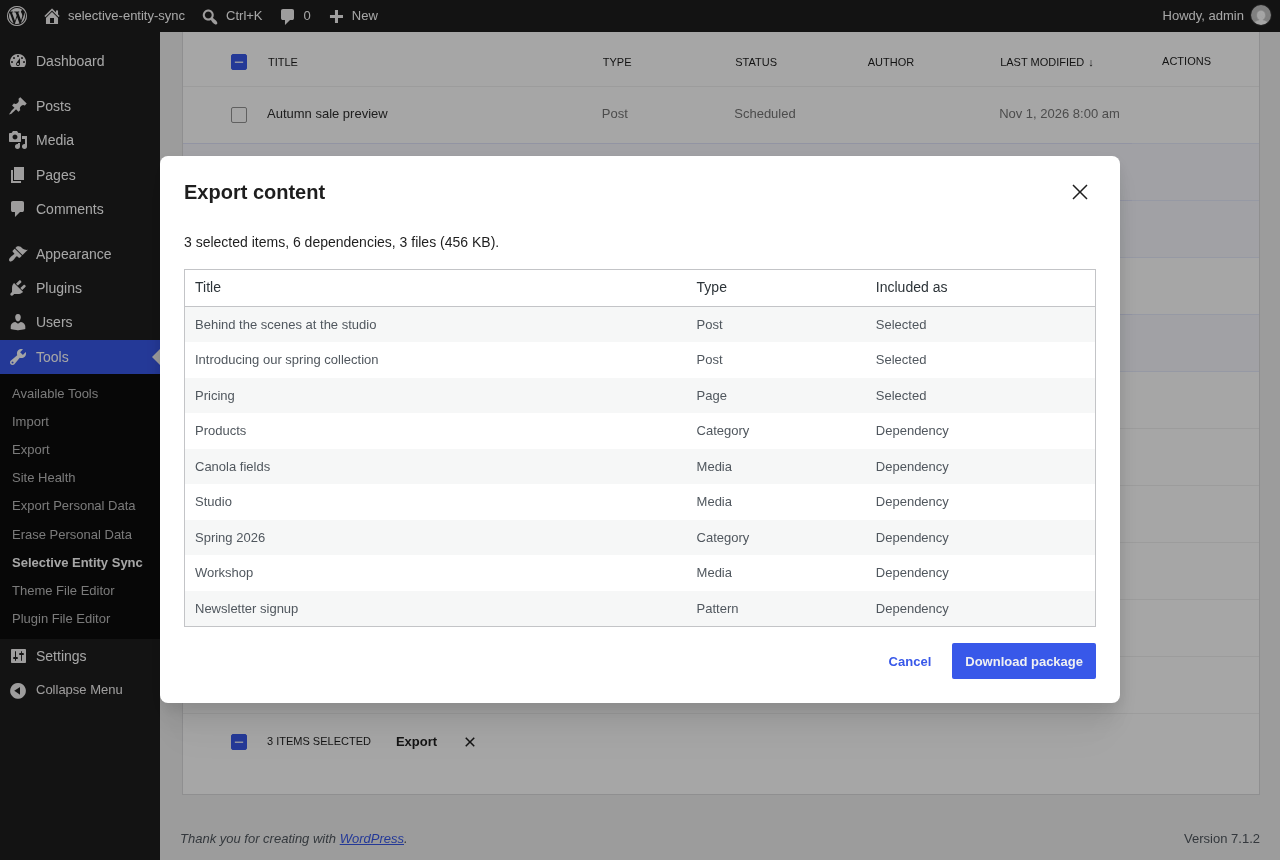 |
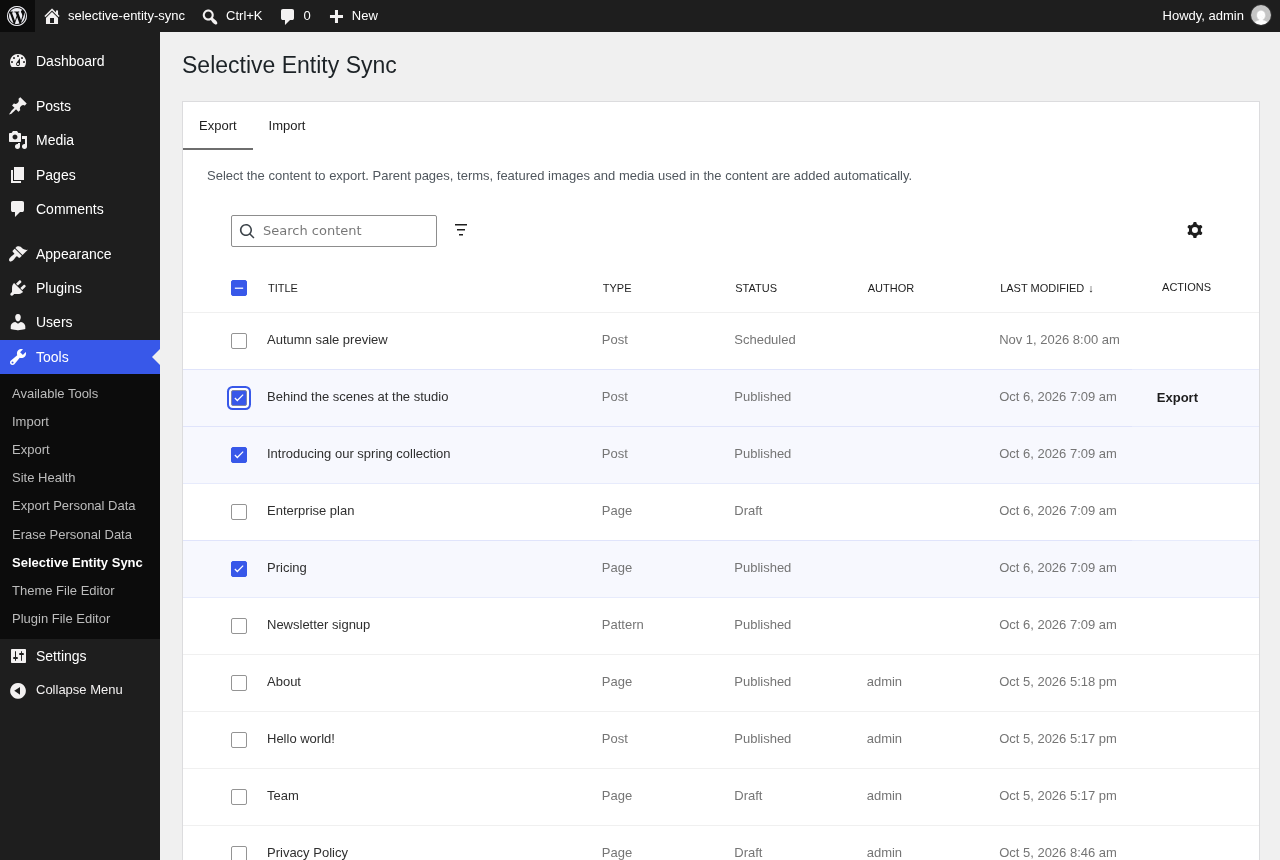
| Export: search, filter and select content. | Export preview: dependencies are added automatically. |
 |
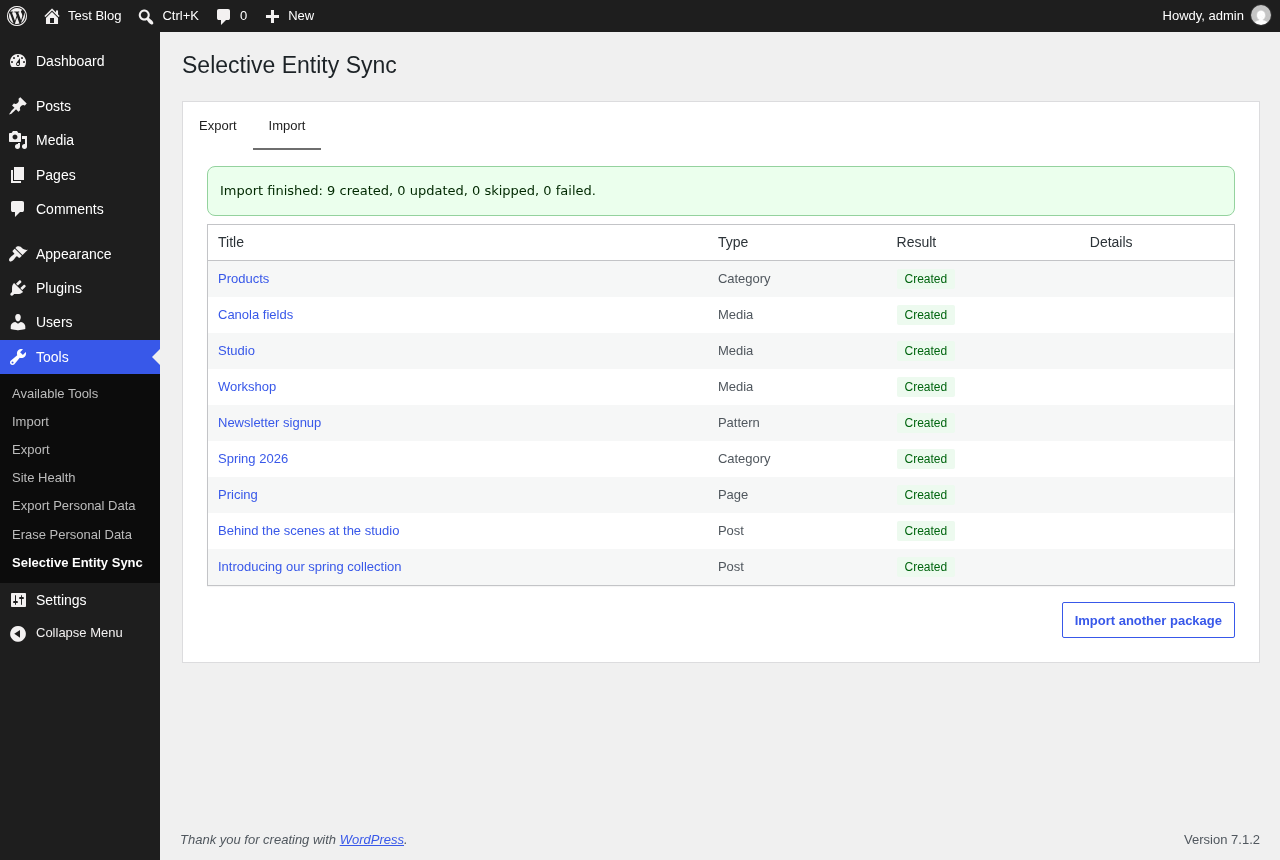 |
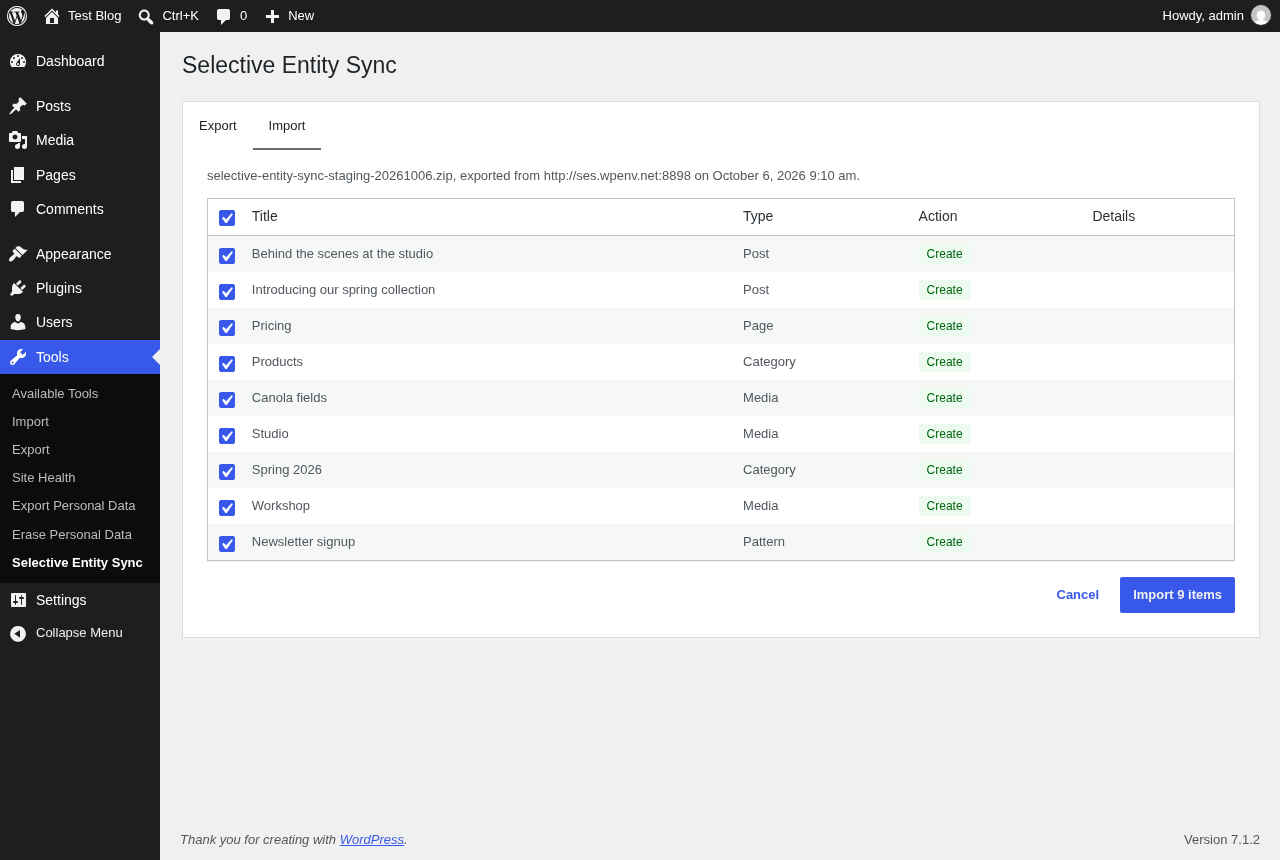
| Import preview: untick anything you want to keep unchanged. | Import report: links to every imported item. |
Limitations
- No ACF support yet. ACF fields that store plain values are synced as post meta, but relational ACF fields (post object, relationship, image, gallery) aren't remapped.
- No direct site-to-site push. Packages are transferred as files.
- File types must be allowed on the target. Media whose type the target doesn't accept for uploads (e.g. SVG on a default install) is rejected.
- Content with the same slug is treated as the same item when it has never been synced (see
selective_entity_sync_match_existing_entityto disable this). - Links to other pages are rewritten from the source domain to the target domain, but not remapped to different slugs.
- Users, comments, orders and other non-content data are intentionally never synced, and neither are site settings, menus, templates or global styles.
- Multisite hasn't been tested yet. Each site can export and import packages, but syncing directly between sites of the same network isn't supported.
- Imports from the admin run in batches (see
selective_entity_sync_import_batch_limits), but the package must still fit PHP's upload limit (upload_max_filesize,post_max_size). For very large packages, use WP-CLI. - The Export table's selection applies to the current page of results (use up to 100 items per page).
Security
-
Who can sync. Only users with
manage_options(administrators) by default; seeselective_entity_sync_capability. If you lower it, per-item WordPress permissions still apply. Users can only export content they can read, and only import what they could create or edit by hand. That covers creating each content type, publishing, attributing content to other users, managing terms and uploading media. WP-CLI runs are trusted, like WordPress's own CLI commands. -
Only import packages you trust. A package is content from another site. Imported content goes through WordPress's usual filtering for users without the
unfiltered_htmlcapability (e.g. multisite administrators). Only content types can be written: never templates, global styles, navigation menus or other site configuration. -
Uploaded packages are checked before anything is extracted:
- size and file-count limits;
- only the files listed in the manifest, with safe paths;
- file types WordPress allows for uploads;
- checksums.
Between upload and import they're kept in
wp-content/uploads/selective-entity-sync-packages/with random names, and are only accessible to the uploader. They're deleted after import, on cancel, or after a day. The folder blocks web access with an.htaccessfile, which only Apache honours. On nginx, add:location ^~ /wp-content/uploads/selective-entity-sync-packages/ { deny all; } -
Temporary files (packages being built or extracted) live in the system temp directory, readable only by the web server's user, and are cleaned up daily.
-
Uninstalling removes temporary files and pending uploads. Imported content, and the UUIDs that link it across sites, are kept.
Found a vulnerability? Please report it privately to the maintainer rather than opening a public issue.
Requirements
- WordPress 6.9 or later
- PHP 7.4 or later
- The PHP
zipextension (ZipArchive)
Installation
- Download the latest
selective-entity-sync.zipfrom the Releases page. - In WordPress, go to Plugins → Add New → Upload Plugin and upload the zip.
- Activate the plugin on both the source and the target site.
Usage
Admin
Tools → Selective Entity Sync has two tabs:
- Export: search and filter your content (by type and status), select entries, then use Export to review what will be included (selected items, dependencies added automatically, files and their size, warnings) and download the package.
- Import (large packages are processed in batches, with a progress bar): upload a package and review the preview: each item is marked Create or Update (with how it was matched, e.g. "Previously synced" or "Same slug"), and you can untick anything you don't want to change. Then import and read the result report, with links to every imported item.
By default only users with the manage_options capability can access the screen. See selective_entity_sync_capability.
WP-CLI
# See what an export would contain (selection + dependencies), without writing anything.
wp selective-entity-sync export --post_ids=12,34 --dry-run

# Export to a package.
wp selective-entity-sync export --post_ids=12,34 --file=/tmp/sync.zip

# Preview an import: what would be created, updated, skipped, linked or missing.
wp selective-entity-sync import /tmp/sync.zip --dry-run

# Import, as an administrator so content isn't filtered.
wp selective-entity-sync import /tmp/sync.zip --user=admin

# Leave some entities untouched.
wp selective-entity-sync import /tmp/sync.zip --user=admin --skip=<uuid>,<uuid>
Run imports with --user=<administrator>. Without a user, WordPress filters imported content the way it does for untrusted authors (scripts, iframes and similar markup are removed).
REST API
All routes live under /wp-json/selective-entity-sync/v1 and need the capability returned by selective_entity_sync_capability.
| Route | Description |
|---|---|
GET /entities |
Content that can be selected for export. Parameters: search, post_type, status, page, per_page (max 100), orderby (modified, date, title), order. |
GET /export/options |
Exportable post types and statuses, with labels. |
POST /export/preview |
{ "post_ids": [12, 34] }: what the export would contain (entities, files, warnings). |
POST /export |
{ "post_ids": [12, 34] }: responds with the package zip file. |
POST /import/packages |
Multipart upload (field package): stores the package and returns a token with the import plan. |
GET /import/packages/{token} |
The import plan of an uploaded package. |
POST /import/packages/{token}/import |
{ "skip": ["<uuid>"] }: starts the import and runs the first batch. Returns { done, processed, total }, plus report once done. |
POST /import/packages/{token}/import/next |
Runs the next batch. Call it until done is true; the package is deleted afterwards. |
DELETE /import/packages/{token} |
Discards an uploaded package. |
Uploaded packages are only visible to the user who uploaded them and expire after a day (see selective_entity_sync_temp_file_lifetime).
Hooks reference
Selective Entity Sync is built to be extended. All hooks are prefixed selective_entity_sync_. Add your code to a small custom plugin or mu-plugin.
Actions
selective_entity_sync_loaded
Fires once the plugin has registered all of its services. This is the recommended place for add-ons to register their integrations.
| Parameter | Type | Description |
|---|---|---|
$plugin |
SelectiveEntitySync\Plugin |
The plugin instance. |
Since 0.1.0.
add_action( 'selective_entity_sync_loaded', function ( $plugin ) {
    // Register custom collectors, handlers or rewriters here.
} );
selective_entity_sync_before_export
Fires before an export package is built.
| Parameter | Type | Description |
|---|---|---|
$post_ids |
int[] |
Selected post IDs. |
Since 0.1.0.
add_action( 'selective_entity_sync_before_export', function ( array $post_ids ) {
    error_log( 'Exporting ' . count( $post_ids ) . ' items.' );
} );
selective_entity_sync_after_export
Fires after an export package has been written, before it's delivered.
| Parameter | Type | Description |
|---|---|---|
$result |
SelectiveEntitySync\Export\ExportResult |
The manifest, package path and plan. |
Since 0.1.0.
add_action( 'selective_entity_sync_after_export', function ( $result ) {
    copy( $result->get_package_path(), WP_CONTENT_DIR . '/sync-archive/' . time() . '.zip' );
} );
selective_entity_sync_before_import
Fires before a package is imported.
| Parameter | Type | Description |
|---|---|---|
$manifest |
SelectiveEntitySync\Manifest\Manifest |
The manifest being imported. |
Since 0.1.0.
add_action( 'selective_entity_sync_before_import', function ( $manifest ) {
    error_log( 'Importing from ' . $manifest->get_source()['site_url'] );
} );
selective_entity_sync_entity_imported
Fires after an entity has been written.
| Parameter | Type | Description |
|---|---|---|
$entity |
array |
Manifest entity. |
$local_id |
int |
Local post or term ID. |
$result |
string |
created or updated. |
Since 0.1.0.
add_action( 'selective_entity_sync_entity_imported', function ( array $entity, int $local_id, string $result ) {
    if ( 'post' === $entity['type'] ) {
        clean_post_cache( $local_id );
    }
}, 10, 3 );
selective_entity_sync_import_failed
Fires when an entity fails to import. The import carries on with the other entities.
| Parameter | Type | Description |
|---|---|---|
$entity |
array |
Manifest entity. |
$message |
string |
Error message (plain text). |
Since 0.1.0.
add_action( 'selective_entity_sync_import_failed', function ( array $entity, string $message ) {
    error_log( "Import of {$entity['uuid']} failed: {$message}" );
}, 10, 2 );
selective_entity_sync_after_import
Fires after a package has been imported.
| Parameter | Type | Description |
|---|---|---|
$report |
SelectiveEntitySync\Import\ImportReport |
What happened to each entity (get_items(), get_counts(), has_failures()). |
$manifest |
SelectiveEntitySync\Manifest\Manifest |
The imported manifest. |
Since 0.1.0.
add_action( 'selective_entity_sync_after_import', function ( $report ) {
    if ( $report->has_failures() ) {
        wp_mail( get_option( 'admin_email' ), 'Content sync finished with errors', print_r( $report->get_counts(), true ) );
    }
} );
Filters
selective_entity_sync_capability
Filters the capability required to export and import content (admin screen and REST API). Invalid values fall back to the default.
| Parameter | Type | Description |
|---|---|---|
$capability |
string |
Capability name. Default manage_options. |
Since 0.1.0.
// Let editors sync content.
add_filter( 'selective_entity_sync_capability', function () {
    return 'edit_others_posts';
} );
selective_entity_sync_manifest_data
Filters the manifest data just before it's written to a package. Use it to add custom data to entities or to the manifest. The files list is managed by the plugin, so changes to it are ignored, and the result must still be a valid manifest.
| Parameter | Type | Description |
|---|---|---|
$data |
array |
Manifest data: schema_version, generator, source, entities, files. |
$manifest |
SelectiveEntitySync\Manifest\Manifest |
The manifest being written. |
Since 0.1.0.
add_filter( 'selective_entity_sync_manifest_data', function ( array $data ) {
    foreach ( $data['entities'] as &$entity ) {
        $entity['data']['exported_by'] = 'deploy-bot';
    }
    return $data;
} );
selective_entity_sync_package_limits
Filters the limits enforced when reading an uploaded package. Invalid or non-positive values fall back to the defaults.
| Parameter | Type | Description |
|---|---|---|
$limits |
array |
max_package_size (bytes, default 512 MB), max_manifest_size (bytes, default 64 MB), max_entries (files in the zip, default 20000), max_uncompressed_size (bytes, default 2 GB). |
Since 0.1.0.
add_filter( 'selective_entity_sync_package_limits', function ( array $limits ) {
    $limits['max_package_size'] = 2 * GB_IN_BYTES;
    return $limits;
} );
selective_entity_sync_temp_file_lifetime
Filters how long temporary working directories (packages being built or extracted) are kept before the daily cleanup deletes them.
| Parameter | Type | Description |
|---|---|---|
$lifetime |
int |
Lifetime in seconds. Default DAY_IN_SECONDS. |
Since 0.1.0.
add_filter( 'selective_entity_sync_temp_file_lifetime', function () {
    return 6 * HOUR_IN_SECONDS;
} );
selective_entity_sync_exportable_post_types
Filters the post types whose content can be selected for export. Attachments are exported as dependencies of the content that uses them, so they aren't selectable.
| Parameter | Type | Description |
|---|---|---|
$post_types |
string[] |
Default: post types with an admin UI, minus templates, template parts, navigation, global styles and fonts. |
Since 0.1.0.
add_filter( 'selective_entity_sync_exportable_post_types', function ( array $post_types ) {
    return array_diff( $post_types, array( 'product' ) );
} );
selective_entity_sync_exportable_statuses
Filters the post statuses that can be exported. trash and auto-draft are always removed.
| Parameter | Type | Description |
|---|---|---|
$statuses |
string[] |
Default: publish, future, draft, pending, private. |
Since 0.1.0.
add_filter( 'selective_entity_sync_exportable_statuses', function () {
    return array( 'publish' );
} );
selective_entity_sync_exportable_taxonomies
Filters the taxonomies whose terms are exported with posts of a given type.
| Parameter | Type | Description |
|---|---|---|
$taxonomies |
string[] |
Default: all taxonomies registered for the post type. |
$post_type |
string |
Post type name. |
Since 0.1.0.
add_filter( 'selective_entity_sync_exportable_taxonomies', function ( array $taxonomies ) {
    return array_diff( $taxonomies, array( 'post_format' ) );
} );
selective_entity_sync_excluded_meta_keys
Filters the meta keys that are never exported. The plugin's own UUID key is always excluded.
| Parameter | Type | Description |
|---|---|---|
$keys |
string[] |
Default for posts: _edit_lock, _edit_last, _wp_old_slug, _wp_old_date, trash bookkeeping keys, and the attachment file keys (_wp_attached_file, _wp_attachment_metadata, _wp_attachment_backup_sizes). None for terms. |
$object_type |
string |
post (including attachments) or term. |
Since 0.1.0.
add_filter( 'selective_entity_sync_excluded_meta_keys', function ( array $keys, string $object_type ) {
    if ( 'post' === $object_type ) {
        $keys[] = '_my_plugin_cache';
    }
    return $keys;
}, 10, 2 );
selective_entity_sync_id_reference_meta_keys
Filters the meta keys whose values are IDs of other posts or terms. The referenced entities are exported as dependencies, and the IDs are remapped to the target site's IDs on import. A value may be a single ID, a comma-separated list or an array of IDs.
| Parameter | Type | Description |
|---|---|---|
$keys |
array<string, string> |
Meta key => referenced object type (post or term). Default: _thumbnail_id => post. |
$object_type |
string |
Object type owning the meta: post or term. |
Since 0.1.0.
add_filter( 'selective_entity_sync_id_reference_meta_keys', function ( array $keys, string $object_type ) {
    if ( 'post' === $object_type ) {
        $keys['related_posts'] = 'post';
        $keys['hero_image_id'] = 'post';
    }
    return $keys;
}, 10, 2 );
selective_entity_sync_block_reference_attributes
Filters which block attributes hold IDs of other posts (media, synced patterns, …). Referenced posts are exported as dependencies, and the attribute values are remapped on import.
| Parameter | Type | Description |
|---|---|---|
$map |
array<string, string[]> |
Block name => attribute names. Default covers core/image, core/gallery, core/cover, core/media-text, core/video, core/audio, core/file and core/block. |
Since 0.1.0.
add_filter( 'selective_entity_sync_block_reference_attributes', function ( array $map ) {
    $map['acme/hero'] = array( 'imageId', 'galleryIds' );
    return $map;
} );
selective_entity_sync_include_dependency
Filters whether a dependency is bundled in the package or only referenced. Reference-only entities are matched on the target site but never created there.
| Parameter | Type | Description |
|---|---|---|
$include |
bool |
Default true. |
$dependency |
SelectiveEntitySync\Export\EntityReference |
The dependency (get_object_type(), get_id()). |
$required_by |
SelectiveEntitySync\Export\EntityReference\|null |
The entity that first required it. |
Since 0.1.0.
// Never bundle terms: expect them to exist on the target already.
add_filter( 'selective_entity_sync_include_dependency', function ( bool $bundle, $dependency ) {
    return 'term' === $dependency->get_object_type() ? false : $bundle;
}, 10, 2 );
selective_entity_sync_export_entity_data
Filters an entity before it's added to the export manifest. The entity must keep its uuid, type, source_id and data keys.
| Parameter | Type | Description |
|---|---|---|
$entity |
array |
Entity data: uuid, type, source_id, data, and depending on the type relations, meta, file. |
$reference |
SelectiveEntitySync\Export\EntityReference |
Local object the entity was built from. |
Since 0.1.0.
add_filter( 'selective_entity_sync_export_entity_data', function ( array $entity ) {
    unset( $entity['meta']['_internal_notes'] );
    return $entity;
} );
selective_entity_sync_collectors
Filters the entity collectors used to export content. The first collector whose supports() returns true handles an entity, so prepend custom collectors to override the defaults. Collectors implement SelectiveEntitySync\Export\Collectors\EntityCollector.
| Parameter | Type | Description |
|---|---|---|
$collectors |
EntityCollector[] |
Default: post, attachment and term collectors. |
Since 0.1.0.
add_filter( 'selective_entity_sync_collectors', function ( array $collectors ) {
    array_unshift( $collectors, new My_Product_Collector() );
    return $collectors;
} );
selective_entity_sync_import_handlers
Filters the handlers used to import entities. The first handler whose supports() returns true imports an entity, so prepend custom handlers to override the defaults. Handlers implement SelectiveEntitySync\Import\Handlers\ImportHandler.
| Parameter | Type | Description |
|---|---|---|
$handlers |
ImportHandler[] |
Default: post, attachment and term handlers. |
Since 0.1.0.
add_filter( 'selective_entity_sync_import_handlers', function ( array $handlers ) {
    array_unshift( $handlers, new My_Product_Import_Handler() );
    return $handlers;
} );
selective_entity_sync_match_existing_entity
Filters the local object an imported entity is matched to. Matching tries the UUID first, then the slug (or the file checksum for media), but only accepts a slug match when the local object has no UUID or the same one.
| Parameter | Type | Description |
|---|---|---|
$local_id |
int\|null |
Matched local ID, or null. Return a local ID to force a match, or null to import the entity as new. |
$entity |
array |
Manifest entity. |
$method |
string\|null |
How it was matched: uuid, slug, file, or null. |
Since 0.1.0.
// Never link by slug: only UUID matches count.
add_filter( 'selective_entity_sync_match_existing_entity', function ( $local_id, array $entity, $method ) {
    return 'slug' === $method ? null : $local_id;
}, 10, 3 );
selective_entity_sync_import_action
Filters what happens to an entity on import. The admin screen also lets users untick items.
| Parameter | Type | Description |
|---|---|---|
$action |
string |
create, update or skip. Default: update when a local match exists, create otherwise. |
$entity |
array |
Manifest entity. |
$local_id |
int\|null |
ID of the matched local object, if any. |
Since 0.1.0.
// Never overwrite pages that already exist on this site.
add_filter( 'selective_entity_sync_import_action', function ( string $action, array $entity ) {
    return 'update' === $action && 'page' === ( $entity['data']['post_type'] ?? '' ) ? 'skip' : $action;
}, 10, 2 );
selective_entity_sync_import_entity_data
Filters an entity just before it's written to this site.
| Parameter | Type | Description |
|---|---|---|
$entity |
array |
Manifest entity. |
$local_id |
int\|null |
Local ID being updated, or null when creating. |
Since 0.1.0.
// Import everything as a draft for review.
add_filter( 'selective_entity_sync_import_entity_data', function ( array $entity ) {
    if ( 'post' === $entity['type'] ) {
        $entity['data']['post_status'] = 'draft';
    }
    return $entity;
} );
selective_entity_sync_import_author
Filters the local user an imported post or media item is attributed to. By default authors are matched by login, then email. Without a match, existing content keeps its author and new content is attributed to the importing user.
| Parameter | Type | Description |
|---|---|---|
$user_id |
int |
Resolved local user ID (0 for none). |
$author |
array\|null |
Exported author info: login, email, display_name. |
$current_id |
int |
Current author of the local post (0 for new content). |
Since 0.1.0.
add_filter( 'selective_entity_sync_import_author', function ( int $user_id ) {
    return $user_id ?: (int) get_user_by( 'login', 'editorial' )->ID;
} );
selective_entity_sync_replace_site_url
Filters whether the source site's URL is replaced with this site's URL in imported content (post content and excerpts). Media file URLs are always remapped.
| Parameter | Type | Description |
|---|---|---|
$replace |
bool |
Default true. |
$source_url |
string |
The source site URL from the package. |
Since 0.1.0.
add_filter( 'selective_entity_sync_replace_site_url', '__return_false' );selective_entity_sync_import_batch_limits
Filters how much one import request processes before continuing in the next one. Imports from the admin screen run in batches so large packages stay within PHP's time and memory limits. A batch stops after max_entities entities or max_seconds seconds, whichever comes first, and always processes at least one entity. WP-CLI imports aren't batched.
| Parameter | Type | Description |
|---|---|---|
$limits |
array |
max_entities (default 25) and max_seconds (default 15). Invalid or non-positive values fall back to the defaults. |
Since 0.1.0.
// A host with a 30-second limit and slow image processing.
add_filter( 'selective_entity_sync_import_batch_limits', function ( array $limits ) {
    $limits['max_entities'] = 10;
    $limits['max_seconds']  = 10;
    return $limits;
} );
Roadmap to launch
What's left before the first public release. Items are ticked as they land on main.
Export
- [x] REST endpoint listing selectable content (search, filter by post type and status)
- [x] Dependency resolution: parent posts, terms and their ancestors, featured images, media and synced patterns used in blocks,
wp-image-Nclasses and[gallery]shortcodes, ID-bearing meta - [x] Post, term and attachment collectors, with author info exported as login and email (mapped on import)
- [x] Default excluded meta keys (
_edit_lock,_edit_last,_wp_old_slug, …), filterable - [x] Export REST endpoints: preview and package download
- [x] WP-CLI:
wp selective-entity-sync export
Import
- [x] Package upload, validation and storage between requests
- [x] Preview (dry run): what will be created, updated or skipped, and why
- [x] Matching existing content by UUID, falling back to natural keys (post type + slug, taxonomy + slug, file hash)
- [x] Ordered import (dependencies first) building a UUID → local ID map
- [x] Reference rewriting: block attributes (
id,ids,mediaId, …),wp-image-Nclasses,[gallery ids],_thumbnail_id, post and term parents, ID-bearing meta, media URLs, site URL - [x] Media import: file sideloading, regenerated image sizes, deduplication
- [x] Conflict handling: update by default, skip per item (UI) or by filter
- [x] Batched processing for large packages (admin imports run over several requests with a progress bar)
- [x] Import REST endpoints (upload, preview, run, discard)
- [x] WP-CLI:
wp selective-entity-sync import <file> [--dry-run]
Admin UI
- [x] Export tab: DataViews table with search, filters and multi-select, dependency summary, download
- [x] Import tab: upload, preview table, confirmation, progress, result report
Extensibility
- [x] Export lifecycle hooks (
before_export,after_export) - [x] Import lifecycle hooks (
before_import,after_import,entity_imported,import_failed) - [x] Filterable collector registry (export)
- [x] Filterable import handler registry; block reference map shared by export and import
- [ ] Abilities API integration (WordPress 6.9+) for export, preview and import (optional)
Quality and maintenance
- [x] Round-trip tests: export, alter the target, import, assert every reference is remapped and unrelated content is untouched (integration test for all reference types, Playwright for the UI flow)
- [x] Automated dependency updates and vulnerability alerts (Dependabot for Composer, npm and GitHub Actions;
composer auditandnpm auditin CI) - [x] Security review of all entry points (REST, uploads, WP-CLI)
- [x] Translation files:
.pot, French translation (PHP.mo+ JS.json), checked in a French admin; CI keeps the template up to date
Release
- [x] Finalise docs:
readme.txt(FAQ, limitations such as ACF and SVG),CONTRIBUTING.md, screenshots - [x] Tag
v0.1.0and publish the zip to GitHub Releases - [x] Make the GitHub repository public
- [x] Pass Plugin Check (0.1.1) and run it in CI; banner and icon for the plugin page
- [x] Submit to the WordPress.org plugin directory
- [x] Workflow that deploys tagged releases to WordPress.org's SVN repository
- [ ] WordPress.org review approved, first release published there
Development
Requirements: PHP 7.4+, Composer, Node.js 22+ (24 recommended, see .nvmrc), and Docker (or Podman with the Docker-compatible socket) for wp-env.
composer install
npm install
npm run build
npm run sites:start         # source site: http://localhost:8898, target site: http://localhost:8897 (admin / password)
npm run demo:source         # optional: realistic content to export on the source site
Local sites
The plugin moves content between sites, so the dev setup has two WordPress sites, each with its own database and uploads. A third site is reserved for the automated tests.
| Site | Config | URL | Use it for |
|---|---|---|---|
| Source | .wp-env.json |
http://localhost:8898 | Create or edit content and export it. npm run demo:source adds sample pages, posts, media, a synced pattern and nested categories. |
| Target | .wp-env.target.json |
http://localhost:8897 | Import packages exported from the source. Starts empty, like a production site you sync into. |
| Test | .wp-env.test.json |
http://localhost:8899 | Automated tests only (npm run test:php, npm run test:e2e). Its database is reset by every PHPUnit run. |
Commands:
- Start / stop both dev sites:
npm run sites:start/npm run sites:stop. - One site at a time:
npm run wp-env …targets the source,npm run wp-env:target …the target. - WP-CLI on the target:
npm run wp-env:target -- run cli wp post list. Always keep the--after the script name: without it, npm swallows options such as--user=adminand WP-CLI never sees them. - WP-CLI exports: WP-CLI runs in
/var/www/html, which may not be writable, so pass a path under uploads, e.g.npm run wp-env -- run cli wp selective-entity-sync export --post_ids=12 --file=wp-content/uploads/export.zip. The file then appears in the site'swp-content/uploads/folder. - WP-CLI imports:
npm run wp-env:target -- run cli wp selective-entity-sync import wp-content/uploads/export.zip --user=admin. The target has its own uploads folder: copy the zip into it first, or upload it from the admin screen instead. - Empty the target:
npm run wp-env:target -- run cli wp site empty --uploads --yes. - Demo content on the target too:
npm run demo:target, e.g. to test updates and slug matching against existing content.
A typical manual test:
- Export on the source.
- Import the downloaded zip on the target.
- Change something on the source, export again and import again: the target should show Update and stay free of duplicates.
Testing batching with a few items: the target loads a development helper (dev/mu-plugins/) that can force small import batches. Add this to the gitignored .wp-env.target.override.json and run npm run wp-env:target start -- --update:
{
  "config": {
    "SELECTIVE_ENTITY_SYNC_DEV_BATCH_SIZE": 2
  }
}| Task | Command |
|---|---|
| PHP coding standards (WP VIP) | composer lint / composer lint:fix |
| PHP static analysis | composer analyse |
| JS/CSS lint | npm run lint |
| PHP unit tests | composer test:unit |
| PHP integration tests | npm run test:php |
| End-to-end tests | npm run test:e2e |
| Translations | npm run makepot, composer updatepo, npm run makejson (see AGENTS.md) |
Accessing the sites from another machine
If wp-env runs on a VM or remote box, WordPress's default localhost URLs won't work from your own browser. Point each dev site at its own hostname in its gitignored override file, then restart it with --update:
- Source:
.wp-env.override.json, thennpm run wp-env start -- --update. - Target:
.wp-env.target.override.json, thennpm run wp-env:target start -- --update, with port8897and a different hostname such asmysite-target.wpenv.net.
{
  "config": {
    "WP_HOME": "http://mysite.wpenv.net:8898",
    "WP_SITEURL": "http://mysite.wpenv.net:8898"
  }
}
On the machine running the browser, map the hostnames to the VM's IP in /etc/hosts, e.g. 192.168.1.50 mysite.wpenv.net mysite-target.wpenv.net. *.wpenv.net resolves to 127.0.0.1 everywhere else, so WordPress's requests to itself (WP-Cron, REST API) keep working inside the container. Keep the test site on localhost, because Playwright runs on the same machine as wp-env. SSH port forwarding (ssh -L 8898:localhost:8898 -L 8897:localhost:8897 <vm>) is an alternative that needs no config change.
See CONTRIBUTING.md for how to contribute; detailed rules for contributors and AI agents live in AGENTS.md.