Install
This is the repository archive. It installs, but the folder name will carry the branch suffix and updates will not flow.
Install straight from GitHub with WP-CLI:
wp plugin install https://github.com/fyrins/retype/archive/refs/heads/main.zip
Fyrins Retype
A rich text format for the block editor: a word erases and retypes itself, letter by letter, with words from a list you type.




Submitted to the WordPress.org plugin directory, awaiting review.
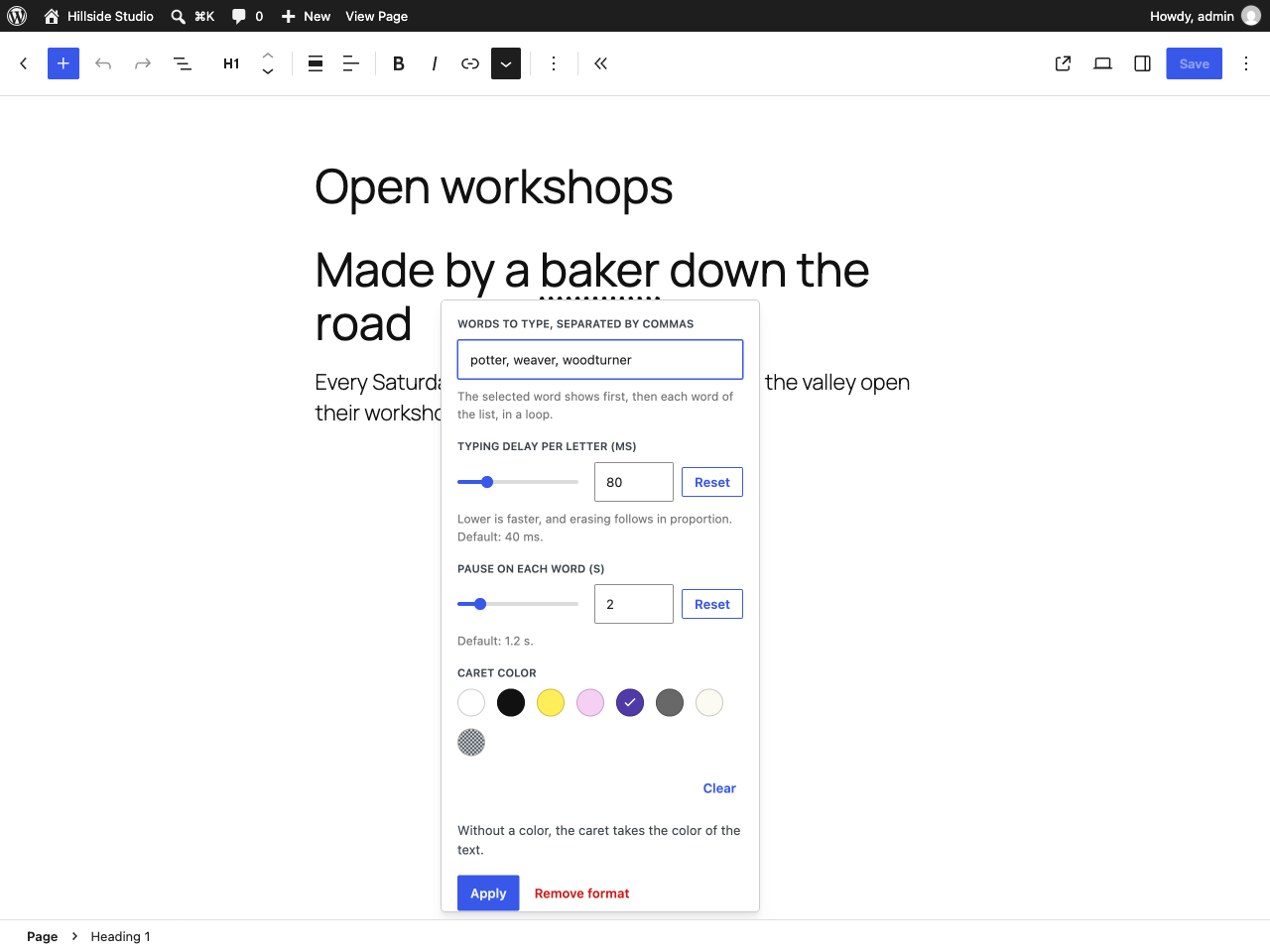
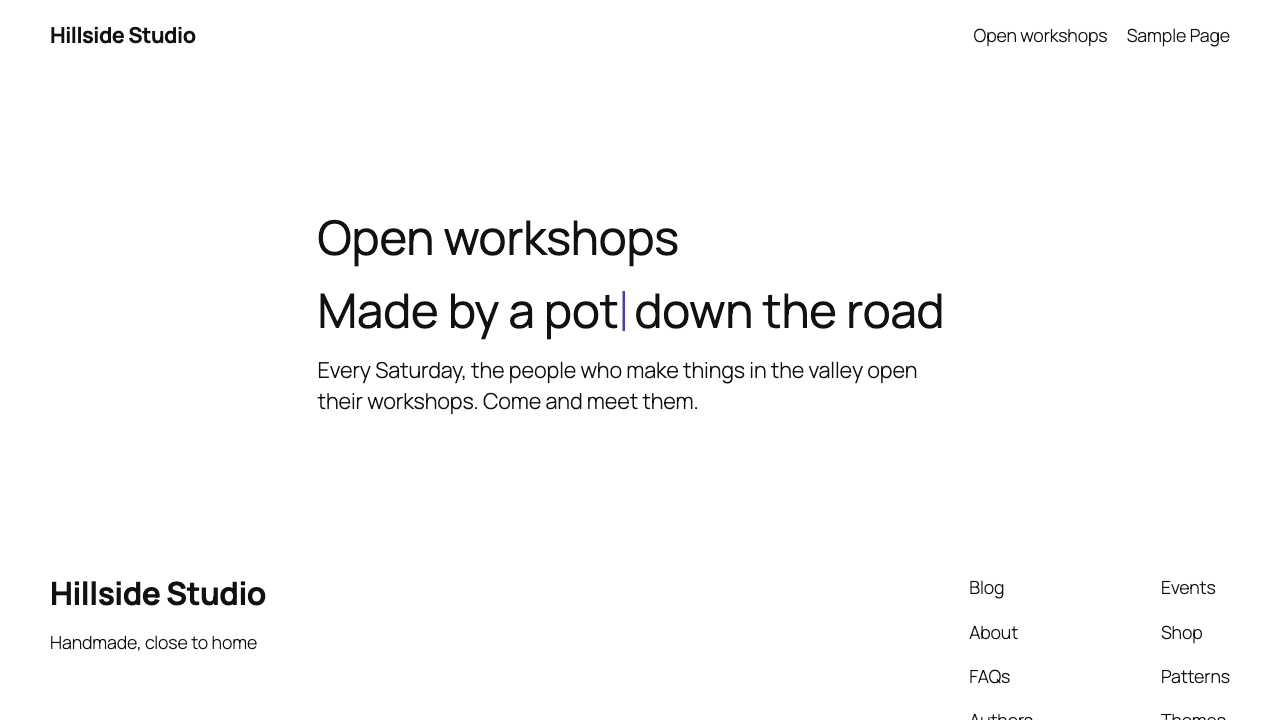
Select a word in a heading or a paragraph, choose Retype in the "More" dropdown of the formatting toolbar, type a few words separated by commas, and apply. The popover can also set, for that word only, the delay per typed letter, the pause on each word and the caret color, taken from the theme palette. On the front end the selected word is shown first, then erased and retyped with each word of the list, in a loop.
What it looks like
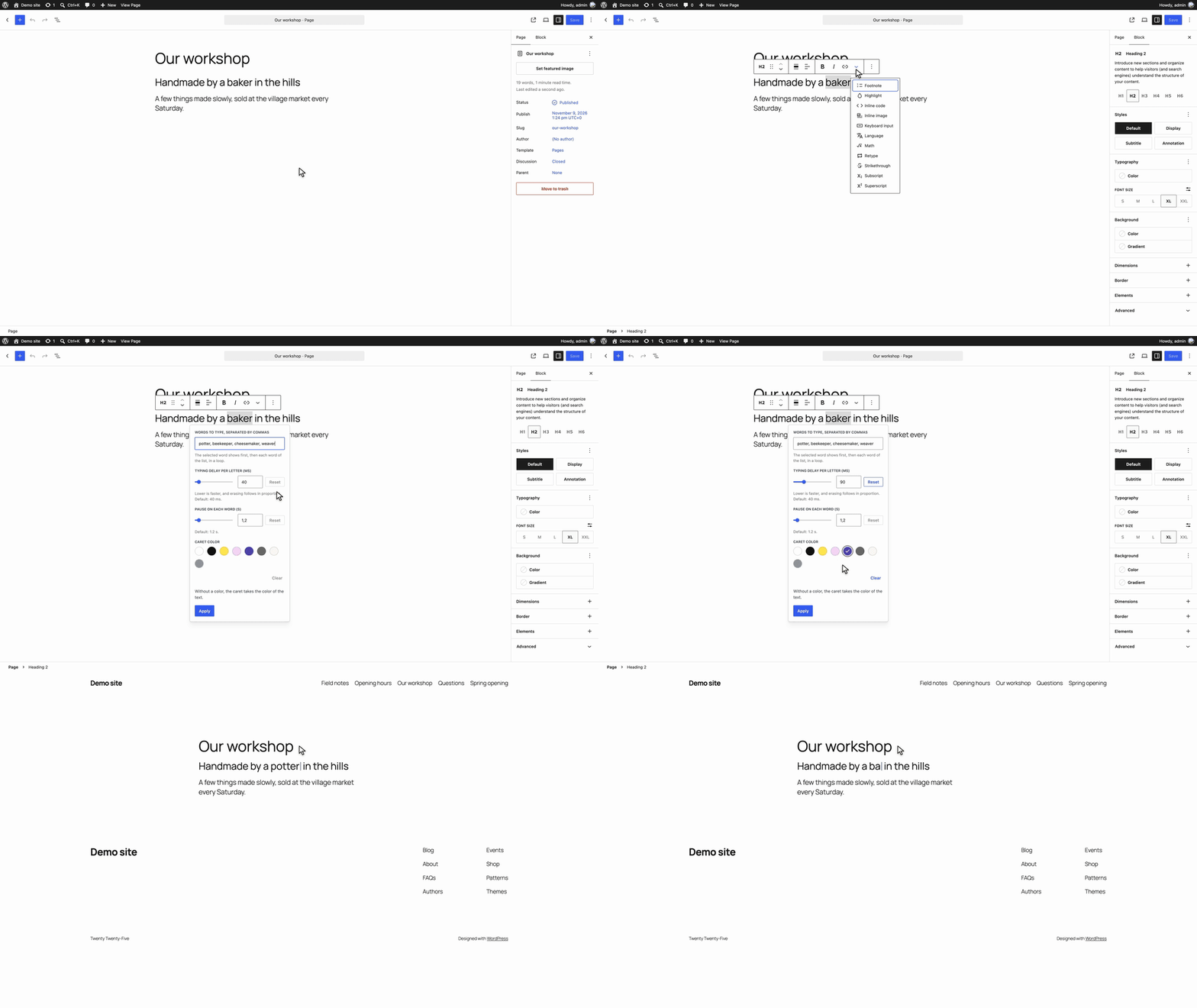
Recorded on WordPress with Twenty Twenty-Five.
|
The popover, reopened on a word that already carries the format and its own settings |
On the site, halfway through typing "potter" |
Design decisions
The saved markup is a plain span
<span class="retype" data-retype-words="potter, weaver, woodturner">baker</span>The settings of a word are three more data attributes, each written only when it is set:
<span data-retype-words="potter, weaver, woodturner" data-retype-type="80"
  data-retype-hold="2000" data-retype-caret="var(--wp--preset--color--accent-3)"
  class="retype">baker</span>
data-retype-type and data-retype-hold are milliseconds (the popover shows the pause in seconds). There is no erasing attribute: a word with its own typing delay erases at the site's ratio between the two delays, half with the defaults. data-retype-caret holds a palette color as its preset variable, so the caret follows the theme. A palette slug that WordPress would rename when it builds the variable (accent1 becomes --wp--preset--color--accent-1) is saved as its plain color value instead, when that value is a hex, rgb() or hsl() color, rather than guessing the variable name.
class and data-* are global attributes for KSES (_wp_add_global_attributes()), so the markup survives wp_kses_post() for authors without unfiltered_html, and the plugin never touches the allow list. The color is a data attribute rather than a custom property in style for the same reason: style goes through safecss_filter_attr(), which does keep a custom property today, but a data attribute depends on nothing, and it has no effect at all once the plugin is gone. Deactivating the plugin leaves the selected word in the sentence and invalidates no block: the format is markup the paragraph and heading blocks already accept.
The script reads each attribute again and trusts none of them: delays go through the same validation and bounds as the filter, and the color is accepted only as a hex, rgb(), rgba(), hsl() or hsla() color with numeric components, or var(--wp--preset--color--slug). Anything else is ignored. A valid color is applied with element.style.setProperty( '--retype-caret', … ), never written into markup, and removed when the animation stops.
The front end only runs where the format is used
The script and the stylesheet are registered on init and enqueued from render_block, the first time a rendered block contains the format: a span element with the retype class and a data-retype-words attribute. The markup is read with WP_HTML_Tag_Processor, after a plain text search that rules out most blocks, so the same characters escaped in a code block, in a comment or in an attribute value do not count. A page without the format carries no reference to either file. The script has no dependency, is deferred, and is printed in the footer.
Accessibility, within the plugin's scope
No plugin makes a site accessible on its own. What this one does:
- The animated markup is built by the script. The original word goes in a visually hidden span, read once; the word being typed is
aria-hidden. The heading's accessible name stays the original sentence, which was checked in an accessibility tree snapshot while the animation ran. - Under
prefers-reduced-motion: reducenothing is animated and the caret is not drawn. The script listens to the media query, so turning the setting on while reading restores the original content straight away, exactly: the script keeps a copy of the span's children and itsstyleattribute when it starts, and puts them back. - Without JavaScript the span is a plain word.
- The loop stops while the tab is hidden (
visibilitychange) and while the word is off screen (IntersectionObserver).
What it does not do: there is no pause control. A loop that starts on its own and runs for more than five seconds is the situation WCAG 2.2.2 (Pause, Stop, Hide) is about, so whether to animate a word, and where, is a decision for the site owner. The readme says so.
The text follows the writing
The word being typed takes its real width at every letter, so the rest of the sentence moves along with it, the way it would if someone typed it. The word itself never breaks across two lines.
Text only, never HTML
Every piece of text is inserted as a text node. The words come from a data attribute that an author typed, and they are never parsed as markup.
What the script animates is chosen conservatively:
- Spaces at the edges of the selection stay outside the animation, so the words around the span keep their spacing.
- A word whose text sits in a single text node, directly in the span or under a chain of single elements (
<strong><a>word</a></strong>), is animated in place: the elements stay, only their text changes, and a link keeps its target and its accessible name. Any other content, such as a word bold in part, is not animated at all. Rebuilding markup an author made is the kind of thing that breaks quietly. - Letters are grapheme clusters (
Intl.Segmenter, withArray.fromas the fallback), so a composed emoji, a flag or a letter with a combining accent is never shown in halves.
Content that changes after load
A light MutationObserver on the body watches for added nodes only, and scans the page when an added node is, or contains, .retype[data-retype-words]. The animation itself changes the data of a text node, which that observer does not see. A word removed from the page stops at its next tick (or at its next visibility change when it was off screen) and is forgotten.
Delays are code, not settings
retype_delays sets the site defaults, and the popover sets the delays of one word in the post content. There is no settings page and no option in the database. The PHP side validates the filtered values and prints them only when they differ from the defaults, as a global defined before the script; the script validates the global again, since a theme can set it too. An inline script added before a deferred script keeps it deferred, which a test asserts on the printed tag.
Why those minimum versions
WordPress 6.6 is set by the editor bundle. @wordpress/scripts compiles JSX against the automatic runtime, so build/editor.asset.php lists react-jsx-runtime, and core registers that handle from 6.6 on (checked in script-loader.php of the 6.5 and 6.6 branches of wordpress-develop). Below 6.6 WordPress silently drops a script with a missing dependency, and the format would never appear. The other recent APIs are older: useAnchor is exported by @wordpress/rich-text since WordPress 6.1, and the strategy argument of wp_register_script() arrived in 6.3. A PHPUnit test asserts that every dependency of the editor script is registered by the WordPress it runs against.
PHP 7.4 is WordPress's own floor, as reported by https://api.wordpress.org/core/version-check/1.7/ (php_version: 7.4 for 7.1.4). The code uses nothing newer than PHP 7.1 syntax (nullable return types); the declared value is a support commitment aligned with core. CI lints on 7.4 to 8.4 and runs PHPUnit on 7.4 and 8.3. composer.json pins the platform to PHP 7.4 so the development dependencies install there too.
Filter
retype_delays
Delays of the animation, in milliseconds.
add_filter(
    'retype_delays',
    function ( $delays ) {
        $delays['type']  = 90;   // Per letter while typing. Default 40, kept between 10 and 2000.
        $delays['erase'] = 30;   // Per letter while erasing. Default 20, kept between 10 and 2000.
        $delays['hold']  = 2500; // Pause on each complete word. Default 1200, kept between 200 and 60000.

        return $delays;
    }
);
Missing keys keep their default. Numeric strings are accepted, values are rounded and confined to their bounds, and anything that is not a finite number, or a filter that returns something other than an array, falls back to the defaults.
A script of your own can set window.retypeDelays with the same keys before build/view.js runs. The same validation applies. The settings of a word, set in the popover, take precedence over both.
When the filter changes the delays, the editor script gets the same global, so the popover shows the site defaults rather than the plugin's.
Installing from this repository
The release on wordpress.org will be the supported install path. To run the development copy:
git clone git@github.com:Fyrins/retype.git
cd retype
composer install          # PHPCS and PHPUnit; the plugin has no runtime PHP dependency
npm install               # @wordpress/scripts
npm run build             # produces build/
Then symlink or copy the directory into wp-content/plugins/fyrins-retype. The directory name matters: Plugin Check infers the text domain from it.
npm run build is required. build/ is not in the repository, and without it the plugin activates but registers nothing.
Checks
composer lint             # PHPCS: WordPress ruleset plus PHPCompatibilityWP
composer lint:php         # php -l over every PHP file
composer test             # PHPUnit against a real WordPress, see CONTRIBUTING.md
npm run lint:js           # ESLint with the WordPress config, plus Prettier
npm run lint:style        # Stylelint
npm run test:js           # Vitest: words, delays, colors, graphemes, popover values, and the front-end script in jsdom
Plugin Check runs on the built package, in a directory named exactly retype, never on the source tree. CONTRIBUTING.md has the commands.
Translating
Translations are handled on translate.wordpress.org, not in this repository's package. The plugin directory asks hosted plugins not to ship .po, .mo or JSON files, so languages/ holds only retype.pot, regenerated with npm run i18n.
translations/fyrins-retype-fr_FR.po is a French translation kept for import on translate.wordpress.org once the plugin is approved. It is excluded from the package by .distignore.
The text domain matches the slug. There is no load_plugin_textdomain() call, and wp_set_script_translations() gets no path: just-in-time loading and the language packs cover both PHP and the editor script.
Contributing
See CONTRIBUTING.md.
License
GPL-2.0-or-later. See LICENSE for the full text.