Install
Upload it under Plugins → Add New Plugin → Upload Plugin, then activate.
Install straight from GitHub with WP-CLI:
wp plugin install https://github.com/fyrins/content-manager-for-ai/releases/download/v1.3.0/wp-mcp-abilities.zipContent management abilities for AI agents, registered with the WordPress Abilities API and reachable over MCP through the MCP Adapter.
version 1.1.1 · license GPL-2.0-or-later · WordPress 6.9+ · PHP 8.1+
An agent connected over MCP can list, read, create, update and delete posts of every public post type, media, taxonomy terms, post and term meta, block templates and template parts, WooCommerce products, variations and attributes, and SEOPress fields. It does so as a WordPress user, within that user's capabilities, and each ability can be switched off from the settings screen.
Table of contents
- Requirements
- Installation
- Connecting an MCP client
- Settings screen
- Abilities reference
- Third-party abilities
- Security model
- Filters reference
- Extending the plugin
- Development
- Migrating from bsaweb-mcp-abilities
- Contributing
- License
Requirements
| Component | Version | Notes |
|---|---|---|
| WordPress | 6.9 or later | The Abilities API ships with core from 6.9. |
| PHP | 8.1 or later | |
| MCP Adapter | optional, 0.5 or later | Needed to reach the abilities from an MCP client. Not hosted on WordPress.org. |
| WooCommerce | optional | The WooCommerce abilities are only registered when it runs. |
| SEOPress | optional | The SEOPress abilities are only registered when it runs. update-post-schemas-seopress also needs SEOPress Pro. |
MCP is not part of WordPress, whatever the version. Core provides the Abilities API, the catalogue of what an agent may do; the MCP Adapter exposes that catalogue over MCP under /wp-json/mcp/.
Without the adapter, the abilities are still registered and usable by any other consumer of the Abilities API. The plugin then shows a warning notice to users who can activate plugins, on the Plugins screen and on its settings screen only, with a link to the adapter releases and, when the adapter's folder is already in wp-content/plugins/, the command to activate it. Without the Abilities API (WordPress older than 6.9), nothing can be registered and the notice is an error, shown on every admin screen.
Installation
From WordPress.org. Search for "Content Manager for AI Agents" under Plugins → Add New, or download the zip from the plugin page and upload it.
From a GitHub release. Download the zip attached to a release on the GitHub repository and upload it under Plugins → Add New → Upload Plugin.
With Composer (Bedrock and similar setups).
composer require fyrins/content-manager-for-ai-agents
wp plugin activate content-manager-for-ai-agents
The package has the wordpress-plugin type, so composer/installers places it in your plugins directory. It has no runtime Composer dependency.
Then install the MCP Adapter. Download it from its releases page, or on a Composer project:
composer require wordpress/mcp-adapter
wp plugin activate mcp-adapter
The adapter is not bundled: it is not hosted on WordPress.org and several plugins may ship it, so it is installed once, as its own plugin.
Connecting an MCP client
The adapter's default server answers at:
https://example.com/wp-json/mcp/mcp-adapter-default-serverIts REST namespace is mcp and its route mcp-adapter-default-server.
The settings screen does this for you. Its Connection tab shows the server URL, creates an application password for your account in one click, and fills it into ready-to-paste configurations for Claude Code, Claude Desktop, Cursor, Codex and a generic HTTP client (see Settings screen). The rest of this section explains what those configurations contain.
Authentication. The client acts as a WordPress user. The usual way is an application password: in the WordPress admin, open Users → Profile, create one under "Application Passwords", and send it with HTTP Basic authentication (username:application-password, base64-encoded). WordPress only offers application passwords on sites served over HTTPS, or on a local environment.
Client configuration. The exact format depends on the client. A typical configuration for a client speaking HTTP looks like this:
{
  "mcpServers": {
    "my-site": {
      "type": "http",
      "url": "https://example.com/wp-json/mcp/mcp-adapter-default-server",
      "headers": {
        "Authorization": "Basic BASE64_OF_USERNAME_COLON_APPLICATION_PASSWORD"
      }
    }
  }
}
How the abilities show up. The default server exposes the adapter's three generic tools: mcp-adapter-discover-abilities, mcp-adapter-get-ability-info and mcp-adapter-execute-ability. Every ability of this plugin carries meta.mcp.public, so the agent finds it through discovery and runs it through execute-ability. Third-party abilities exposed from the settings screen are the exception: they become tools of their own (see Third-party abilities).
Which user. Pick the account deliberately. Every call is checked against that user's capabilities, exactly as in the admin: an Editor account can publish and delete other people's posts, an Author account cannot. A dedicated user with the lowest role that covers the job is the safest choice.
Settings screen
Settings → Content Manager for AI Agents (wp-admin/options-general.php?page=content-manager-for-ai-agents), visible to users with manage_options.
The screen is a React app built with @wordpress/components. It reads and saves through the cm4ai/v1/settings REST route (GET and POST, manage_options required), preloaded so the page renders without a first round trip. It has three tabs.
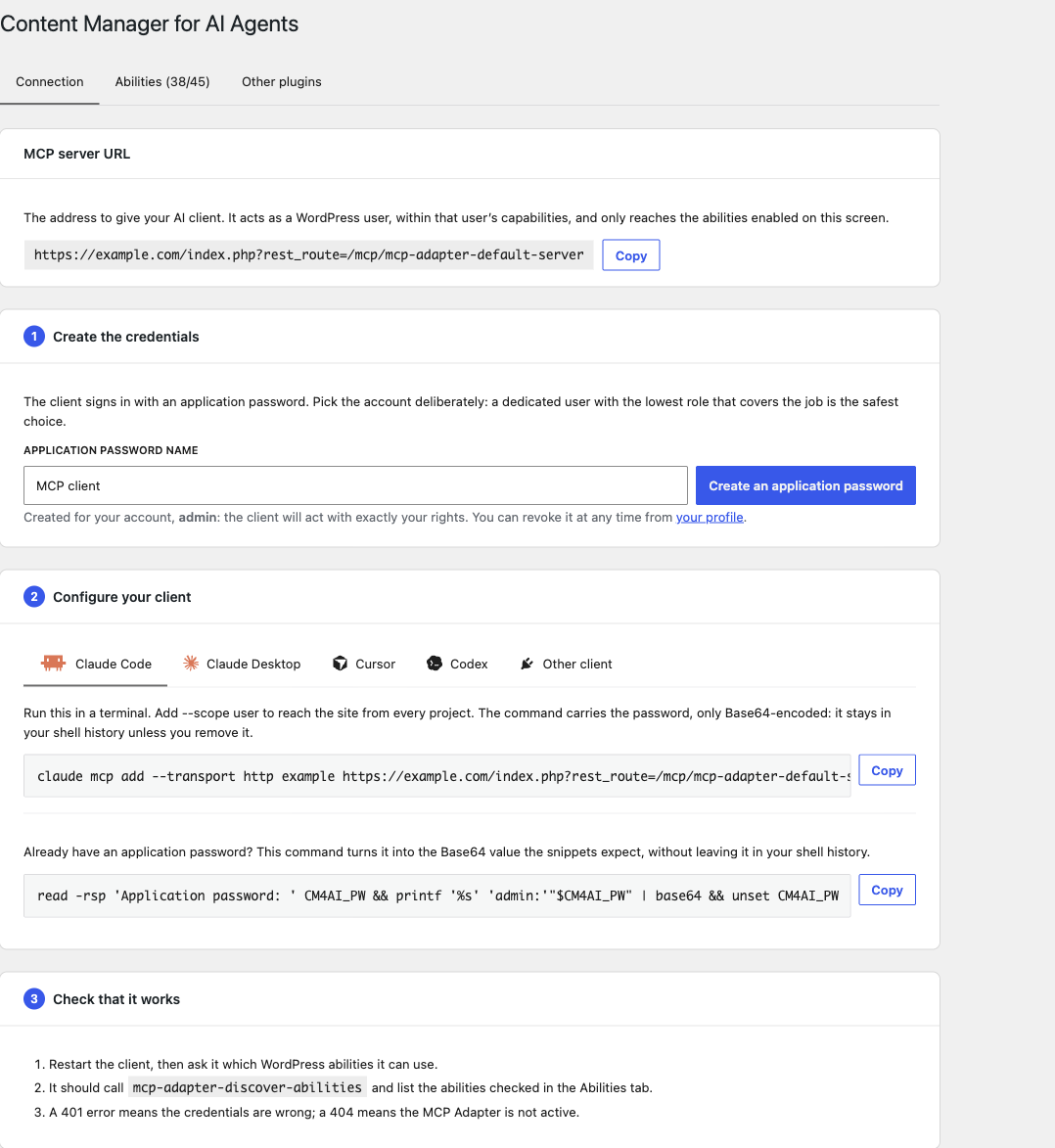
Connection. The URL of the adapter's default server with a copy button; a form creating an application password for the current user through the core /wp/v2/users/me/application-passwords route; and per-client tabs (Claude Code, Claude Desktop, Cursor, Codex, other), each with its logo, whose snippets are filled with the login and, once created, the password. The password lives in the page only: it is shown once, like on the profile screen. Warnings appear when the MCP Adapter is not running, when the default server is switched off, or when application passwords are unavailable (no HTTPS outside a local environment).
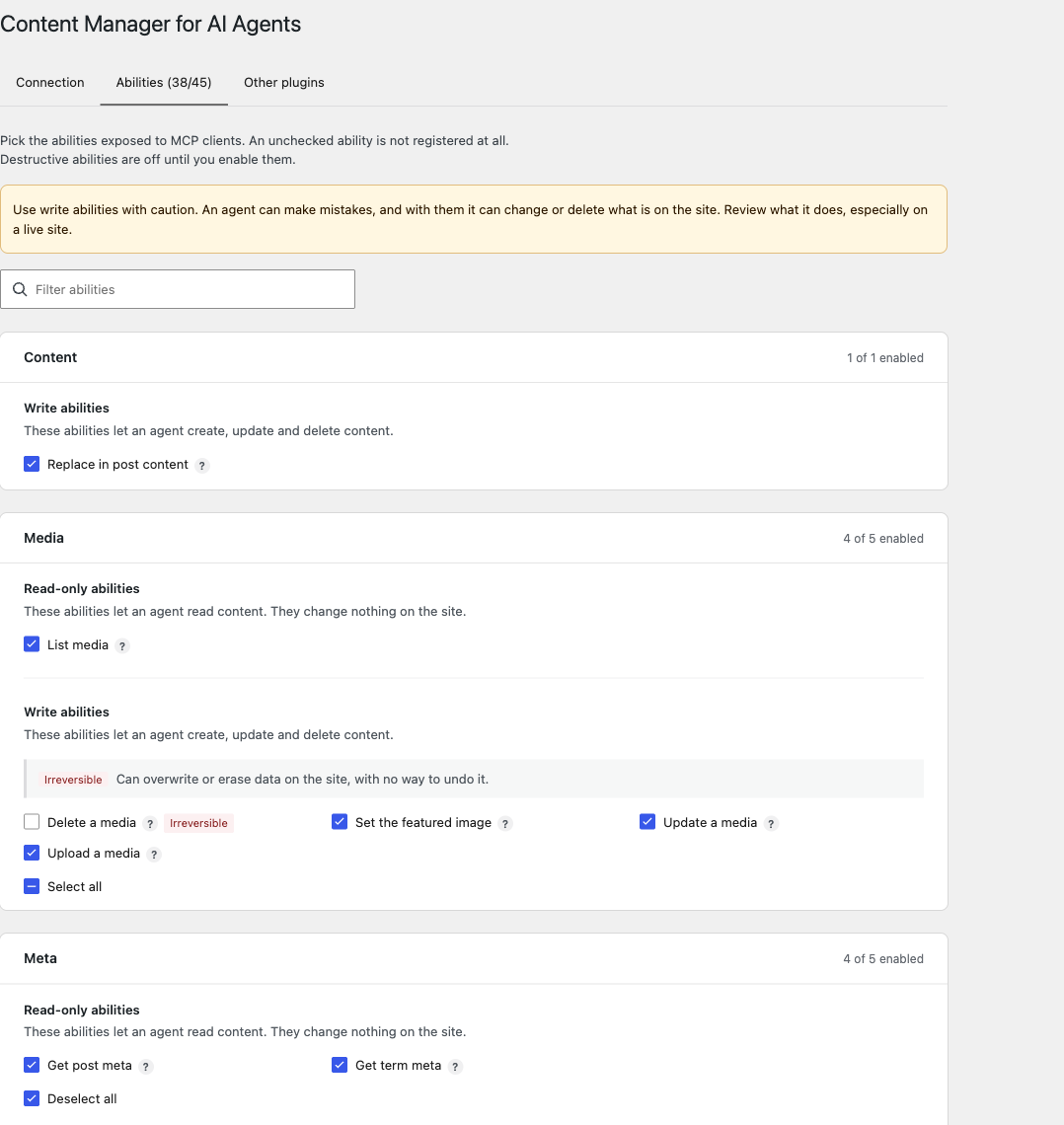
Abilities. Every ability of the plugin that can run on the site, one card per group sorted alphabetically: one per exposed post type (named after its plural label), plus Content, Media, Meta, SEOpress, Taxonomies, Templates, WooCommerce and WP Grid Builder. Each card splits its abilities into read-only and write, with a select-all box per block. A ? shows the ability name and description in a tooltip, when the description says more than the label. An "Irreversible" badge marks the abilities annotated destructive, and a "Hidden by default" badge the third-party ones their plugin keeps closed to MCP; a legend above each block explains them, and a badge every ability of the block carries is shown there only. A filter field narrows the list. Abilities whose dependency is missing (WooCommerce, SEOPress, SEOPress Pro) are not listed.
Other plugins. Abilities registered by other plugins, one card per namespace, described in Third-party abilities. This tab only shows when there are some.
Read-only and destructive. The split comes from the readonly and destructive annotations every ability now publishes in meta.annotations (AbstractAbility::isReadOnly() and isDestructive()). MCP clients receive them too. For third-party abilities the screen reads the same annotations, and an ability declaring nothing is shown as writing.
What unchecking does. An unchecked ability is not registered at all: it disappears from the Abilities API and from what an MCP client can discover.
Defaults. Every ability is enabled by default except the destructive ones, which stay off until an administrator checks them:
delete-{post type}for every post type,delete-media,delete-term,delete-term-meta,delete-template,delete-product-variation.
An ability absent from the stored option falls back to its own default, so an ability added by a later version shows up enabled, or disabled if it deletes something. A deletion is the one operation an agent cannot take back, and an update of the plugin must never widen on its own what an agent can reach.
Storage. The switches live in the cm4ai_enabled option, an array keyed by ability name. Third-party exposure lives in cm4ai_exposed. Both options are deleted when the plugin is uninstalled.
Which option a third-party box writes to. A third-party ability its own plugin exposes is switched off in cm4ai_enabled; one its plugin keeps closed is exposed in cm4ai_exposed. The rule lives in ThirdPartyAbilityCatalog::optionFor(), the only place the screen, the validation and the route ask, and every row the route returns names its REST parameter in option.
Writing the option from code. The setting is registered on admin_init, and from then on its validation (Services\SettingsSanitizer) applies to every write of the option made from the admin. It sets to false every listed ability the payload does not mention, the way a form treats an unchecked box. A partial write such as update_option( 'cm4ai_enabled', [ 'cm4ai/delete-post' => true ] ) therefore switches everything else off. Read the option, change the key you want, and write the whole array back:
wp eval '$o = (array) get_option( "cm4ai_enabled", [] ); $o["cm4ai/delete-post"] = true; update_option( "cm4ai_enabled", $o );'The REST route behaves differently: it lays the current state under the request before validating, so a POST to cm4ai/v1/settings only changes the switches it sends, and an empty one changes nothing.
A client that creates test objects and needs to clean up after itself can have delete-{post type} enabled for the session this way, then disabled again.
The cm4ai_is_enabled filter can also force the state of an ability from code (see Filters reference).
Abilities reference
Conventions
- Every name is prefixed with
cm4ai/, which is also the slug of the ability category the plugin registers. - Read capability. Abilities marked "read" check
edit_posts, the same baseline as the REST API content endpoints. - Two permission checks. The capability is checked in the ability's
permission_callback, then again insideexecute(), against the object actually targeted. - Paginated lists (
list-{plural},list-media,list-terms,list-templates) takeper_page(1 to 100, default 50) andpage(from 1, default 1), and returntotal,pageandper_pagealong with the items. Exceptions:list-taxonomiestakes no parameter and returns a plain array, and the WooCommerce lists use WooCommerce's own collection parameters and returntotalandtotal_pages(see WooCommerce). - Annotations. The plugin's abilities do not declare Abilities API annotations (
readonly,destructive,idempotent). Destructive abilities are recognisable by theirdelete-prefix and by being disabled by default. - Errors come back as
WP_Errorwith a code and an HTTP status in the error data (for instancepost_not_found/ 404,insufficient_permissions/ 403).
Content: post type abilities
Five abilities are generated for each public post type (attachments excepted):
| Ability | What it does | Capability | Default |
|---|---|---|---|
list-{plural} |
Paginated list of published and draft items, most recently modified first | read | enabled |
get-{singular} |
One item with its content, excerpt, date and terms | read | enabled |
create-{singular} |
Creates an item | the post type's create_posts |
enabled |
update-{singular} |
Updates an item | edit_post on that item |
enabled |
delete-{singular} |
Moves an item to the trash, or deletes it for good with force |
delete_post on that item |
disabled |
Naming. {singular} is the post type slug. {plural} is its rest_base when it declares one, otherwise the slug followed by s. Underscores become hyphens and any character outside a-z0-9- is dropped, because the Abilities API only accepts those. So post gives list-posts and get-post, page gives list-pages and create-page, and a book_review post type without a rest_base gives list-book-reviews and update-book-review.
Which post types. Every post type registered with public => true, except attachment. The cm4ai_post_types filter narrows or widens the list, and cm4ai_post_type_operations removes individual operations for a post type. If another plugin already registered an ability under the same name, the generated one is skipped rather than overriding it.
WooCommerce products. When WooCommerce runs, product gives up create and update to the dedicated WooCommerce abilities, which carry the same names (create-product, update-product). From WooCommerce 10.9, which describes its own catalogue, list, get and delete are given up as well; on older versions they stay generic.
list-{plural}
- Input:
per_page,page. - Output:
items[]withid,title,slug,status,date_modified,link,author_id,category_ids; plustotal,page,per_page.
get-{singular}
- Input:
post_id(integer, required). - Output:
id,title,slug,content,excerpt,status,author_id,date,category_ids, andterms: term IDs keyed by taxonomy, for every assignable taxonomy.
create-{singular} and update-{singular}
Both accept the same writable properties; create requires title, update requires post_id.
| Property | Type | Notes |
|---|---|---|
post_id |
integer | update only. |
title |
string | |
content |
string | HTML or serialised block markup, stored as sent (kses applies to users without unfiltered_html). |
excerpt |
string | |
slug |
string | Sanitised with sanitize_title(); generated from the title when omitted. |
status |
draft or publish |
Defaults to draft on create. publish requires the post type's publish_posts. |
parent_id |
integer | Hierarchical post types only. |
category_ids |
integer[] | Post types supporting category only. Same as the category entry of terms. |
terms |
object | Term IDs keyed by taxonomy. See below. |
author_id |
integer | Requires the post type's edit_others_posts. |
date |
string | Publication date, YYYY-MM-DD HH:MM:SS in site time. |
sticky |
boolean | post only. Pins (true) or unpins (false). |
Output: success, link, status and date, plus post_id on create. status and date are read back from the database: WordPress schedules a publish carrying a future date as future, and the response says so.
Dating, pinning, classifying.
dateworks on creation as on update. It is parsed strictly and must survive a round trip unchanged; anything else, including the0000-00-00 00:00:00placeholder, is refused withinvalid_dateinstead of producing a post dated year zero.- Pinning requires
edit_others_postsorpublish_posts, as the core REST controller does (cannot_assign_stickyotherwise).sticky_postsis a site-wide option, soedit_poston one's own draft is not enough. Unpinning needs nothing more than the update itself. termscovers every taxonomy registered for the post type that declaresshow_in_rest, the same rule the taxonomy abilities follow. The schema lists these taxonomies by name, so an agent reading it knows which ones exist.post_formatfalls out on its own, as it does not declareshow_in_rest. Thecm4ai_assignable_taxonomiesfilter adjusts the list.
{
  "title": "A paper",
  "date": "2026-03-14 09:30:00",
  "terms": {
    "category": [ 12 ],
    "topic": [ 85, 41 ]
  }
}- Each taxonomy sent replaces the terms the post carried in it. A taxonomy left out is untouched, and an empty array clears it.
- Terms are assigned with
wp_set_object_terms()after the write, so a taxonomy the user may not assign in is refused rather than dropped without a word. - Sending both
category_idsandterms.categoryis refused withambiguous_categories: they write the same taxonomy.
Refusals come before the write. Unknown or non-assignable taxonomy (taxonomy_not_assignable), malformed terms (invalid_terms), missing assign_terms capability (terms_not_allowed), unknown term (term_not_found), unreadable date, forbidden pin: all of it is checked before wp_insert_post() or wp_update_post(), so a refusal never leaves a half-created post behind. If assigning terms still fails after the write (a term deleted in between, a third-party filter), the error carries post_id and post_written: true so the caller can reconcile.
Writes are slashed before reaching wp_insert_post() and wp_update_post(), so backslashes in block markup (such as \u002d escapes in block attributes) survive.
delete-{singular}
- Input:
post_id(integer, required),force(boolean, defaultfalse: trash;true: permanent deletion). - Output:
success.
Content: replace in post content
cm4ai/replace-in-post-content
Replaces a literal string inside the content of a post of any type, without the caller resending the whole content. The update-* abilities take the full content, so changing three words in a long page means reading it, reproducing it and sending it back, which costs a lot and risks a silent transcription slip.
- Input:
post_id(integer, required);search(string, required, at least 1 character): the literal string to look for;replace(string, required): what goes in its place; an empty string deletes the match;expected_occurrences(integer, 0 or more): how many matches the caller expects; if the count differs, nothing is written and the errorunexpected_occurrences(409) reports the count found;dry_run(boolean, defaultfalse): counts and measures without writing.
- Output:
success,post_id,occurrences,replaced(true when the content was actually written),dry_run,length_before,length_after(read back from the database, or projected on a dry run),content_intact. - Capability:
edit_poston the target post. Default: enabled.
The search is a literal string, never a regular expression: block markup is full of characters a pattern would interpret. Literal also means untouched. search and replace are used byte for byte, tags, attributes, HTML comments, newlines and runs of spaces included, so a caller can anchor on <h1 class="wp-block-heading"> or on the boundary between two blocks. What the user may write is decided by the edit_post check and by kses on the way into the database, not by altering the needle.
content_intact is false when what was stored differs from what was submitted, which points to wp_filter_post_kses() having stripped markup because the user lacks unfiltered_html.
A missing search gives missing_search, an empty one empty_search.
Taxonomies
The scope is every taxonomy declaring show_in_rest, the same rule as the taxonomies assignable through terms: whatever a client can assign, it can also list, read and edit. Internal taxonomies that declare show_in_rest, such as nav_menu and wp_pattern_category, stay reachable on purpose: they carry their own capabilities (edit_theme_options for nav_menu), delete-term is off by default, and each ability can be switched off. Use the cm4ai_taxonomies filter to narrow the scope. A taxonomy outside it is refused with taxonomy_not_allowed.
Terms are returned as id, name, slug, description, parent, count, taxonomy.
cm4ai/list-taxonomies
- Input: none.
- Output: an array of
{ name, label, hierarchical, object_types[] }. - Capability: read. Default: enabled.
cm4ai/list-terms
- Input:
taxonomy(string, required),search(string),parent(integer: children of this term),hide_empty(boolean, defaultfalse),per_page,page. - Output:
terms[],total,page,per_page. - Capability: read. Default: enabled.
cm4ai/get-term
- Input:
term_id(integer, required),taxonomy(string, optional when the ID is unambiguous). - Output: the term.
- Capability: read. Default: enabled.
cm4ai/create-term
- Input:
taxonomy(string, required),name(string, required),slug(generated from the name when omitted),description,parent_id(hierarchical taxonomies). - Output:
success,term. - Capability: the taxonomy's
manage_terms. Default: enabled.
cm4ai/update-term
- Input:
term_id(integer, required),taxonomy,name,slug,description,parent_id(0moves the term to the root). - Output:
success,term. - Capability:
edit_termon that term. Default: enabled.
cm4ai/delete-term
- Input:
term_id(integer, required),taxonomy(optional when the ID is unambiguous). - Output:
success. The deletion is permanent. - Capability:
delete_termon that term. Default: disabled.
Media
Media are returned as id, title, filename, url, mime_type, alt_text, caption.
cm4ai/list-media
- Input:
mime_type(string, such asimageorimage/png),search(string),per_page,page. - Output:
items[],total,page,per_page. - Capability: read. Default: enabled.
cm4ai/upload-media
Downloads a file from a URL and adds it to the media library.
- Input:
url(string, required,httporhttpsonly),filename(string, inferred from the URL when omitted),alt_text(string). - Output:
success,media. - Capability:
upload_files. Default: enabled.
The download goes through core's download_url(), which refuses unsafe URLs such as internal addresses. Files larger than 10 MB are refused with file_too_large (adjust with cm4ai_upload_media_max_bytes). The file type is validated by media_handle_sideload(), as for any upload.
cm4ai/update-media
- Input:
attachment_id(integer, required),title,alt_text,caption. - Output:
success,media. - Capability:
edit_poston the attachment. Default: enabled.
cm4ai/set-featured-image
- Input:
post_id(integer, required),attachment_id(integer, required). - Output:
success,post_id,attachment_id. - Capability:
edit_poston the post. Default: enabled.
cm4ai/delete-media
- Input:
attachment_id(integer, required). - Output:
success. The attachment and its files are deleted permanently. - Capability:
delete_poston the attachment. Default: disabled.
Meta
Protected meta keys (prefixed with _, or declared protected with is_protected_meta) are never read, written or deleted unless they are on an allow-list, empty by default and filled through cm4ai_allowed_meta_keys. A refused key gives meta_key_not_allowed (403).
meta_value accepts a string, a number, a boolean, or an array of those; objects are refused with invalid_meta_value. A key registered through register_meta() with a sanitize_callback gets its strings as sent: that callback is what WordPress applies, for instance esc_url_raw() on a URL, which keeps its %20. Other keys have their strings stripped of tags and invalid UTF-8, keeping line breaks and percent-encoded octets.
cm4ai/get-post-meta
- Input:
post_id(integer, required),meta_key(string; omit it to get every readable meta of the post). - Output:
success,post_id, and eithermeta_keywithmeta_value, ormeta(every readable key, single values unwrapped). - Capability:
edit_poston the post. Default: enabled.
cm4ai/update-post-meta
- Input:
post_id(integer, required),meta_key(string, required),meta_value(required). - Output:
success,post_id,meta_key,meta_value. - Capability:
edit_poston the post. Default: enabled.
cm4ai/get-term-meta
- Input:
term_id(integer, required),taxonomy(disambiguates the lookup),meta_key(omit it to get every readable meta of the term). - Output:
success,term_id, and eithermeta_keywithmeta_value, ormeta. - Capability:
edit_termon the term. Default: enabled.
cm4ai/update-term-meta
- Input:
term_id(integer, required),taxonomy,meta_key(string, required),meta_value(required). - Output:
success,term_id,meta_key,meta_value. - Capability:
edit_termon the term. Default: enabled.
cm4ai/delete-term-meta
- Input:
term_id(integer, required),taxonomy,meta_key(string, required). - Output:
success,term_id,meta_key. - Capability:
edit_termon the term. Default: disabled.
SEOPress
Registered only when SEOPress is active (SEOPRESS_VERSION defined); update-post-schemas-seopress also needs SEOPress Pro. Without them the abilities do not exist, rather than reporting a success while writing orphan meta.
Fields shared by posts and terms (read and write):
| Field | Type | SEOPress meta |
|---|---|---|
meta_title |
string | _seopress_titles_title |
meta_description |
string | _seopress_titles_desc |
canonical_url |
string (URL) | _seopress_robots_canonical |
noindex |
boolean | _seopress_robots_index |
nofollow |
boolean | _seopress_robots_follow |
og_title, og_description, og_image |
string | _seopress_social_fb_* |
twitter_title, twitter_description, twitter_image |
string | _seopress_social_twitter_* |
Fields specific to posts:
| Field | Type | SEOPress meta |
|---|---|---|
focus_keyword |
string, comma-separated keywords | _seopress_analysis_target_kw |
primary_category |
string: a category ID, or none |
_seopress_robots_primary_cat |
breadcrumb_title |
string | _seopress_robots_breadcrumbs |
nosnippet |
boolean | _seopress_robots_snippet |
noimageindex |
boolean | _seopress_robots_imageindex |
redirect_enabled |
boolean | _seopress_redirections_enabled |
redirect_type |
301, 302 or 307 |
_seopress_redirections_type |
redirect_url |
string (URL) | _seopress_redirections_value |
Booleans are stored as SEOPress expects them (yes or empty). Empty values are read back as null.
cm4ai/get-post-seopress
- Input:
post_id(integer, required). - Output: every shared and post-specific field.
- Capability: read. Default: enabled.
cm4ai/update-post-seopress
- Input:
post_id(integer, required) and any shared or post-specific field. Only the fields sent are written. - Output:
success. - Capability:
edit_poston the post. Default: enabled.
cm4ai/update-post-schemas-seopress
Replaces the SEOPress Pro manual JSON-LD schemas of a post (_seopress_pro_schemas_manual).
- Input:
post_id(integer, required),schemas(string[], required): each entry is a raw JSON object or a full `` inside a string cannot close the tag on the front end.
cm4ai/get-term-seopress
- Input:
term_id(integer, required),taxonomy(optional when the ID is unambiguous). - Output: the shared fields.
- Capability:
edit_termon the term. Default: enabled.
cm4ai/update-term-seopress
- Input:
term_id(integer, required),taxonomy, and any shared field. - Output:
success. - Capability:
edit_termon the term. Default: enabled.
Templates
Block templates (wp_template) and template parts (wp_template_part). Every ability takes type, one of these two values, defaulting to wp_template. Reads go through get_block_templates() and get_block_template(), so templates provided by theme files are visible alongside those stored in the database.
A template is identified either by id, formatted {theme}//{slug}, or by slug, which is completed with the active theme. Slugs may only contain letters, digits, _, % and -.
Templates are returned as id, slug, theme, type, title, description, content, source, origin, has_theme_file, wp_id, is_custom (templates only), area (template parts only), status.
cm4ai/list-templates
- Input:
type,area(template parts only),per_page,page. - Output:
items[],total,page,per_page. - Capability: read. Default: enabled.
cm4ai/get-template
- Input:
type,idorslug. - Output: the template.
- Capability: read. Default: enabled.
cm4ai/create-template
Creates a template or template part tagged with the active theme.
- Input:
slug(required),type,title,description,content(serialised block markup),area(template parts only;uncategorized,header,footer,navigation-overlay; invalid values fall back touncategorized). - Output:
success,content_filtered,template. - Capability:
edit_theme_options. Default: enabled.
cm4ai/update-template
- Input:
type,idorslug,title,description,content,area,revert(boolean, defaultfalse). - Output:
success,reverted,content_filtered,template. - Capability:
edit_theme_options. Default: enabled.
Three cases:
- the template already exists in the database: it is updated;
- it only exists as a theme file: a database copy is created, which from then on overrides the file;
- with
revert: true: the database copy is removed and the theme file takes over again.
content_filtered is true when WordPress filtered the submitted markup, which happens when the user lacks unfiltered_html.
cm4ai/delete-template
- Input:
type,idorslug,force(boolean, defaultfalse: trash;true: permanent deletion). - Output:
success. - Capability:
edit_theme_options. Default: disabled.
Only customised templates (stored in the database) can be deleted; templates that come from theme files are refused with invalid_template.
WooCommerce
Registered only when WooCommerce runs. Without it, none of them exists.
WooCommerce 10.9 and later register their own product abilities (woocommerce/products-query, product-delete and neighbours). This plugin does not duplicate them. It covers what they leave out: variations, global attributes, and writing a variable product.
These abilities write nothing themselves: they hand the request to the WooCommerce REST controllers (/wc/v3). Their input schemas are derived at runtime from those controllers' arguments, so a field added by a WooCommerce release appears without a change here. Business rules and permission checks are those of the REST API.
| Ability | Route | What it does | Default |
|---|---|---|---|
cm4ai/create-product |
POST /wc/v3/products |
Creates a product, variable included |
enabled |
cm4ai/update-product |
PUT /wc/v3/products/{id} |
Updates a product; only the fields sent are written, and type may turn a simple product into a variable one |
enabled |
cm4ai/list-product-variations |
GET /wc/v3/products/{id}/variations |
Lists the variations of a variable product | enabled |
cm4ai/get-product-variation |
GET /wc/v3/products/{id}/variations/{id} |
Reads one variation | enabled |
cm4ai/create-product-variation |
POST /wc/v3/products/{id}/variations |
Creates a variation | enabled |
cm4ai/update-product-variation |
PUT /wc/v3/products/{id}/variations/{id} |
Updates a variation; sending attributes replaces the current pairs |
enabled |
cm4ai/delete-product-variation |
DELETE /wc/v3/products/{id}/variations/{id} |
Deletes a variation for good (force: true; variations have no trash) |
disabled |
cm4ai/list-product-attributes |
GET /wc/v3/products/attributes |
Lists the global attributes | enabled |
cm4ai/create-product-attribute |
POST /wc/v3/products/attributes |
Creates a global attribute | enabled |
Inputs.
create-product: the controller's creation fields,namerequired.update-product:product_id(required) plus the controller's update fields.list-product-variations:product_id(required) plus the controller's collection parameters (page,per_page, filters).get-product-variation,delete-product-variation:product_idandvariation_id(required).create-product-variation:product_id(required) plus the controller's creation fields. Eachattributesentry pairs an attribute of the parent with one of its values; an empty value means "any". The parent must bevariableand carry attributes marked for variations.update-product-variation:product_idandvariation_id(required) plus the controller's update fields.list-product-attributes: nothing besides_fields.create-product-attribute: the controller's creation fields,namerequired.
Every ability except delete-product-variation accepts _fields, a comma-separated list of the fields to return (for instance id,name,sku,price,stock_quantity). A product has more than seventy properties, and a page of results pays for all of them when only three are needed.
Outputs. The REST API response, minus its _links. The output schema is deliberately open: WooCommerce describes its fields for input, not output (stock_quantity is an integer that answers null when stock is not managed), and enforcing those descriptions would reject ordinary products. Lists are wrapped: variations[] or attributes[], plus total and total_pages when WooCommerce sends its pagination headers. Both keys are absent, rather than guessed, when it does not.
Capabilities. Those of the WooCommerce routes. Their verdict then goes through cm4ai_check_permission, with rest_route as the capability and the route as the context. An invalid payload comes back as WooCommerce's validation error, not as a permission refusal.
Attributes created in the same request. WooCommerce registers its pa_* taxonomies on init, from the database. A global attribute created by create-product-attribute is registered on the spot, so values assigned to it later in the same request are not dropped.
WP Grid Builder
Registered only when WP Grid Builder is active (WPGB_VERSION defined). The plugin keeps facets and their index in tables of its own, out of reach of the content and meta abilities, and has no public function listing them; these abilities read them through its internal Database query builder and use its Helpers and Indexer classes. Recheck them on each major WP Grid Builder release.
cm4ai/list-wpgb-facets
- Input:
ids(integer[], optional): facet IDs to return. Omit to list every facet. - Output:
facets(each withid,slug,name,type,source,index_rows,modified_date,settings) andtotal. - Capability:
manage_options. Default: enabled.
The ID is what the wp-grid-builder/facet block references, and an import can renumber it. index_rows tells an empty index from a facet that simply has nothing to offer on a page.
cm4ai/index-wpgb-facets
- Input:
ids(integer[], required, at least one). - Output:
queued(IDs handed to the indexing queue) andskipped(IDs matching no facet, or a facet that indexes nothing: search, selection, sort…). - Capability:
manage_options. Default: disabled.
Facets go to the plugin's own indexing queue, as its "Index" button does, and the call returns at once: indexing runs in the background, in batches. Follow the row counts with list-wpgb-facets, then clear the cache. It is not run within the request because the indexer only guards time, memory and cancellation from its queue, and empties a facet's index before rebuilding it. Disabled by default, since a rebuild empties the index first and loads the site while it runs.
cm4ai/clear-wpgb-cache
- Input: none (
{}). - Output:
cleared. - Capability:
manage_options. Default: enabled.
Does what the "Clear cache" button of the WP Grid Builder settings does. A facet created or indexed after its choices were cached keeps rendering them, often empty, until the cache is cleared.
Third-party abilities
The settings screen also lists the abilities other plugins registered, grouped by namespace under "Other plugin: {namespace}", with one checkbox each. What the checkbox does depends on how the ability declares itself.
Abilities open to MCP (they carry meta.mcp.public): the checkbox removes them. They stay checked by default, since unchecking them on update would break integrations already in place.
- Removal uses
wp_unregister_ability(), the only lever the Abilities API offers. - It only happens on the routes served by the MCP Adapter, under
/wp-json/mcp/, when the request is dispatched (rest_pre_dispatch). The rest of the site is untouched: the plugin that provides the ability keeps using it, including from its own admin screens over REST. Removing it everywhere would also make the setting irreversible, since an ability missing from the registry would be missing from the screen, checkbox included. - A site serving its MCP server elsewhere than under
/wp-json/mcp/adds its route prefix withcm4ai_mcp_route_prefixes, otherwise the switches have no effect. - An ability declaring
meta.mcp.typeasresourceorpromptstays listed by the adapter's default server once unchecked, because the server freezes those two lists when it is built (measured on adapter 0.5). Running it still fails, as the registry is read at call time. Tools are not affected.
Abilities closed to MCP (no meta.mcp.public, as with SEOPress's abilities, written for the core REST API): the checkbox exposes them. Checking one declares it to the adapter's default server as a tool, through the adapter's mcp_adapter_default_server_config filter, without touching the registry or the ability's metadata.
- These boxes are unchecked by default and stay so
This README is longer than the copy stored here. Read the rest on GitHub →
Releases
6 releases. Each count is every asset in that release; expand a row for the breakdown.