ACF Color Picker Palette Addon WP Registry grade A. No security issues foundWP RegistryNo security issues foundOpen the reportA
Install
This is the repository archive. It installs, but the folder name will carry the branch suffix and updates will not flow.
Install straight from GitHub with WP-CLI:
wp plugin install https://github.com/frederikrosendahlkaa/acf-color-picker-palette-addon/archive/refs/heads/main.zipUnofficial Advanced Custom Fields (ACF) addon
ACF Color Picker Palette Addon integrates WordPress theme colors and Elementor global colors directly into your ACF Color Picker fields. This helps editors follow the site's visual identity without having to find and enter HEX or RGBA values manually.
Each Color Picker field can use WordPress colors, Elementor colors, or both. The standard color picker remains available, and the plugin does not change existing field values.
🎨 Features
- ✅ WordPress Global Styles and
theme.jsoncolors - ✅ Color palettes registered by classic WordPress themes
- ✅ Elementor system and custom global colors
- ✅ Easy per-field activation
- ✅ Automatic removal of duplicate palette colors
- ✅ Support for Elementor colors with alpha transparency
- ✅ Existing field values and manual color selection remain available
📋 Requirements
- WordPress 6.0 or newer
- PHP 8.1 or newer
- Advanced Custom Fields (free or PRO version)
- Optional: Elementor (for Elementor color integration)
🚀 Installation
- Download the plugin ZIP file.
- In WordPress, go to Plugins → Add New Plugin → Upload Plugin.
- Upload the ZIP file and activate the plugin.
- Create or edit an ACF Color Picker field and enable the palettes you want to use.
💡 How to use
- Create or edit an ACF Field Group
- Add or edit a Color Picker field
- In the field settings you will see new options:
- Enable WordPress colors palette - Enable WordPress theme colors
- Enable Elementor colors palette - Enable Elementor global colors (if Elementor is installed)
- Select the color palettes you want to use
- Save the field group
When you now edit a post or page, the color picker field will display the selected color palettes.
❓ Frequently asked questions
Does the plugin require ACF PRO?
No. It works with both the free version of Advanced Custom Fields and ACF PRO.
Does the plugin require Elementor?
No. WordPress theme colors work without Elementor. Elementor is only required when you want to include its system or custom global colors.
Does it support both block and classic themes?
Yes. The plugin reads colors from WordPress Global Styles and theme.json, as well as palettes registered by classic themes with add_theme_support( 'editor-color-palette' ).
Can editors still choose a different color?
Yes. The palettes are added as convenient shortcuts and do not lock the field to predefined colors.
Does the plugin change existing ACF field values?
No. It extends the color picker interface without modifying existing saved values.
📷 Screenshots
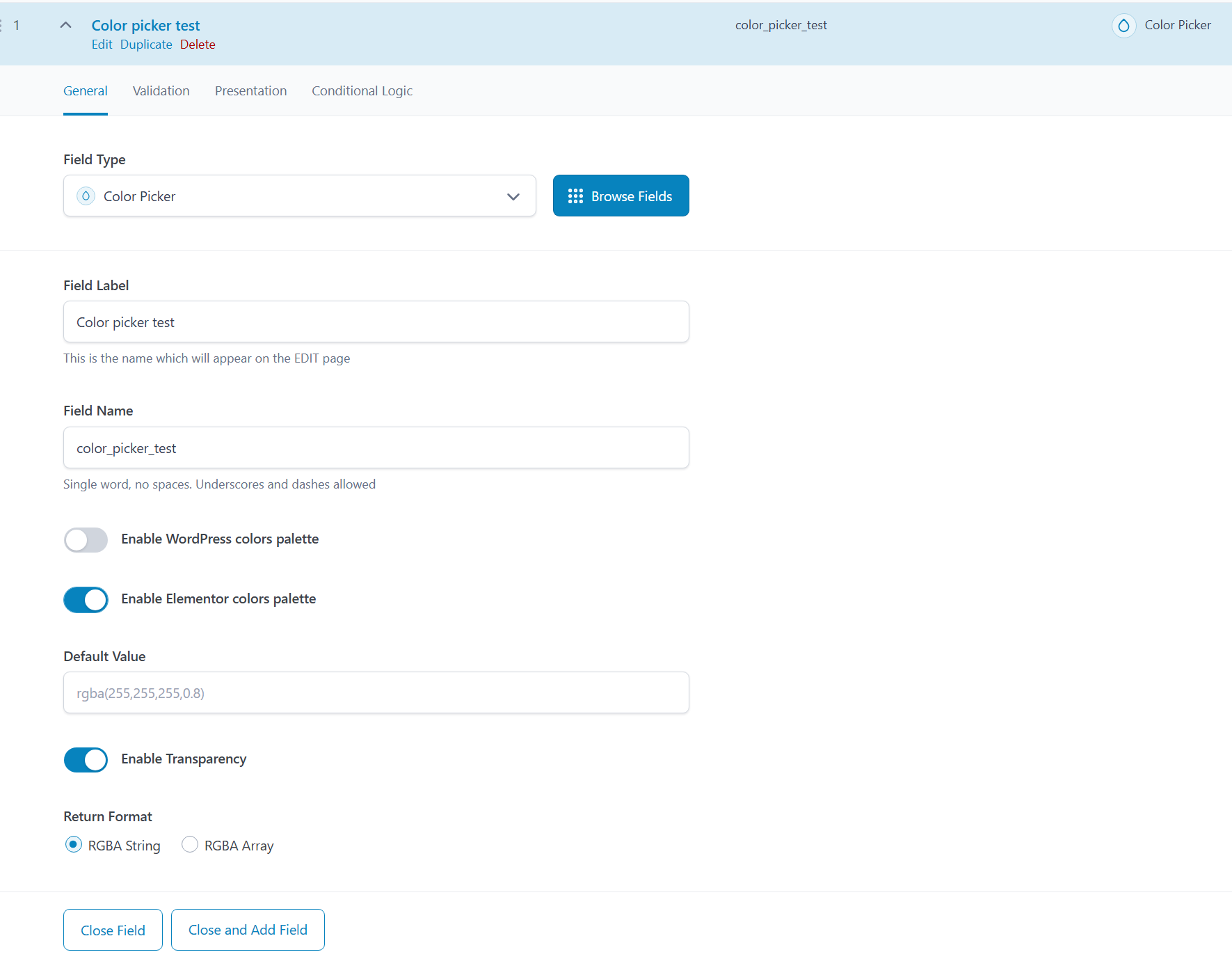
🔧 Technical details
WordPress Colors
The plugin retrieves colors from:
- Global Styles (FSE/Block themes via
wp_get_global_settings()) - Theme support colors (classic themes via
get_theme_support('editor-color-palette'))
Elementor Colors
The plugin retrieves colors from:
- Elementor System Colors
- Elementor Custom Colors
Color format
- Automatically converts Elementor HEX+Alpha colors to RGBA format
- Removes duplicate colors from each palette
- Preserves standard HEX colors
🔄 Updates
Plugin updates are distributed through GitHub Releases. After installing a version that includes the GitHub updater, future stable releases appear in the normal WordPress update interface. Release data is cached for up to 24 hours; using Check again on the WordPress Updates screen bypasses this cache.
🔒 Privacy
The plugin does not set cookies or transmit ACF data, website content, or plugin settings to external services.
To support automatic updates, WordPress may contact GitHub to check for new releases and download update packages. These requests do not include ACF field data or plugin settings. As with normal web requests, GitHub may receive technical request information such as the server IP address, user agent, time, and requested URL.
🌍 Translations
The plugin is fully translated to:
- 🇬🇧 English (default)
- 🇩🇰 Danish (da_DK)
Translation files included:
.pot- Translation template.po/.mo- Traditional translation files.l10n.php- Modern WordPress translation format (WP 6.5+)
📄 License
This plugin is licensed under GPL2 or later.
🤖 Development transparency
AI-assisted tools have been used as part of the development and documentation process. All changes are reviewed and maintained by the plugin author.
👨💻 Author
Frederik Rosendahl-Kaa
- Website: fmrk.dk
- GitHub: frederikrosendahlkaa
⚠️ Disclaimer
This is an unofficial addon for Advanced Custom Fields and is not affiliated with or supported by WPEngine (ACF developers).
🐛 Bug reports & Feature requests
If you find a bug or have an idea for a new feature, feel free to:
- Create an issue on GitHub
- Submit a pull request
📝 Changelog
Version 1.1.0
- Add automatic updates through GitHub Releases with manual cache refresh support
- Add an AI-assisted development disclosure
- Expand feature, compatibility, and privacy documentation
Version 1.0.0
- Initial release
Releases
2 releases.
These releases are tags only. The author does not attach a packaged zip, so there are no download counts to report.