Fred's Twitter Widget WP Registry grade A. No security issues foundWP RegistryNo security issues foundOpen the reportA
a custom Wordpress Twitter timeline widget and shortcode plugin
Install
This is the repository archive. It installs, but the folder name will carry the branch suffix and updates will not flow.
Install straight from GitHub with WP-CLI:
wp plugin install https://github.com/fredbradley/wp-twitter-widget/archive/refs/heads/master.zipTwitter Timeline Widget
By Fred Bradley
A widget and short-code for Wordpress installations that will fetch tweets from the Twitter Widget Timeline and display them using Javascript on your page.
Table Of Contents
Installation
Take download of the latest release from this repository.
Install that by uploading the ZIP file as a new plugin into your Wordpress installation. Finally, ensure that you have activated the plugin.
Usage
Upon installing and activating, nothing will happen just yet.
There are two ways of using this plugin. Both ways can be used multiple times in one Wordpress installation.
1. As A Short-code
Use the short-code to place your Twitter widget anywhere on your site.
[fb_twitter_widget] will set up your timeline with default parameters.
Parameters
| Param Name | Required? | Default Value | Description |
| --- | --- | --- | --- | --- |
| timeline_id | Yes | null | Find out how to find your Twitter Timeline ID |
| num_tweets | No | 1 | How many latest Tweets do you want to pull in from your timeline? |
| div_id | No. (Unless multiple occurrences on the same page) | emaptweet | The ID of the div where the Javascript will place the twitter timeline |
| js_function | No. (Unless multiple occurrences on the same page) | showTweet | We have to name the function that does the hard work. If you are pulling in more than one timeline you will have more than one function, so therefore they need difference names! |
Example
[fb_twitter_widget num_tweets="3" timeline_id="615814546540900352" div_id="my_twitter_div" js_function="my_get_tweets"]
2. As A Widget
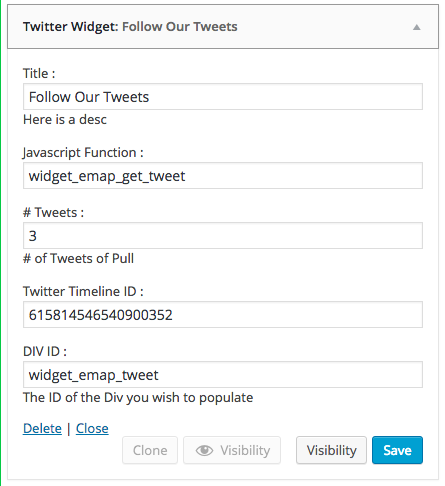
We've also created a Widget so that you can easily place your Twitter Timeline in your sidebars and footers.
This has the same parameters but in form format. See screenshot:
User Feedback
Issues
If you have any problems with or questions about this plugin, please contact the developer(s) through a GitHub issue.
Contributing
This is an open source plugin. We would love you to contribute to help make the plugin better.
You are invited to contribute new features, fixes, or updates, large or small; we are always thrilled to receive pull requests, and do our best to process them as fast as we can.
Before you start to code, we recommend discussing your plans through a GitHub issue, especially for more ambitious contributions. This gives other contributors a chance to point you in the right direction, give you feedback on your design, and help you find out if someone else is working on the same thing.
Developer
- Fred Bradley (https://github.com/fredbradley)
Credits and Mentions
- Jason Mayes (https://github.com/jasonmayes/) for the core Javascript that gets the tweets (https://github.com/jasonmayes/Twitter-Post-Fetcher)
License
MIT License. See LICENSE for details.
Copyright
Copyright (c) 2015 Fred Bradley and Swipe Digital.
Releases
5 releases.
These releases are tags only. The author does not attach a packaged zip, so there are no download counts to report.