Install
This is the repository archive. It installs, but the folder name will carry the branch suffix and updates will not flow.
Install straight from GitHub with WP-CLI:
wp plugin install https://github.com/frankiejarrett/woocommerce-product-fallbacks/archive/refs/heads/master.zip Prevent out-of-stock products from taking up important real estate on your site.
Contributors: fjarrett
Tags: ecommerce, inventory, products, sales, shop, shopping, stock, store, woocommerce
Requires at least: 4.0
Tested up to: 4.2
Stable tag: 1.0.0
License: GPLv3
WC requires at least: 2.1.0
WC tested up to: 2.3.9
Description
The WooCommerce Product Fallbacks plugin prevents out-of-stock items from taking up space on your site by replacing them with the in-stock items you choose.
It's the perfect solution for making sure your customers are only seeing products that are in-stock and ready for purchase.
- You choose which products should be used as fallbacks for other products.
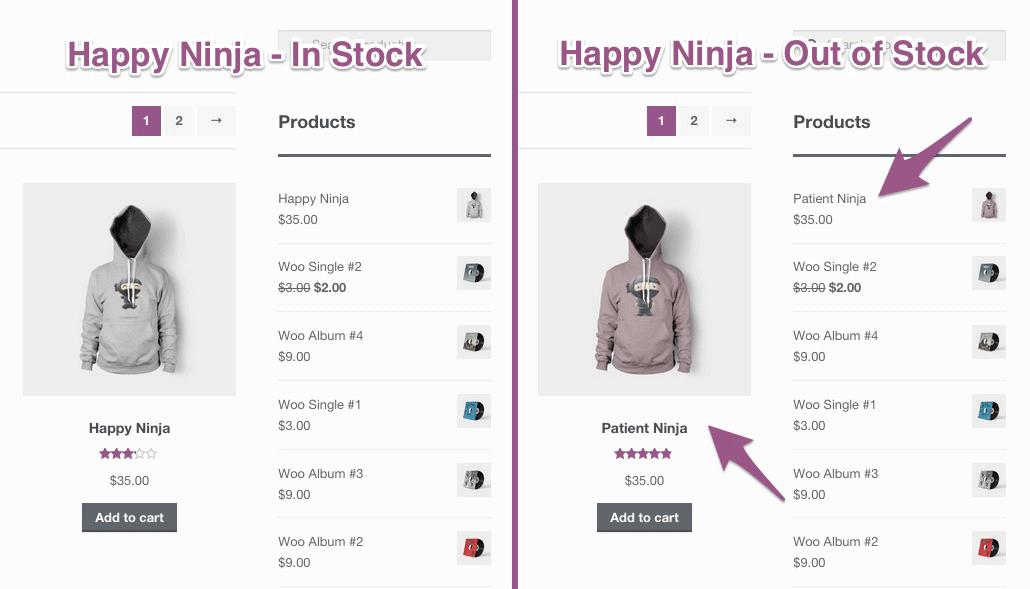
- Automatically displays an in-stock product in place of an out-of-stock product.
- Automatically redirects customers to the in-stock product URL when accessed directly.
- Once your original product is back in-stock the fallback will automatically stop.
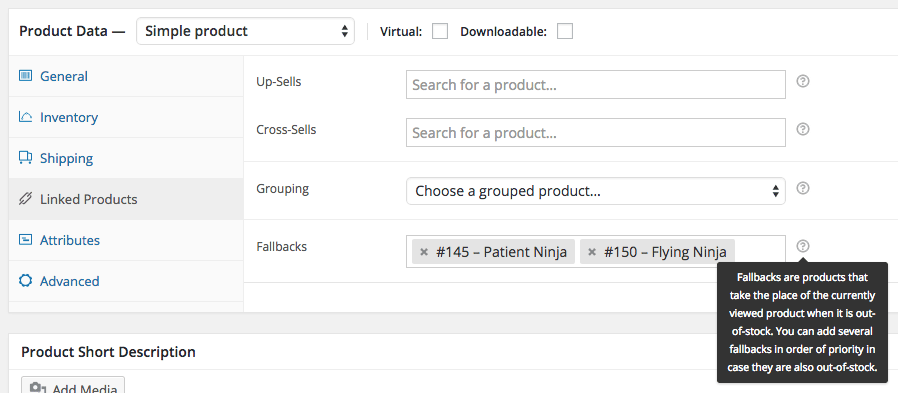
- You can add multiple fallbacks in order of priority in case they also go out-of-stock.
Frequently Asked Questions
Does this plugin overwrite my product data when it goes out-of-stock?
No. This plugin does not alter your out-of-stock products in any way.
It simply puts a veneer over your out-of-stock item with data from an in-stock item so your customers are only presented with something they can purchase immediately.
What happens if the fallback product is also out-of-stock?
This is why you can add more than one fallback, in order of priority, so that if your first choice fallback is sold out another fallback will be used.
If all of the provided fallbacks are out-of-stock, no replacement will be made to the original product.
Do fallbacks work on products placed in widget areas or as cross-sells and up-sells too?
Yes! Everywhere your product is being displayed on the site, whether in a widget area, or as a cross-selling or up-selling item will be replaced by its fallback when it goes out-of-stock.
What happens when someone direclty visits the URL of a product that is out-of-stock?
If that product has an available fallback the customer will be redirected to that URL instead automatically.
If no in-stock fallback is available, no redirection will occur.
Screenshots
List product fallbacks in order of priority from the Linked Products tab.
When products are out-of-stock they are automatically replaced by their fallback product.
Changelog
1.0.0 - May 20, 2015
- Initial release
Props fjarrett