Install
This is the repository archive. It installs, but the folder name will carry the branch suffix and updates will not flow.
Install straight from GitHub with WP-CLI:
wp plugin install https://github.com/frankiejarrett/woocommerce-password-strength-meter/archive/refs/heads/master.zip Display a password strength meter when customers register during checkout.
Contributors: fjarrett
Tags: account, checkout, ecommerce, passwords, security, shop, shopping, store, woocommerce
Requires at least: 4.0
Tested up to: 4.2
Stable tag: 1.0.0
License: GPLv3
WC requires at least: 2.1.0
WC tested up to: 2.3.8
Description
The first line of defense for securing any WooCommerce store is to ensure that customers are using strong passwords.
This plugin encourages the use of strong passwords by showing customers a live strength meter that measures the complexity of their password.
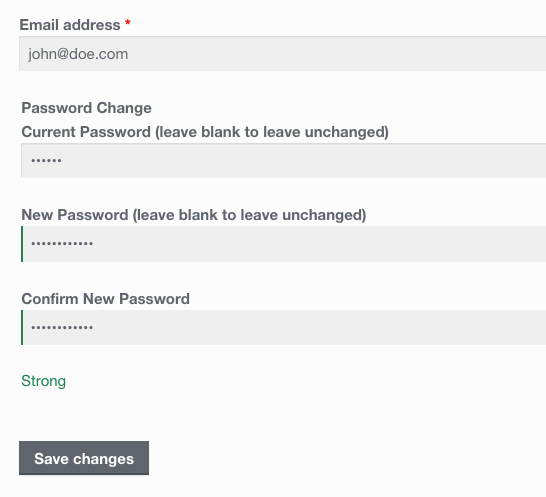
The password strength meter is displayed when customers register during checkout and when they change their password from the account page.
Frequently Asked Questions
Are users forced to choose a strong password?
No, it simply makes users aware of their password "score" to encourage them to use a strong one, it does not block them from completing the checkout process in any way.
How is password strength determined?
Password strength is measured using Dropbox's zxcvbn library that is able to smartly measure password entropy.
It is the same library that WordPress core has used for checking password strength in the WordPress Admin since version 3.7.
Screenshots
Customers can see their password's strength when registering for an account during checkout.
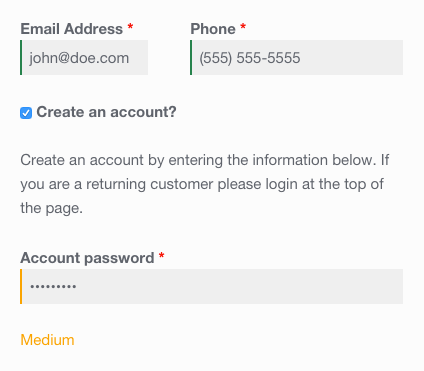
Password strength is also displayed when customers change their password from the account page.
Changelog
1.0.0 - May 21, 2015
- Initial release
Props fjarrett