LP Metrics WP Registry grade A. No security issues foundWP RegistryNo security issues foundOpen the reportA
WordPress plugin that displays liquidity pool position metrics and 1-month PnL for a Solana wallet via the LPAgent API.
★ 1stars
v1.0.2latest · 7mo ago
Install
This is the repository archive. It installs, but the folder name will carry the branch suffix and updates will not flow.
Install straight from GitHub with WP-CLI:
wp plugin install https://github.com/fphxgallery/lpagent-dashboard/archive/refs/heads/main.zipNo built-in updater. New versions won't appear under Dashboard → Updates. Install new releases yourself, or let Git Updater track the repository.
A WordPress plugin that displays liquidity pool position metrics for a Solana wallet using the LPAgent API.
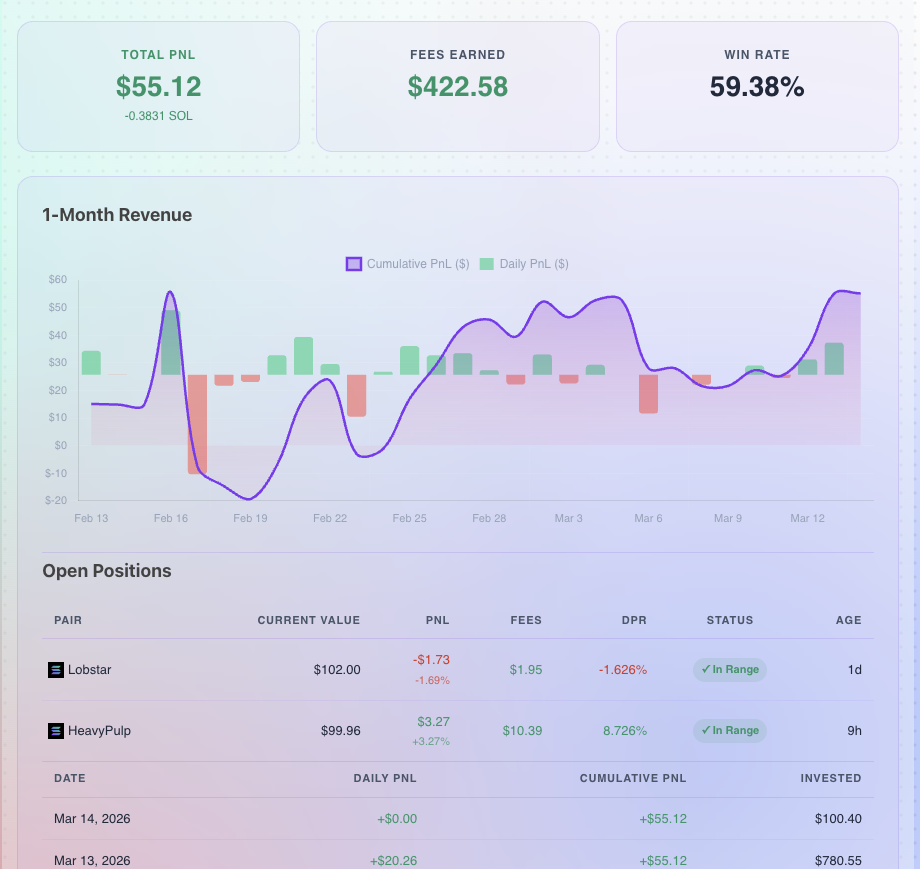
Features
- Overview stat cards — Total PnL (USD + SOL), Fees Earned, Win Rate
- 1-Month Revenue chart — Cumulative PnL line + daily PnL bars via Chart.js
- Open Positions table — Pair, Current Value, PnL, Uncollected Fees, DPR, In/Out Range status, Age
- Revenue date table — Daily PnL, Cumulative PnL, and Invested amount per day
- Glassmorphism design — matches the fphx-theme purple/pink aesthetic
- Transient caching with configurable TTL
Requirements
- WordPress 5.8+
- PHP 7.4+
- LPAgent API key
Installation
- Upload the
lp-metricsfolder to/wp-content/plugins/ - Activate the plugin in Plugins → Installed Plugins
- Go to Settings → LP Metrics and enter your LPAgent API key
- Add the shortcode to any page or post
Usage
[lp_metrics wallet="YOUR_WALLET_ADDRESS" protocol="meteora"]Shortcode Parameters
| Parameter | Default | Description |
|---|---|---|
wallet |
(required) | Solana wallet address |
protocol |
meteora |
LP protocol (e.g. meteora, orca) |
Settings
Navigate to Settings → LP Metrics to configure:
- LPAgent API Key — your API key from lpagent.io
- Default Protocol — fallback protocol used when not specified in shortcode
- Cache Duration — how long API responses are cached (seconds)
- Clear Cache — manually flush all cached LP Metrics data
Author
Releases
3 releases.
These releases are tags only. The author does not attach a packaged zip, so there are no download counts to report.