Install
This is the repository archive. It installs, but the folder name will carry the branch suffix and updates will not flow.
Install straight from GitHub with WP-CLI:
wp plugin install https://github.com/fioru-software/lasntgadmin-groups/archive/refs/heads/master.zipLASNTG WordPress plugin template
Please see WordPress plugin developer handbook for detailed info.
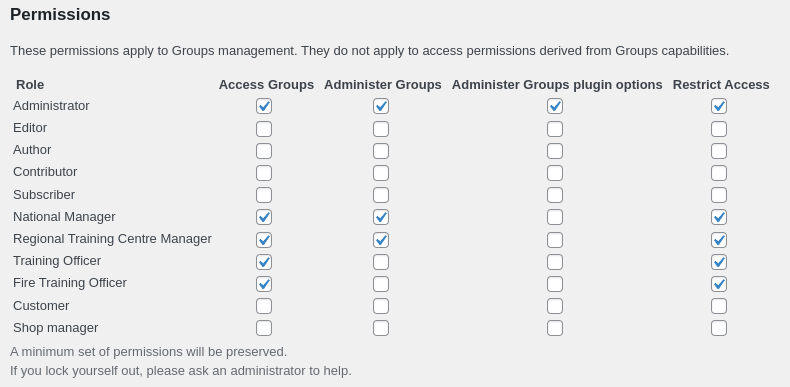
Groups > Options > Permissions
Development
WooCommerce REST API
# NB: requires https://
CONSUMER_KEY=
CONSUMER_SECRET=
curl -k -u '$CONSUMER_KEY:$CONSUMER_SECRET' https://localhost:8443/wp-json/wc/v2/orders/ | jq
PHP
Emails will be sent to Mailtrap Inbox. Credentials are available on our Bitwarden.
Create .env file.
Add your plugin folder name to the WP_PLUGIN= environment variable.
SITE_URL=localhost:8080
SITE_TITLE=WordPress
WP_PLUGIN=example-plugin
WP_PLUGINS=groups woocommerce advanced-custom-fields user-role-editor wp-mail-smtp
WP_THEME=storefront
ADMIN_USERNAME=admin
ADMIN_PASSWORD=secret
ADMIN_EMAIL=admin@example.com
Build images and run WordPress.
# build Docker image
docker-compose build # optionally override Dockerfile build arguments by appending --build-arg USER_ID=$(id -u)
# start container
docker-compose up wordpress
Run the tests
docker exec -ti -u www-data lasntg-plugin_template_wordpress_1 bash
cd /usr/local/src
composer install
composer all
Note: Most WordPress coding convention errors can be automatically fixed by running composer fix
Visit http://localhost:8080/wp-login.php
React
docker run --rm -u node:node -v $(pwd):/usr/local/src -w /usr/local/src -ti node:lts-alpine ash
npm install
npm start
npm build
Release a version
Update composer.json file with appropriate name, version and installer-name.
Update Version: 0.0.0 of main plugin file, in this case example-plugin.php.
Use git to commit and push changes to origin.
Use git to tag the commit and push it to origin.
# list existing tag
git tag -l
# tag the commit with appropriate version
git tag -a 0.1.4
# push tag as a release
git push -u origin 0.1.4
Plugins
- Creating your first WooCommerce extension
- Create your first app with Gutenberg data
- Introduction to WordPress Plugin Development
- Tutorial: Adding React Support to a WooCommerce Extension
- Groups Documentation
- WooCommerce Developer Resources
- Evalon WooCommerce Payment Gateway
- Advanced Custom Fields
- WooCommerce Storefront Theme
- WP Mail SMTP