AyudaWP File Review
A one-off, read-only review of the files of a WordPress site. It compares the core files with the official checksums of your version, lists what sits in the root and is not part of WordPress, finds PHP in the uploads folder, looks for the camouflage tricks that hacked sites tend to share and shows which PHP files changed recently.
Install
Upload it under Plugins → Add New Plugin → Upload Plugin, then activate.
Install straight from GitHub with WP-CLI:
wp plugin install https://github.com/fernandotellado/ayudawp-file-review/releases/download/1.0.0/ayudawp-file-review.zipA one-off, read-only review of the files of a WordPress site. It compares the core files with the official checksums of your version, lists what sits in the root and is not part of WordPress, finds PHP in the uploads folder, looks for the camouflage tricks that hacked sites tend to share and shows which PHP files changed recently. When you are done, it deletes itself.
It was written after finding a phishing kit and three webshells that had been living for more than five years inside a WordPress site that was always up to date. The whole story is in this post on Ayuda WordPress. Every check in this tool comes from something found in that case.
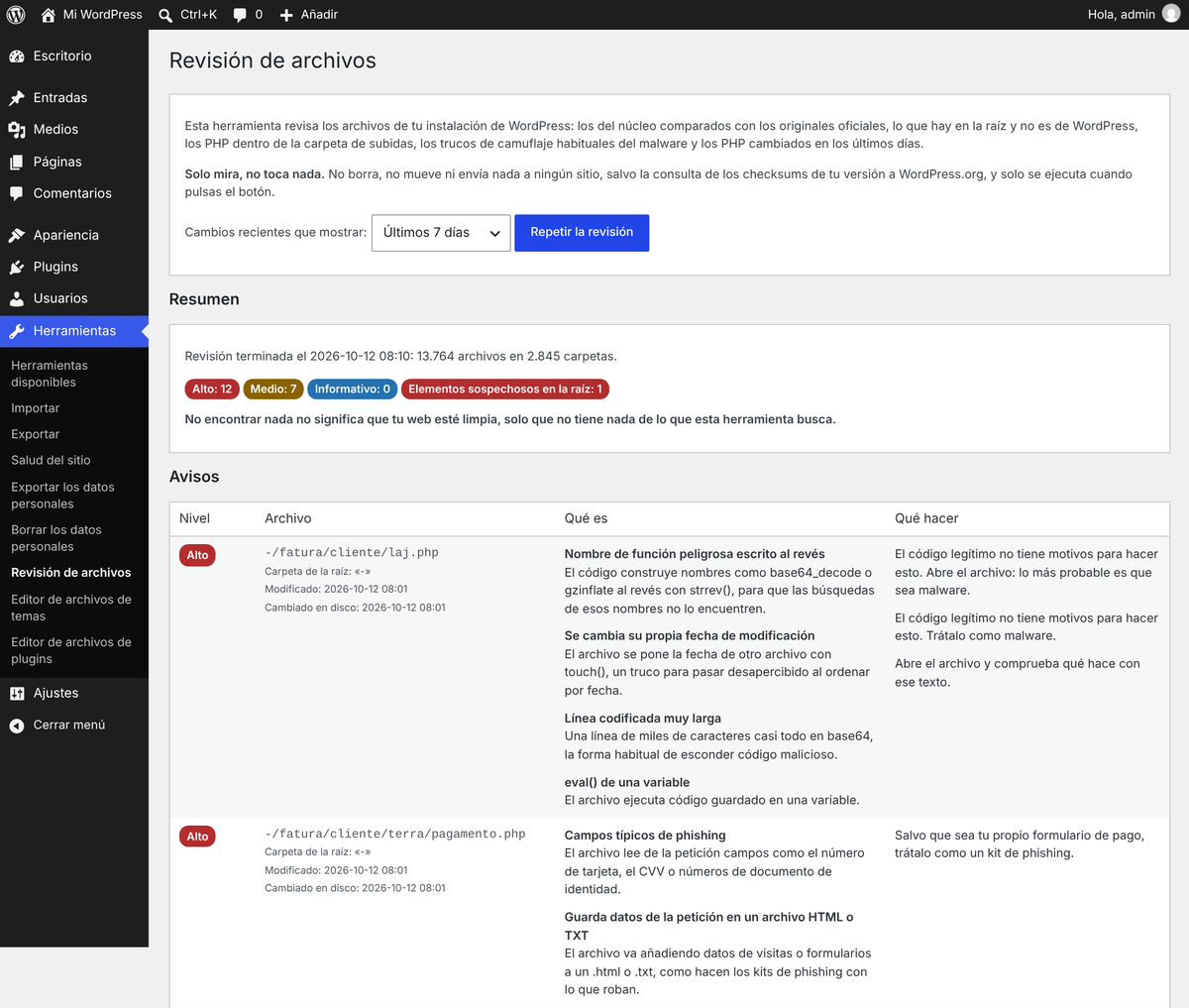
The screenshots show the Spanish interface, with the real files of that case copied to a test site.
What it checks
| Check | What it looks for | Level |
|---|---|---|
| Core integrity | Files in the root, wp-admin and wp-includes compared with the official checksums of your version and language (it falls back to en_US if your language has none). Modified files, PHP files that are not part of WordPress and missing files |
High for modified files and extra PHP, Medium for an extra .htaccess or php.ini, Info for other extra files |
| Root folder | Everything in the root that is not part of WordPress, with the number of PHP files inside each unknown folder | Unknown folders with PHP and loose PHP files count as suspicious |
| Uploads | Any PHP file in wp-content/uploads |
High. An empty index.php and the compiled Twig templates that WPML keeps there are Info |
| Camouflage, by content | Dangerous function names built backwards with strrev(), a file that sets its own date with touch(), PHP that starts with an image header, uploads that use the original file name, phishing form fields (card number, CVV, CPF…) and long encoded lines |
High |
| More content checks | eval() of a variable, a redirect to a bare IP address, request data appended to an .html or .txt file |
Medium |
| PHP configuration | php.ini or .user.ini that empty disable_functions, turn safe mode off or allow remote includes |
High. auto_prepend_file is Medium, because the Wordfence firewall uses it too |
.htaccess |
A hand-made country filter built from many allow from lines |
Medium |
Copies of wp-config.php |
wp-config.php.bak, wp-config-old.txt and similar names. The server does not run them as PHP and may serve them as plain text, database password included |
Medium |
| Recent changes | PHP files changed in the last 24 hours, 7 days or 30 days, grouped by plugin, theme or folder. It uses ctime, which PHP cannot fake, and highlights files that changed recently but show a modification date more than 30 days older |
List |
| Administrators | Every administrator, with the date the account was created | List |
Long encoded lines need a word of their own: the line is decoded and its first bytes are checked. Images and fonts embedded as data URIs (menu icons, logos, icon fonts) are ignored and serialized sample settings are Info. Anything else is reported. Nothing decoded is ever run.
What it does not do
- It only reads. It never changes, moves or deletes your files, and it sends nothing anywhere. The only network request is the one that fetches the official core checksums from api.wordpress.org.
- It runs only when an administrator presses the button. Nothing runs on the front end, in the background or on a schedule.
- It stores the results in a single option,
ayudawp_fr_scan, which is not autoloaded and goes away when you delete the tool. - It does not clean anything, and it is not a firewall or a scanner that keeps watching your site.
Finding nothing does not mean your site is clean, only that it has nothing this tool looks for.
Installation
There are two ways, and both end in the same place.
As a regular plugin. Download ayudawp-file-review.zip from the latest release, go to Plugins > Add New Plugin > Upload Plugin, choose the zip, install it and activate it.
As a must-use plugin. Upload ayudawp-file-review.php to wp-content/mu-plugins/ with your file manager or SFTP (create the folder if it does not exist). Must-use plugins load without being activated.
Use the zip from the releases page rather than GitHub's Download ZIP button: that one also brings the README files and the screenshots folder, and the screenshots folder would be left behind when the tool deletes itself.
How to use it
- Go to Tools > File review.
- Choose the window for recent changes: last 24 hours, 7 days or 30 days.
- Press Start the review. It works in batches of a few seconds each, so it stays well below
max_execution_timeon any hosting. A site with about 60,000 files took around half a minute in our tests. - Read the results. Each file appears once, at the most serious level among its findings, with every reason it was flagged, what that means and what to do.
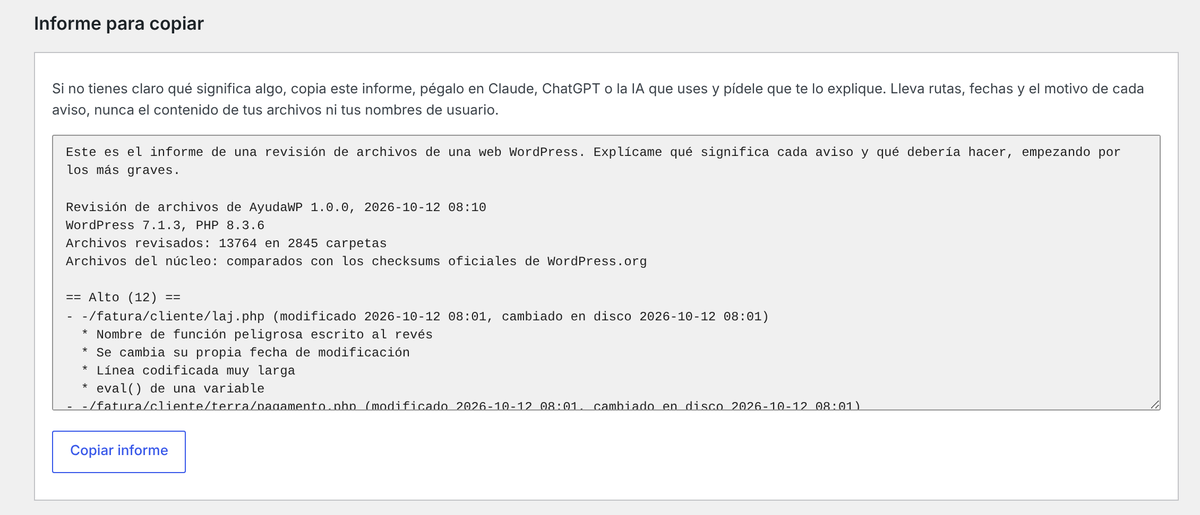
- If something is not clear, press Copy report and paste the report into Claude, ChatGPT or the AI you use. It contains paths, dates and the reason for each finding. It never contains the contents of your files or your user names (administrators appear as "Administrator 1", "Administrator 2"…).
- When you are done, tick Yes, delete the results and this tool and press Delete the review tool.
The delete button removes the stored results and the plugin file. If you installed it as a regular plugin, it deactivates it first and also removes its folder, together with any readme or licence files in it. On sites with DISALLOW_FILE_MODS it deletes the results and tells you to remove the file by hand. Deleting it from the Plugins screen also removes the results.
The three levels
- High. Something legitimate code has no reason to do. Treat the file as malware until you can prove it is not.
- Medium. Something a few legitimate plugins do:
eval()in plugins that run code snippets,auto_prepend_filefor some firewalls. Check which plugin the file belongs to before worrying. - Info. Worth knowing, rarely a problem.
Who can use it
On a single site, administrators (manage_options). On a multisite network, only network administrators (manage_network_options), because every site in the network shares the same files. Every action checks both the capability and a nonce.
How it works
- It walks the installation with its own list of pending folders, saved between batches, and picks up exactly where the previous batch stopped. If
wp-contentlives outside the WordPress folder, it walks that too. - Each batch runs for a third of
max_execution_time, between 2 and 10 seconds. You can change it with theayudawp_fr_time_budgetfilter (seconds, as a float). - It does not follow symbolic links, and it does not skip any folder by name: a folder name on a skip list is a place to hide.
- It reads files up to 2 MB. Bigger PHP files and PHP files the web server cannot read are reported as Info, because their content could not be checked.
- Core files that match their checksum skip the content checks, since they are known to be the originals.
- Why
ctime: the modification date you see in a file listing (mtime) can be changed from PHP with a singletouch(), and the shell in the original case did exactly that. The change time (ctime) is set by the system and cannot be changed from PHP. After a migration or a restored backup most files show a recentctimewith an oldmtime, so when that happens to more than 200 files the tool treats it as a migration and lists only the files outside plugins and themes. - It stores up to 2,000 findings, and the list of recently changed files has a cap too, so a huge site cannot fill the database.
- The interface is in English with the Spanish translation built in, so it stays a single file. Other languages can be added with the usual tools (text domain
ayudawp-file-review).
Tested against
- The real files of the case that led to it: everything is reported.
- The 80 most popular plugins on WordPress.org and 20 of the most used themes, more than 48,000 PHP files: no High findings. The only findings are four Medium
eval()warnings in Code Snippets, WPCode, ManageWP Worker and a Twig test file inside Elementor. - A real installation with WooCommerce, WPML, Elementor and Divi, about 60,000 files: no High findings.
- PHP 8.3 and 8.5, with static compatibility checks down to PHP 7.4. WordPress Coding Standards and PHPCompatibilityWP pass except for the class file name rule, which a single-file plugin cannot follow.
Requirements
- WordPress 5.5 or later.
- PHP 7.4 or later.
FAQ
Does it remove anything it finds? No. It tells you what it found and what to do. Cleaning is up to you, and the steps are in this guide to cleaning a hacked WordPress (in Spanish).
Can it replace a security plugin? No. It is a check you run once and delete. If you want something that compares the core files with the originals on its own and emails you about extra files, use a security plugin such as Vigilante, which is what caught the original case.
My hosting's malware scanner flagged the file. The tool contains the patterns it looks for: names of dangerous functions inside its own rules. Generic scanners sometimes flag security tools for that reason. The code is a single readable file, so check it yourself, and delete the tool when you are done.
The checksums could not be fetched. Some servers block outgoing requests. The other checks still run, and the summary says that the core files were not compared.
Is it safe to paste the report into an AI? That is what it was designed for. It holds file paths, dates, findings and your WordPress and PHP versions. No file contents and no user names.
Reporting problems
Open an issue for bugs or false positives. If you find a security problem in the tool itself, please do not open a public issue: use private vulnerability reporting instead.
License
GPL-2.0-or-later. The full text is in LICENSE.
Support
Need help or have suggestions?
Find it useful? Star the repository and help spread the word!
About AyudaWP.com
We are specialists in WordPress security, SEO, AI and performance optimization plugins. We create tools that solve real problems for WordPress site owners while maintaining the highest coding standards and accessibility requirements.
Releases
1 release. Each count is every asset in that release; expand a row for the breakdown.