Install
This is the repository archive. It installs, but the folder name will carry the branch suffix and updates will not flow.
Install straight from GitHub with WP-CLI:
wp plugin install https://github.com/fedya-dev/docs-library-pro/archive/refs/heads/main.zipA Beautiful, Fast & Smart Document Library for WordPress
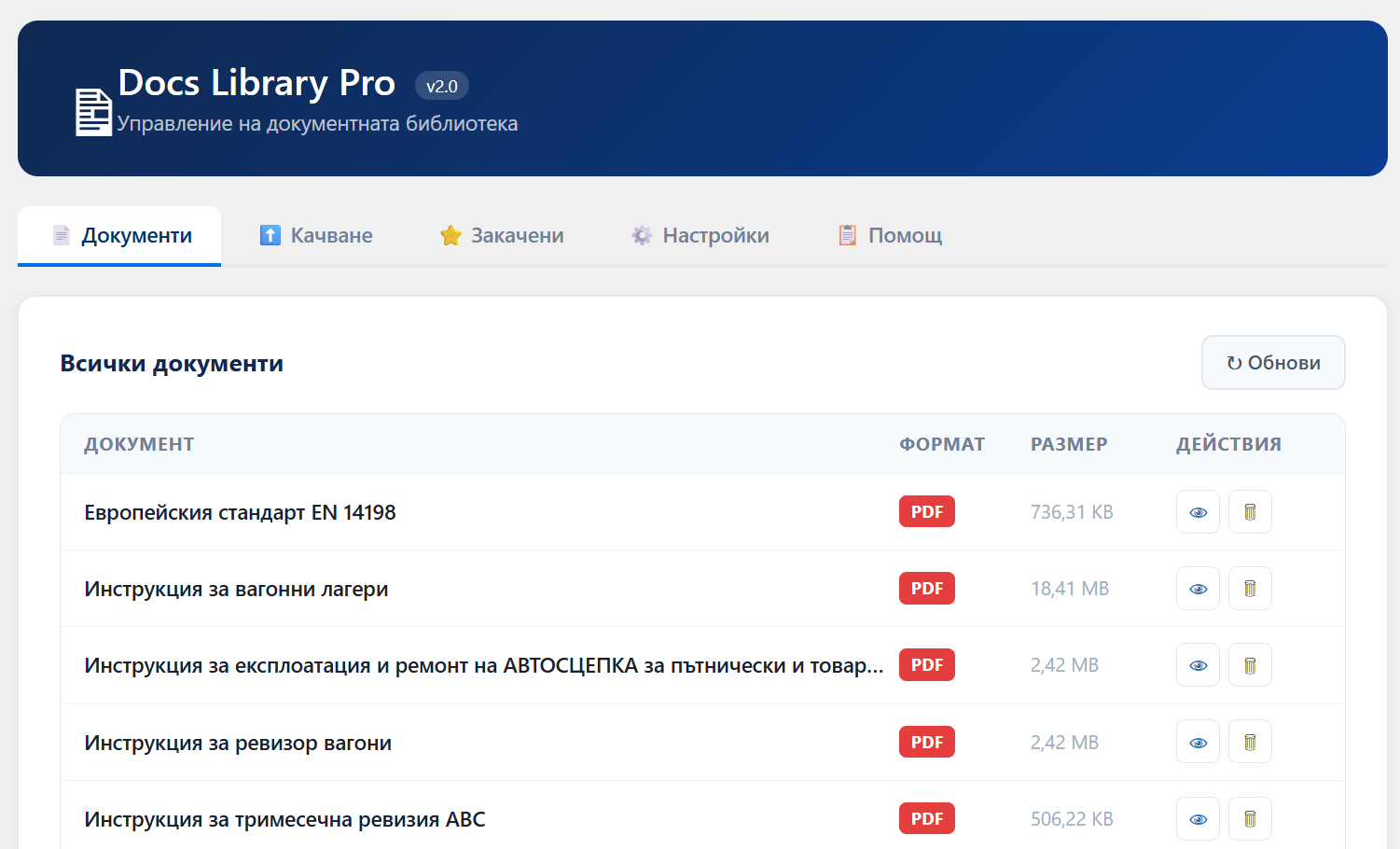 Modern document showcase with real-time search, pagination, pinned documents, dark mode, and rich formatting support.
Features
| Feature | Description |
|---|---|
| Supported Formats | PDF, DOC/DOCX, XLS/XLSX, RTF, PPT/PPTX |
| Color-Coded Icons | SVG icons with distinct colors per format |
| Live Search | Instant filtering by title, description, or filename (Cyrillic-safe) |
| Pagination | 12 documents per page with smart ellipsis navigation |
| Pinned Documents | Pin up to 4 documents — always shown first with a ⭐ badge |
| File Size Display | Human-readable sizes (e.g., 2.4 MB) |
| Media Library Sync | Uses Title and Caption from WordPress Media |
| Admin Panel | Full dashboard with tabs: Documents, Upload, Pinned, Settings, Help |
| Upload & Delete | Upload files via drag-and-drop, delete directly from admin |
| Dark Mode | Auto-detects dark theme via system preference, body class, or background brightness |
| Responsive Grid | Looks perfect on mobile, tablet, and desktop |
| Shortcode & Gutenberg | Use via [docs_library] or native Gutenberg block |
| Secure & Clean | Strict format whitelist, full escaping, rel="noopener", no inline JS vulnerabilities |
Installation
- Download the plugin as
.zip - Go to WordPress Admin → Plugins → Add New → Upload Plugin
- Upload
docs-library-pro.zip - Click Install Now → Activate
Done! Your documents from wp-content/uploads/ are now beautifully displayed.
Usage
Shortcode
[docs_library]With specific formats:
[docs_library formats="pdf,docx,xlsx"]Gutenberg Block
Search for Docs Library in the block editor and insert it directly.
Admin Panel
Navigate to Docs Library in the WordPress sidebar. The panel includes:
| Tab | Description |
|---|---|
| 📄 Documents | View all documents with format badge, size, open & delete actions |
| ⬆️ Upload | Drag-and-drop upload with real-time progress bar |
| ⭐ Pinned | Select up to 4 documents to always appear first |
| ⚙️ Settings | Choose visible formats, set section title and description |
| 📋 Help | Shortcode reference and plugin info |
Pinned Documents
You can mark up to 4 documents as pinned from the ⭐ Закачени tab in the admin panel.
- Pinned documents always appear first in the grid, regardless of alphabetical order
- They are highlighted with an orange ⭐ Препоръчан badge in the top-left corner
- After pinned documents, the rest are sorted alphabetically
Dark Mode
The plugin automatically adapts to dark themes:
- Detects system preference (
prefers-color-scheme: dark) - Detects WordPress dark mode body classes (
ast-dark-mode,dark-theme,is-dark-theme, etc.) - Measures the actual background brightness of the page for full compatibility with any theme
Allowed Formats
The following formats are supported and can be toggled in Settings:
PDF · DOC · DOCX · XLS · XLSX · RTF · PPT · PPTX
Security note: No matter what is passed via shortcode, formats like
TXT,PHP,HTACCESSand all other file types are always blocked by a hardcoded server-side whitelist.
Changelog
v2.0.0
- Full admin panel with 5 tabs (Documents, Upload, Pinned, Settings, Help)
- Drag-and-drop file upload with progress bar
- Delete documents directly from admin
- Pinned documents feature (up to 4, always shown first)
- Pagination (12 per page, with ellipsis navigation)
- Dark mode auto-detection via background brightness analysis
- Strict server-side format whitelist (blocks TXT, HTACCESS, etc.)
- Compiled Gutenberg block editor script (no raw JSX)
- Settings: configurable formats, section title and description
v1.0.3
- Initial release
- Shortcode
[docs_library] - Gutenberg block
- Live search with Cyrillic normalization
- Color-coded SVG icons per format
- Responsive grid layout
Author
Fedya Serafiev — urocibg.eu
License: GPL v2 or later