Install
This is the repository archive. It installs, but the folder name will carry the branch suffix and updates will not flow.
Install straight from GitHub with WP-CLI:
wp plugin install https://github.com/fan-shiyu/ecfi-cf-workflow/archive/refs/heads/main.zipA WordPress plugin for managing a collaborative data update workflow for the ECFI Atlas community foundation directory.
Overview
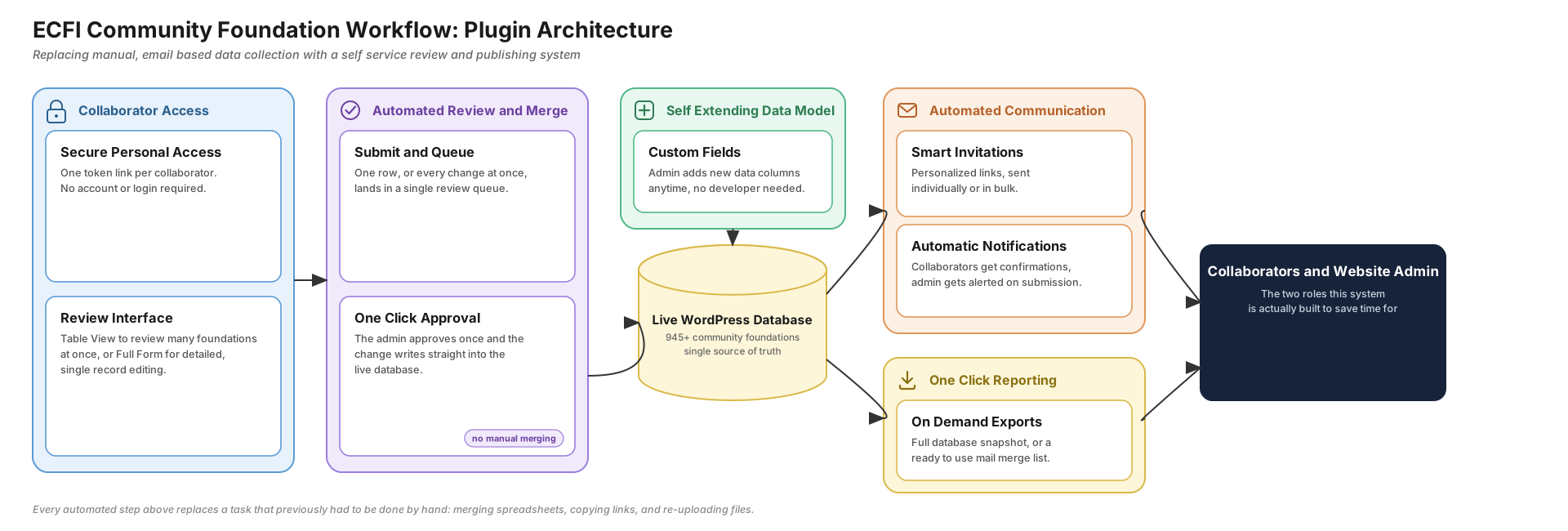
Community foundation data in the ECFI Atlas requires periodic review and correction by multiple stakeholders — people outside the WordPress admin who shouldn't need direct database or admin access. This plugin gives each collaborator a private, tokenised link to review and update the foundation(s) they're responsible for. Every change lands in a pending-changes queue for an admin to approve or reject, field by field, before it ever touches the live foundation post.
Features
Collaborator access
- Token-based, passwordless landing page (
?ecfi_token=...) — no WordPress account needed - Each collaborator can be assigned one or more foundations
- Draft (mailto) or send (via configured SMTP) an invitation email per collaborator
- Revoke / reactivate collaborators, regenerate their token at any time
- Export the collaborator list for mail-merge
Two ways to submit changes
- Table View — an editable, paginated, searchable table for bulk-editing every assigned foundation at once
- Full Form — a single-foundation edit form, including a flow for proposing a brand-new foundation
- Taxonomy fields (Type, Status) validate against real terms and reject unrecognised values before anything is queued
Review & approval
- Every submitted change queues in a Pending Changes screen with Pending / Approved / Rejected tabs
- Side-by-side current-vs-proposed diff, approved or rejected per field (not just per submission)
- Confirmation email to the collaborator summarising what was approved/rejected
Custom fields
- Admins can define additional fields (text, number, or dropdown) from a dedicated admin screen — no code changes needed
- Custom fields flow through Table View, Full Form, the pending-changes diff, and the export automatically
Audit log
- Every collaborator, assignment, and change-review action is logged with actor, target, and timestamp
- Filterable and searchable from its own admin screen
Export
- One-click
.xlsxexport of every Community Foundation and Support Organisation, matching ECFI's reference spreadsheet column order - Includes all taxonomy-backed columns (Type, Status, Visibility, Country + ISO2) — each resolved independently, so one misconfigured taxonomy can't blank out the others
Admin screens
Under CF Workflow in the WordPress admin menu: Review Changes, Audit Log, Collaborators, Custom Fields.
Taxonomies
Community foundations are classified by three taxonomies: organisation-status, organisation-visibility, and organisation-type. The first two are managed through ACF's Taxonomy UI; organisation-type is registered directly by this plugin (idempotently — it steps aside if ACF already provides it on a given environment) and seeded with its 5 standard terms on activation.
Requirements
- WordPress 6.0+
- PHP 8.1+ (required by the bundled
phpoffice/phpspreadsheetdependency) - Advanced Custom Fields (ACF) 6.0+ — free or Pro
Installation
- Download or clone this repository.
- Run
composer installto fetch thevendor/dependencies (required — not committed to the repo). - Upload the plugin folder to
wp-content/plugins/, or zip it and upload via Plugins → Add New → Upload Plugin. - Activate the plugin. Activation creates its database tables automatically; on every request it also checks for and applies any pending schema upgrades.
- Configure collaborators and custom fields under CF Workflow in the admin menu.
Development Setup
Prerequisites: a local WordPress environment (e.g. LocalWP) with ACF installed and Composer available.
# Clone into your wp-content/plugins directory
git clone https://github.com/Fan-shiyu/ecfi-cf-workflow.git
cd ecfi-cf-workflow
composer install
Then activate the plugin from Plugins in your local WordPress admin.
License
MIT © 2026 Fan Shiyu. See LICENSE for details.