Wordpress Preact Plugin
A WordPress plugin with Preact frontend integration using Vite.
by Estevan Ulian · github.com/estevan-ulian/wp-preact-plugin · website
Install
No release zip yet. The repository archive installs, but the folder name will carry the branch suffix and updates will not flow:
wp plugin install https://github.com/estevan-ulian/wp-preact-plugin/archive/refs/heads/main.zipA WordPress plugin with Preact frontend integration using Vite.
📋 Description
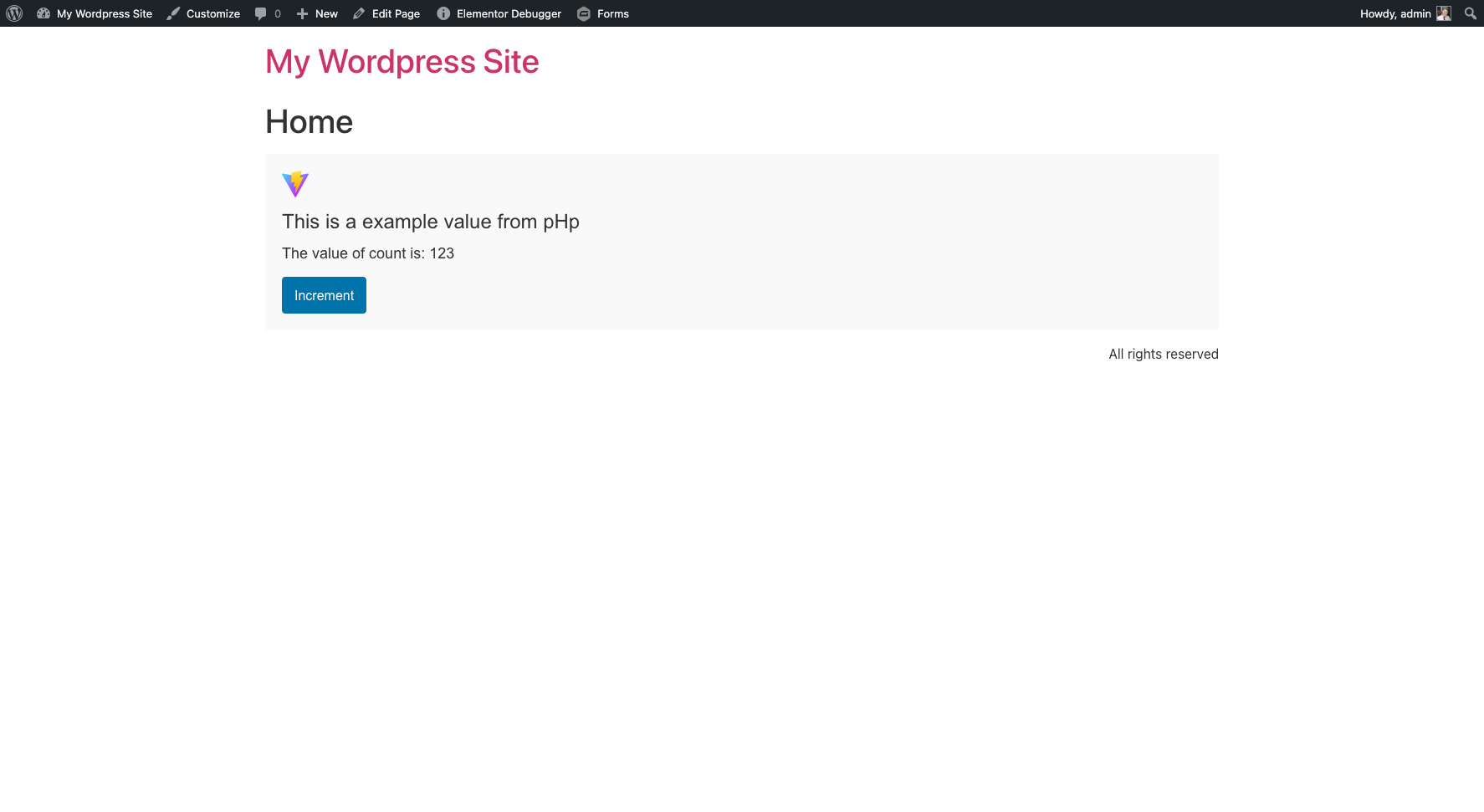
This plugin provides the basic setup to integrate a Preact application into a WordPress site. It enables you to create modern and reactive interfaces using Preact technology within WordPress and use them through shortcodes.
✨ Features
- ⚡ Preact + Vite: Fast builds and lightweight application
- 🔄 TypeScript: Static typing for enhanced code safety
- 📦 Build System: Automated generation of optimized files
- 🎯 Shortcode Support: Easy integration with WordPress pages/posts
- 🔗 PHP ↔ Frontend Communication: Seamless data passing from backend to frontend
🚀 Requirements
- PHP >= 7.4
- WordPress 6.0+
- Node.js >= 18
- Composer
📦 Installation
1. Clone or extract the plugin
cd wp-content/plugins/
# Place the plugin files here
2. Install PHP dependencies
composer install3. Install Node.js dependencies
cd frontend
npm install
🛠️ Development
Development Mode (Frontend)
To work on the frontend with hot reload:
cd frontend
npm run dev
This will start the Vite development server on the default port (5173).
IMPORTANT
When working in development mode, data passed from PHP (backend) to the frontend via wp_localize_script will not be available, as Vite serves the files directly. To test PHP → Frontend communication, you'll need to do a temporary production build or implement an alternative solution to inject the data during development.
The current solution creates fallbacks for all values passed from PHP (backend) to the frontend. In this example, the strings constant located in frontend/src/core/config.ts has fallbacks for demonstration purposes.
Frontend Build
To compile the frontend for production:
cd frontend
npm run build
This will generate optimized files in the assets/ folder:
assets/js/wp-preact-plugin.jsassets/css/wp-preact-plugin.css
Building the ZIP Plugin for Distribution
To create a ZIP file ready for distribution:
composer buildor
php Build.phpThis will create the build/wp-preact-plugin.zip file containing only the necessary files to run the plugin on a WordPress site.
📖 Usage
Activating the Plugin
- Access the WordPress admin panel
- Go to Plugins → Installed Plugins
- Activate Wordpress Preact Plugin
Using the Shortcode
In any page or post, add the shortcode:
[wp_preact_plugin]This will render the Preact application at the desired location.
🏗️ Project Structure
wp-preact-plugin/
├── main.php                    # Main plugin file
├── index.php                   # Security file
├── Build.php                   # Build script
├── build-config.json           # Build configuration
├── composer.json               # PHP dependencies
│
├── includes/                   # PHP classes
│   └── shortcodes/
│       └── wp-preact-shortcode.php  # Shortcode implementation
│
├── frontend/                  # Preact application
│   ├── package.json           # Node dependencies
│   ├── vite.config.ts         # Vite configuration
│   ├── tsconfig.json          # TypeScript configuration
│   │
│   ├── public/                # Static files
│   │   └── vite.svg
│   │
│   └── src/                   # Source code
│       ├── main.tsx           # Entry point
│       ├── app.tsx            # Main component
│       ├── app.css            # Global styles
│       │
│       ├── core/
│       │   └── config.ts      # App configuration
│       │
│       └── components/
│           └── SimpleCounter/  # Example component
│               ├── index.tsx
│               └── styles.css
│
├── assets/                    # Compiled files (generated)
│   ├── css/
│   │   └── wp-preact-plugin.css
│   └── js/
│       └── wp-preact-plugin.js
│
├── build/                     # ZIP builds (generated)
│   └── wp-preact-plugin.zip
│
└── vendor/                    # PHP dependencies (generated)
🔄 PHP → Frontend Communication Flow
1. In PHP (includes/shortcodes/wp-preact-shortcode.php)
Data is passed via wp_localize_script:
// ...
wp_localize_script(
  'wp-preact-plugin-js',
  'wp_preact_plugin_args', // global JS variable
  array(
    'root' => 'wp_preact_plugin_root',
    'assets_url' => WPPreactPlugin::get_asset_url(''),
    'strings' => array(
      'example' => 'This is an example value from PHP',
      'start_counter' => 123,
    ),
  )
);
// ...
2. In Frontend (frontend/src/core/config.ts)
Data is accessed via window.wp_preact_plugin_args:
// Remember to always update the Window interface when
// data or strings are added, removed, or changed
// in the backend. This ensures proper TypeScript typing.
declare global {
  interface Window {
    wp_preact_plugin_args: {
      root: string;
      assets_url: string;
      strings: {
        example: string;
        start_counter: number;
      }
    }
  }
}

const wpPreactPluginArgs = window.wp_preact_plugin_args || {};

const root = document.getElementById(wpPreactPluginArgs.root || "app") as HTMLElement;

// If you don't provide strings from PHP, use these defaults to avoid
// undefined errors in the app. This is useful for development using
// `npm run dev` command. To see the real strings from PHP, use
// `npm run build` and load the plugin in WordPress.
const strings = wpPreactPluginArgs.strings || {
  example: "Default example string",
  start_counter: 0,
}

export const appConfig = Object.freeze({
    root,
    baseAssetsUrl: wpPreactPluginArgs.assets_url,
    strings: strings,
});
3. Using in Components
import { appConfig } from './core/config';

// Access strings
<h1>{appConfig.strings.example}</h1>
<span>{appConfig.strings.start_counter}</span>

// Access assets URL (essential for static files
// like images, fonts, etc. located in /frontend/public)
<img src={`${appConfig.baseAssetsUrl}/image.jpg`} />
🎯 How It Works
1. Plugin Registration
The main.php file registers the plugin in WordPress and defines basic information.
2. Shortcode
The WPPreactPluginShortcode class in includes/shortcodes/wp-preact-shortcode.php:
- Registers scripts and styles
- Creates the
[wp_preact_plugin]shortcode - Renders the
<div id="wp_preact_plugin_root"> - Enqueues scripts only when the shortcode is used
3. Frontend
Vite compiles the TypeScript/Preact code into single JavaScript and CSS files that are loaded in WordPress.
4. Mounting
The main.tsx mounts the Preact application in the div created by the shortcode.
🎨 Adding New Components
- Create a new folder in
frontend/src/components/:
mkdir frontend/src/components/MyComponent- Create the
index.tsxfile:
import { useState } from 'preact/hooks';
import './styles.css';

export function MyComponent() {
    return (
        <div>
            <h2>My Component</h2>
        </div>
    );
}- Create
styles.css(optional):
/* Component styles */- Import in
app.tsx:
import { MyComponent } from './components/MyComponent';

export function App() {
    return (
        <div>
            <MyComponent />
        </div>
    );
}
📝 Passing Custom Data to the Frontend
To pass different data for each shortcode instance:
1. Send data via shortcode attributes:
/**
 * Shortcode callback function
 * @param array $atts Shortcode attributes
 * @return string HTML output of the shortcode
 */
public function shortcode_callback($atts)
{
  // Enqueue registered scripts and styles only when shortcode is used
  wp_enqueue_style('wp-preact-plugin-css');
  wp_enqueue_script('wp-preact-plugin-js');

  // Pass data and strings to frontend via wp_localize_script
  wp_localize_script(
    'wp-preact-plugin-js',
    'wp_preact_plugin_args',
    array(
      'root' => 'wp_preact_plugin_root',
      'assets_url' => WPPreactPlugin::get_asset_url(''),
      'strings' => array(
        'example' => 'This is an example value from PHP',
        'start_counter' => 123,
        'data_from_atts' => isset($atts['data']) ? $atts['data'] : 'default value',
        'another_data_from_atts' => isset($atts['another_data']) ? $atts['another_data'] : 'another default value',
      ),
    )
  );
  // ...
}
2. Use in WordPress:
[wp_preact_plugin data_from_atts="some data value from atts..." another_data_from_atts="another data value from atts..."]🔧 Build Configuration
The build-config.json file controls what is included in the final ZIP:
{
  // Include only necessary files and folders
  "include": ["main.php", "index.php", "includes", "assets"],
  // Exclude Vite HTML file. This file is not needed in the WordPress plugin (production).
  "exclude": ["assets/index.html"]
}- include: Files/folders to include
- exclude: Files/folders to remove from the build
📚 Technologies Used
Backend (PHP)
- WordPress Plugin API
- Composer (dependency manager)
- Symfony Components (Filesystem, Finder, Console)
Frontend
- Preact: Lightweight UI library (React alternative)
- TypeScript: JavaScript superset with static typing
- Vite: Modern and fast build tool
- @preact/preset-vite: Vite preset for Preact
🐛 Troubleshooting
Scripts not loading
- Make sure you ran
npm run buildin the frontend folder - Check if files exist in
assets/js/andassets/css/
TypeScript errors
- Run
npm installagain in the frontend folder - Check versions in
package.json
Plugin doesn't appear in WordPress
- Verify the plugin is in the
wp-content/plugins/folder - Confirm the
main.phpfile exists
ZIP build fails
- Run
composer installto install PHP dependencies - Check permissions for the
build/folder
📄 License
This project is licensed under the MIT License. See the LICENSE file for more details.
🤝 Contributing
Contributions are welcome! Feel free to open issues or pull requests.