Install
This is the repository archive. It installs, but the folder name will carry the branch suffix and updates will not flow.
Install straight from GitHub with WP-CLI:
wp plugin install https://github.com/esmond-m/esmond-elementor-widgets/archive/refs/heads/main.zipNo built-in updater. New versions won't appear under Dashboard → Updates. Install new releases yourself, or let Git Updater track the repository.
Project: https://github.com/Esmond-M/esmond-elementor-widgets
Author: esmondmccain.com
Features
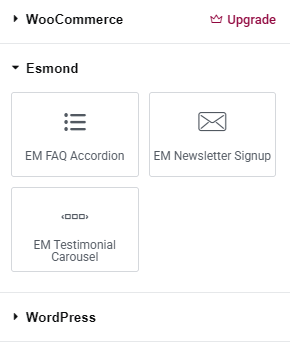
This plugin adds a collection of custom widgets to the Elementor page builder , under the "Esmond" widget category , with lightweight, optimized, and developer-friendly widgets.
FAQ Widget
- Allows the user to create a list of FAQ (Frequently Asked Questions) items, where each item consists of a question and its corresponding answer.
- Enables the user to add multiple FAQ entries dynamically using a repeater control inside the Elementor editor.
- On the website frontend, the widget displays the FAQs in an accordion style, where each question acts as a toggle button:
- Clicking a question expands or collapses the corresponding answer.
- One or more answers can be visible at a time (depending on how the accordion script is implemented).
- Comes with its own styles and JavaScript for smooth accordion behavior.
NewsLetter widget
- Email input with customizable placeholder text.
- Customizable submit button text.
- Simple form markup for easy styling and integration.
- Handles AJAX newsletter signups with validation and database storage.
- Provides an admin page to view and manage newsletter subscribers.
- Creates a custom database table upon activation to store subscriber data securely.
- Includes styles and scripts for smooth user interaction.
- Supports localization for easy translation.
Testimonial Carousel Widget
- Add multiple testimonials with name, role, photo, and text.
- Responsive carousel powered by Slick Carousel.
- Easy to customize and reorder testimonials in Elementor.
- Includes styles and scripts for smooth carousel behavior.
Installation
- Download the latest version from https://github.com/Esmond-M/esmond-elementor-widgets/blob/main/build/esmond-elementor-widgets.zip.
- Upload the
esmond-elementor-widgetszip to the/wp-content/plugins/directory. - Extract the zip folder. The folder name of the plugin should be
esmond-elementor-widgets. - Activate the plugin through the 'Plugins' menu in WordPress.
- There will be a new category called Esmond Widgets in the Elements section of the Elementor page builder.