Install
This is the repository archive. It installs, but the folder name will carry the branch suffix and updates will not flow.
Install straight from GitHub with WP-CLI:
wp plugin install https://github.com/esmond-m/em-woo-team-manage/archive/refs/heads/main.zipEM WooTeamManage Plugin
A WordPress plugin for WooCommerce that lets site admins and team leaders manage their teams directly from the WordPress admin. Create team leaders automatically after purchase, import subordinate users via CSV or individually, view and edit team rosters, and export team data — all from dedicated admin pages.
Version: 0.1.0
Project: GitHub Repository
Author: esmondmccain.com
Features
Team Leader Management
- Automatically creates a Team Leader account after a WooCommerce purchase (via
woocommerce_thankyouhook) - Team leaders get WooCommerce admin access so they can log in to wp-admin
- A "My Team" link is added to the WooCommerce My Account navigation for team leader accounts
Subordinate Management (Team Leaders)
- Add Subordinates page — two methods:
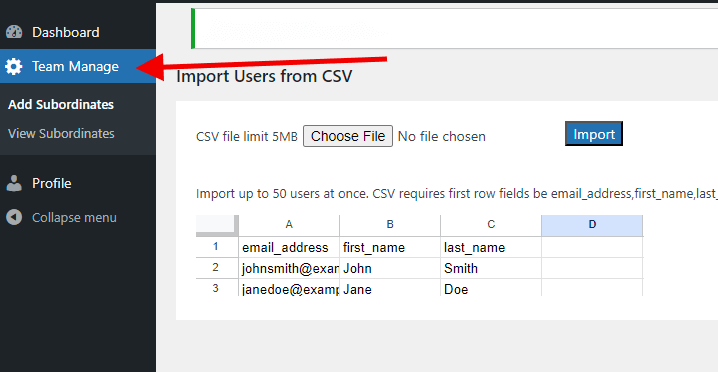
- CSV import: drag-and-drop or file-select upload, up to 50 users per file (max 5 MB), columns:
email_address,first_name,last_name - Single add form: add one subordinate by name and email via AJAX
- CSV import: drag-and-drop or file-select upload, up to 50 users per file (max 5 MB), columns:
- View Subordinates page — paginated table of all subordinates with:
- Remove subordinate from the current team while retaining the WordPress/WooCommerce account
- Restore final team-only members to the WooCommerce Customer role while preserving other roles
- Site admins can permanently delete pure team-subordinate accounts after explicit confirmation
- Edit subordinate details inline via modal
- Resend welcome/password email
- Export team roster to CSV
- View subordinate details panel
- Email notifications sent to subordinates when added or removed from a team
Site Admin Tools
- Site Admin View page — overview of all team leaders with subordinate counts and quick-access links
- View Subordinates page works for site admins too — select any team leader from a dropdown to manage their subordinates, export their CSV, or add/remove members; no separate emulation step required
- Add Subordinates page includes an "Acting as Team Leader" dropdown for admins — both the CSV import and single-add form sync to the selected leader
Custom Roles
- Registers two custom WordPress roles:
team_leaderandteam_subordinate
Admin Pages (under "Team Manage" menu)
| Page | Slug | Access |
|---|---|---|
| Add Subordinates | user-import-controls |
Team leaders and site administrators |
| View Subordinates | team-leader-admin |
Team leaders and site administrators |
| Site Admin View | site-admin-team-leader-admin |
manage_options only |
| Settings | emwtm-settings |
manage_options only |
Installation
- Download the latest release
- Upload the
em-Woo-Team-Manage.zipfile to your/wp-content/plugins/directory and extract it. The folder must be namedem-Woo-Team-Manage. - Activate the plugin via Plugins > Installed Plugins in your WordPress admin.
- Ensure WooCommerce is installed and activated.
Deactivating the plugin flushes its rewrite rules but preserves team relationships, user roles, user metadata, settings, and the custom relationship table. The plugin does not automatically delete this data on deactivation or uninstall.
Usage
For Site Admins
- Navigate to Team Manage > Site Admin View for an overview of all team leaders.
- Use Team Manage > View Subordinates and select a team leader from the dropdown to manage their roster, export their CSV, or remove/edit members.
- Use Team Manage > Add Subordinates and select a team leader from the "Acting as Team Leader" bar to import a CSV or add a single user on their behalf.
For Team Leaders
- Log in to wp-admin and navigate to Team Manage > Add Subordinates to import users via CSV or add them one at a time.
- Navigate to Team Manage > View Subordinates to see your team roster, edit member details, remove members from the team, or export to CSV.
- In the WooCommerce My Account area, find the My Team tab for a quick view of your team.
CSV Import Format
The first row must be the header:
email_address,first_name,last_name- Maximum 50 rows per file
- Maximum file size: 5 MB
Requirements
- WordPress 6.1 or higher
- PHP 7.4.33 or higher
- WooCommerce plugin
Development
Install the locked PHP development dependencies and run the unit suite:
composer install
composer test
The unit suite uses Brain Monkey and does not load WordPress, WooCommerce, or a database. It is safe to run without connecting to a LocalWP database.
Integration tests run in wp-env's separate tests-cli container and never use the working LocalWP database. Docker Desktop must be installed and running:
npm install
npm run env:start
npm run test:integration:install
npm run test:integration
npm run env:stop
The environment pins WordPress and WooCommerce versions in .wp-env.json. Use npm run env:destroy to remove its containers and disposable volumes.
File Structure
em-Woo-Team-Manage/
├── em-Woo-Team-Manage.php          # Plugin entry point
├── includes/classes/
│   ├── TeamManageCore.php          # Role registration, menu/hooks setup
│   ├── TeamAjaxHandler.php         # AJAX handlers, asset enqueue
│   └── TeamUserImporter.php        # CSV import logic
├── templates/
│   ├── team-leader-admin-page.php          # View/manage subordinates
│   ├── team-leader-user-import-page.php    # CSV + single-add import
│   └── site-admin-team-leader-page.php     # Site admin overview
└── admin/assets/
    ├── css/                        # Compiled CSS
    ├── sass/                       # SCSS source files
    └── js/                         # JavaScript (+ minified in js/min/)
Support & Development
For issues, suggestions, or contributions, please use the GitHub Issues page.