Esmond Daily Posts Queue
This plugin allows for daily posts to be displayed on the front-end. These posts can be submitted to the website through a short-code form on the front-end. I have also made a custom role on the back-end for a user that will edit these posts. The role will have access to reordering the release of the daily post.
Install
This is the repository archive. It installs, but the folder name will carry the branch suffix and updates will not flow.
Install straight from GitHub with WP-CLI:
wp plugin install https://github.com/esmond-m/em-daily-posts-queue/archive/refs/heads/main.zipProject: https://github.com/Esmond-M/em-daily-posts-queue
Author: esmondmccain.com
Version: 0.1.2
Summary
Originally made for an intranet website. Packaged as a reusable plugin. Allows daily posts to be displayed on the front end via shortcode. Visitors submit photos through a front-end form; queue viewers can review the display order, and administrators can reorder, schedule, or wipe the queue. The first post in the queue is shown by the display shortcode and is rotated by Action Scheduler.
Requirements
- WordPress: 6.1+
- PHP: 7.4+
- Required Plugin: Action Scheduler
Quick Start — Shortcodes
After activation, go to Net Submissions → 📋 Shortcodes in the WP admin sidebar, or check the Daily Posts Queue widget on the main dashboard. Both show copy buttons for each shortcode.
| Shortcode | Where to use |
|---|---|
[EmDailyPostsQueueForm] |
Any page where visitors submit photos |
[EmDailyPostsQueueDisplayPost] |
Any page/widget area to show today's post |
Both shortcodes accept an optional class attribute:
[EmDailyPostsQueueForm class="my-wrapper"]
[EmDailyPostsQueueDisplayPost class="my-wrapper"]
Features
- Photo submission form — front-end shortcode form; visitors upload a photo, headline, and caption (max 8 MB, JPG/PNG)
- Daily post display — shortcode that renders the current first-in-queue post (image, headline, caption)
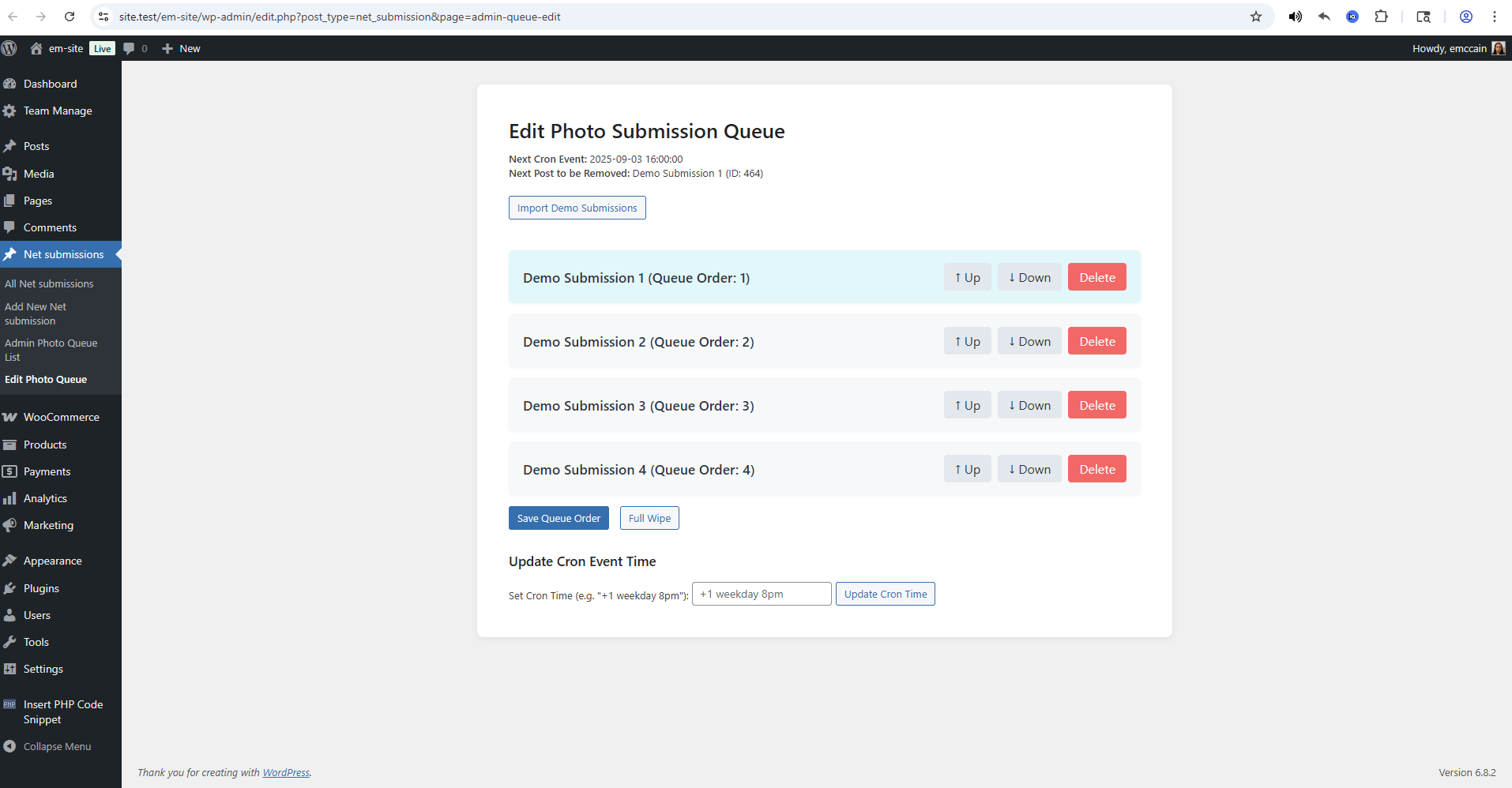
- Photo Queue screen — unified admin screen for queue review, administrator-only reorder controls, schedule controls, demo import, and Full Wipe
- Keyboard queue management — administrators can reorder with arrow buttons or Alt+Up / Alt+Down, discard unsaved changes, and save with conflict feedback
- Structured scheduled rotation — Action Scheduler advances the queue on daily, weekday, or selected-day schedules using the WordPress timezone; admins can pause/resume rotation
- Demo content import — one-click button on the Photo Queue screen seeds 4 sample posts with bundled demo images
- Custom post type
net_submission— separate from regular posts; supports title and featured image - Custom role
Net Submitter— preserves submission permissions and can view the read-only Photo Queue withoutmanage_options - Shortcode reference — dedicated admin sub-menu page + dashboard widget so shortcodes are always visible
- Optimistic concurrency — queue edits check for stale data and warn before overwriting
- JSON queue storage — queue stored as JSON (migrated transparently from legacy serialize+base64)
Installation
- Download the latest zip from build/em-daily-posts-queue.zip.
- In WordPress admin go to Plugins → Add New → Upload Plugin.
- Upload the zip and activate.
- Install and activate the Action Scheduler plugin.
- Find your shortcodes under Net Submissions → 📋 Shortcodes.
Usage
1. Add the submission form to a page
[EmDailyPostsQueueForm]Visitors fill in a headline, caption, and photo. On submission an email is sent to the site admin.
2. Display the current daily post
[EmDailyPostsQueueDisplayPost]Shows the featured image, headline, and caption of the first item in the queue.
3. Review or manage the queue
- Go to Net Submissions → Photo Queue
- Net Submitters can review the saved display order
- Administrators can move items with the arrow controls or Alt+Up / Alt+Down
- Administrators can save or discard pending queue changes
- Administrators can import demo content, configure scheduled rotation, or run Full Wipe
4. Review submissions
Go to Net Submissions to see all submitted posts. Publishing a post automatically appends it to the end of the queue.
Technical Details
Database
| Table | Purpose |
|---|---|
{prefix}edpq_net_photos_queue_order |
Stores queue order as a JSON array of {postid, queueNumber} objects |
Meta Fields
| Key | Description |
|---|---|
topic_headline_value |
Submission headline |
topic_caption_value |
Submission caption |
Custom Post Type
- Slug:
net_submission - Supports: title, thumbnail
- Custom capabilities:
edpq_view_queue,edit_net_submission,read_net_submission,delete_net_submission, etc.
User Roles
- Net Submitter — retains existing
net_submissionpost permissions and can view the read-only Photo Queue; no queue mutation, schedule, demo import, or Full Wipe access - Administrator — full access including queue reorder, demo import, Full Wipe, and schedule controls
Shortcodes
| Shortcode | Class | Description |
|---|---|---|
[EmDailyPostsQueueForm] |
EmDailyPostsQueue\init_plugin\Classes\Shortcodes |
Renders the photo submission form |
[EmDailyPostsQueueDisplayPost] |
EmDailyPostsQueue\init_plugin\Classes\Shortcodes |
Renders the current daily post |
API Hooks
Actions
| Hook | Description |
|---|---|
init |
CPT registration, role setup, cron scheduling |
add_meta_boxes |
Custom meta box registration |
save_post |
Saves headline/caption meta |
publish_net_submission |
Appends post to queue on first publish |
trashed_post |
Force-deletes instead of trashing |
eg_1_weekdays_log |
Action Scheduler hook that advances the queue |
Filters
| Hook | Description |
|---|---|
post_row_actions |
Removes Quick Edit and Trash from submission list |
bulk_actions-edit-net_submission |
Removes bulk edit action |
template_include |
Loads plugin template for single net_submission view |
Development Setup
Prerequisites
- WordPress local environment with database access
- Composer
- PHPUnit (included via composer)
- Node.js + npm (for
plugin-zipbuild script)
Setup
git clone https://github.com/Esmond-M/em-daily-posts-queue.git
cd em-daily-posts-queue
composer install
Run composer test to verify the database-free test baseline. No Local site shell
or database configuration is needed. See Testing for setup,
individual suites, and the limits of this baseline.
Build zip
npm run plugin-zip
# Output: build/em-daily-posts-queue.zip
File Structure
em-daily-posts-queue/
├── admin/assets/           # Admin-only CSS and JS
├── assets/                 # Frontend CSS, JS, images, bundled demo images
├── classes/
│   ├── class-cpt-net-submission.php          # CPT registration + roles
│   ├── class-cpt-net-submission-meta.php     # Meta box (headline, caption)
│   ├── class-cron-event-timer.php            # Action Scheduler scheduling
│   ├── class-cron-events.php                 # Weekly queue rotation logic
│   ├── class-photo-submission-ajax.php       # All AJAX handlers
│   ├── class-photo-submission-queue-manager.php  # Main admin controller
│   ├── class-photo-submission-utils.php      # DB helpers, queue encode/decode
│   └── class-shortcodes.php                  # Frontend shortcode renderers
├── templates/
│   ├── options-page-admin-queue-list.php     # Unified Photo Queue admin screen
│   ├── shortcode-reference.php               # Shortcode reference card
│   └── single-net-submission.php             # Single post template
├── tests/
│   ├── bootstrap.php
│   ├── unit/, wordpress-hooks/, and integration/
│   └── wp-config.php
├── docs/
├── vendor/
├── composer.json
├── phpunit.xml
├── package.json
├── em-daily-posts-queue.php   # Plugin entry point
└── readme.md
Testing
# Run both database-free suites
composer test

# Run either suite separately
composer test:unit
composer test:hooks

# Run the full WordPress integration suite with a disposable MySQL database
.\tests\run-integration.ps1 -MySqlBinDirectory 'C:\Program Files\MySQL\MySQL Server 5.7\bin'
Coverage areas
- Queue decoding, legacy storage compatibility, malformed entries, and snapshot comparisons
- Submission row/bulk action behavior through the real WordPress hook API
- Authenticated and guest AJAX hook registration
- Queue viewing capability enforcement, admin-only mutations, menu/direct URL access, Full Wipe confirmation, schedule controls, and demo image import through a disposable WordPress integration database
This does not replace live browser review for visual layout, keyboard ergonomics, or WordPress admin styling. See Testing before adding or running integration tests.
Changelog
Version 0.1.2
- Security: Replaced
serialize/base64queue storage withjson_encode; eliminates PHP object injection risk - Security:
net_photo_deletion_info_ajaxno longer registered asnopriv; added nonce and capability checks to AJAX handlers - Security: Sanitised all
$_POSTinputs (sanitize_text_field,sanitize_textarea_field,(int)casts) - Security:
$wpdb->prepare()used consistently; removed one unparameterisedUPDATEquery - Feature: Added Shortcodes submenu page (📋) under Net Submissions CPT menu
- Feature: Added dashboard widget showing both shortcodes with copy-to-clipboard buttons
- Bug fix: Fatal
TypeError: Cannot access offset on stringon queue list page when DB contained the install greeting row - Bug fix:
get_queue_list_from_dbandget_queue_listwere identical; unified viadecode_queue()helper with legacy migration - Bug fix:
new CronEventsat file scope removed; instantiation moved to plugin bootstrap only - Bug fix:
wp_set_current_user()hack replaced with directadmin_url()call for edit links
Version 0.1.1
- Queue system now guarantees sequential queue numbers (no gaps)
- Changed admin queue container class name for uniqueness
- Removed bulk edit options for net_submission post type
- Added demo content import button to admin queue edit page
- Added cron event time update and display using WordPress timezone
- Added stubs for Action Scheduler functions to prevent IDE warnings
- Disabled submit buttons during form submission for better UX
Version 0.1.0
- Initial release
- Custom post type and user role creation
- Frontend form and display shortcodes
- Queue management system
- Cron-based automatic posting
- Comprehensive test suite
Support
For issues and feature requests, please visit the GitHub repository.
License
This plugin is licensed under GPL