Install
This is the repository archive. It installs, but the folder name will carry the branch suffix and updates will not flow.
Install straight from GitHub with WP-CLI:
wp plugin install https://github.com/ernilambar/notira/archive/refs/heads/main.zipNo built-in updater. New versions won't appear under Dashboard → Updates. Install new releases yourself, or let Git Updater track the repository.
WordPress plugin that turns draft notes into clean HTML with AI—email polish and proofreading in the admin.
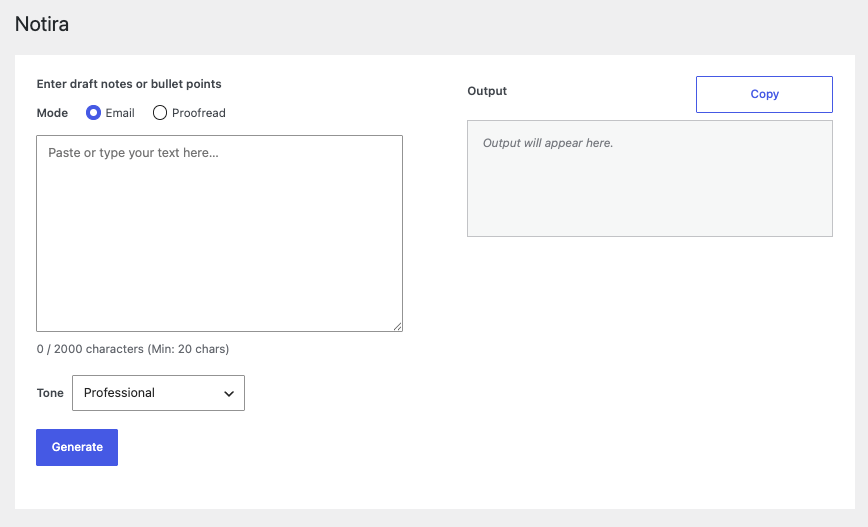
What it does
- Email — Polishes the body and wraps it with your opening/closing lines from Notira → Settings → Output.
- Proofread — Fixes grammar, spelling, and clarity with minimal rewriting.
- Tone presets (default Professional; Match original follows the source register). Input up to 2000 characters (minimum 20); one-click Copy for the result.
Requirements
- PHP 7.4+
- WordPress 7.0+
- API key under Settings → Connectors
Install
pnpm install— Front-end dependenciespnpm run build— Build the admin UIcomposer install— PHP dependencies- Activate the plugin in WordPress
- Add your API key under Settings → Connectors
Usage
- In wp-admin, open Notira from the sidebar.
- Paste your draft, select Email or Proofread, and pick a Tone.
- Click Generate, then Copy when the output is ready.