HTMLBlocks WP Registry grade A. No security issues foundWP RegistryNo security issues foundOpen the reportA
Capture sections of HTML document into Wordpress Blocks so that HTML template can be filled with Wordpress content.
Install
This is the repository archive. It installs, but the folder name will carry the branch suffix and updates will not flow.
Install straight from GitHub with WP-CLI:
wp plugin install https://github.com/ergosarapu/wp-htmlblocks/archive/refs/heads/master.zipOn Packagist as ergosarapu/wp-htmlblocks:
composer require ergosarapu/wp-htmlblocksWP HtmlBlocks plugin
Capture sections of HTML document into Wordpress Blocks so that HTML template can be filled with Wordpress content. Well-suited for composing HTML template based newsletters quickly and regularly.
Install using Composer
The plugin uses Carbon Fields composer dependency. Carbon Fields library contains JS/CSS assets, which are requested by wp-admin but not found due to the default vendor directory not being a web directory.
A workaround is to install Carbon Fields library to web directory by changing installer-paths for "htmlburger/carbon-fields", change your composer.json accordingly:
"extra": {
    "installer-paths": {
        "YOUR_DESIRED_LOCATION/vendor/{$vendor}/{$name}/": ["htmlburger/carbon-fields"]
    }
}
Then require WP HtmlBlocks plugin using Composer:
composer require "ergosarapu/wp-htmlblocks"Configuration
Configuration is currently loaded when environment variable HTMLBLOCKS_CONFIG is set to a valid YAML configuration file. For multiple configurations separate paths using PATH_SEPARATOR, e.g.
/path/to/config1.yml;/path/to/config2.ymlon Windows;/path/to/config1.yml:/path/to/config2.ymlotherwise;
Configuration errors are logged to error_log, in case blocks do not appear in WP post editor, seek culprit from logs.
Example
HTML:
<html>
    <h1>Greeting</h1>
    <table>
        <tr>
            <td id="post_left">Post on left</td>
            <td id="post_right">Post on right</td>
        </tr>
    </table>
</html>
YAML configuration:
block: # Define block
  html: example.html # Path to html template file
  name: Newsletter # Block name
  description: Newsletter block # Block description
  xpath: //html # Select whole HTML to render this Block
  icon: email # Block icon as WP Dashicon
  category: # Set category this Block appears under
    slug: newsletter
    title: Newsletter
    icon: email
  fields: # Create Fields for Block
    - field:
        type: text # Field type 'text' (can be any of Carbon Fields supported field types)
        name: greeting
        label: Enter Your greeting here
        replaces: # Define how Field values replaces sections in HTML
          - replace:
              xpath: //h1/text() # XPath of section to replace in HTML
              value_path: greeting # Path to field value using dot notation
  blocks: # Define unlimited nested blocks
    - block:
        name: Two Posts
        description: Two Posts block
        xpath: //tr
        icon: block-default
        category:
          slug: newsletter
          title: Newsletter
          icon: email
        fields:
          - field:
              type: association
              name: posts
              label: Select Post or Page
              functions: # Configure Field using config methods supported by Carbon Fields
                - name: set_types
                  args:
                    - - type: post
                        post_type: post
                      - type: post
                        post_type: page
                - name: set_min
                  args:
                    - 2
                - name: set_max
                  args:
                    - 2
              replaces:
                - replace:
                    xpath: //td[@id="post_left"]/text()
                    function:
                      name: get_the_title
                      args:
                        - arg:
                            value_path: posts.0.id
                - replace:
                    xpath: //td[@id="post_right"]/text()
                    function: # Call arbitrary functions to render desired replacement result
                      name: strtoupper
                      args:
                        - arg:
                            function: # Pass another arbitrary function as an argument
                              name: get_the_title
                              args:
                                - arg:
                                    value_path: posts.1.id
Result blocks in WP admin:
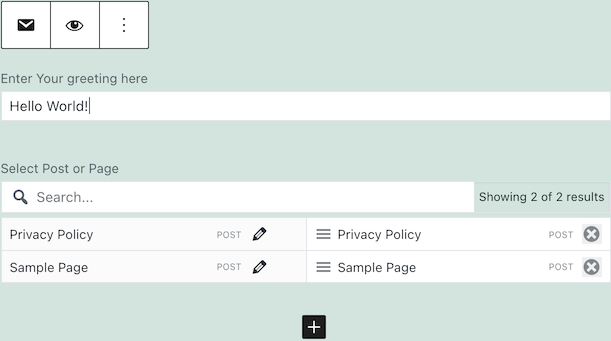
Rendered HTML result:
<html>
<body>
    <h1>Hello World!</h1>
    <table>
        <tr>
            <td id="post_left">Privacy Policy</td>
            <td id="post_right">SAMPLE PAGE</td>
        </tr>
    </table>
</body>
</html>
Note! The final end-result depends on the template used to render the post. You may want to render output within plain template, for that you can use a specific plugin to set blank template for the post or modify your theme to support blank template.
Tasks
composer build- build by running tests and code checkscomposer test- run testscomposer phpcs- run PHP CodeSniffercomposer phpmd- run PHP Mess Detector
License
Licensed under GPLv2
Releases
5 releases.
These releases are tags only. The author does not attach a packaged zip, so there are no download counts to report.