Install
This is the repository archive. It installs, but the folder name will carry the branch suffix and updates will not flow.
Install straight from GitHub with WP-CLI:
wp plugin install https://github.com/enderkus/mwb-translate-manager/archive/refs/heads/main.zipMWB Translation Manager Document
Developer's note
I use boilerplate when I develop plugins. This makes the code more readable and controllable.
Usage
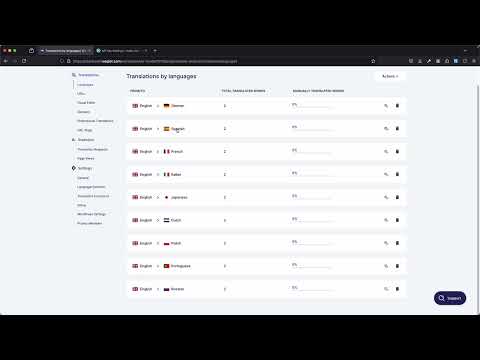
- You can see how to use it in this video : https://www.youtube.com/watch?v=x1jEtvzpVhI
Download and Install Plugin
- Download the plugin ZIP file from the source.
- In your WordPress admin panel, go to Plugins > Add New.
- Click on the Upload Plugin button.
- Choose the downloaded ZIP file and click Install Now.
- After installation, click Activate Plugin.
Verify Plugin Activation
- Once activated, the plugin will automatically create the necessary database tables and schedule the required cron jobs.
Configure Weglot API Key
- Navigate to MWB Translate Manager > API Key Settings.
- Enter your Weglot API Key in the provided field.
- Click Save API Key to store the key.
- The plugin will test the API key by translating the text "Hello World!" into all available languages. If successful, the translations will be displayed.
Manage Languafes
-
Navigate to MWB Translate Manager > Languages.
-
Here you can see the languages that are automatically generated for you.
-
Add a New Language:
- Enter the language name and language code.
- Reference https://api.weglot.com/public/languages for language codes.
- Click Add Language to save the language.
-
Delete a Language:
- Click the Delete button next to the language you wish to remove.
Manage Translations
-
Navigate to MWB Translate Manager > Translations.
-
Add a New Translation:
- Enter the text you want to translate in the New Text field.
- Click Add Translation to translate and store the text.
-
View Translations:
- Click the View Translations button next to the text to see translations in all available languages.
Check Dahsboard
- Navigate to MWB Translate Manager to see a summary of your translations and API endpoints.
- This page displays the total number of English texts and their translations.
- It also lists accessible API endpoints for retrieving translations.
API Endpoints
-
You can retrieve translations via the following API endpoints:
- English Texts:
/wp-json/mwb/v1/translations/en - Translations for a Specific Language (e.g., French):
/wp-json/mwb/v1/translations/fr
- English Texts:
-
These endpoints can be accessed programmatically to integrate translations into your applications.
Scheduled Translation Updates
- The plugin schedules a daily cron job to check and process translations in batches, ensuring your translations are updated without overloading the server.
- The
mwb_process_translation_batchevent runs every 3 minutes to handle a batch of translations, maintaining optimal performance.
Code Explanation
This section gives information about the database tables and cronjob created when the plugin is activated.
1.1 Events that happen when the plugin is activated
After activation, the following tables are created. CRON tasks are also created.
Reference file to see the activation code: /includes/class-mwb-translate-manager-activator.php1.1.1 mwb_translation_languages
Stores languages used for translations.
$table_name_languages = $wpdb->prefix . 'mwb_translation_languages';

$sql_languages = "CREATE TABLE IF NOT EXISTS $table_name_languages (
    id mediumint(9) NOT NULL AUTO_INCREMENT,
    language_name varchar(255) NOT NULL,
    language_code varchar(10) NOT NULL,
    PRIMARY KEY  (id)
) $charset_collate;";
Languages:
The following languages are automatically added to the table during activation.
$default_languages = [
    ['French', 'fr'],
    ['Spanish', 'es'],
    ['German', 'de'],
    ['Italian', 'it'],
    ['Portuguese', 'pt'],
    ['Dutch', 'nl'],
    ['Polish', 'pl'],
    ['Japanese', 'ja'],
    ['Russian', 'ru']
];
Reference https://api.weglot.com/public/languages for language codes.
1.1.2 mwb_english_texts
Stores English text strings to be translated.
$table_name_texts = $wpdb->prefix . 'mwb_english_texts';

$sql_texts = "CREATE TABLE IF NOT EXISTS $table_name_texts (
     id mediumint(9) NOT NULL AUTO_INCREMENT,
     text varchar(255) NOT NULL,
     UNIQUE (text),
     PRIMARY KEY  (id)
) $charset_collate;";
1.1.3 mwb_translations
Stores translations of English text strings.
$table_name_translations = $wpdb->prefix . 'mwb_translations';

$sql_translations = "CREATE TABLE IF NOT EXISTS $table_name_translations (
    id mediumint(9) NOT NULL AUTO_INCREMENT,
    english_text_id mediumint(9) NOT NULL,
    language_code varchar(10) NOT NULL,
    translated_text varchar(255) NOT NULL,
    PRIMARY KEY  (id),
    FOREIGN KEY (english_text_id) REFERENCES $table_name_texts(id) ON DELETE CASCADE
) $charset_collate;";
1.1.4 Cronjob
This plugin sets up a cronjob to periodically update translations using the Weglot API.
Reference file to see the cronjob code:
/includes/class-mwb-translate-manager-cron.phpif (!wp_next_scheduled('mwb_daily_translation_check')) {
wp_schedule_event(time(), 'daily', 'mwb_daily_translation_check');
}1.2 Events that happen when the plugin is deactivated
When the MWB Translate Manager plugin is deactivated, the following actions are performed
Reference file to see the activation code: /includes/class-mwb-translate-manager-deactivator.php1.2.1 Delete Database Tables
The following tables are dropped from the WordPress database:
- mwb_translation_languages: Stores languages used for translations.
- mwb_english_texts: Stores English text strings to be translated.
- mwb_translations: Stores translations of English text strings.
global $wpdb;

$table_name_languages = $wpdb->prefix . 'mwb_translation_languages';
$table_name_texts = $wpdb->prefix . 'mwb_english_texts';
$table_name_translations = $wpdb->prefix . 'mwb_translations';

$wpdb->query("DROP TABLE IF EXISTS $table_name_translations;");
$wpdb->query("DROP TABLE IF EXISTS $table_name_texts;");
$wpdb->query("DROP TABLE IF EXISTS $table_name_languages;");
1.2.2 Clear Scheduled Cron Jobs
- The daily cron job responsible for updating translations is cleared.
- Any helper cron jobs are also cleared.
wp_clear_scheduled_hook('mwb_daily_translation_check');
wp_clear_scheduled_hook('mwb_process_translation_batch');
1.2.3 Reset Plugin Options
The mwb_translation_offset option, which tracks the number of processed translations, is deleted.
delete_option('mwb_translation_offset');2.1 API Key Settings Page
The API Key settings page allows administrators to update the Weglot API key, ensuring secure communication with the Weglot translation service. This page also includes functionality to translate the text "Hello World!" (This is to activate the Weglot api) into various languages using the updated API key.
2.1.1 Form Handling and CSRF Protection
-
When the form is submitted, the API key is updated, and the "Hello World!" text is translated using the Weglot API.
-
CSRF protection is implemented using wp_nonce_field() and check_admin_referer().
File : admin/partials/mwb-translate-manager-api-key-settings-display.php
if ( isset( $_POST['mwb_weglot_api_key'] ) ) {
    // Check CSRF protection
    if ( ! check_admin_referer( 'mwb_weglot_api_key_action', 'mwb_weglot_api_key_nonce' ) ) {
        wp_die( 'The security check failed.' );
    }

    update_option( 'mwb_weglot_api_key', sanitize_text_field( $_POST['mwb_weglot_api_key'] ) );
    echo '<div class="notice notice-success is-dismissible"><p>' . esc_html__( 'API Key updated successfully!', 'mwb-translate-manager' ) . '</p></div>';

    // Translate Hello World! text after updating API Key
    mwb_weglot_api_key_updated( sanitize_text_field( $_POST['mwb_weglot_api_key'] ) );
}
2.1.2 HTML Form
- Displays the current API key and allows the administrator to update it.
- Includes nonce for security.
$api_key = get_option( 'mwb_weglot_api_key', '' );
?>
<div class="wrap">
    <h1><?php esc_html_e( 'API Key Settings', 'mwb-translate-manager' ); ?></h1>
    <form method="post" action="">
        <?php wp_nonce_field( 'mwb_weglot_api_key_action', 'mwb_weglot_api_key_nonce' ); ?>
        <table class="form-table">
            <tr valign="top">
                <th scope="row"><?php esc_html_e( 'Weglot API Key', 'mwb-translate-manager' ); ?></th>
                <td><input type="text" name="mwb_weglot_api_key" value="<?php echo esc_attr( $api_key ); ?>"/></td>
            </tr>
        </table>
        <?php submit_button( esc_html__( 'Save API Key', 'mwb-translate-manager' ) ); ?>
    </form>
</div>
2.1.3 API Key Update Function
- Deletes the existing "Hello World!" text and its translations. (The new api key is deleted to make sure it is valid.)
- Retrieves the new translations using the Weglot API.
- Updates the database with the new translations.
function mwb_weglot_api_key_updated( $api_key ) {
    global $wpdb;
    $table_name_languages = $wpdb->prefix . 'mwb_translation_languages';
    $table_name_texts = $wpdb->prefix . 'mwb_english_texts';
    $table_name_translations = $wpdb->prefix . 'mwb_translations';

    // Delete the text "Hello World!" and related translations
    $hello_world_text = $wpdb->get_row( "SELECT * FROM $table_name_texts WHERE text = 'Hello World!'" );
    if ( $hello_world_text ) {
        $wpdb->delete( $table_name_texts, [ 'id' => $hello_world_text->id ] );
        $wpdb->delete( $table_name_translations, [ 'english_text_id' => $hello_world_text->id ] );
    }

    $languages = $wpdb->get_results( "SELECT language_code FROM $table_name_languages" );

    $errors = [];
    $translations = [];
    $all_translations_success = true;

    foreach ( $languages as $language ) {
        $url = "https://api.weglot.com/translate?api_key=$api_key";
        $body = json_encode( [
            'l_from' => 'en',
            'l_to' => $language->language_code,
            'request_url' => home_url(),
            'words' => [
                [ 'w' => 'Hello World!', 't' => 1 ]
            ]
        ] );

        $response = wp_remote_post( $url, [
            'headers' => [ 'Content-Type' => 'application/json' ],
            'body' => $body
        ] );

        if ( is_wp_error( $response ) || wp_remote_retrieve_response_code( $response ) != 200 ) {
            $errors[] = $language->language_code;
            $all_translations_success = false;
        } else {
            $body = wp_remote_retrieve_body( $response );
            $data = json_decode( $body, true );
            if ( ! isset( $data['to_words'][0] ) ) {
                $errors[] = $language->language_code;
                $all_translations_success = false;
            } else {
                $translated_text = $data['to_words'][0];
                $translations[] = [
                    'language_code' => $language->language_code,
                    'translated_text' => $translated_text
                ];
            }
        }
    }

    if ( $all_translations_success ) {
        // Add the text "Hello World!" to the english_texts table
        $wpdb->insert( $table_name_texts, [
            'text' => 'Hello World!'
        ] );
        $english_text_id = $wpdb->insert_id;

        // Add translations to translations table
        foreach ( $translations as $translation ) {
            $wpdb->insert( $table_name_translations, [
                'english_text_id' => $english_text_id,
                'language_code' => $translation['language_code'],
                'translated_text' => $translation['translated_text']
            ] );
        }

        echo '<div class="notice notice-success is-dismissible"><p>' . esc_html__( 'API Key test successful! Translations:', 'mwb-translate-manager' ) . '</p><ul>';
        foreach ( $translations as $translation ) {
            echo '<li>' . esc_html( $translation['language_code'] ) . ': ' . esc_html( $translation['translated_text'] ) . '</li>';
        }
        echo '</ul></div>';
    } else {
        echo '<div class="notice notice-error is-dismissible"><p>' . esc_html__( 'Translation failed for languages:', 'mwb-translate-manager' ) . ' ' . implode( ', ', $errors ) . '</p></div>';
    }
}
3.1 Languages Page
Manages the addition and deletion of languages used for translations in the MWB Translate Manager plugin.
File : admin/partials/mwb-translate-manager-languages-display.php3.1.1 Database Table Initialization
- The script uses the $wpdb global object to interact with the WordPress database.
- The mwb_translation_languages table is referenced to store languages.
global $wpdb;
$table_name = $wpdb->prefix . 'mwb_translation_languages';
3.1.2 Form Handling and CSRF Protection
- The form submissions for adding and deleting languages are handled securely with CSRF protection using wp_nonce_field() and check_admin_referer().
if (isset($_POST['action'])) {
    // Check CSRF protection
    if (!check_admin_referer('mwb_manage_languages_action', 'mwb_manage_languages_nonce')) {
        wp_die('The security check failed.');
    }

    if ($_POST['action'] == 'add_language' && !empty($_POST['language_name']) && !empty($_POST['language_code'])) {
        $wpdb->insert($table_name, [
            'language_name' => sanitize_text_field($_POST['language_name']),
            'language_code' => sanitize_text_field($_POST['language_code'])
        ]);
        echo '<div class="notice notice-success is-dismissible"><p>' . __('Language added successfully!', 'mwb-translate-manager') . '</p></div>';
    } elseif ($_POST['action'] == 'delete_language' && !empty($_POST['language_id'])) {
        $wpdb->delete($table_name, ['id' => intval($_POST['language_id'])]);
        echo '<div class="notice notice-success is-dismissible"><p>' . __('Language deleted successfully!', 'mwb-translate-manager') . '</p></div>';
    }
}
3.1.3 Retrieving Languages from the Database
- Languages stored in the mwb_translation_languages table are retrieved and displayed in a list.
$languages = $wpdb->get_results("SELECT * FROM $table_name");3.1.4 HTML Form for Adding Languages
- A form is provided to add new languages with CSRF protection.
<div class="wrap">
    <h1><?php _e('MWB Translate Manager Languages', 'mwb-translate-manager'); ?></h1>
    <form method="post" action="">
        <?php wp_nonce_field('mwb_manage_languages_action', 'mwb_manage_languages_nonce'); ?>
        <input type="hidden" name="action" value="add_language">
        <table class="form-table">
            <tr valign="top">
                <th scope="row"><?php _e('New Language Name', 'mwb-translate-manager'); ?></th>
                <td><input type="text" name="language_name" required /></td>
            </tr>
            <tr valign="top">
                <th scope="row"><?php _e('Language Code', 'mwb-translate-manager'); ?></th>
                <td><input type="text" name="language_code" required /></td>
            </tr>
        </table>
        <?php submit_button( __( 'Add Language', 'mwb-translate-manager' ) ); ?>
    </form>
    <hr />
3.1.5 Displaying Existing Languages
- Existing languages are displayed in a table with options to delete each language. The deletion forms are also protected with CSRF tokens.
    <h2><?php _e('Languages', 'mwb-translate-manager'); ?></h2>
    <table class="wp-list-table widefat fixed striped">
        <thead>
        <tr>
            <th><?php _e('ID', 'mwb-translate-manager'); ?></th>
            <th><?php _e('Language Name', 'mwb-translate-manager'); ?></th>
            <th><?php _e('Language Code', 'mwb-translate-manager'); ?></th>
            <th><?php _e('Actions', 'mwb-translate-manager'); ?></th>
        </tr>
        </thead>
        <tbody>
        <?php foreach ($languages as $language): ?>
            <tr>
                <td><?php echo esc_html($language->id); ?></td>
                <td><?php echo esc_html($language->language_name); ?></td>
                <td><?php echo esc_html($language->language_code); ?></td>
                <td>
                    <form method="post" action="" style="display:inline;">
                        <?php wp_nonce_field('mwb_manage_languages_action', 'mwb_manage_languages_nonce'); ?>
                        <input type="hidden" name="action" value="delete_language">
                        <input type="hidden" name="language_id" value="<?php echo esc_attr($language->id); ?>">
                        <?php submit_button(esc_html__('Delete', 'mwb-translate-manager'), 'delete', '', false); ?>
                    </form>
                </td>
            </tr>
        <?php endforeach; ?>
        </tbody>
    </table>
</div>
4.1 Translations Page
Manages the addition and display of translations in the MWB Translation Manager plugin. It manages form submissions to add new translations, interacts with the Weglot API and displays translations in a user-friendly interface.
File : mwb-translate-manager-translations-display.php4.1.1 Database Table Initialization
-
The script uses the $wpdb global object to interact with the WordPress database.
-
The following tables are referenced:
- mwb_english_texts for storing English text strings.
- mwb_translations for storing translated text strings.
- mwb_translation_languages for storing available languages.
global $wpdb;
$table_name_texts        = $wpdb->prefix . 'mwb_english_texts';
$table_name_translations = $wpdb->prefix . 'mwb_translations';
$table_name_languages    = $wpdb->prefix . 'mwb_translation_languages';
4.1.2 Form Handling and CSRF Protection
- Form submissions for adding new translations are handled securely with CSRF protection using wp_nonce_field() and check_admin_referer().
if ( isset( $_POST['action'] ) && $_POST['action'] == 'add_translation' && ! empty( $_POST['new_text'] ) ) {
    // Check CSRF protection
    if ( ! check_admin_referer( 'mwb_add_translation_action', 'mwb_add_translation_nonce' ) ) {
        wp_die( 'The security check failed.' );
    }

    $new_text      = sanitize_text_field( $_POST['new_text'] );
    $existing_text = $wpdb->get_row( $wpdb->prepare( "SELECT * FROM $table_name_texts WHERE text = %s", $new_text ) );

    if ( $existing_text ) {
        echo '<div class="notice notice-warning is-dismissible"><p>' . __( 'The text already exists in the database.', 'mwb-translate-manager' ) . '</p></div>';
    } else {
        // Code to interact with Weglot API and store translations
    }
}
4.1.3 Interacting with Weglot API
- The script interacts with the Weglot API to translate the new text into multiple languages and stores the translations in the database.
$api_key                  = get_option( 'mwb_weglot_api_key', '' );
$languages                = $wpdb->get_results( "SELECT language_code FROM $table_name_languages" );
$errors                   = [];
$translations             = [];
$all_translations_success = true;

foreach ( $languages as $language ) {
    $url  = "https://api.weglot.com/translate?api_key=$api_key";
    $body = json_encode( [
        'l_from'      => 'en',
        'l_to'        => $language->language_code,
        'request_url' => home_url(),
        'words'       => [
            [ 'w' => $new_text, 't' => 1 ]
        ]
    ] );

    $response = wp_remote_post( $url, [
        'headers' => [ 'Content-Type' => 'application/json' ],
        'body'    => $body
    ] );

    if ( is_wp_error( $response ) || wp_remote_retrieve_response_code( $response ) != 200 ) {
        $errors[]                 = $language->language_code;
        $all_translations_success = false;
    } else {
        $body = wp_remote_retrieve_body( $response );
        $data = json_decode( $body, true );
        if ( ! isset( $data['to_words'][0] ) ) {
            $errors[]                 = $language->language_code;
            $all_translations_success = false;
        } else {
            $translated_text = $data['to_words'][0];
            $translations[]  = [
                'language_code'   => $language->language_code,
                'translated_text' => $translated_text
            ];
        }
    }
}

if ( $all_translations_success ) {
    // Add the new text to the english_texts table
    $wpdb->insert( $table_name_texts, [
        'text' => $new_text
    ] );
    $english_text_id = $wpdb->insert_id;

    // Add translations to translations table
    foreach ( $translations as $translation ) {
        $wpdb->insert( $table_name_translations, [
            'english_text_id' => $english_text_id,
            'language_code'   => $translation['language_code'],
            'translated_text' => $translation['translated_text']
        ] );
    }

    echo '<div class="notice notice-success is-dismissible"><p>' . __( 'Translation added successfully!', 'mwb-translate-manager' ) . '</p></div>';
} else {
    echo '<div class="notice notice-error is-dismissible"><p> ' . __( 'Translation failed for languages:', 'mwb-translate-manager' ) . ' ' . implode( ', ', $errors ) . '</p></div>';
}
4.1.4 Retrieving and Displaying Translations
- Retrieves texts and their translations from the database and displays them in a user-friendly interface.
$texts        = $wpdb->get_results( "SELECT * FROM $table_name_texts" );
$languages    = $wpdb->get_results( "SELECT * FROM $table_name_languages" );
$translations = $wpdb->get_results( "SELECT * FROM $table_name_translations" );

$translations_by_text = [];
foreach ( $translations as $translation ) {
    $translations_by_text[ $translation->english_text_id ][ $translation->language_code ] = $translation->translated_text;
}
<div class="wrap">
<h1><?php _e( 'MWB Translate Manager Translations', 'mwb-translate-manager' ); ?></h1>
<form method="post" action="">
<?php wp_nonce_field( 'mwb_add_translation_action', 'mwb_add_translation_nonce' ); ?>
<input type="hidden" name="action" value="add_translation">
<table class="form-table">
<tr valign="top">
<th scope="row"><?php _e( 'New Text', 'mwb-translate-manager' ); ?></th>
<td><input type="text" name="new_text" required/></td>
</tr>
</table>
<?php submit_button( __( 'Add Translation', 'mwb-translate-manager' ) ); ?>
</form>
<hr/>
<ul class="text-list">
<?php foreach ( $texts as $text ): ?>
<li>
<strong><?php echo esc_html( $text->text ); ?></strong>
<button class="button view-translations" data-text-id="<?php echo esc_attr( $text->id ); ?>"><?php _e( 'View Translations', 'mwb-translate-manager' ); ?></button>
<div class="translations-modal" id="modal-<?php echo esc_attr( $text->id ); ?>" style="display:none;">
<div class="modal-content">
<span class="close" data-text-id="<?php echo esc_attr( $text->id ); ?>">×</span>
<h2><?php _e( 'Translations for', 'mwb-translate-manager' ); ?> "<?php echo esc_html( $text->text ); ?>"</h2>
<ul>
<?php foreach ( $languages as $language ): ?>
<li>
<strong><?php echo esc_html( $language->language_name ); ?> (<?php echo esc_html( $language->language_code ); ?>):</strong>
<?php echo esc_html( $translations_by_text[ $text->id ][ $language->language_code ] ?? 'No translation available' ); ?>
</li>
<?php endforeach; ?>
</ul>
</div>
</div>
</li>
<?php endforeach; ?>
</ul>
</div>5.1 API
Provides REST API endpoints to retrieve translations stored in the WordPress database. It integrates with the WordPress REST API infrastructure to expose translation data.
File : includes/class-mwb-translate-manager-api.php5.1.1 Initialization and Route Registration
- The constructor hooks into the rest_api_init action to register custom REST API routes.
class Mwb_Translate_Manager_API {

    public function __construct() {
        add_action('rest_api_init', [$this, 'register_routes']);
    }

    public function register_routes() {
        register_rest_route('mwb/v1', '/translations/(?P<language>[a-zA-Z0-9-]+)', [
            'methods' => 'GET',
            'callback' => [$this, 'get_translations'],
            'permission_callback' => '__return_true',
        ]);
    }
}

new Mwb_Translate_Manager_API();
5.1.2 Endpoint Registration
- The register_routes method registers the /translations/{language} endpoint which supports GET requests.
public function register_routes() {
    register_rest_route('mwb/v1', '/translations/(?P<language>[a-zA-Z0-9-]+)', [
        'methods' => 'GET',
        'callback' => [$this, 'get_translations'],
        'permission_callback' => '__return_true',
    ]);
}
5.1.3 Endpoint Callback Function
- The get_translations method handles the logic for retrieving translations based on the specified language.
public function get_translations($request) {
    global $wpdb;

    $language = $request['language'];
    $table_name_texts = $wpdb->prefix . 'mwb_english_texts';
    $table_name_translations = $wpdb->prefix . 'mwb_translations';
    $table_name_languages = $wpdb->prefix . 'mwb_translation_languages';

    // Check if the requested language exists in the database
    $language_exists = $wpdb->get_var($wpdb->prepare(
        "SELECT COUNT(*) FROM $table_name_languages WHERE language_code = %s",
        $language
    ));

    if ($language_exists == 0 && $language !== 'en') {
        return new WP_REST_Response(['message' => 'Invalid language'], 404);
    }

    $translations = [];

    if ($language === 'en') {
        $results = $wpdb->get_results("SELECT id, text FROM $table_name_texts");
        foreach ($results as $row) {
            $translations[] = [
                'id' => $row->id,
                'text' => $row->text,
                'translation' => $row->text,
            ];
        }
    } else {
        $results = $wpdb->get_results($wpdb->prepare(
            "SELECT t1.id, t1.text, t2.translated_text
            FROM $table_name_texts t1
            LEFT JOIN $table_name_translations t2 ON t1.id = t2.english_text_id
            WHERE t2.language_code = %s",
            $language
        ));
        foreach ($results as $row) {
            $translations[] = [
                'id' => $row->id,
                'text' => $row->text,
                'translation' => $row->translated_text,
            ];
        }
    }

    return new WP_REST_Response($translations, 200);
}
5.1.4 Error Handling
- If the specified language is invalid, the API returns a 404 status with an error message.
if ($language_exists == 0 && $language !== 'en') {
    return new WP_REST_Response(['message' => 'Invalid language'], 404);
}
5.1.5 Fetching Translations
- If the language is
en, it retrieves the English texts. - If another language is specified, it retrieves the corresponding translations from the database.
if ($language === 'en') {
    $results = $wpdb->get_results("SELECT id, text FROM $table_name_texts");
    foreach ($results as $row) {
        $translations[] = [
            'id' => $row->id,
            'text' => $row->text,
            'translation' => $row->text,
        ];
    }
} else {
    $results = $wpdb->get_results($wpdb->prepare(
        "SELECT t1.id, t1.text, t2.translated_text
        FROM $table_name_texts t1
        LEFT JOIN $table_name_translations t2 ON t1.id = t2.english_text_id
        WHERE t2.language_code = %s",
        $language
    ));
    foreach ($results as $row) {
        $translations[] = [
            'id' => $row->id,
            'text' => $row->text,
            'translation' => $row->translated_text,
        ];
    }
}
5.1.6 Example Endpoints
- Endpoint:
/wp-json/mwb/v1/translations/en - Method:
GET
Request GET /wp-json/mwb/v1/translations/en
Response :
[
    {
        "id": 1,
        "text": "Hello World",
        "translation": "Hello World"
    },
    ...
]- Endpoint:
/wp-json/mwb/v1/translations/fr - Method:
GET
Request GET /wp-json/mwb/v1/translations/fr
Response :
[
  {
    "id": 1,
    "text": "Hello World",
    "translation": "Bonjour le monde"
  },
  ...
]- Invalid language request
Endpoint: /wp-json/mwb/v1/translations/invalid
Method: GET
Response :
{
    "message": "Invalid language"
}
6.1 CRON JOB
The Mwb_Translate_Manager_Cron class handles the scheduling and execution of translation tasks for the MWB Translate Manager plugin. It ensures translations are processed periodically without overwhelming the server, thus maintaining optimal performance.
File : includes/class-mwb-translate-manager-cron.php6.1.1 Class Initialization and Hook Registration
- The constructor sets up two custom hooks: mwb_daily_translation_check and mwb_process_translation_batch.
class Mwb_Translate_Manager_Cron {
    public function __construct() {
        add_action('mwb_daily_translation_check', [$this, 'start_translation_process']);
        add_action('mwb_process_translation_batch', [$this, 'process_translation_batch']);
    }
}

new Mwb_Translate_Manager_Cron();
6.1.2 Starting the Translation Process
- The start_translation_process method resets the offset and schedules the first batch of translations.
public function start_translation_process() {
    // Reset the offset and schedule the first batch
    update_option('mwb_translation_offset', 0);
    $this->schedule_next_batch();
}
6.1.3 Scheduling the Next Batch
- The
schedule_next_batchmethod schedules the next batch of translations to be processed after 3 minutes.
public function schedule_next_batch() {
    if (!wp_next_scheduled('mwb_process_translation_batch')) {
        wp_schedule_single_event(time() + 180, 'mwb_process_translation_batch'); // Schedule to run in 3 minutes
    }
}
6.1.4 Processing a Batch of Translations
- The
process_translation_batchmethod processes translations in batches to avoid overloading the server. - It retrieves a batch of English texts and translates them into all available languages.
public function process_translation_batch() {
    global $wpdb;
    $table_name_translations = $wpdb->prefix . 'mwb_translations';
    $table_name_texts = $wpdb->prefix . 'mwb_english_texts';
    $table_name_languages = $wpdb->prefix . 'mwb_translation_languages';

    $api_key = get_option('mwb_weglot_api_key', '');
    $languages = $wpdb->get_results("SELECT language_code FROM $table_name_languages");
    $batch_size = 10; // Number of translations to process each time
    $offset = get_option('mwb_translation_offset', 0);

    $texts = $wpdb->get_results($wpdb->prepare(
        "SELECT id, text FROM $table_name_texts LIMIT %d OFFSET %d",
        $batch_size, $offset
    ));

    if (empty($texts)) {
        // Reset offset if there are no more translations to process
        update_option('mwb_translation_offset', 0);
        return;
    }

    foreach ($texts as $text) {
        foreach ($languages as $language) {
            $url = "https://api.weglot.com/translate?api_key=$api_key";
            $body = json_encode([
                'l_from' => 'en',
                'l_to' => $language->language_code,
                'request_url' => home_url(),
                'words' => [
                    ['w' => $text->text, 't' => 1]
                ]
            ]);

            $response = wp_remote_post($url, [
                'headers' => ['Content-Type' => 'application/json'],
                'body' => $body
            ]);

            if (!is_wp_error($response) && wp_remote_retrieve_response_code($response) == 200) {
                $body = wp_remote_retrieve_body($response);
                $data = json_decode($body, true);

                if (isset($data['to_words'][0])) {
                    $translated_text = $data['to_words'][0];

                    $translation = $wpdb->get_row($wpdb->prepare(
                        "SELECT id FROM $table_name_translations
                        WHERE english_text_id = %d AND language_code = %s",
                        $text->id, $language->language_code
                    ));

                    if ($translation) {
                        $wpdb->update($table_name_translations, [
                            'translated_text' => $translated_text
                        ], ['id' => $translation->id]);
                    } else {
                        $wpdb->insert($table_name_translations, [
                            'english_text_id' => $text->id,
                            'language_code' => $language->language_code,
                            'translated_text' => $translated_text
                        ]);
                    }
                }
            }
        }
    }

    // Increase the number of processed translations
    update_option('mwb_translation_offset', $offset + $batch_size);

    // Schedule the next batch
    $this->schedule_next_batch();
}
6.1.5 Performance Related Issues
- Batch Processing: Translations are processed in batches of 10 to prevent server overload and ensure the system remains responsive.
- Offset Management: The
mwb_translation_offsetoption tracks the number of processed translations, ensuring that each batch starts from the correct position in the dataset. - Scheduled Events: The
mwb_process_translation_batchhook runs every 3 minutes, allowing translations to be processed incrementally rather than all at once.