Install
This is the repository archive. It installs, but the folder name will carry the branch suffix and updates will not flow.
Install straight from GitHub with WP-CLI:
wp plugin install https://github.com/efraimray/ambag-drive/archive/refs/heads/main.zipA free WordPress plugin that shows your community how close a fundraising or donation drive is to its goal. Built for schools, parishes, cooperatives, barangays and LGUs in the Philippines.
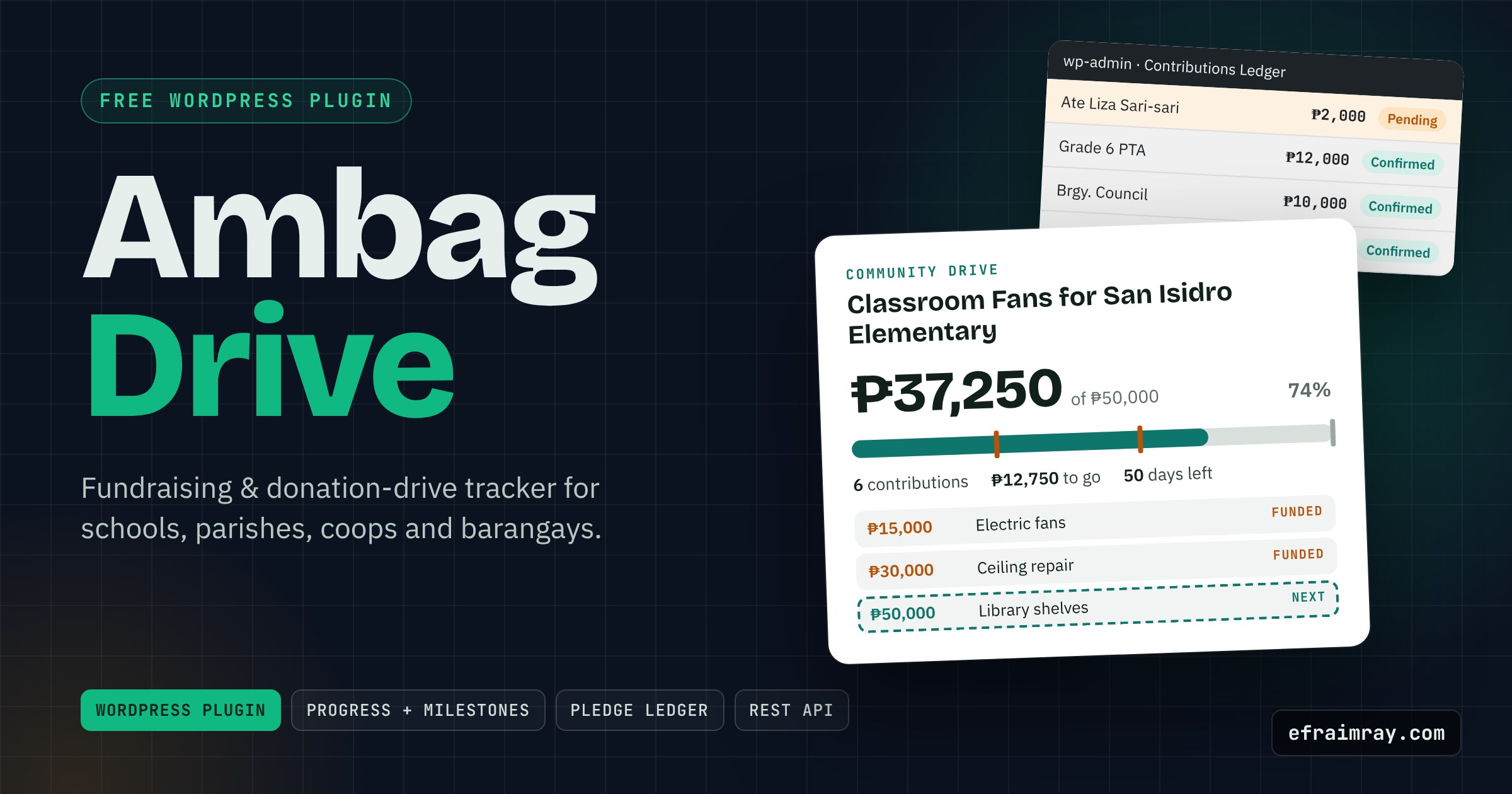
Live demo: https://efraimray.github.io/ambag-drive/demo/ (an interactive preview of the visitor page and wp-admin side by side)
New here? Read docs/BUILD-LOG.md for the languages used and how this was built.
Ambag is Filipino for "contribution". Drives for classroom fans, relief packs or a chapel roof usually live in a notebook or a Facebook post that goes stale. Ambag Drive gives each drive its own page with a live progress bar, funded milestones, a thank-you wall and a pledge form, and gives the treasurer one ledger to confirm everything.
Features
- Goals in pesos or items (₱50,000, or 300 relief packs, 120 school chairs)
- Progress bar with milestone checkpoints ("₱15,000 | Electric fans for 4 classrooms") marked Funded / Next
- Donor wall, newest first, that hides anonymous givers; private notes never appear on the site
- Pledge form for visitors: nonce, honeypot, 60-second cooldown per visitor, saved as Pending until an editor confirms it, optional email to the admin
- Contributions ledger in wp-admin: add, edit, confirm or remove rows; totals and pending count at a glance
- CSV export with a UTF-8 BOM (₱ and ñ show correctly in Excel) and formula-injection protection
- Three ways to show a drive: automatically on the drive's own page, the
[ambag]shortcode, or the Ambag Drive block - Read-only REST endpoint
GET /wp-json/ambag/v1/drives/<id>(totals only, no names) for signage, chatbots and n8n - Hook for automations:
ambag_drive_pledge_receivedfires after each pledge - Deadline countdown, "Drive closed" state, per-drive accent colour
- Translation-ready (
ambag-drivetext domain,.potincluded), no tracking, no payment processing
Tech Stack
| Layer | Technology |
|---|---|
| Platform | WordPress 6.3+ (tested on 6.5.5): custom post type, meta boxes, Shortcode API, Block API v3, REST API, admin-post.php |
| Server | PHP 7.4+ (no Composer, no framework) |
| Front end | Vanilla JavaScript (IntersectionObserver animation, form check), CSS custom properties |
| Block editor | wp.element / wp.components / ServerSideRender, written without a build step |
Folder Structure
ambag-drive/
├── ambag-drive.php              # Plugin header, constants, bootstrap
├── uninstall.php                # Removes drives and their data when the plugin is deleted
├── includes/
│   ├── class-ambag-ledger.php   # Pure maths: totals, milestones, donor wall, CSV safety
│   ├── class-ambag-campaign.php # "Drive" post type + typed settings/entries access
│   ├── class-ambag-admin.php    # Meta boxes, ledger editor, list columns, CSV export
│   ├── class-ambag-render.php   # [ambag] shortcode, block render, tracker HTML
│   ├── class-ambag-pledge.php   # Public pledge form + handler
│   └── class-ambag-rest.php     # GET /wp-json/ambag/v1/drives/<id>
├── blocks/tracker/block.json    # Block metadata
├── assets/css/                  # ambag.css (front end), ambag-admin.css
├── assets/js/                   # ambag.js, ambag-admin.js, ambag-block.js
├── languages/ambag-drive.pot
├── demo/index.html              # Interactive showcase (GitHub Pages)
├── docs/                        # BUILD-LOG.md, TUTORIAL.md, DEPLOYMENT.md
├── readme.txt                   # WordPress.org-style readme
└── publish-to-github.bat / .ps1 # One-click GitHub publisher (Windows)
Quick Start / Installation
- Download
ambag-drive.zipfrom the latest release. - In wp-admin go to Plugins → Add New → Upload Plugin, choose the zip, then Activate.
- Open Ambag Drives → Add New. Write the story, set the goal, deadline and milestones, and publish.
- Visit the drive's page: the tracker is already there. To show it elsewhere, add the Ambag Drive block or a shortcode.
Usage
[ambag id="12"]                              Full tracker: bar, milestones, how to give, donor wall, pledge form
[ambag id="12" layout="compact"]             Bar and numbers only (sidebar, home page)
[ambag id="12" wall="no" form="no" limit="5"]
When a visitor pledges, the row appears in the ledger as Pending (highlighted) and does not count yet. Change it to Confirmed once the money or items arrive, then Update.
REST example:
curl https://example.com/wp-json/ambag/v1/drives/12
# {"raised":31750.5,"goal":50000,"percent":63.5,"contributions":4,"days_left":50,"next_milestone":{"amount":50000,"label":"Library shelves"}, ...}
Configuration
Per drive (in the Drive Settings box): goal, money or items (with the item name), deadline, milestones (amount | label, one per line), "How to give" text, accent colour, donor wall on/off, pledges on/off.
Developer filters and actions:
| Hook | Use |
|---|---|
ambag_drive_notify_pledge (filter) |
Return false to stop the admin email for new pledges |
ambag_drive_pledge_received (action) |
( $drive_id, $amount ) after a pledge is saved: send to n8n, SMS or Messenger |
--ambag-accent, --ambag-line, --ambag-radius (CSS) |
Restyle the tracker from your theme |
Deployment
On Windows, double-click publish-to-github.bat: it creates the repository, pushes the code, adds topics, publishes the release zip and turns on GitHub Pages. Full steps (GitHub Desktop, git CLI, version bumps, releases) are in docs/DEPLOYMENT.md.
Customization
- Change the default accent in
Ambag_Campaign::$defaults['color']or per drive in the editor. - Override
.ambag__*classes or the--ambag-*custom properties in your theme's CSS. - Translate with Loco Translate or Poedit using
languages/ambag-drive.pot(Filipino and Cebuano translations are on the roadmap).
Roadmap
- [x] v1.0.0: drives, ledger, milestones, donor wall, pledge form, CSV, block, REST
- [ ] Expense log ("where the money went") with receipts, for full transparency reports
- [ ] Multiple drives overview block (all active drives with mini bars)
- [ ] Filipino and Cebuano translations
- [ ] Optional WooCommerce "donate" product that adds confirmed rows automatically
Contributing
Issues and pull requests are welcome. Please follow the WordPress Coding Standards, keep all maths in Ambag_Ledger, and run php -l on changed files.
Requesting improvements
Open an issue and add the label claude-improve. The nightly showcase run reads those issues, implements the change, bumps the version and prepares a new release.
License
GPL-2.0-or-later. See LICENSE.
Author
Efraim Ray, web developer and AI automation specialist in Valencia City, Bukidnon. https://www.efraimray.com/