{eac}SoftwareRegistry Custom Hooks WP Registry grade A. No security issues foundWP RegistryNo security issues foundOpen the reportA
Add PHP code for the many hooks (filters and actions) available in the Software Registration Server.
Install
Upload it under Plugins → Add New Plugin → Upload Plugin, then activate.
Install straight from GitHub with WP-CLI:
wp plugin install https://github.com/earthasylum/eacsoftwareregistry-custom-hooks/releases/download/2.0.16/eacSoftwareRegistry-custom-hooks.2.0.16.zip{eac}SoftwareRegistry Custom Hooks
Plugin HeaderPlugin URI: https://swregistry.earthasylum.com/software-registry-hooks/
Author: EarthAsylum Consulting
Stable tag: 2.0.15
Last Updated: 30-Aug-2026
Requires at least: 5.8
Tested up to: 7.1
Requires PHP: 8.1
Contributors: EarthAsylum,KevinBurkholder
Donate link: https://github.com/sponsors/EarthAsylum
Support link: https://github.com/EarthAsylum/eacSoftwaReregistry-custom-hooks/issues
License: GPLv3 or later
License URI: https://www.gnu.org/licenses/gpl.html
Tags: software registration, software registry, software license, license manager, registration hooks, {eac}SoftwareRegistry
GitHub URI: https://github.com/EarthAsylum/eacSoftwaReregistry-custom-hooks
{eac}SoftwareRegistry custom hooks - Add PHP code for the many hooks (filters and actions) available in the Software Registration Server.
Description
{eac}SoftwareRegistry Custom Hooks is an extension plugin to {eac}SoftwareRegistry Software Registration Server.
Using the many hooks available in the Software Registration Server, you can customize the registration server options, incoming API requests, outgoing API responses, and client emails and notifications.
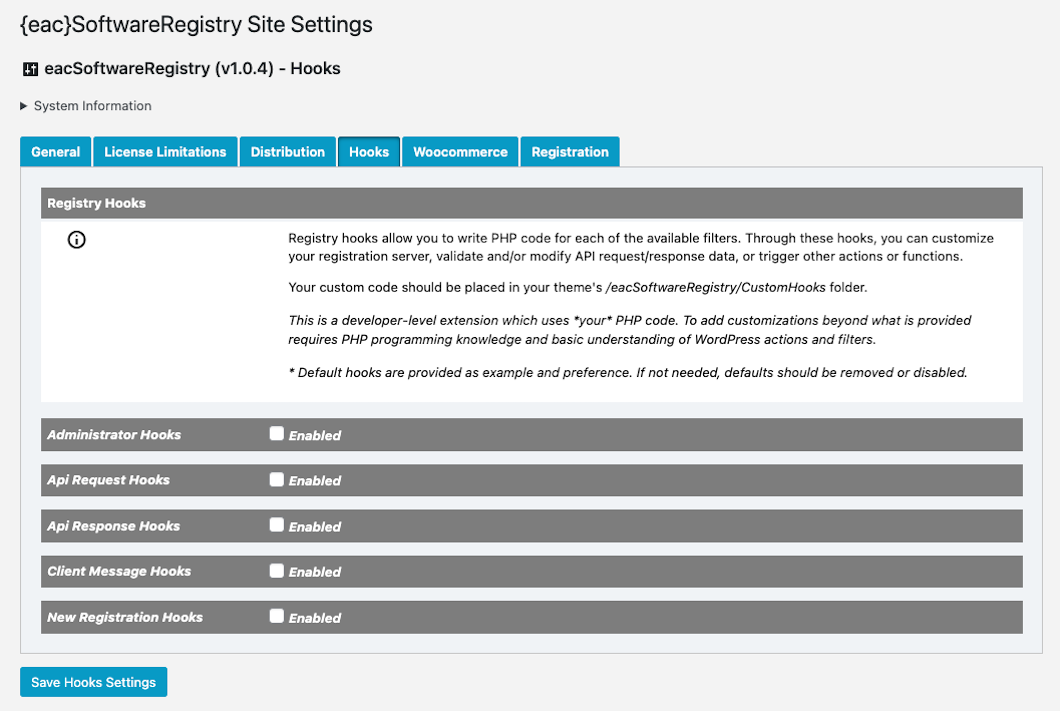
{eac}SoftwareRegistry Custom Hooks allow you to write PHP code for any of the available filters. Through these hooks, you can customize your registration server, validate and/or modify API request and response data, or trigger other actions or functions.
Although this extension includes some pre-built customizations, the main purpose is to allow you (or your programmer) to further customize the Software Registration Server. The extensions included provide all of the ground-work needed so you only need to focus on the actual customizations you need to make.
This custom hooks extension is a developer-level extension which uses your PHP code. To add customizations beyond what is provided requires PHP programming knowledge and basic understanding of WordPress actions and filters.
Implementing Custom Hooks
To implement your customizations:
- Copy the
/eacSoftwareRegistry/Customhooksfolder from this plugin folder to your development environment. - Modify the appropriate extension(s) [
custom_hooks_*.extension.php] found in theCustomhooksfolder. - Upload the
/eacSoftwareRegistry/Customhooksfolder from your development environment to your WordPress theme folder (preferably a child theme - see: Child Themes).
Example directory structure
/wp-content/themes/my-awesome-theme
    /eacSoftwareRegistry
        /CustomHooks
            custom_hooks_admin_options.extension.php
            custom_hooks_api_request.extension.php
            custom_hooks_api_response.extension.php
            custom_hooks_client_messages.extension.php
            custom_hooks_new_registration.extension.php
The only code changes needed are in the appropriate method(s), within the try...catch block.
For example, if you wanted to customize the assignment of a new registration key, you would modify custom_hooks_new_registration.extension.php; find the new_registry_key() method, and make your changes where you see /* custom code here */:
/**
 * new_registry_key handler
 *
 * @param string $newRegistrationKey The key value (uuid) assigned to a new registration
 * @return string
 */
public function new_registry_key(string $newRegistrationKey): string
{
    global $wp, $wpdb;

    try {
        /* custom code here */
        return $newRegistrationKey;
    } catch (\Throwable $e) {$this->plugin->logError($e);return $newRegistrationKey;}
}
In some cases, default code is provided as both example and preference. If not needed, defaults should be removed or disabled.
WordPress Administration
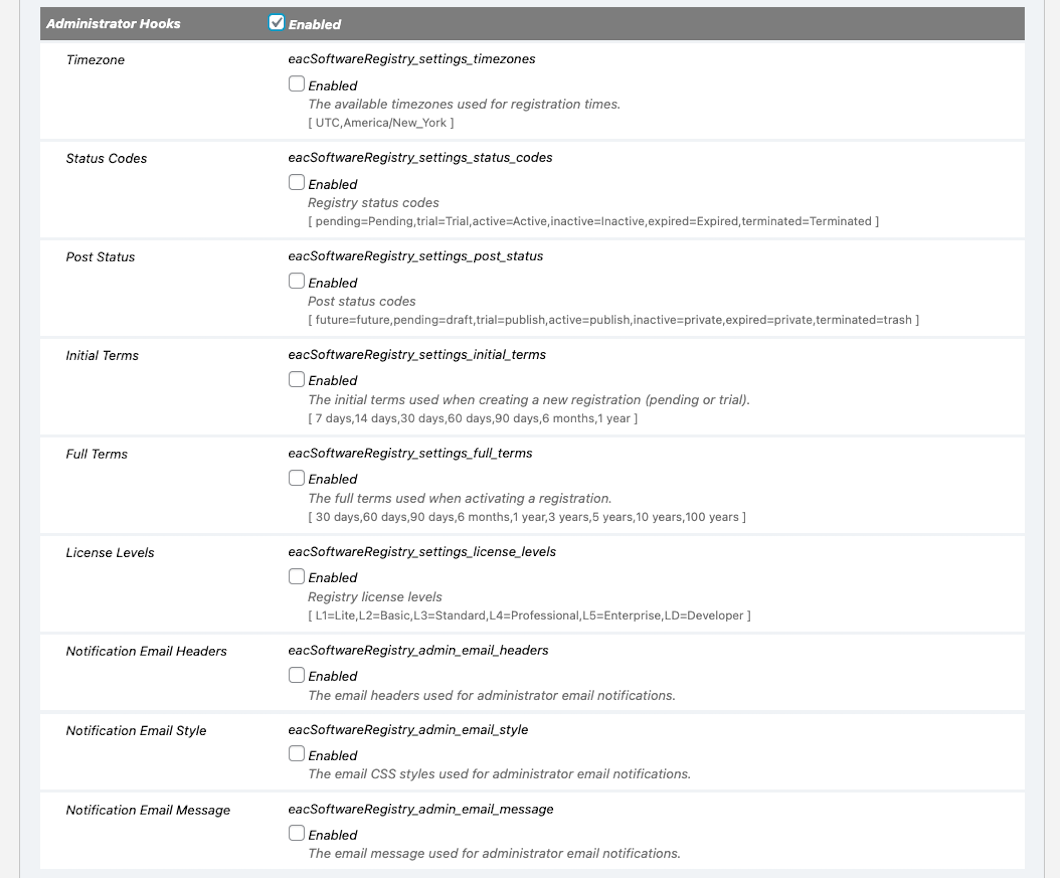
From the administrator settings screen (found at Software Registry » Settings » Hooks), you may enable or disable each hook independently or as a group (by each extension).
- Each extension is disabled by default and must be enabled from the settings screen.
- For each filter that is customized, the individual hook must be enabled from the settings screen.
For example, after modifying the new_registry_key() method (above), you must go to the settings screen, enable the New Registration Hooks extension and then enable the New Registration Key hook.

List of Available Hooks
Administrator settings eacSoftwareRegistry/Customhooks/custom_hooks_admin_options.extension.php
'eacSoftwareRegistry_settings_timezones'
'eacSoftwareRegistry_settings_status_codes'
'eacSoftwareRegistry_settings_post_status'
'eacSoftwareRegistry_settings_initial_terms'
'eacSoftwareRegistry_settings_full_terms'
'eacSoftwareRegistry_settings_refresh_intervals'
'eacSoftwareRegistry_settings_license_levels'
'eacSoftwareRegistry_admin_email_headers'
'eacSoftwareRegistry_admin_email_style'
'eacSoftwareRegistry_admin_email_message'
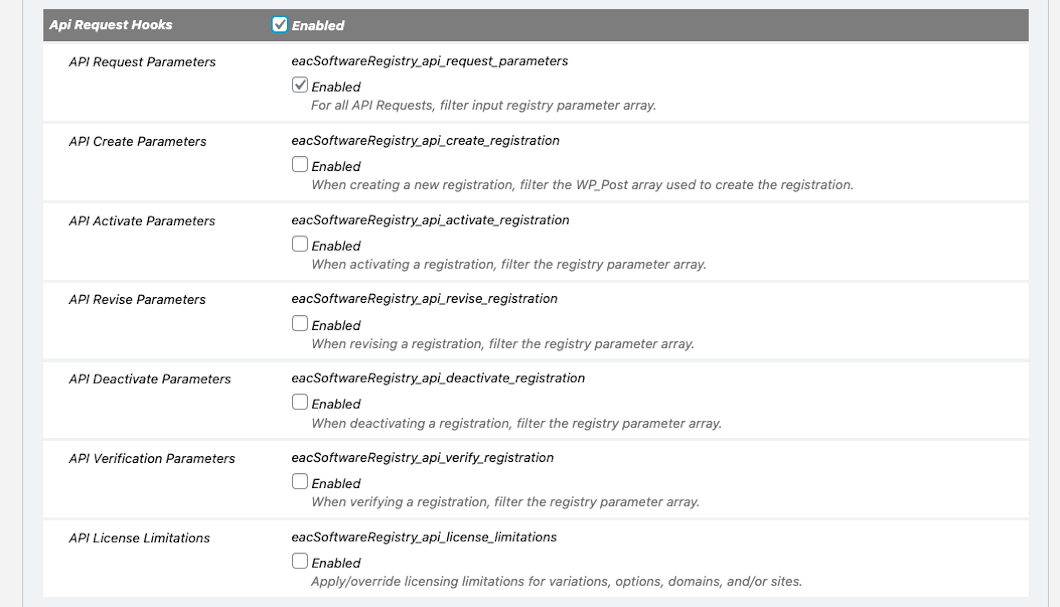
API Requests eacSoftwareRegistry/Customhooks/custom_hooks_api_request.extension.php
'eacSoftwareRegistry_api_request_parameters'        // pre-coded to log the api request parameters
'eacSoftwareRegistry_api_create_registration'
'eacSoftwareRegistry_api_activate_registration'
'eacSoftwareRegistry_api_revise_registration'
'eacSoftwareRegistry_api_renew_registration'
'eacSoftwareRegistry_api_deactivate_registration'
'eacSoftwareRegistry_api_refresh_registration'
'eacSoftwareRegistry_api_verify_registration'
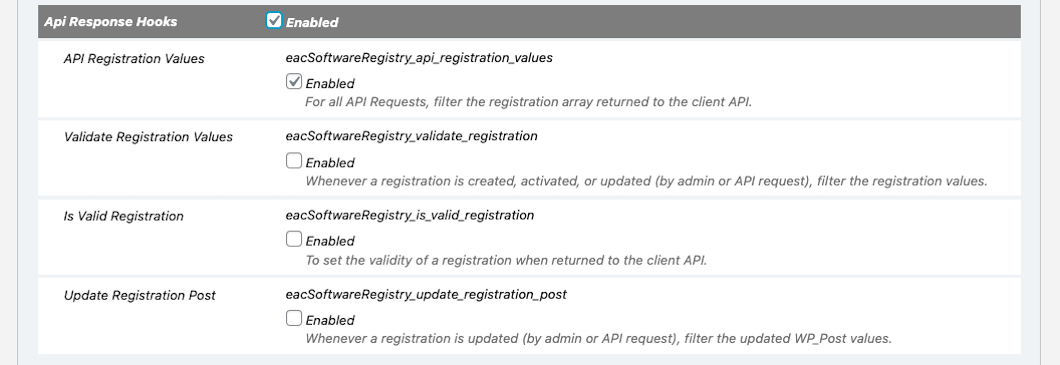
API Responses eacSoftwareRegistry/Customhooks/custom_hooks_api_response.extension.php
'eacSoftwareRegistry_api_registration_values'       // pre-coded to log the api response values
'eacSoftwareRegistry_validate_registration'
'eacSoftwareRegistry_is_valid_registration'
'eacSoftwareRegistry_update_registration_post'
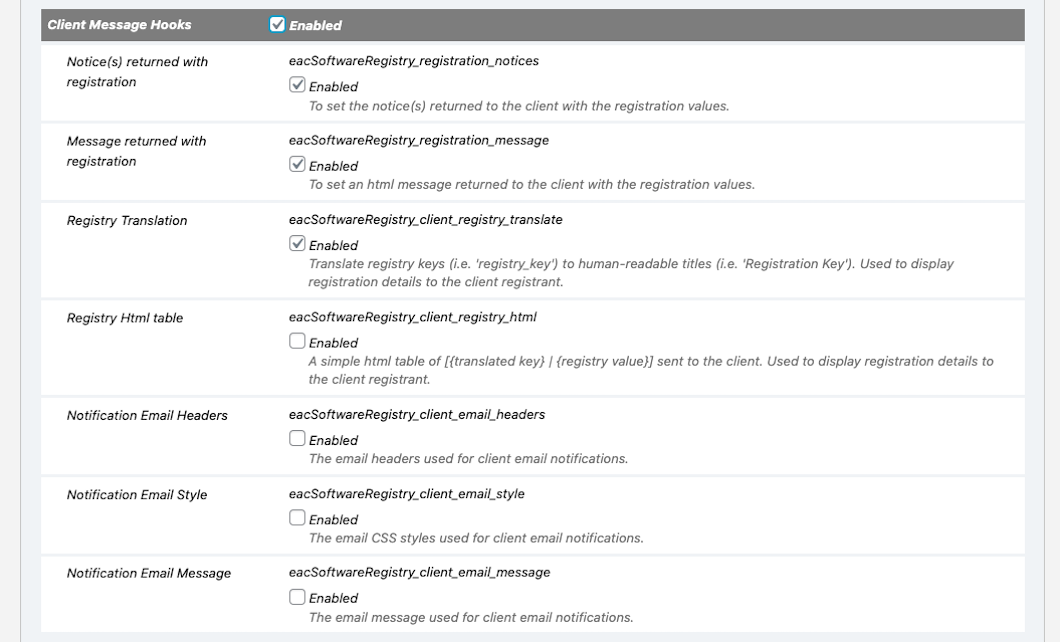
Client Message Hooks eacSoftwareRegistry/Customhooks/custom_hooks_client_messages.extension.php
'eacSoftwareRegistry_api_registration_notices'
'eacSoftwareRegistry_api_registration_message'
'eacSoftwareRegistry_api_registration_supplemental'
'eacSoftwareRegistry_client_registry_translate'     // pre-coded to remove certain values passed to the client
'eacSoftwareRegistry_client_registry_html'
'eacSoftwareRegistry_client_email_headers'
'eacSoftwareRegistry_client_email_style'
'eacSoftwareRegistry_client_email_message'
'eacSoftwareRegistry_client_email_footer'
New registration eacSoftwareRegistry/Customhooks/custom_hooks_new_registration.extension.php
'eacSoftwareRegistry_new_registry_key'Custom Hook Method Arguments
$newRegistrationKey     // The key value (uuid) assigned to a new registration

$requestParams          // The parameter array passed through the API. May include:
    'registry_key'          => string       //  UUID,
    'registry_status'       => string,      //  'pending', 'trial', 'active', 'inactive', 'expired', 'terminated', 'invalid'
    'registry_effective'    => string,      //  effective date
    'registry_expires'      => string,      //  expiration date
    'registry_name'         => string,      //  registrant's full name
    'registry_email'        => string,      //  registrant's email address
    'registry_company'      => string,      //  registrant's company/organization name
    'registry_address'      => string,      //  registrant's full address (textarea)
    'registry_phone'        => string,      //  registrant's telephone
    'registry_product'      => string,      //  your product name/id ((your_productid))
    'registry_title'        => string,      //  your product title
    'registry_description'  => string,      //  your product description
    'registry_version'      => string,      //  your product version (when registered)
    'registry_license'      => string,      // 'L1'(Lite), 'L2'(Basic), 'L3'(Standard), 'L4'(Professional), 'L5'(Enterprise), 'LD'(Developer)
    'registry_count'        => int,         //  number of licenses (users/seats/devices)
    'registry_variations'   => array,       //  associative array of name/value pairs
    'registry_options'      => array,       //  indexed array of registry options
    'registry_domains'      => array,       //  array of valid/registered domains
    'registry_sites'        => array,       //  array of valid/registered sites/uris
    'registry_transid'      => string,      //  external transaction id
    'registry_timezone'     => string,      //  standard timezone string (client timezone)
    'registry_paydue'       => float,       //  amount to be paid/billed,
    'registry_payamount'    => float,       //  amount paid,
    'registry_paydate'      => string,      //  date paid
    'registry_payid'        => string,      //  transaction id/check #, etc.
    'registry_nextpay'      => string,      //  next payment/renewal date

$apiAction              // One of 'create', 'activate', 'revise', 'deactivate', 'verify' or 'update' (non-api)

$registration           // The registration data array with above registry values

$wpPost                 // WP_Post object

$postValues             // Array of values passed to wp_insert_post(), including 'meta_input' array with above registry values
Installation
{eac}SoftwareRegistry Custom Hooks is an extension plugin to and requires installation and registration of {eac}SoftwareRegistry.
Automatic Plugin Installation
Due to the nature of this plugin, it is NOT available from the WordPress Plugin Repository and can not be installed from the WordPress Dashboard » Plugins » Add New » Search feature.
Upload via WordPress Dashboard
Installation of this plugin can be managed from the WordPress Dashboard » Plugins » Add New page. Click the [Upload Plugin] button, then select the eacsoftwareregistry-custom-hooks.zip file from your computer.
See Managing Plugins -> Upload via WordPress Admin
Manual Plugin Installation
You can install the plugin manually by extracting the eacsoftwareregistry-custom-hooks.zip file and uploading the 'eacsoftwareregistry-custom-hooks' folder to the 'wp-content/plugins' folder on your WordPress server.
See Managing Plugins -> Manual Plugin Installation
Settings
Options for this extension will be added to the Software Registry » Settings » Hooks tab.
Screenshots
-
{eac}SoftwareRegistry Custom Hooks
-
{eac}SoftwareRegistry Administrator Hooks
-
{eac}SoftwareRegistry API Request Hooks
-
{eac}SoftwareRegistry API Response Hooks
-
{eac}SoftwareRegistry Client Hooks
-
{eac}SoftwareRegistry New Registration Hooks
Other Notes
See Also
Consulting
If you are unable to perform the customizations as outlined, yet need your Software Registration Server customized, we are more than happy to discuss and provide a quote to do these customizations for you. You may contact us at support@earthasylum.com
Copyright
Copyright © 2019-2026, EarthAsylum Consulting, distributed under the terms of the GNU GPL.
This program is free software: you can redistribute it and/or modify it under the terms of the GNU General Public License as published by the Free Software Foundation, either version 3 of the License, or (at your option) any later version.
This program is distributed in the hope that it will be useful, but WITHOUT ANY WARRANTY; without even the implied warranty of MERCHANTABILITY or FITNESS FOR A PARTICULAR PURPOSE. See the GNU General Public License for more details.
You should receive a copy of the GNU General Public License along with this program. If not, see https://www.gnu.org/licenses/.
Releases
6 releases. Each count is every asset in that release; expand a row for the breakdown.