{eac}Cloudflare
Provides limited control of Cloudflare settings, caching, blacklisting, and rate-limiting from WordPress.
Install
This is the repository archive. It installs, but the folder name will carry the branch suffix and updates will not flow.
Install straight from GitHub with WP-CLI:
wp plugin install https://github.com/earthasylum/eaccloudflare/archive/refs/heads/main.zip{eac}Doojigger Cloudflare Doololly for WordPress
Plugin HeaderPlugin URI: https://eacdoojigger.earthasylum.com/eaccloudflare/
Author: EarthAsylum Consulting
Stable tag: 2.0.0
Last Updated: 15-Oct-2026
Requires at least: 5.8
Tested up to: 7.1
Requires PHP: 8.1
Requires EAC: 3.3
Contributors: kevinburkholder
Donate link: https://github.com/sponsors/EarthAsylum
Support link: https://github.com/EarthAsylum/eacCloudflare/issues
License: GPLv3 or later
License URI: https://www.gnu.org/licenses/gpl.html
Tags: Cloudflare, rate-limit, blacklist, edge-caching, {eac}Doojigger
GitHub URI: https://github.com/EarthAsylum/eacCloudflare
Provides limited control of Cloudflare settings, caching, blacklisting, and rate-limiting from WordPress.
Description
Cloudflare control from WordPress
- Pause/Resume Cloudflare service.
- Override the browser cache time-to-live.
- Set 'cf-edge-cache' header to trigger APO or custom rules.
- Custom rules can look for this header set to
cache, platform=wordpressorno-cacheor not set.
- Custom rules can look for this header set to
- Add 'Cache-Tag' header with mime type that can be used for selective cache purge.
- Set common Cloudflare options for speed & security directly from WordPress.
- Automatically purge cloudflare cache (by host name).
- Add a rate limiting rule to temporarily block IP addresses after 100 requests within 10 seconds.
- Create and update Cloudflare IP blacklist (account) and blocking rule (zone) using risk assessment results.
Recommended for free plans. Paid plans should use the official Cloudflare plugin with Automatic Platform Optimization (APO).
Cloudflare Settings
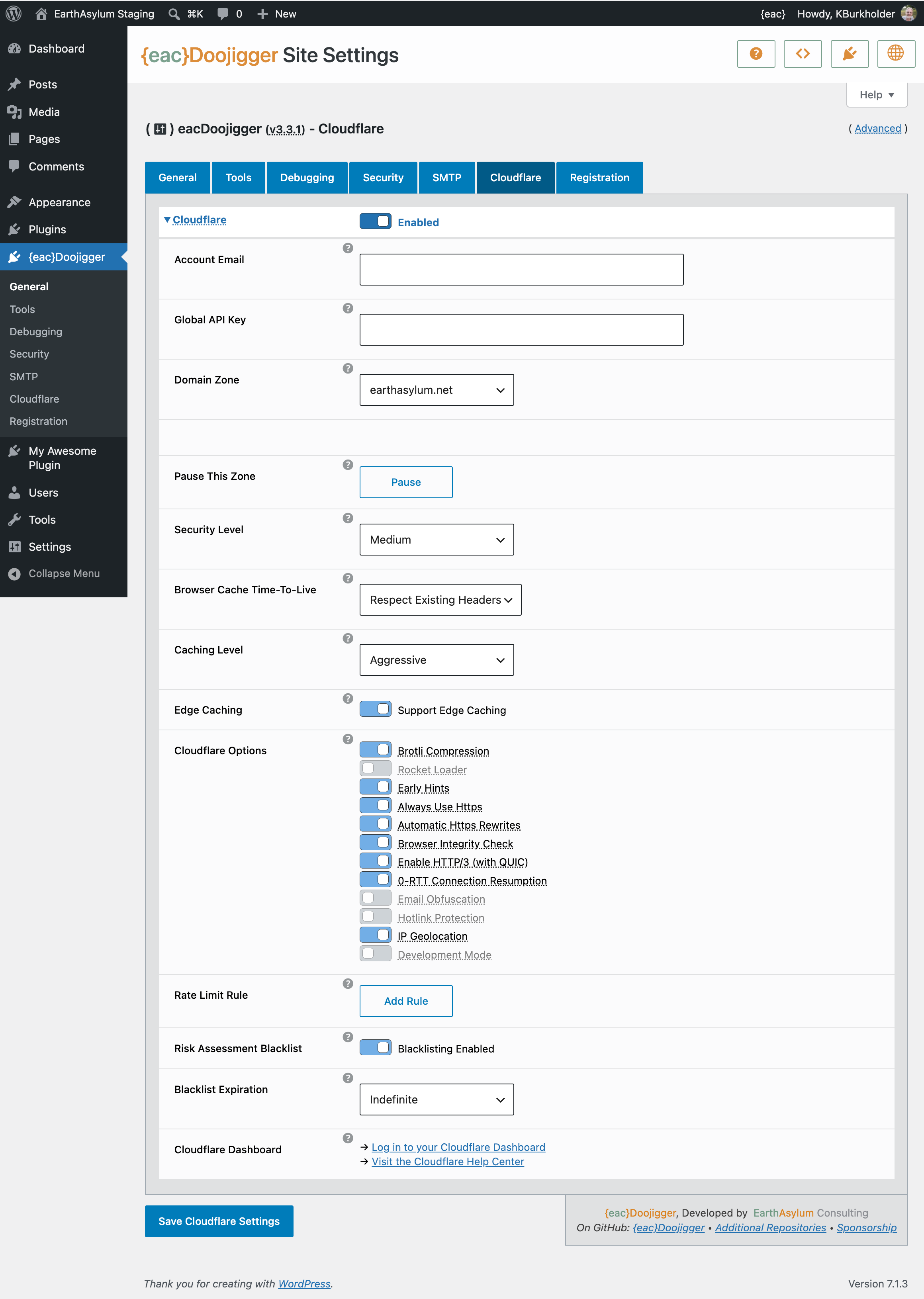
With your Cloudflare account information, we can set certain common Cloudflare options as well as automatically purge the Cloudflare cache when purging the local WordPress caches, add a rate-limiting rule to mitigate brute-force and DDoS attacks, and blacklist IP addresses identified by Risk Assessment.
Account Email
Your Cloudflare account email address.
Global API Key
Your Cloudflare global API key. From your Account Profile → API Tokens → API Keys → Global API Key
Domain Zone
Your Cloudflare zone for this domain.
Pause This Zone
Pausing stops traffic from passing through the Cloudflare network, making your origin server IP address visible. Also, Cloudflare’s security and protection features become disabled.
Browser Cache Time-To-Live
Controls how long resources cached by client browsers remain valid. Zone → Caching → Configuration
Cloudflare Options
Enable/disable common Cloudflare options for speed & security. Zone → Speed → Settings Zone → SSL/TLS → Edge Certificates Zone → Security → Settings
Rate Limit Rule
Adds a rate limiting rule to temporarily block IP addresses after 100 requests within 10 seconds. Set to work with free plans but may overwrite existing rule. Zone → Security → Security rules
Risk Assessment Blacklist
When a request is blocked by the {eac}Doojigger Risk Assessment process, add the remote IP address to the Cloudflare blacklist to prevent further access to the site. This creates or updates a Cloudflare IP list (Account → Configurations → Lists) and adds a security rule (Zone → Security → Security Rules) to block the list.
Note: To use an existing IP list, add [{eac}Cloudflare] to its description.
Blacklist Expiration
Controls how long an IP address is blacklisted due to Risk Assessment. The Cloudflare blacklist is purged hourly.
Filters and Actions
Filters
- 'cloudflare_purge_everything_actions' (array) - filter actions that trigger a cache purge.
- 'cloudflare_use_cache' (bool) - override
cf-edge-cachesetting (cache/no-cache).
Actions
- 'eacDoojigger_cloudflare_pause' - pause the cloudflare service
- 'eacDoojigger_cloudflare_resume' - resume the cloudflare service
- 'eacDoojigger_cloudflare_purge' - purge the cloudflare cache
Installation
{eac}Doojigger Cloudflare Doololly is an extension plugin to and requires installation and registration of {eac}Doojigger.
Automatic Plugin Installation
Due to the nature of this plugin, it is NOT available from the WordPress Plugin Repository and can not be installed from the WordPress Dashboard » Plugins » Add New » Search feature.
Upload via WordPress Dashboard
Installation of this plugin can be managed from the WordPress Dashboard » Plugins » Add New page. Click the [Upload Plugin] button, then select the eacCloudflare.zip file from your computer.
See Managing Plugins -> Upload via WordPress Admin
Manual Plugin Installation
You can install the plugin manually by extracting the eacCloudflare.zip file and uploading the 'eacCloudflare' folder to the 'wp-content/plugins' folder on your WordPress server.
See Managing Plugins -> Manual Plugin Installation
Settings
Once installed and activated options for this extension will show in the 'Cloudflare' tab of {eac}Doojigger settings.
Screenshots
- {eac}Cloudflare Doololly
Copyright
Copyright © 2026, EarthAsylum Consulting, distributed under the terms of the GNU GPL.
This program is free software: you can redistribute it and/or modify it under the terms of the GNU General Public License as published by the Free Software Foundation, either version 3 of the License, or (at your option) any later version.
This program is distributed in the hope that it will be useful, but WITHOUT ANY WARRANTY; without even the implied warranty of MERCHANTABILITY or FITNESS FOR A PARTICULAR PURPOSE. See the GNU General Public License for more details.
You should receive a copy of the GNU General Public License along with this program. If not, see https://www.gnu.org/licenses/.