Install
This is the repository archive. It installs, but the folder name will carry the branch suffix and updates will not flow.
Install straight from GitHub with WP-CLI:
wp plugin install https://github.com/dpohl-web/taxogrid_public/archive/refs/heads/master.zip
TaxoGrid is a powerful plugin that allows you to create custom taxonomies along with associated terms for any custom post types and assign posts accordingly.
Description
TaxoGrid is a powerful plugin that allows you to create custom taxonomies along with associated terms for any custom post types and assign posts accordingly. Using integrated shortcodes, the defined taxonomies and their terms can be displayed in various interactive and responsive layouts—such as carousel, accordion, or flipping cards. Additionally, the plugin offers the option to generate a dedicated overview page for each term, where all associated posts are presented in an organized manner. TaxoGrid provides a flexible and expandable solution for structuring and dynamically presenting your content.
Core Features
- Create custom taxonomies and associated terms for custom post types.
- Assign posts to taxonomies and terms.
- Display taxonomies and terms via shortcodes in layouts like carousel, accordion, flipping cards, bubbles, or animate.
- Generate dedicated overview pages for each term with associated posts.
- Interactive and responsive designs for better user experience.
Important: Ensure your permalinks are set to "Post name" (/%postname%/) for optimal performance. After creating new taxonomies, save your permalinks to make term views accessible via URL.
Installation
- Upload the plugin to the
/wp-content/plugins/taxogriddirectory. - Activate the plugin via the WordPress "Plugins" menu.
- Configure your custom taxonomies and terms via the plugin settings.
- Ensure that your permalinks are set to "Post name" (/%postname%/) for optimal performance.
- After you have created new taxonomies, you must save your permalinks so that the term view is accessible via URL.
- Insert the provided shortcode into your pages or posts wherever you want to display the category list.
Shortcodes
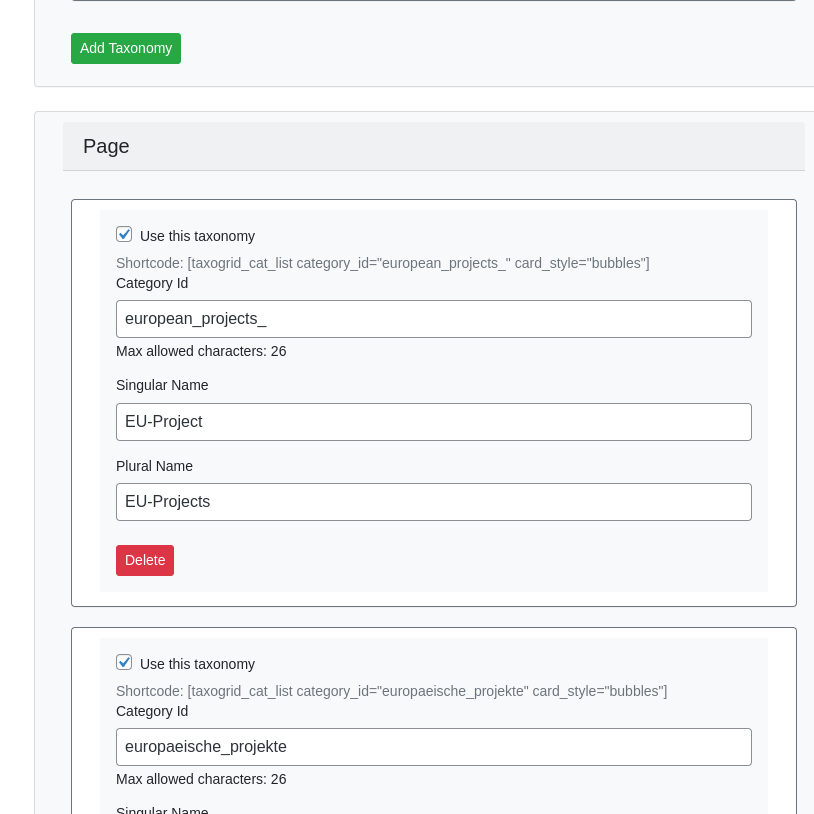
Please add [taxogrid_cat_list category_id="category-id" card_style="caroussel" css_class="customclass" default_open="3"] shortcode wherever you want to show the list of categories.
Category-id is set by you in the settings. Use 'bubbles', 'accordion', 'flip', 'animate' or 'caroussel' as the card_style parameter.
Frequently Asked Questions
How do I create custom taxonomies?
Configure them via the plugin settings in the WordPress admin area.
What layouts are supported?
Carousel, accordion, flipping cards, bubbles, and animate.
Do I need to adjust permalinks?
Yes, set to "Post name" and save after creating taxonomies for term views to work.
How do I display the categories?
Use the shortcode [taxogrid_cat_list] with appropriate parameters.
Screenshots
-
Example of an accordion layout

-
Taxonomy Page example

-
Settings Page
Changelog
1.0.0
- Initial release of the plugin.
Upgrade Notice
1.0.0
Initial release. Ensure permalinks are set correctly for full functionality.
License
This plugin is licensed under the GPLv2 or later. You are free to use, modify, and redistribute it under the same license.