Moving Calculator Pro - Complete Edition WP Registry grade A. No security issues foundWP RegistryNo security issues foundOpen the reportA
Moving Calculator Pro is a WordPress plugin for building an inventory-based moving calculator. Visitors select quantities for moving items, review estimated quantity, cubic feet, and weight totals, then submit a quote request. Administrators manage the inventory and quote pipeline from the WordPress dashboard.
Install
Upload it under Plugins → Add New Plugin → Upload Plugin, then activate.
Install straight from GitHub with WP-CLI:
wp plugin install https://github.com/dotabdullah/moving-calculator-pro/releases/download/2.0.0/moving-calculator-pro.zipMoving Calculator Pro is a WordPress plugin for building an inventory-based moving calculator. Visitors select quantities for moving items, review estimated quantity, cubic feet, and weight totals, then submit a quote request. Administrators manage the inventory and quote pipeline from the WordPress dashboard.
Screenshots
Frontend experience
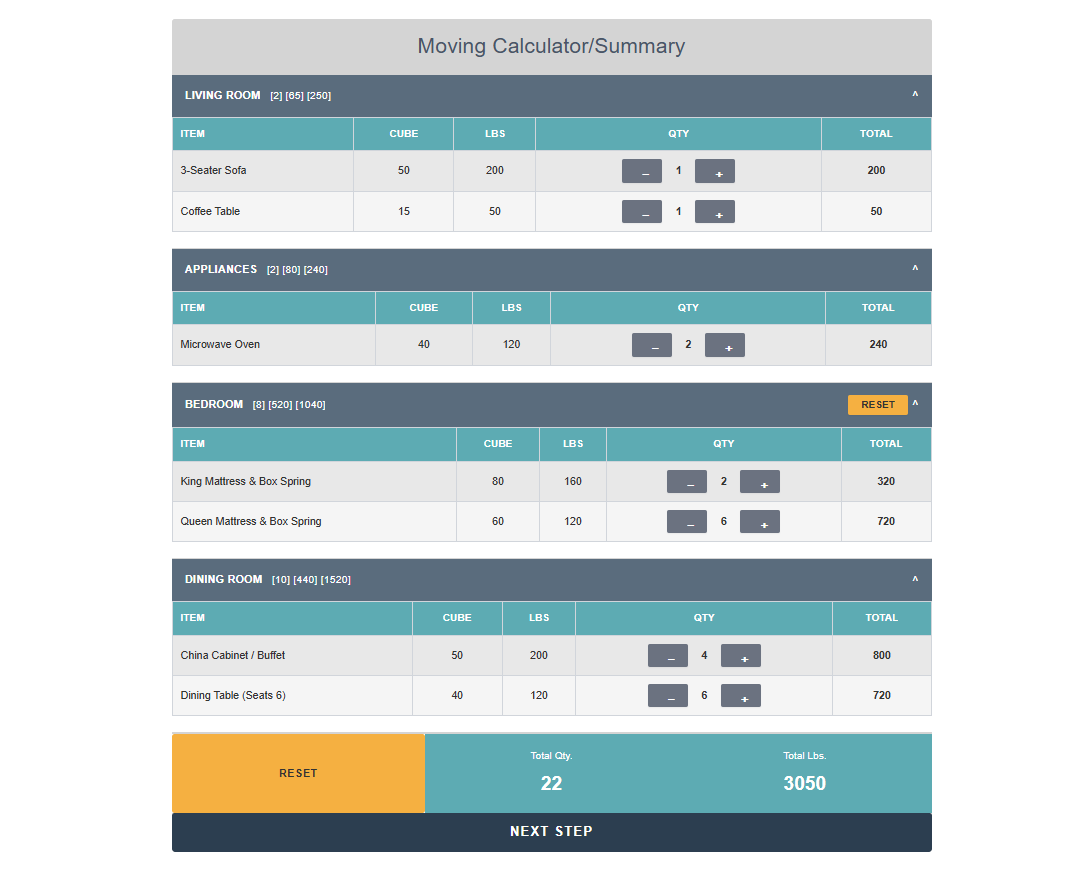
Inventory calculator
Visitors can choose quantities for each item, review per-category totals, reset sections, and continue to the summary.
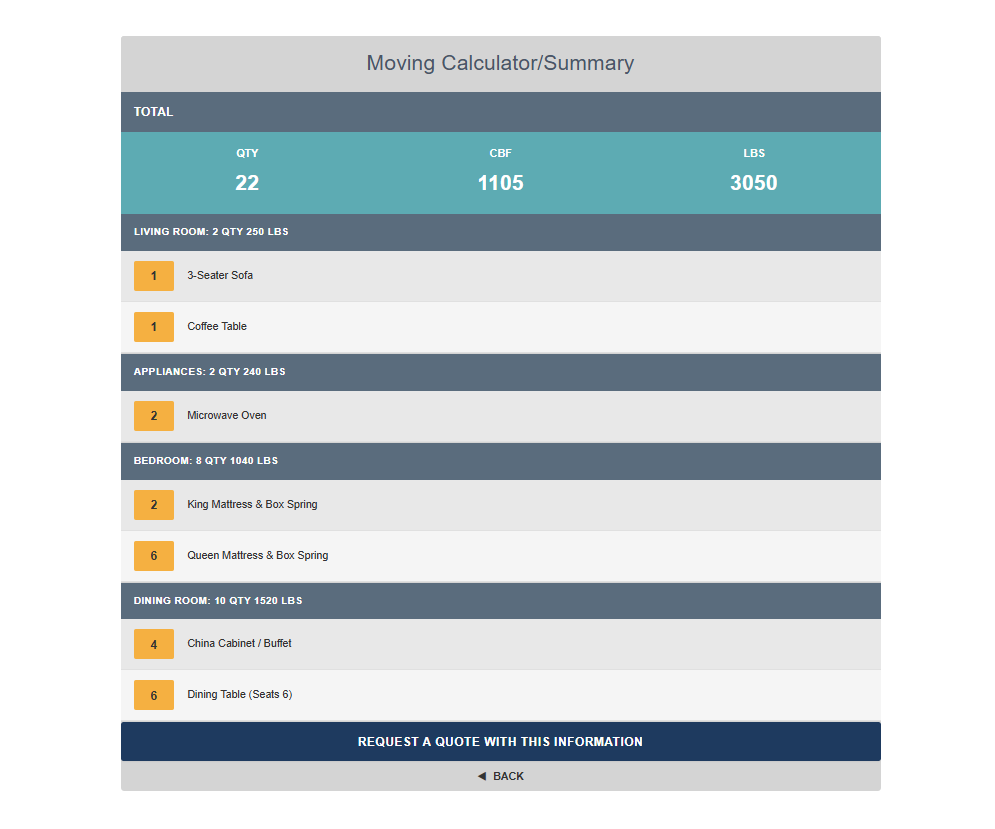
Selected inventory summary
The summary view groups selected items by category and shows total quantity, cubic feet, and weight before the quote request.
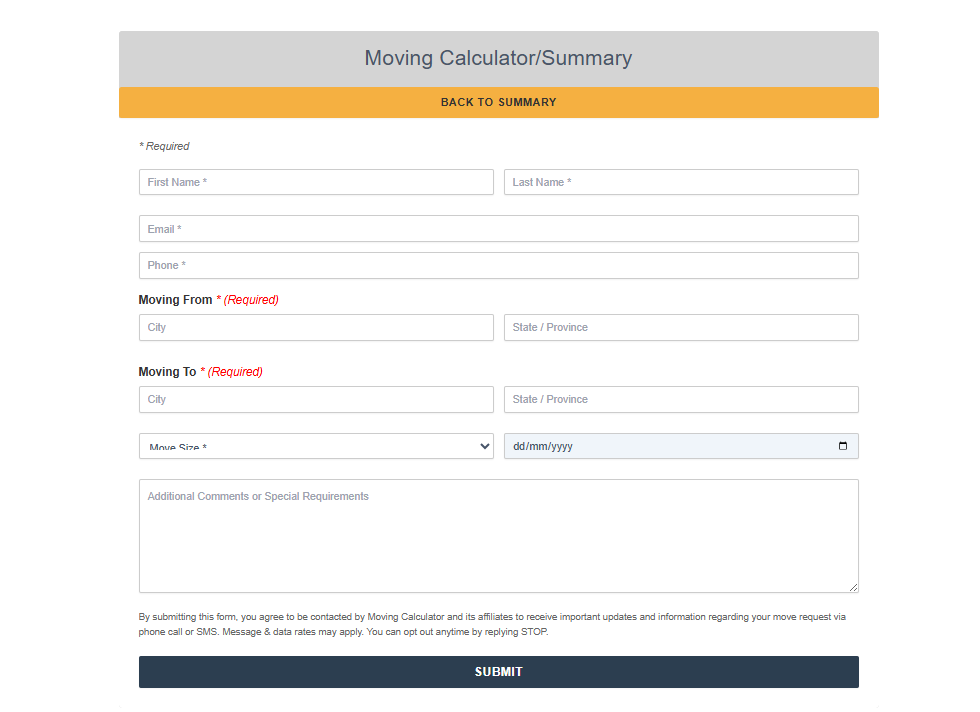
Quote request form
Customers submit their contact details, moving route, move size, preferred date, and additional requirements.
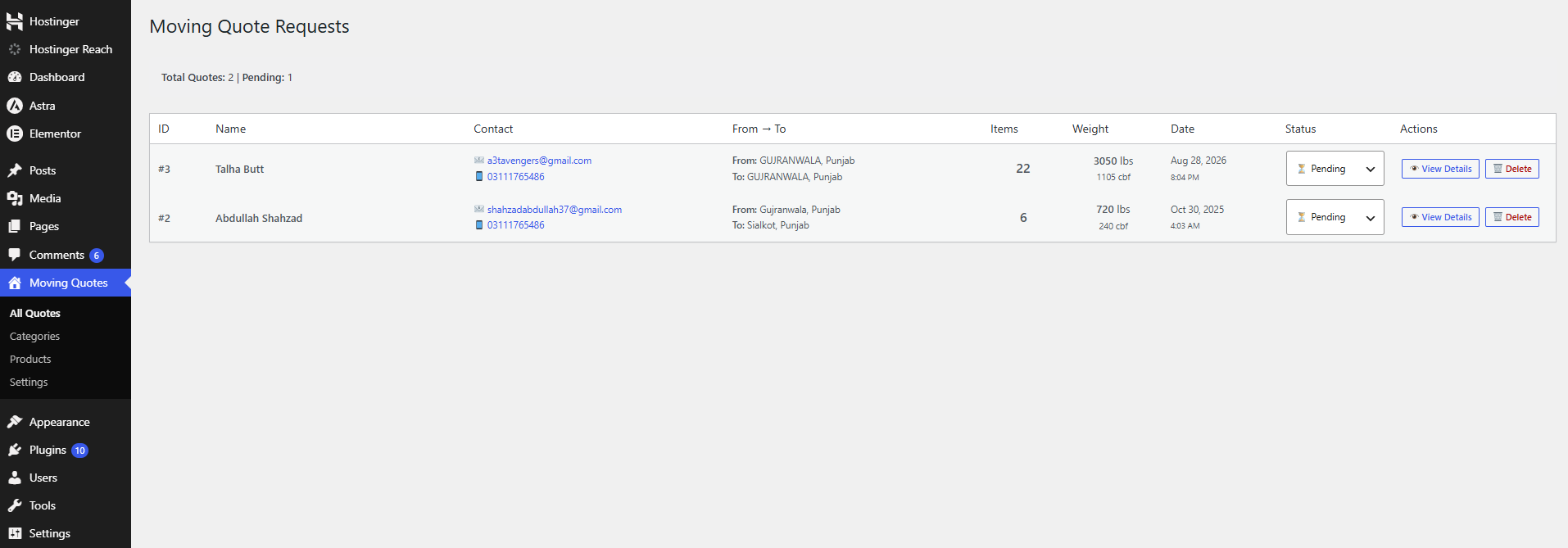
WordPress admin dashboard
Quote requests
Administrators can review quote totals, customer contact details, routes, statuses, and available actions from the All Quotes screen.
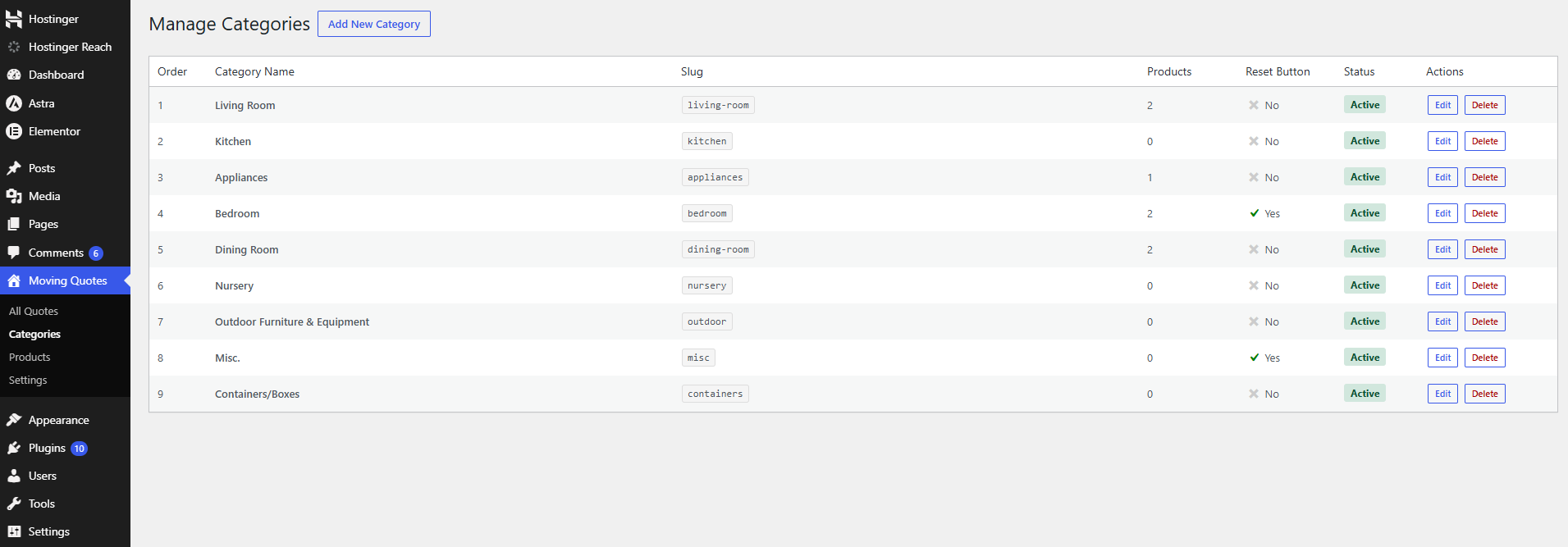
Category management
Categories can be ordered, activated or deactivated, configured with reset buttons, and managed alongside their product counts.
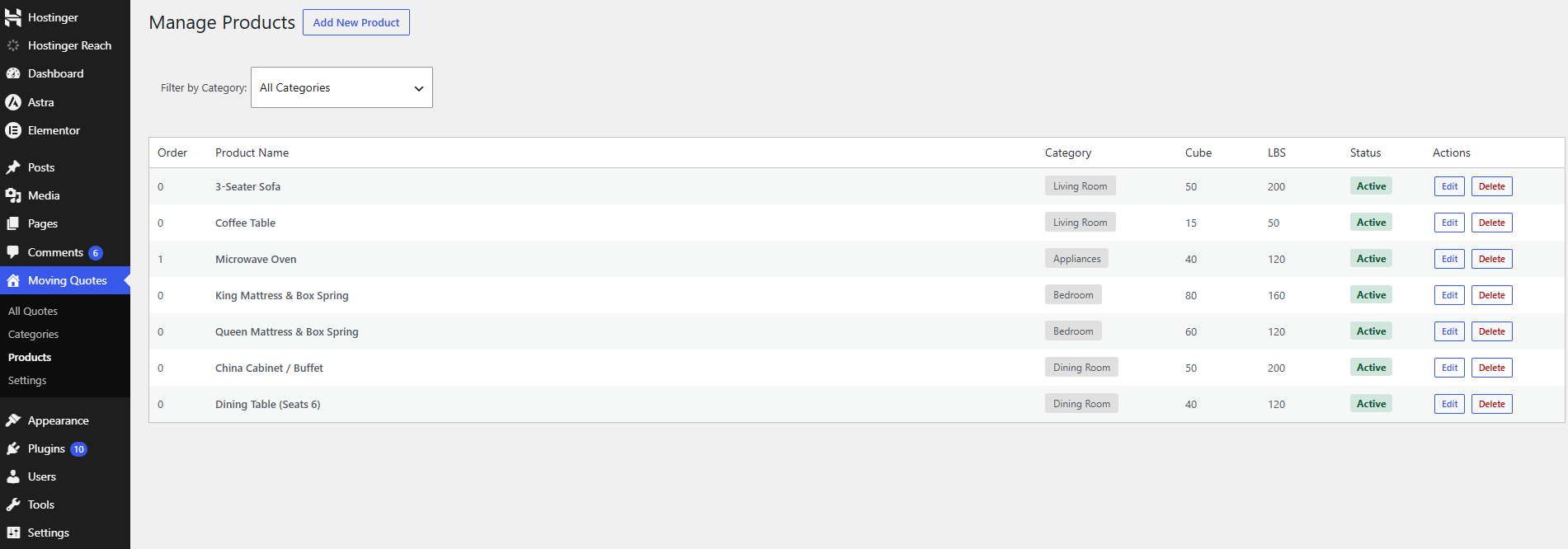
Product management
Products can be filtered by category and maintained with their cube, weight, display order, status, and category assignment.
Features
Frontend calculator
- Database-driven categories and products; no inventory is hardcoded in the calculator template.
- Displays only active categories that contain at least one active product.
- Configurable category and product display order.
- Expandable and collapsible inventory sections.
- Quantity controls with plus and minus buttons.
- Per-item total weight calculation.
- Per-category quantity, cube, and weight statistics.
- Global quantity and weight summary bar.
- Category-specific reset buttons, configurable by an administrator.
- Reset-all control for the entire inventory.
- Prevents visitors from continuing without selecting at least one item.
- Summary step showing selected items grouped by category.
- Summary totals for quantity, cubic feet (CBF), and pounds (LBS).
- Responsive layout for desktop, tablet, and mobile screens.
Quote request form
- Collects first name, last name, email, phone, origin, destination, move size, moving date, and comments.
- Supports these move sizes: Studio, 1 Bedroom, 2 Bedroom, 3 Bedroom, 4+ Bedroom, 5+ Bedroom, Office, and Storage Unit.
- Carries the selected inventory and calculated totals into the submission.
- Browser-required validation for customer and route fields.
- AJAX submission through
admin-ajax.php. - Nonce-protected submission request.
- Success and error feedback without leaving the page.
- Returns the quote reference ID after a successful submission.
- Reloads the calculator after the success message so a new estimate can be started.
Quote notifications
- Stores every submitted quote in the WordPress database.
- Sends an admin notification email with customer details, route, move size, date, totals, and item breakdown.
- Sends an optional customer confirmation email with the quote reference and estimate summary.
- Uses the configured notification email, falling back to the WordPress administrator email.
- Includes reply-to headers for practical customer follow-up.
- Sends plaintext email messages using WordPress
wp_mail().
WordPress admin dashboard
The plugin adds a Moving Quotes menu with four screens:
- All Quotes: review submissions in newest-first order.
- Categories: create, edit, reorder, activate, deactivate, and delete categories.
- Products: create, edit, reorder, activate, deactivate, delete, and filter products by category.
- Settings: configure the notification email and customer confirmation email.
Quote management
- Quote list with ID, customer, contact links, route, item count, weight, volume, submission date, and status.
- Expandable quote detail view.
- Full inventory breakdown grouped by category.
- Customer message display.
mailto:link for contacting the customer.- Print-friendly quote action.
- Inline status updates.
- Supported statuses: Pending, Contacted, Quoted, Completed, and Cancelled.
- Quote deletion with a confirmation prompt.
- Pending quote count and total quote count on the quote screen/settings screen.
Inventory management
Categories support:
- Name and URL-friendly slug.
- Display order.
- Optional frontend reset button.
- Active/inactive state.
- Product count visibility.
- Delete protection when products are still assigned to the category.
Products support:
- Category assignment.
- Product name.
- Cubic feet value.
- Weight in pounds.
- Display order.
- Active/inactive state.
- Category filtering in the admin list.
Requirements
- A WordPress installation that supports standard plugin activation hooks, shortcodes, AJAX, and
dbDelta(). - A server configuration that allows WordPress to send mail through
wp_mail(). - The administrator must have the WordPress
manage_optionscapability to manage quotes, categories, products, and settings.
The plugin header does not declare minimum WordPress or PHP versions. Confirm compatibility with the target hosting environment before deploying to production.
Installation
- Copy the
moving-calculator-prodirectory intowp-content/plugins/. - In WordPress, open Plugins.
- Activate Moving Calculator Pro - Complete Edition.
- On activation, the plugin creates its three custom tables and inserts nine default categories.
- Add products under Moving Quotes > Products. The activation process does not insert sample products.
- Configure email delivery under Moving Quotes > Settings.
- Add the shortcode below to a page or post.
Display the calculator
Add this shortcode to any WordPress page, post, or shortcode-compatible widget:
[moving_calculator]The calculator is rendered from templates/calculator.php. Frontend CSS and JavaScript are loaded by the plugin on every frontend request.
First-time setup
- Open Moving Quotes > Categories.
- Review the default categories or add your own.
- Set category order and decide which categories need a reset button.
- Open Moving Quotes > Products.
- Add each inventory item and assign its category.
- Enter the item's cubic-foot and pound values.
- Set the product order and active state.
- Add
[moving_calculator]to a page. - Submit a test request and confirm both the admin email and customer email behavior.
Default categories
Activation inserts these categories when the category table is empty:
- Living Room
- Kitchen
- Appliances
- Bedroom
- Dining Room
- Nursery
- Outdoor Furniture & Equipment
- Misc.
- Containers/Boxes
Bedroom and Misc. have the category reset button enabled by default. No products are created automatically, so the frontend will remain empty until products are added.
Database tables
The plugin uses the active WordPress table prefix, so wp_ below may differ on a specific site.
| Table | Purpose |
|---|---|
wp_moving_quotes |
Customer information, route details, move size, date, message, totals, serialized item data, timestamp, and status. |
wp_moving_categories |
Category name, slug, display order, reset-button setting, active state, and creation timestamp. |
wp_moving_products |
Category assignment, product name, cube value, pounds value, display order, active state, and creation timestamp. |
Quote item details are stored as JSON in the items_data column. Deleting a category is blocked while products reference it; deleting a product does not remove existing quote records.
Email settings
Under Moving Quotes > Settings:
- Notification Email Address controls where admin quote notifications are sent. The WordPress administrator email is used by default.
- Customer Confirmation Email controls whether the submitting customer receives a confirmation message.
The email templates are currently defined in handle_quote_submission() in moving-calculator-pro.php. They are plaintext templates and are not editable from the settings screen.
Security and data handling
- Direct PHP access is blocked with an
ABSPATHguard. - Frontend and admin AJAX requests use WordPress nonces.
- Product and category AJAX operations require
manage_options. - Submitted values are sanitized before database insertion or update.
- Database writes use
$wpdbAPIs and prepared statements where query values are dynamic. - Frontend and admin output uses escaping functions in the plugin templates.
Review the form consent language, retention policy, mail configuration, and privacy requirements for the site before launch. The plugin stores customer contact information and moving details in the WordPress database.
Plugin structure
moving-calculator-pro/
|-- moving-calculator-pro.php
|-- README.md
|-- assets/
|   |-- css/
|   |   |-- admin.css
|   |   `-- calculator.css
|   `-- js/
|       |-- admin.js
|       `-- calculator.js
`-- templates/
    |-- admin-categories.php
    |-- admin-products.php
    |-- admin-quotes.php
    |-- admin-settings.php
    `-- calculator.php
Shortcode and AJAX reference
| Type | Value |
|---|---|
| Shortcode | [moving_calculator] |
| Frontend AJAX action | mcp_submit_quote |
| Add category | mcp_add_category |
| Update category | mcp_update_category |
| Delete category | mcp_delete_category |
| Add product | mcp_add_product |
| Update product | mcp_update_product |
| Delete product | mcp_delete_product |
Limitations and extension ideas
The current plugin does not include CSV import/export, product images, pricing calculations, customer account history, pagination, bulk inventory actions, or editable email templates in the admin UI. These can be added as separate features without changing the shortcode used to display the calculator.
License
Moving Calculator Pro is released under the GPL-2.0-or-later license as declared in the plugin header.
Author
Abdullah Shahzad
XpertsWP
Releases
2 releases. Each count is every asset in that release; expand a row for the breakdown.