Install
Upload it under Plugins → Add New Plugin → Upload Plugin, then activate.
Install straight from GitHub with WP-CLI:
wp plugin install https://github.com/donnchawp/travel-steps/releases/download/v0.5.1/travel-steps.zipA Polarsteps-style travel journal for your own WordPress, built with WpApp. The route comes from your Dawarich location history, or from where your photos were taken. Photos come from Immich and are served through WordPress, so Immich stays private. Every step is a post you write in the block editor.
Demo
Try it in WordPress Playground. The demo is a week in the west of Ireland that runs in your browser, with nothing to install. Stand-in Immich and Dawarich servers feed the real sync. You're logged in as an admin, so you can pin, hide and choose photos, edit the days in the block editor, and sync again.
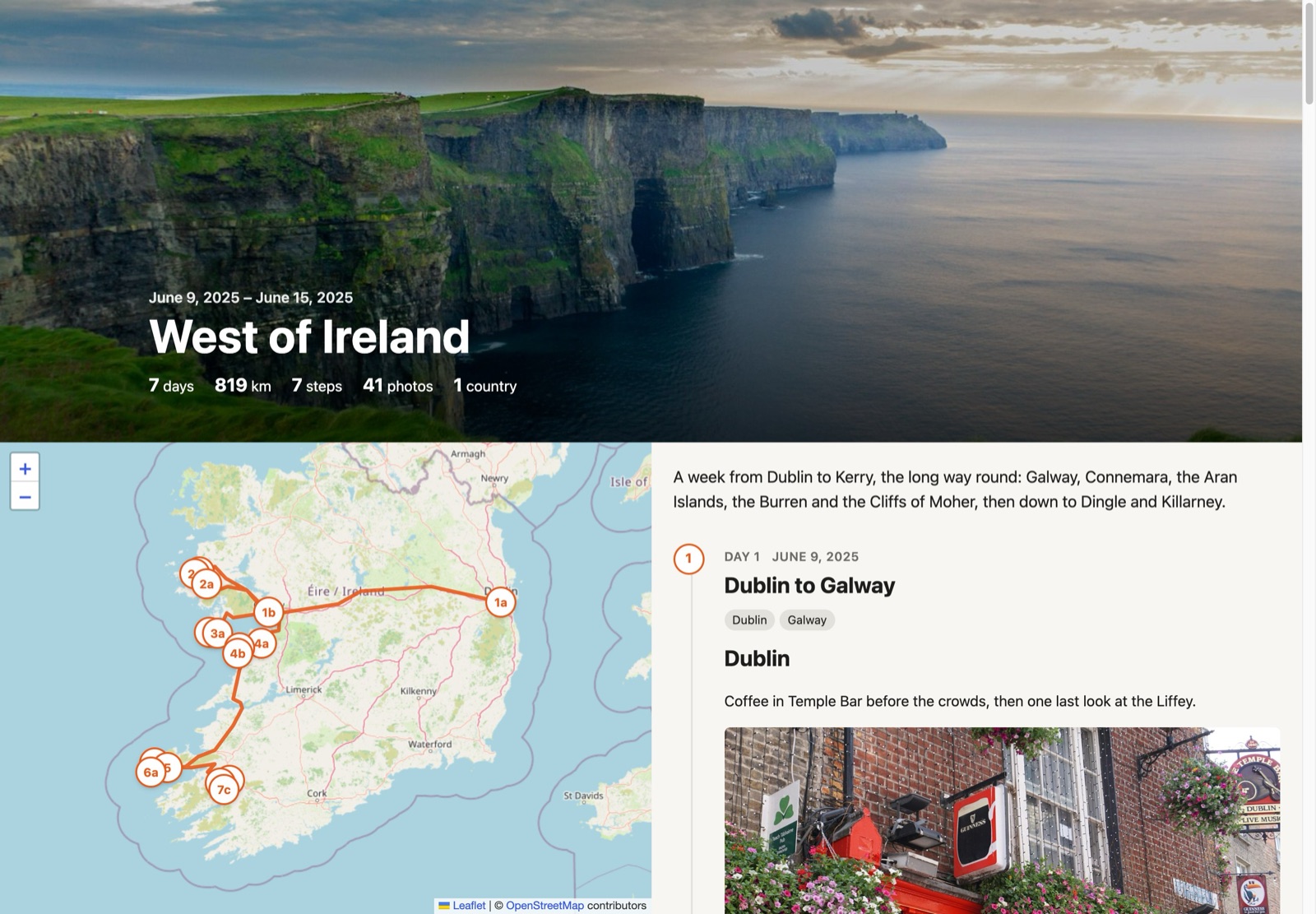
Demo photos from Unsplash, each credited in its caption; in the screenshot, the Cliffs of Moher by Jarek Skowron and Temple Bar by Sarah. Map © OpenStreetMap contributors.
How it works
A trip (a ts_trip post) has a date range and, optionally, an Immich album. A step (a ts_step post, child of the trip) is one day. Sync works like this:
- If Dawarich is set up, fetches your points for those dates and drops anything near home, and GPS glitches: any fix you'd have had to travel faster than 1,080 km/h to reach.
- Fetches the album's photos, or all photos taken during those dates if there's no album. Photos without GPS get the position you were at when you took them. A camera that records no time zone gets the offset of the nearest phone photo that does (or the site's), so abroad its photos aren't hours off. Photos are kept by the local date they were taken, so the first morning and last evening of a trip in another time zone aren't cut off.
- Creates a draft step for each day with favourites. The day is the local date the photos were taken (Immich's
localDateTime). - Groups each new day's favourites into places. A new place starts when a favourite is more than 2 km (configurable) from the current one and in a different town. A day with several places gets a heading per place in its story and a place tag (
ts_place) for each. Each place also gets an empty paragraph to write in and a Trip photos block. The title lists the places: "Lisbon, Sintra". - Simplifies the route (your Dawarich points, or else the photos with GPS in time order), splits it at big jumps (flights, ferries) and caches it on the trip. A track made from photos loses its GPS glitches too. The distance follows the whole track, jumps included, so flights count.
Headings and tags are seeded once. After that a step is yours. Re-syncing never changes its title, story, date, status or tags, and doesn't recreate days whose step you've moved to the bin; the notice after a sync says how many days that skipped, with a link to the trash. To recreate a day, empty its step from the trash and sync again. It only refreshes each step's map position.
Publish the days you want shown. Draft steps and their photos stay private, but a published trip's map route, distance and country count cover all its dates, unpublished days included. To keep a day's whereabouts private, leave it outside the trip's dates.
Which photos are shown
A step shows photos from its date. Favourites in Immich decide which:
- A step with favourites shows exactly those.
- A step without favourites (one you added by hand) gets an automatic pick (8 by default), spread across the day. Bursts of shots taken seconds apart count as one.
- On the trip page, Pin a photo to always show it, or Hide it to never show it. Press the button again to undo.
- Cover makes a photo the trip's header image; press it again to go back to the automatic choice (the first landscape favourite on a published step). A chosen cover is public with the trip, even if its step isn't.
- Everything else stays behind a collapsed "Show N more photos".
- Days without a step show no photos at all.
- Sync skips screenshots and other images with no camera make or model in EXIF, unless they're favourites.
- Star ratings are ignored, since they often belong to a Lightroom workflow rather than rating quality.
Shown photos sit under the place heading they belong to. Each seeded heading carries an anchor with its start time (id="ts-place-<unix>") and owns the photos taken from then until the next heading. Rename the headings, write between them, or add your own. Delete one and its photos join the section above. Favourites added later appear in the right section without sync touching the story.
The Trip photos block marks where a section's photos go and previews them in the block editor. Move it to put text after the photos, or insert one under a heading of a step made before the block existed. A section without one gets its photos after its text. Only the first block in a section shows photos.
Grids load a 640 px (short side) copy of Immich's preview, made once and cached; a photo shown on its own, and the lightbox, use the full preview.
The map gets a marker per place heading (3a, 3b…), or one per step without headings, numbered by trip day.
Selection happens when the page loads, so pin and hide take effect immediately. New favourites need a re-sync to be picked up, and only create a step for a day that doesn't have one yet.
To add a step by hand, click Add step, set its date in the block editor and write it up. It shows that day's photos, and the next sync places it on the map.
Privacy
Creating, editing and syncing trips uses the site's Immich and Dawarich credentials, which reach your whole photo library and location history, so it needs the manage_options capability (administrators) rather than just being able to write posts. To let other roles manage trips, filter it:
add_filter( 'travel_steps_capability', fn() => 'edit_others_posts' );Add the filter before init, e.g. in a plugin or mu-plugin, since routes are registered then.
Steps and places are in core REST for the block editor, but a step is only readable when its trip is (published, or you can edit it), and place terms only by editors. The photo proxy serves the public only photos shown on published steps of published trips. Shared caches (CDNs, proxies) keep a public photo for 5 minutes, so unpublishing a step or hiding a photo takes effect within that; browsers revalidate after an hour with an ETag, which re-runs the access check without resending the image.
Leaflet (1.9.4, BSD-2-Clause) ships with the plugin in assets/vendor/leaflet/, so no third-party script runs on trip pages. Map tiles still load from OpenStreetMap's tile servers, which see visitors' IP addresses.
Pages
| URL | Who |
|---|---|
/travel-steps/ |
Everyone: published trips (editors also see drafts) |
/travel-steps/trip/{slug} |
Map, route and step timeline with photos and lightbox. Editors can pin and hide photos. |
/travel-steps/new, /travel-steps/trip/{slug}/edit |
Trip managers (see Privacy): dates, album, visibility, sync, step list |
/travel-steps/settings |
Admins: Dawarich/Immich URLs and keys, home privacy zone, place radius |
Setup
composer install --no-devThen activate the plugin and open /travel-steps/settings:
- Dawarich (optional): the URL as reachable from the WordPress server (e.g.
http://dawarich_app:3000on a shared Docker network), and the API key from Dawarich → Settings → Account. Without a key, trips are mapped from photo locations. The route joins the places photos were taken with straight lines, dashed where they're over 20 km apart, and the distance is measured along those lines, so a winding drive comes out short and a flight counts. Photos without GPS stay unplaced, and a day without any located photo has no marker. - Immich: falls back to the URL and key from Media Picker for Immich when that's configured. The key needs
asset.read,asset.viewandalbum.read. - Home: coordinates and a radius to keep your home off every map. Right-click your home in Google Maps and click the coordinates to copy them, then paste the pair into either field.
Development
make test    # standalone: geometry, local days and places, photo selection
make smoke   # end-to-end in WordPress Playground with fake Dawarich/Immich clients
make demo    # the Playground demo, from this checkout, at http://127.0.0.1:9400
The demo's stand-in servers, trip and photos are in demo/fake-services.php, and demo/setup.php creates and syncs the trip. demo/blueprint.json is the public demo: it installs the latest release and fetches those two files from master.
make smoke covers sync and re-sync (edits kept, binned days stay binned), the sync lock, the REST gate for steps and places, photo visibility, story sections and the trip pages.
Deploying
Copy the plugin to a server with rsync over SSH. Put the destination in Makefile.local, which git ignores:
DEPLOY_DEST = host:/path/to/wp-content/plugins/travel-steps/make deploy-dry # what would be copied and deleted
make deploy # composer install --no-dev, then rsync --delete- It copies your working tree, not the last commit, so uncommitted changes go too.
tests/, the Makefiles and all dotfiles (.git,.gitignore,.githubin dependencies) stay behind.vendor/goes, with runtime dependencies only.make distbuilds the same files intodist/travel-steps.zip, ready to upload or run through Plugin Check.--deleteremoves files on the server that aren't in your copy, so keep nothing else in the plugin folder there.vendor/composer/installed.phpis copied every time: Composer writes the current commit into it.- If
vendor/ever goes missing on the server, the plugin stands down and shows admins a notice instead of breaking the site.
Proxies and caches
If an authentication proxy guards the whole site, trips aren't public until it lets these paths through:
/travel-steps/*: the trip pages. The new, edit and settings routes still need a WordPress login with the right capability (edit_posts,manage_options)./wp-json/travel-steps/v1/*: map data and photos, each checked against the trip's visibility/wp-content/plugins/travel-steps/*: scripts, styles and Leaflet
Photos come from /wp-json/travel-steps/v1/trips/{id}/photo/{asset}. Public ones are sent with s-maxage=300, so a CDN that honours origin headers keeps them 5 minutes; drafts and editor URLs are private. Don't let a CDN or page cache store /travel-steps/* pages for logged-in users: editors see drafts and editing tools.
Releases
8 releases. Each count is every asset in that release; expand a row for the breakdown.
v0.5.1
latest
Oct 19, 2026 3d ago
travel-steps.zip
+2 assets
37
Oct 17, 2026 5d ago
travel-steps.zip
+2 assets
10
Oct 15, 2026 7d ago
travel-steps.zip
+2 assets
7
Oct 13, 2026 9d ago
travel-steps.zip
+2 assets
cohort
38
Oct 11, 2026 11d ago
travel-steps.zip
+2 assets
17
Active-site estimate ≈20 comes from the v0.3.0 cohort. Method.