CF Access Login WP Registry grade B. Medium-severity findings · 1 findingWP RegistryMedium-severity findings · 1 findingOpen the reportB
Install
Upload it under Plugins → Add New Plugin → Upload Plugin, then activate.
Install straight from GitHub with WP-CLI:
wp plugin install https://github.com/domkirby/cf-access-login/releases/download/1.0.1/CF-Access-Login.zipLogin to WordPress with Cloudflare Access Token
This WordPress plugin allows you to login to WordPress using a Cloudflare Access JSON Web Token (JWT). It works for websites that are protected by Cloudflare Access to require additional authentication to the WordPress admin area.
Installation
Download the latest Release ZIP from this repo and upload it to your site. Be sure to download CF-Access-Login.zip and not the source code zip, as this will ensure the folder is named correctly once you install it to WordPress.
The plugin will use the stable branch to check for released updates and is auto updater compatible.
Use
If you do not protect your WordPress site with Cloudflare Access, this plugin will do you no good!
This plugin works by searching for a user matching the email claim in the JWT with a matching user's email in WordPress. If no such user exists, the login will fail as it does not create users for you.
WARNING: I recommend that you maintain an account for which you know the password so that you can access your site in the event of a Cloudflare, Plugin, or other failure.
Configuration
This plugin is simple to configure. Once activated, a new options page will be created under "Settings" in the WordPress admin menu.
Configure the following options:
-
Cloudflare Team Name. This is the name of your team as presented in the domain used for logging in. For example, if your team domain is
contoso.cloudflareaccess.com, then your team name would becontoso(without the.cloudflareaccess.compart) -
App Audience ID. This is the AUD tag displayed in your Cloudflare app and is a string such as
dc52e74361d1df510a0ef83eb6e3dfd42e78420820... -
Auto Redirect Setting. This setting will automatically redirect
wp-login.phpto/wp-adminto trigger your Access application rule. -
Logout from Cloudflare on WordPress Logout. Recommended to be ENABLED. This setting will automatically log you out of CF Access when you sign out out of WordPress. If you leave it off, your token will simply log you right back into WordPress. This may be desired behavior for some, so the option is there.
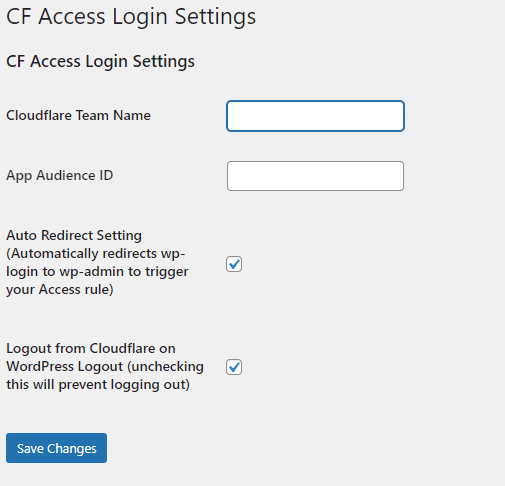
All other authentication options are handled by Cloudflare.
Issues
If you find an issue, please open a detailed issue on this repo. Pull requests are welcome!
Releases
12 releases. Each count is every asset in that release; expand a row for the breakdown.