Install
This is the repository archive. It installs, but the folder name will carry the branch suffix and updates will not flow.
Install straight from GitHub with WP-CLI:
wp plugin install https://github.com/diskchord/eseq-midi-converter-plugin/archive/refs/heads/main.zipE-SEQ MIDI Converter for WordPress
E-SEQ MIDI Converter is a public-facing WordPress plugin that converts batches of Yamaha E-SEQ song files to Standard MIDI files and Standard MIDI files back to E-SEQ. It was built for alexanderpeppe.com and uses a bounded, native-PHP port of the conversion engine from APS MIDI Prep Tool.
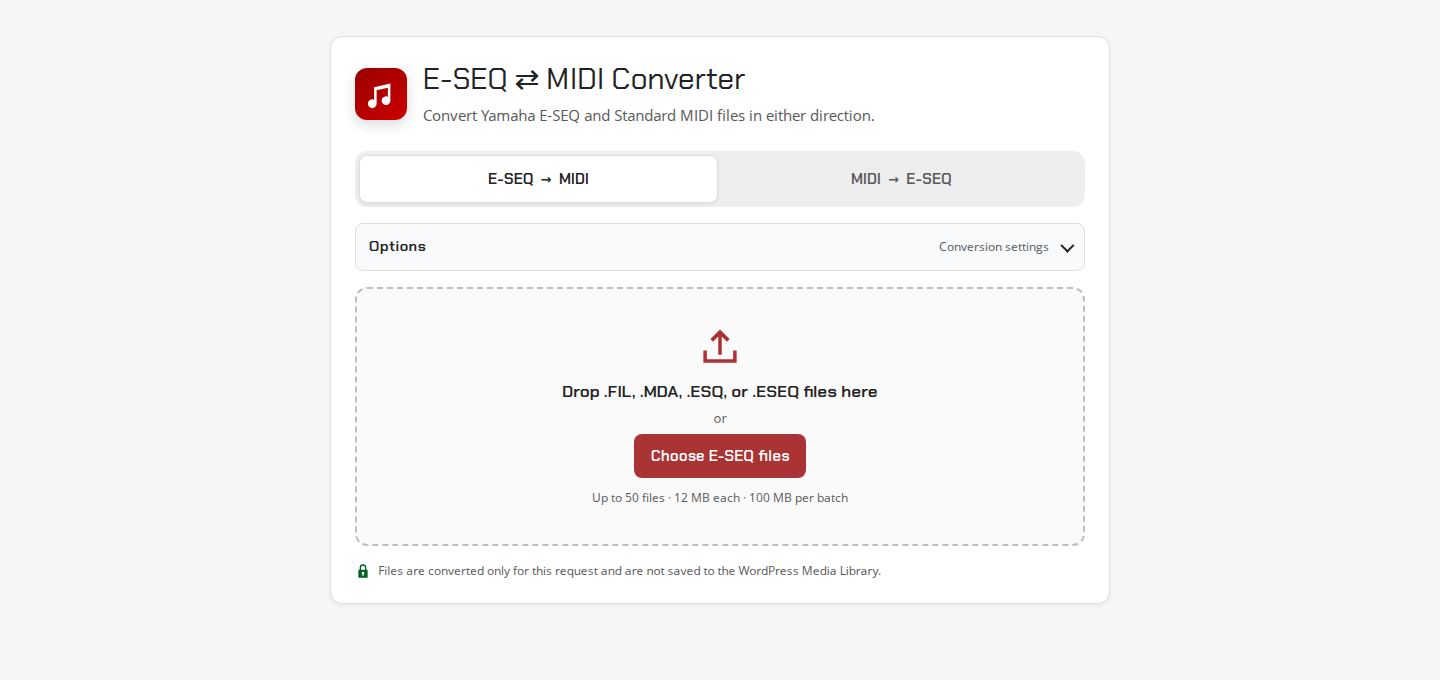
The plugin performs each conversion in one stateless request, returns the result directly to the browser, and does not retain uploaded or converted files. No Python runtime, shell command, Composer dependency, or external conversion service is required.
Features
- Convert normal Disklavier
.FIL,.ESQ, and.ESEQsongs to SMF0 MIDI. - Read the known
Q11V1.00E-SEQ variant. - Convert Clavinova/CVP
.MDAsongs to SMF0 MIDI. - Convert SMF0 and SMF1 MIDI to Disklavier
.FILor Clavinova.MDA. - Automatically repair the narrow legacy zero-volume condition that can make converted MIDI silent.
- Preserve original controller data instead by turning repair off under Options.
- Select many files at once or use drag and drop.
- Track measured upload progress and the conversion state of every file independently.
- Cancel, retry, remove, or download individual files without restarting the batch.
- Download all successful results in a client-built ZIP.
- Prepare a Disklavier-ready
.FILset with a generatedPIANODIR.FIL, hardware-safe song names, and an optional disk title. - Avoid retaining uploaded or converted files on the server.
- Use a responsive, keyboard-accessible interface styled for alexanderpeppe.com.
- Bound file sizes, event counts, ticks, SysEx payloads, generated markers, tracks, chunks, request rates, and server concurrency.
Requirements
- WordPress 6.2 or newer.
- 64-bit PHP 7.4 or newer.
- A modern browser with JavaScript,
Blob,Promise, typed-array, and File APIs. - A PHP/WordPress upload limit large enough for the files being submitted.
The public endpoint uses WordPress's admin-post.php. Pretty permalinks are not required.
Installation
Install a release ZIP
- Download
eseq-midi-converter-1.2.0.zipfrom the GitHub Releases page. - In WordPress, open Plugins → Add New → Upload Plugin.
- Select the ZIP, choose Install Now, and activate E-SEQ MIDI Converter.
- Add
[eseq_midi_converter]to a page or post.
Install from source
- Clone or download this repository.
- Copy it to
wp-content/plugins/eseq-midi-converter. - Activate E-SEQ MIDI Converter in WordPress.
- Add
[eseq_midi_converter]to a page or post.
Setup notes and the effective server upload limit are available under Tools → E-SEQ MIDI Converter.
Shortcode reference
The basic shortcode is:
[eseq_midi_converter]Supported attributes:
| Attribute | Default | Allowed value | Purpose |
|---|---|---|---|
title |
E-SEQ ⇄ MIDI Converter |
Plain text | Replaces the converter heading. |
description |
Convert Yamaha E-SEQ and Standard MIDI files in either direction. |
Plain text | Replaces the introductory sentence. |
default_direction |
eseq-to-midi |
eseq-to-midi or midi-to-eseq |
Chooses the initially active direction. |
Examples:
[eseq_midi_converter default_direction="midi-to-eseq"]

[eseq_midi_converter title="Convert piano files" description="Convert your files online."]
Invalid default_direction values safely fall back to eseq-to-midi. Titles and descriptions are escaped as text.
Using the converter
- Choose E-SEQ → MIDI or MIDI → E-SEQ.
- Open Options only if you want to change the recommended default.
- Drop files onto the upload area or choose them with the file picker.
- Review the queue and choose Convert files.
- Watch each file move through queued, uploading, converting, and ready/failed/cancelled states.
- Download files individually or use the batch download button. For MIDI-to-FIL batches, its recommended default creates a Disklavier-ready ZIP with
PIANODIR.FIL.
The browser submits one file per HTTP request with two requests in flight by default. This avoids PHP's max_file_uploads limit, isolates a malformed file from the rest of the batch, and makes per-file cancellation and retry reliable.
Options
The Options disclosure is collapsed by default.
| Option | Direction | Default | Effect and tradeoff |
|---|---|---|---|
| Repair silent MIDI playback automatically | E-SEQ → MIDI | On | Repairs a targeted legacy CC7=0 condition. Turn off for exact controller preservation. |
| E-SEQ output format | MIDI → E-SEQ | Disklavier .FIL |
Choose .FIL for classic Disklavier systems or .MDA for compatible Clavinova/CVP systems. |
| Prepare a Disklavier-ready set | MIDI → E-SEQ with .FIL output |
On | Makes the batch ZIP contain a generated PIANODIR.FIL plus consistently named .FIL songs. |
| Disk/album title | Disklavier-ready set | Empty | Optionally writes up to 64 ASCII characters into the generated directory metadata. |
SMF1-to-SMF0 merging, timing conversion, safe filename generation, compatible FIL padding, and clean MIDI metadata are automatic. APS MIDI Prep Tool's separate pedal normalization, binary-pedal, duplicate/stuck-pedal cleanup, and Piano Roll Vector transforms are intentionally not exposed here because they can be lossy or are unrelated to basic E-SEQ conversion.
The Disklavier-ready option is shown only for .FIL output. It does not change individual downloads: each converted song can still be downloaded using its own row. Before conversion, use the up/down arrow buttons beside selected files to set the disk order. The generated set follows that visible order and supports no more than 60 successful songs, matching the PIANODIR.FIL format.
Automatic silent-MIDI repair
Automatic playback repair is enabled by default for E-SEQ-to-MIDI conversion. Some Yamaha-oriented files contain an early channel-volume controller command with a value of zero:
B0 07 00A standards-compliant MIDI player treats this as channel volume zero and may play valid piano notes silently. The repair changes the value to 100 only when:
- later notes occur on the same MIDI channel; and
- no non-zero channel-volume restoration occurs before those notes.
The repair does not remove arbitrary controller data, normalize pedals, fix truncated files, or recover corrupt MIDI structures. Turn it off under Options when exact archival preservation of channel-volume events is more important than immediate generic MIDI playback.
MIDI-to-E-SEQ conversion preserves the submitted MIDI controller data.
Supported formats
| Input | Output | Notes |
|---|---|---|
Disklavier .FIL, .ESQ, .ESEQ |
.mid |
Reads normal headers and the known Q11 profile. |
Clavinova/CVP .MDA |
.mid |
Reads the E-SEQ stream from the known MDA container profile. |
SMF0 .mid, .midi |
Disklavier .FIL |
Rescales timing to 384 PPQN and writes a normal padded FIL song. |
SMF1 .mid, .midi |
Disklavier .FIL |
Merges tracks deterministically before E-SEQ conversion. |
SMF0 or SMF1 .mid, .midi |
Clavinova .MDA |
Writes the known Clavinova/CVP container profile. |
The converter rejects:
- MIDI format 2 files;
- SMPTE-timed MIDI files;
- structurally truncated or malformed MIDI/E-SEQ data;
- incomplete E-SEQ or MIDI SysEx events;
- Yamaha Electone
.EVTfiles; - uploaded
PIANODIR.FILandMUSIC.DIRfiles, which are disk indexes rather than songs; and - files that use a supported extension but do not contain the required binary signature.
The plugin can generate PIANODIR.FIL for a MIDI-to-Disklavier-FIL output batch. It does not generate the MUSIC.DIR index used by .MDA workflows, and it does not create or format a floppy-disk image. Use APS MIDI Prep Tool when a complete filesystem or disk-image workflow is required.
Batch progress and downloads
Every selected file has its own lifecycle:
- Ready to convert — selected, but conversion has not been started.
- Queued — after Convert files is pressed, waiting for an available browser slot.
- Uploading — measured from the browser's network upload progress.
- Converting — shown as indeterminate because conversion is an atomic server operation.
- Ready to download, Failed, or Cancelled.
The interface never invents a conversion percentage. Successful responses are validated by status, a plugin response header, MIME type, output filename, and binary magic before a file becomes downloadable.
Completed files remain in browser memory as temporary Blob URLs. The standard Download all as ZIP action creates an uncompressed ZIP in the browser and disambiguates duplicate filenames. Closing the page or removing a row releases its Blob URL.
For MIDI-to-E-SEQ conversion with Disklavier .FIL selected, Prepare a Disklavier-ready set is checked by default under Options. The batch download then creates a ZIP containing PIANODIR.FIL first, followed by every successful .FIL in visible queue order. Packaged songs receive unique uppercase DOS 8.3 filenames, and each song's internal filename key is patched to match its ZIP name. This packaging does not rename or alter the separately downloadable result for an individual queue row. If part of a batch fails or is cancelled, the interface asks for confirmation before packaging only the successful songs. A directory supports at most 60 songs; the plugin reports an error instead of silently truncating a larger set.
PIANODIR.FIL and all filename patching are generated locally from the successful result blobs in the browser. The package step does not upload those results again or retain a server-side archive. The ZIP is a coordinated file set, not a formatted floppy image; extract or copy it using the workflow appropriate for the target instrument and media.
Privacy and data lifecycle
- WordPress/PHP receives one temporary uploaded file per conversion request.
- The plugin reads that temporary file, converts it in memory, and streams the result directly to the browser.
- The plugin does not create public content, user records, or retained output files.
- PHP removes its normal temporary upload after the request lifecycle.
- The plugin does not send file data to APS MIDI Prep Tool, alexanderpeppe.com, or any third-party conversion API.
- A short random reference is returned for server errors. The error log receives the reference and exception message, not the uploaded file contents.
Server, reverse-proxy, CDN, security-plugin, and hosting logs remain subject to the site's own configuration and privacy policy.
Limits and security
Default public-endpoint controls:
| Control | Default |
|---|---|
| File upload limit | 12 MiB, further limited by WordPress/PHP and the 32 MiB engine ceiling |
| Selected browser batch | 50 files and 100 MiB |
| Browser concurrency | 2 requests |
| Disklavier-ready package | 60 successful .FIL songs |
| Request timeout | 120 seconds |
| Rate limit | 75 accepted conversions per remote address in a rolling ten-minute window |
| Server admission | 4 database-backed named-lock slots when MySQL/MariaDB exposes GET_LOCK() |
| Conversion input ceiling | 32 MiB |
| Conversion output ceiling | 64 MiB |
| Parsed events | 100,000 |
| Parser operations | 250,000 |
| Tick value | 100,000,000 |
| SysEx event | 2 MiB |
| Generated bar markers | 50,000 |
| MIDI tracks/chunks | 256 tracks and 512 chunks |
The public endpoint requires a same-origin browser Origin or Referer. Scheme, hostname, and effective port must match home_url(); requests with neither header are rejected. Uploaded extensions and signatures are checked before full parsing, and all parser offsets and declared lengths are bounded.
The database named-lock admission control is best effort. When a host does not expose GET_LOCK(), the bounded parser still runs, but high-traffic sites should also enforce request/body limits and rate limiting at the CDN, WAF, or reverse-proxy layer.
WordPress filters
Site owners can tune deployment limits:
| Filter | Default | Clamp/behavior |
|---|---|---|
aps_emc_max_file_size |
12 * MB_IN_BYTES |
Effective value is at least 1 byte and no higher than WordPress's upload limit; the engine still caps input at 32 MiB. |
aps_emc_max_batch_files |
50 |
At least 1. Browser-side selection limit. |
aps_emc_max_batch_bytes |
100 * MB_IN_BYTES |
At least the effective per-file limit. Browser-side selection limit. |
aps_emc_browser_concurrency |
2 |
Clamped to 1–4. |
aps_emc_server_concurrency |
4 |
Clamped to 0–32; 0 disables named-lock admission. |
aps_emc_request_timeout_ms |
120000 |
At least 30,000 milliseconds. |
aps_emc_rate_limit |
75 |
Values below 1 disable the plugin's per-address limiter. |
Example:
add_filter( 'aps_emc_max_file_size', fn() => 16 * MB_IN_BYTES );
add_filter( 'aps_emc_max_batch_files', fn() => 25 );
add_filter( 'aps_emc_max_batch_bytes', fn() => 80 * MB_IN_BYTES );
add_filter( 'aps_emc_browser_concurrency', fn() => 2 );
add_filter( 'aps_emc_server_concurrency', fn() => 4 );
add_filter( 'aps_emc_request_timeout_ms', fn() => 90000 );
add_filter( 'aps_emc_rate_limit', fn() => 50 );
These examples use PHP arrow functions, which are available on the plugin's minimum PHP 7.4 runtime.
Conversion and round-trip notes
- E-SEQ-to-MIDI output is SMF0 at 384 PPQN and retains the parsed E-SEQ end tick.
- Output MIDI includes tempo, time signature when available, C-major key metadata, a track title, a short APS conversion marker, preserved channel events, channel prefixes, and complete SysEx data.
- Normal
.FILoutput is padded to a 2048-byte boundary withF6. .MDAoutput follows the container profile observed in the APS corpus and is not FIL-block-padded.- E-SEQ titles are single-byte Latin-1 fields limited to 32 bytes; unrepresentable filename-fallback characters become
?. - Internal E-SEQ filename keys are DOS 8.3-style printable ASCII.
- Disklavier-ready ZIP entries use unique uppercase DOS 8.3 names, and their internal E-SEQ filename keys are updated to match.
- Generated
PIANODIR.FILrecords follow the visible queue order and may include the optional disk/album title entered under Options. - The optional directory title is limited to 64 ASCII bytes; unsupported characters are stored as
?. - Tempo-factor conversion and 384-PPQN rescaling can introduce small rounding differences.
- Most nonmusical MIDI metadata has no E-SEQ equivalent and is omitted.
- A clean Q11-to-MIDI-to-E-SEQ conversion writes a normal
.FIL; restoring the complete private Q11 prefix is outside this web converter's clean-output workflow. .MDAcompatibility cannot be guaranteed across every Clavinova/CVP model; test output on the intended instrument using copies.
Development
The conversion engine has no WordPress runtime dependency, so its regression suite runs directly with PHP:
php tests/test-converter.php
php tests/test-wordpress-integration.php
node tests/test-disklav-package.js
find . -name '*.php' -not -path './dist/*' -print0 | xargs -0 -n1 php -l
node --check assets/js/converter.js
node --check assets/js/disklav-package.js
The tests generate small synthetic musical data. They cover FIL and MDA writing, round trips, Q11 reading, SMF1 merging, running status, tempo changes, channel prefixes, complete SysEx, automatic and archival CC7 policies, Unicode filename handling, PIANODIR records and package naming, malformed structures, shortcode output, late asset loading, same-origin normalization, rolling rate limits, and the Options panel defaults.
GitHub Actions runs these checks across the supported PHP versions. No musical fixture from a commercial library should be committed to this repository.
Project layout
assets/                         Browser CSS and JavaScript
includes/                       Conversion engine and WordPress integration
languages/                      Translation template
scripts/build-release.sh        Reproducible WordPress ZIP builder
tests/                          Standalone regression and integration tests
eseq-midi-converter.php         Plugin bootstrap and metadata
readme.txt                      WordPress plugin readme
README.md                       GitHub project documentation
LICENSE                         Apache License 2.0
NOTICE                          Copyright, derivation, and attribution notices
Building a release
From the repository root:
./scripts/build-release.shThe script verifies version synchronization, runs the test and syntax suites, stages only distributable files, normalizes permissions, creates dist/eseq-midi-converter-VERSION.zip, checks the archive, and writes dist/SHA256SUMS.
Release tags use vMAJOR.MINOR.PATCH. Build from a clean tagged commit and attach the ZIP and checksum file to the matching GitHub Release rather than committing dist/ artifacts.
Contributing, support, and security
- Read CONTRIBUTING.md before submitting a change.
- See SECURITY.md for private vulnerability-reporting guidance.
- User-facing setup information is also available under Tools → E-SEQ MIDI Converter in WordPress.
- General service and product information is available at alexanderpeppe.com.
Do not attach copyrighted PianoSoft disks, commercial player-piano libraries, proprietary software, private customer files, or any other material you do not have the right to share to a public issue. Use synthetic, public-domain, or explicitly redistributable test files.
License and attribution
E-SEQ MIDI Converter is licensed under the Apache License, Version 2.0.
The native PHP conversion engine and browser-side PIANODIR.FIL writer are derived from APS MIDI Prep Tool, ported from Python, and modified for bounded public WordPress request processing and private client-side packaging. Required attribution and modification notices are in NOTICE and the source headers.
Yamaha, Disklavier, PianoSoft, Electone, Clavinova, CVP, and other names are trademarks or product names of their respective owners. They are used only to identify format, instrument, and preservation-workflow compatibility. This project and APS MIDI Prep Tool are independent utilities and are not affiliated with, sponsored by, or endorsed by those owners.
Use the converter only with recordings and files you own or are authorized to preserve, convert, repair, or modify. Do not use it to distribute copyrighted music or commercial player-piano libraries without permission.