Simple OIDC SSO
A lightweight WordPress plugin for quick and easy OpenID Connect authentication. Designed specifically for Keycloak identity provider. Simple setup, automatic user sync, and secure token handling.
Install
This is the repository archive. It installs, but the folder name will carry the branch suffix and updates will not flow.
Install straight from GitHub with WP-CLI:
wp plugin install https://github.com/disisto/simple-keycloak-oidc-sso-for-wordpress/archive/refs/heads/main.zipLightweight WordPress plugin for quick and easy Keycloak authentication via OpenID Connect.
Requirements
- WordPress 5.3+
- PHP 7.4+
- Keycloak 26+
- HTTPS (production)
Installation
- Upload plugin to WordPress
- Activate plugin
- Go to Settings → OIDC SSO
- Enter your Keycloak settings:
- Server URL (e.g.,
https://keycloak.example.com) - Realm name
- Client ID
- Client Secret
- Server URL (e.g.,
- Save settings
- Enable the plugin checkbox
- Save again
Keycloak Configuration Guide
- Create new client in Keycloak
- Set client protocol to
openid-connect - Set Access Type to
confidential - Add Valid Redirect URIs:
https://your-wоrdpress-site.com/wp-login.phphttps://your-wоrdpress-site.com/wp-login.php?*
- Add Valid Post Logout Redirect URI (for automatic logout):
https://your-wоrdpress-site.comhttps://your-wоrdpress-site.com/*
- For profile picture sync: Enable the
pictureclaim in your client scope - For name sync: Ensure
profilescope includesgiven_name,family_name, andnameclaims - Save and copy Client Secret
Features
- ✅ OpenID Connect authentication
- ✅ Automatic user creation and profile sync
- ✅ Profile picture sync from Keycloak
- ✅ First name & last name sync from Keycloak
- ✅ Simple admin interface
- ✅ Enable/disable toggle
- ✅ Configurable logout behavior (WordPress only OR WordPress + Keycloak)
- ✅ Backchannel logout support (server-to-server logout notifications)
- ✅ Secure token handling
- ✅ Full WordPress Multisite support
- Network-wide configuration
- Site-specific overrides
- Network-wide user access option
Security
- State and nonce validation
- Secure token exchange
- Input sanitization
- HTTPS required for production
Screenshots
WordPress Login Page
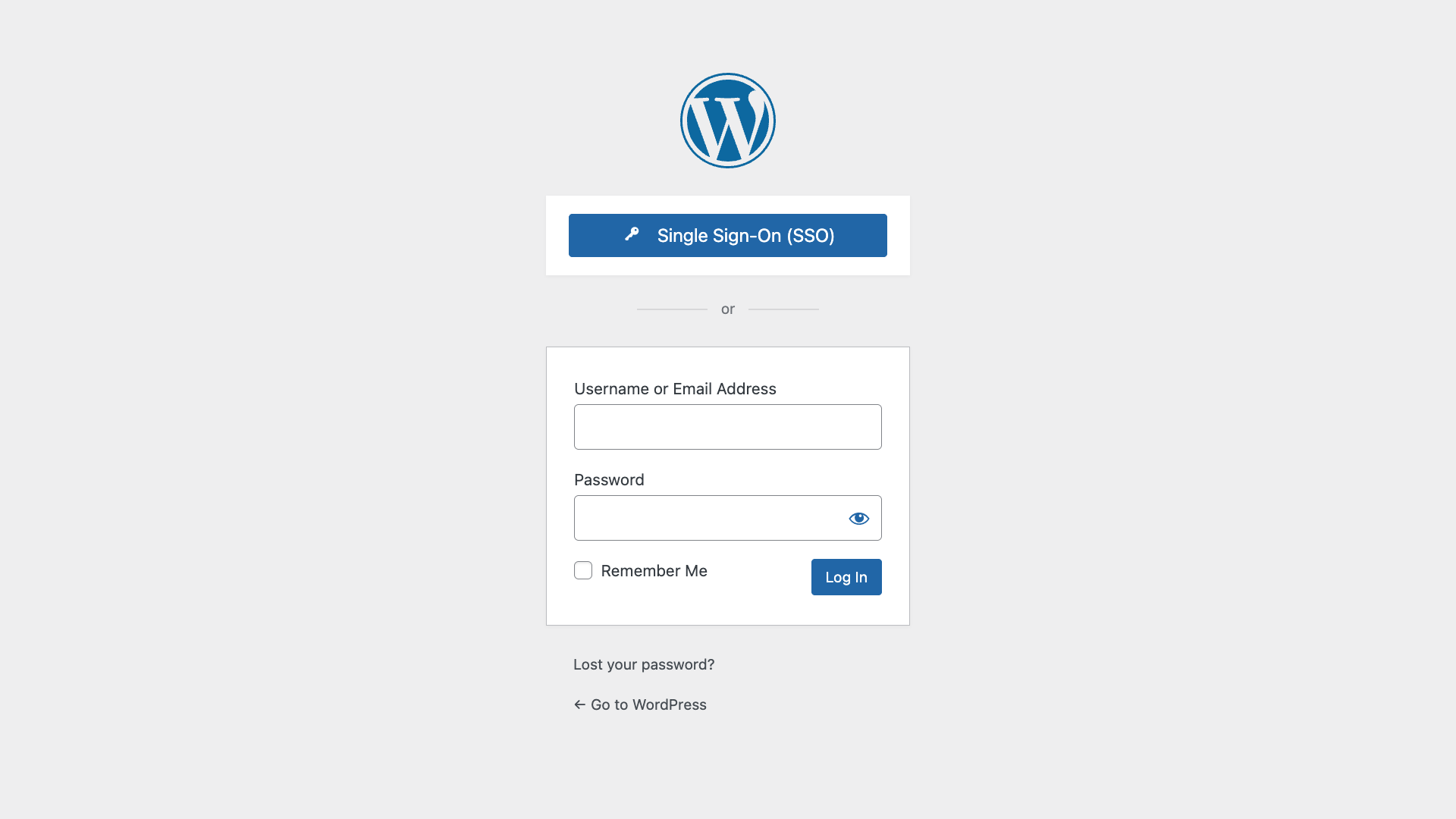 WordPress login page with the Single Sign-On (SSO) button
Plugin Settings - Basic Configuration
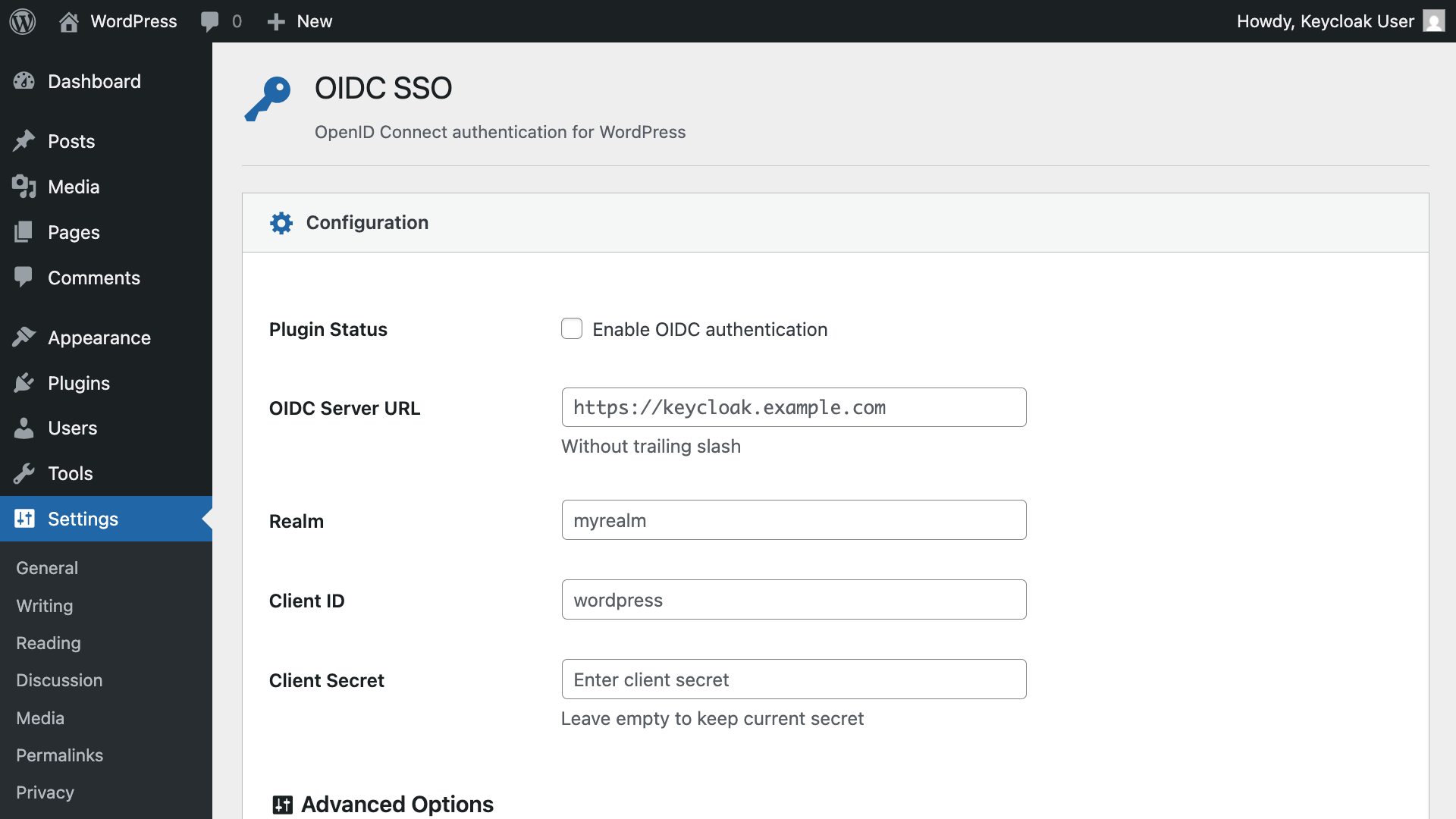 Configure your Keycloak server, realm, and client credentials
Plugin Settings - Advanced Options
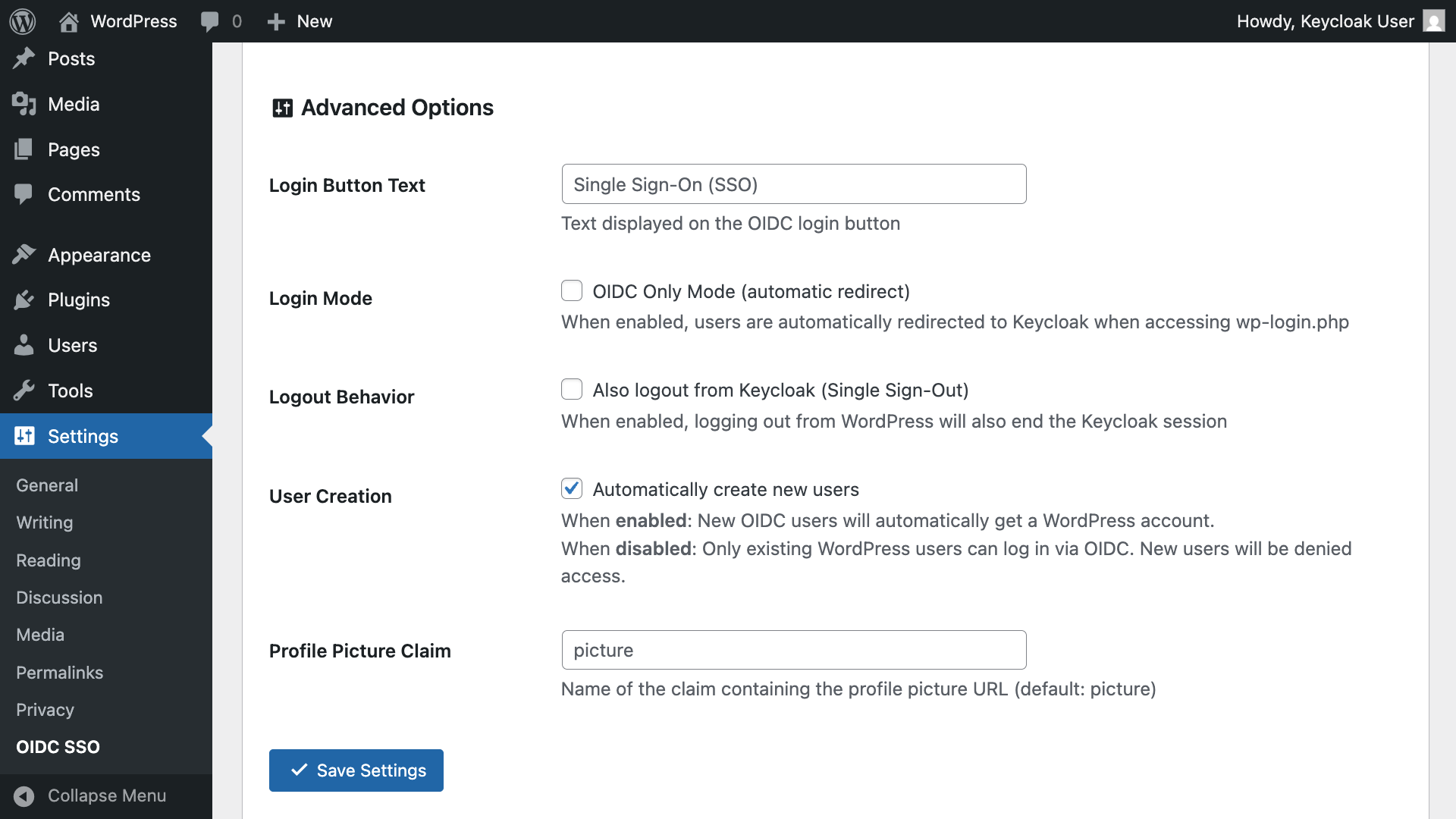 Configure logout behavior, user creation, and profile picture sync
Connection Test Results
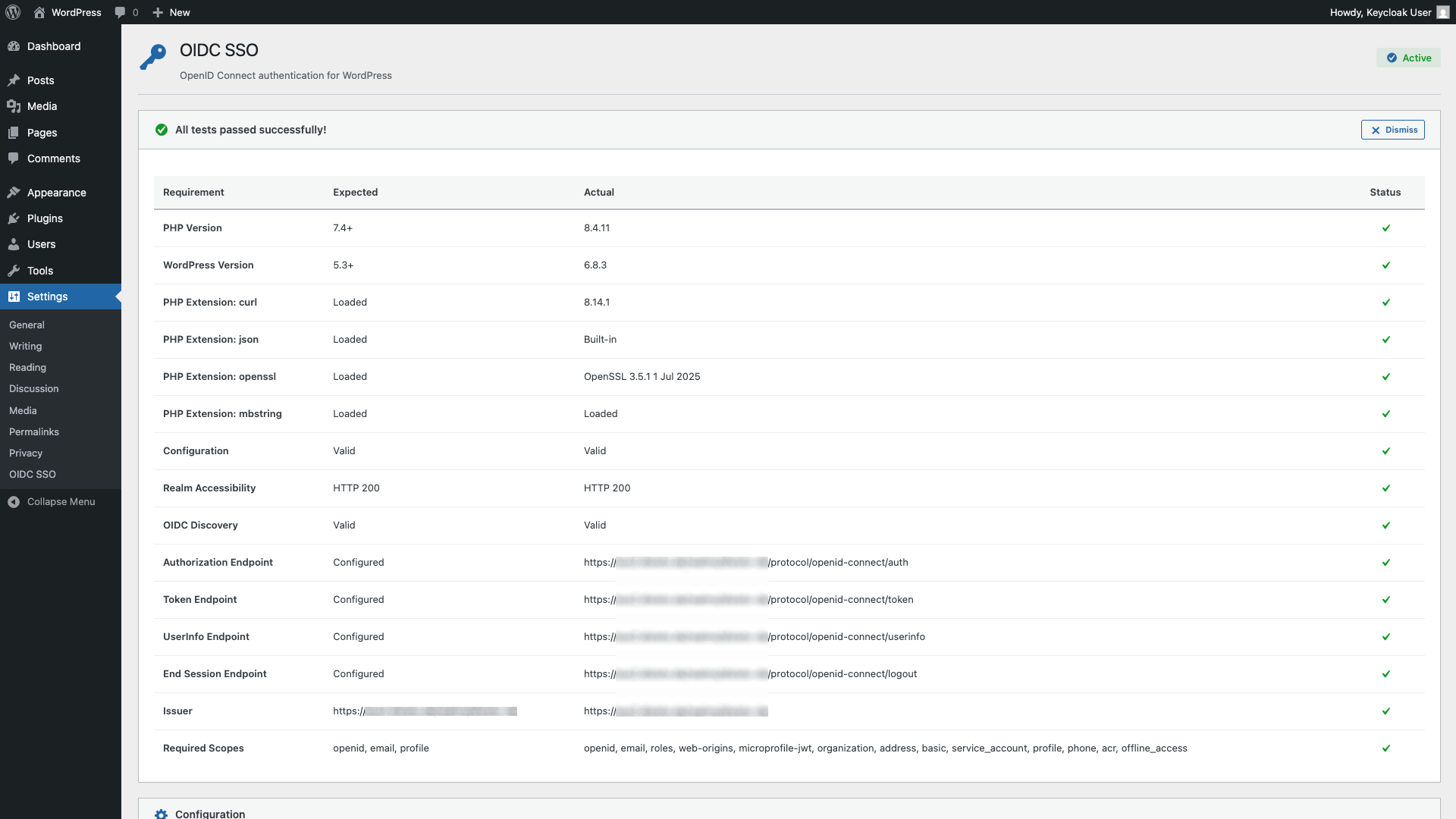 Test your Keycloak connection and validate OIDC configuration
Keycloak Client Configuration Guide
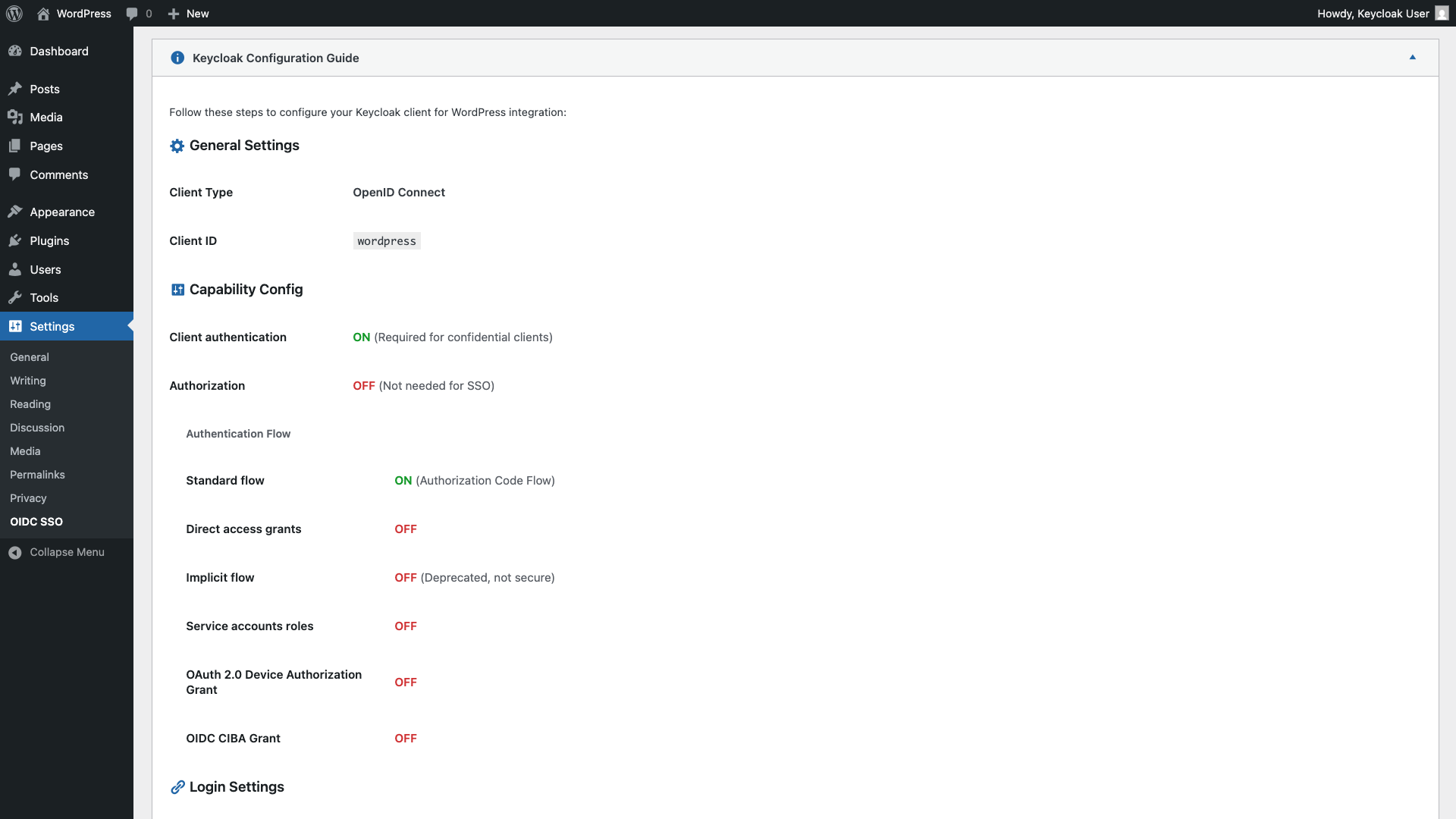 Built-in guide for configuring your Keycloak client
Usage
Login
Once configured and enabled:
- Go to WordPress login page
- Click "Single Sign-On (SSO)"
- Log in with Keycloak credentials
- Redirected back to WordPress logged in
Automatic Profile Sync:
- First name, last name, and display name are synced from Keycloak on every login
- Profile picture is automatically downloaded and displayed in WordPress (admin bar, comments, etc.)
- Changes in Keycloak are reflected in WordPress after next login
Logout Options
You can choose between two logout behaviors:
Option 1: WordPress Only (Default)
- Unchecked: "Also logout from Keycloak..."
- Logout only from WordPress
- Keycloak session remains active
- User stays logged in to other apps using the same Keycloak
Option 2: WordPress + Keycloak (Single Sign-Out)
- Checked: "Also logout from Keycloak..."
- Logout from both WordPress AND Keycloak
- Terminates Keycloak session completely
- User is logged out from all connected applications
Backchannel Logout
The plugin supports Keycloak's backchannel logout feature, which allows Keycloak to notify WordPress when a user logs out from another application. This ensures automatic logout synchronization across all connected applications.
To enable backchannel logout in Keycloak:
- Go to your client settings in Keycloak
- Scroll to Logout settings
- Turn OFF "Front channel logout" (required in Keycloak 26+)
- Set Backchannel logout URL to:
https://your-wordpress-site.com/wp-json/simple-oidc/v1/backchannel-logout - Turn ON "Backchannel logout session required"
- Turn ON "Backchannel logout revoke offline sessions"
This is the recommended logout method as it's more reliable than frontchannel logout (no browser dependencies or CSP issues).
Multisite Support
This plugin fully supports WordPress Multisite installations:
- Network Admin Settings: Configure once for all sites
- Site Overrides: Individual sites can customize settings
- Network-wide Users: Option to add users to all sites automatically
- Flexible Configuration: Mix network settings with site-specific configurations
Contributing
Contributions are welcome! Please feel free to submit a Pull Request.
This project is not affiliated with Keycloak and/or WordPress.
All mentioned trademarks are the property of their respective owners.
Releases
1 release.
These releases are tags only. The author does not attach a packaged zip, so there are no download counts to report.