WP Manifestindependent plugin directory
manifest / integrations / disciple-tools-storage

Disciple.Tools - Storage WP Registry grade A-. Low-severity findings · 2 findingsWP RegistryLow-severity findings · 2 findingsOpen the reportA-

★ 0stars
106release downloads
≈10active sites
1.5.0latest · 1 year ago

Install

Download disciple-tools-storage.zip From the 1.5.0 release on GitHub, Aug 22, 2025

Upload it under Plugins → Add New Plugin → Upload Plugin, then activate.

Install straight from GitHub with WP-CLI:

wp plugin install https://github.com/discipletools/disciple-tools-storage/releases/download/1.5.0/disciple-tools-storage.zip
Updates itself. It ships its own updater (Plugin Update Checker), so new versions appear under Dashboard → Updates.

Disciple.Tools - Storage is intended to help manage connections with remote object storage services, such as AWS S3, Backblaze, etc.

Community

Need help or have a question? Join the D.T Forum: https://community.disciple.tools/category/17/d-t-storage

Purpose

Provide the ability to store/retrieve all storage content within 3rd party object storage services; offering greater security.

Security

Keep your files in a private S3 Bucket, protected from being findable from the web. This integration with Disciple.Tools creates short lived links (24 hours) to display images.

API

See the API Documentation for more information.

DT_Storage::get_file_url( string $key = '' )
DT_Storage::upload_file( string $key_prefix = '', array $upload = [], string $existing_key = '', array $args = [] )

Setup

  • Once D.T Storage Plugin has been installed, create a new connection. Go to WP Admin > Extensions (D.T) > Storage.
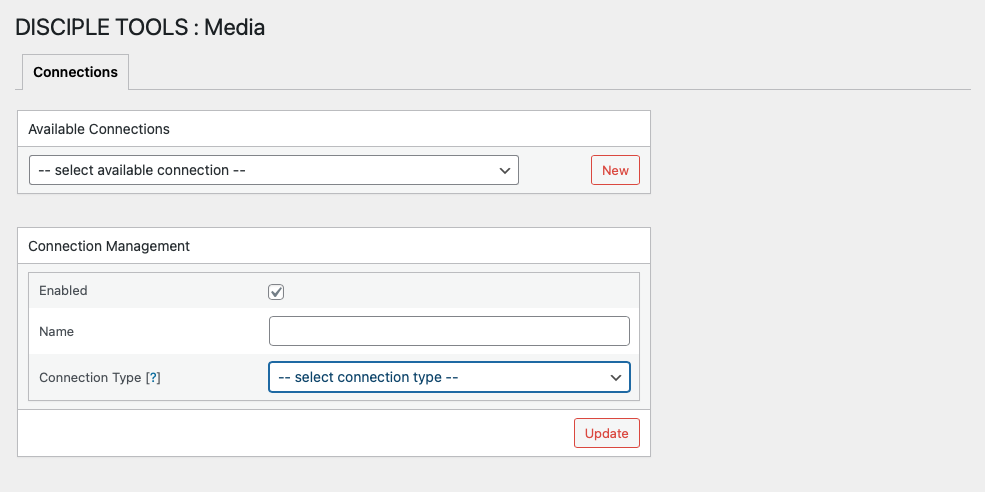
1

  • The following connection types (3rd Party Object Storage Services) are currently supported:

  • Enter required connection details; ensuring specified bucket has already been created within 3rd party object storage service.
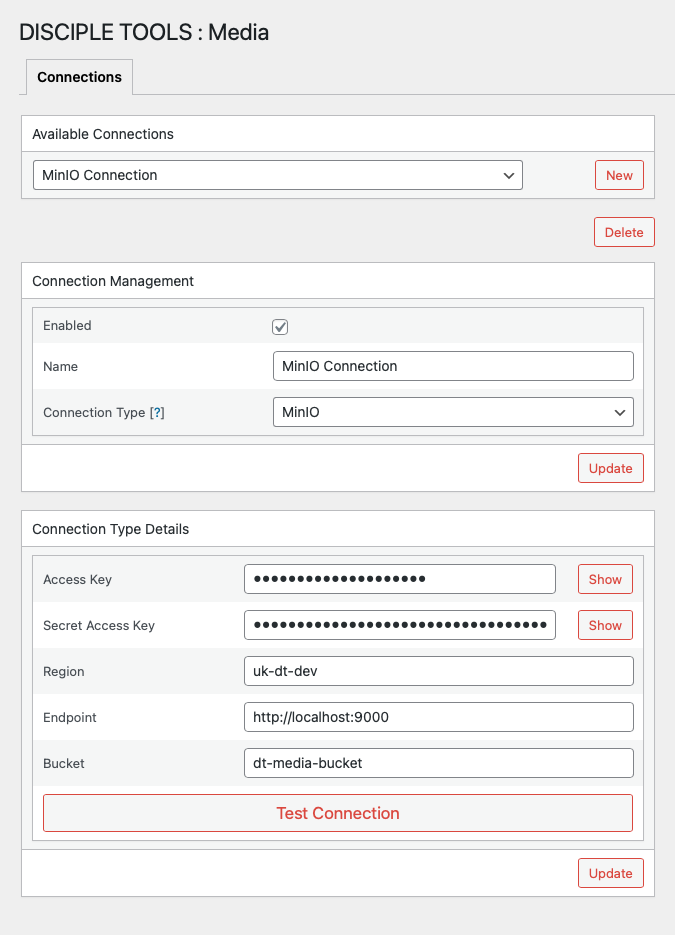
2

If no endpoint protocol scheme is specified; then https:// will be used.

  • Once new connection has been validated and saved, navigate to Storage Settings section within D.T General Settings and select connection to be used for the default media storage within D.T.
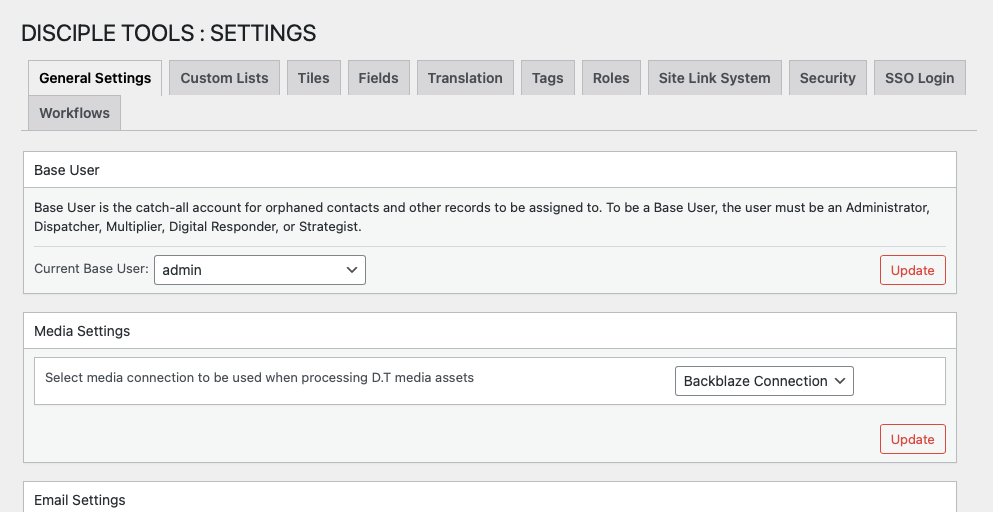
6

Requirements

  • Disciple.Tools Theme installed on a Wordpress Server.
  • Ensure PHP v8.1 or greater, has been installed.

Installing

  • Install as a standard Disciple.Tools/Wordpress plugin in the system Admin/Plugins area.
  • Requires the user role of Administrator.

Contribution

Contributions welcome. You can report issues and bugs in the Issues section of the repo. You can present ideas in the Discussions section of the repo. And code contributions are welcome using the Pull Request system for git. For a more details on contribution see the contribution guidelines.

Releases

8 releases. Each count is every asset in that release; expand a row for the breakdown.

Tag
Published
Assets
Downloads
1.5.0 latest
Aug 22, 2025 1 year ago
disciple-tools-storage.zip
19
May 20, 2025 1 year ago
disciple-tools-storage.zip
30
May 17, 2024 2 years ago
disciple-tools-storage.zip
37
May 9, 2024 2 years ago
disciple-tools-storage.zip
6
May 3, 2024 2 years ago
disciple-tools-storage.zip
6
Apr 23, 2024 2 years ago
disciple-tools-storage.zip
4
Apr 19, 2024 2 years ago
disciple-tools-storage.zip
2
Apr 19, 2024 2 years ago
disciple-tools-storage.zip
2

Active-site estimate ≈10 comes from the median of recent superseded releases. Method.

A- grade

Security

Disciple.Tools - Storage 1.5.0 · audited by WP Registry

Low-severity findings only.

2 low
Audited release
1.5.0
Findings
2
Worst severity
low
Content hash
6ecc7f9d8831c83d24090e18…

Findings

  • low Plugin is an intentionally disabled stub; storage now lives in the Disciple.Tools theme

    unmaintained

    Release 1.5.0 (commit message “Depracate this plugin”) only bumps the version of an already-gutted tree. The plugin header Description is “DELETE ME - I'm a deprecated plugin”; add_action('after_setup_theme', 'disciple_tools_storage', 20) and the dt_plugins registration filter are commented out, so the singleton never loads the REST API, admin connections UI, or S3 filters. Disciple.Tools theme now implements the same feature in dt-core/dt-storage.php (Settings → Storage). Header still says Tested up to: 5.6. The active plugin therefore does no storage work, still runs a Plugin Update Checker against GitHub, and leaves a ~3MB vendor tree on disk. Sites should uninstall it rather than leave a deprecated stub enabled.

    disciple-tools-storage.php:4-8,59

    Recommendation

    Deactivate and delete disciple-tools-storage. Configure S3-compatible storage in the Disciple.Tools theme (Settings → Storage). Do not uncomment the bootstrap; the theme owns this feature.

  • low Composer require-dev PHPCS, WPCS, and phpcs tests shipped in the production zip

    dev_tool_in_production

    vendor/composer/installed.php records squizlabs/php_codesniffer 3.9.1, wp-coding-standards/wpcs 2.3.0, and dealerdirect/phpcodesniffer-composer-installer as dev_requirement true, and the root package as 'dev': true (composer install with dev deps). Those trees are in the GitHub 1.5.0 zip: vendor/bin/phpcs, vendor/bin/phpcbf, vendor/squizlabs/php_codesniffer/src (550+ PHP files), vendor/squizlabs/php_codesniffer/tests (exec/shell_exec in Git/blame/debug sniffs), and vendor/wp-coding-standards/wpcs. None of those files check ABSPATH; an unauthenticated GET to vendor/bin/phpcs or vendor/squizlabs/php_codesniffer/bin/phpcs bootstraps PHP_CodeSniffer\Runner. Config reads $_SERVER['argv'] rather than $_GET, so this is not a demonstrated unauth RCE, but it is a large unnecessary attack surface on a plugin whose application code no longer loads. The unused AWS SDK (aws/aws-sdk-php 3.304.7) is also web-reachable under vendor/aws/.

    vendor/squizlabs/php_codesniffer/bin/phpcs:1-15

    Recommendation

    Uninstall this deprecated plugin. If a storage plugin is rebuilt, ship composer install --no-dev (AWS SDK only) and deny HTTP execution under vendor/ (index.php silencers or server rule). Do not include phpcs, wpcs, or phpcs tests in the release zip.

WP Registry hashes the installable build and reports on that exact bytes-for-bytes copy. Embargoed findings are withheld until they are disclosed, so a clean verdict means nothing public is outstanding. WP Manifest does not audit code itself.