Disciple.Tools - Multisite Dropdown WP Registry grade A. No security issues foundWP RegistryNo security issues foundOpen the reportA
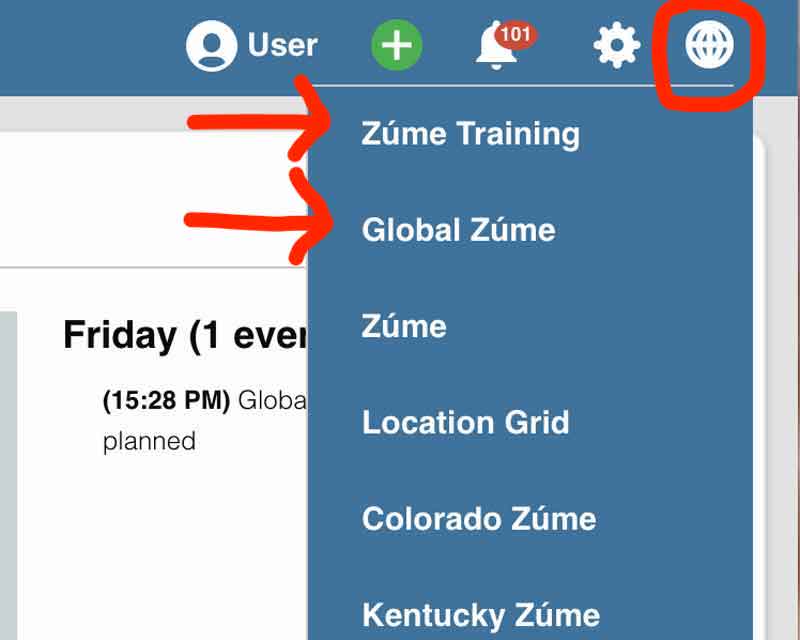
Adds a simple dropdown menu that displays all the sites the users is a member of on the current multisite.
Install
Upload it under Plugins → Add New Plugin → Upload Plugin, then activate.
Install straight from GitHub with WP-CLI:
wp plugin install https://github.com/discipletools/disciple-tools-multisite-dropdown/releases/download/1.7/disciple-tools-multisite-dropdown.zip
Disciple.Tools - Multisite Dropdown
Add a simple dropdown menu that lists other Disciple.Tools sites the user is a member of on the same multisite server.
Purpose
Disciple.Tools can be set up for multiple teams on a single server with their own sites. If a user is a member of multiple sites (teams), the dropdown provides quick links between the sites customized to the user.
Usage
Will Do
- Add a dropdown of links to other sites on the same multisite server that the user is a member of.
Will Not Do
- Connect to other Disciple.Tools multisites the user is a member of.
- Connect to remote Disciple.Tools sites the user is a member of.
Requirements
- Disciple.Tools Theme installed on a Wordpress Server
- Multisite Wordpress server
Installing
- Install as a standard Disciple.Tools/Wordpress plugin in the system Admin/Plugins area.
- Requires the user role of Administrator.
Contribution
Contributions welcome. You can report issues and bugs in the Issues section of the repo. You can present ideas in the Discussions section of the repo. And code contributions are welcome using the Pull Request system for git. For a more details on contribution see the contribution guidelines.
Screenshots
Releases
10 releases. Each count is every asset in that release; expand a row for the breakdown.
Active-site estimate ≈40 comes from the median of recent superseded releases. Method.