WP Manifestindependent plugin directory
manifest / content / disciple-tools-metrics-export

Disciple.Tools - Metrics Export WP Registry grade D+. High-severity findings · 3 findingsWP RegistryHigh-severity findings · 3 findingsOpen the reportD+

Export CSV, JSON, KML, and GEOJSON file types of contacts and groups. Create distributable public links as either one-time download, expiring, or permanent link access. Extendable to facilitate your own downloads with a developer starter plugin.

★ 3stars
289release downloads
≈30active sites
1.6.3latest · 3 years ago

Install

Download disciple-tools-metrics-export.zip From the 1.6.3 release on GitHub, Nov 25, 2022

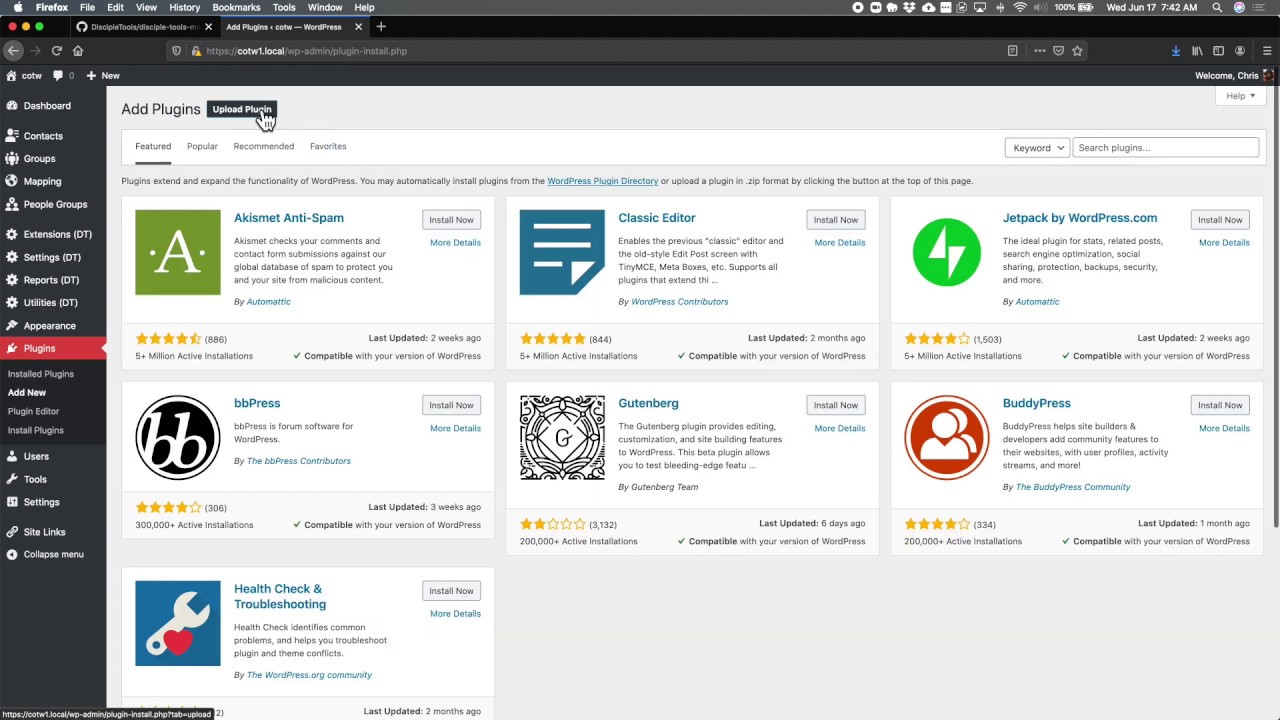
Upload it under Plugins → Add New Plugin → Upload Plugin, then activate.

Install straight from GitHub with WP-CLI:

wp plugin install https://github.com/discipletools/disciple-tools-metrics-export/releases/download/1.6.3/disciple-tools-metrics-export.zip

Updates itself. It ships its own updater (Plugin Update Checker), so new versions appear under Dashboard → Updates.

Plugin Banner

Disciple.Tools - Metrics Export

Export CSV, JSON, KML, and GEOJSON file types of contacts and groups. Create distributable public links as either one-time download, expiring, or permanent link access. Extendable to facilitate your own downloads with a developer starter plugin.

Purpose

The key to this plugin is that it is expandable to serve other kinds of exports beyond the default export.
Usage

Will Do

  • Adds CSV exports for contacts and groups. Can export with longitude and latitude for import into mapping applications like Google Earth, Arc GIS, Google Maps, Google Data Studio.
  • Adds JSON exports for contacts and groups. When combined with a permanent link, it can be used in other applications to draw maps or other visiualizations of data.
  • Adds KML exports for contacts and groups. KML can be used in Google Earth and Google Earth Pro for mapping.
  • Adds GEOJSON exports for contacts and groups. GEOJSON is a open standard for mapping services and is well supported for importing to other systems.
  • Adds compatible export for iShare system and the Coalition of the Willing.
  • Is built for expandability by a custom plugin. A starter plugin is include in this code base and a guide is included in documentation for a developer to expand and add exports appropriate to your organizations usage.

Will Not Do

  • Exports are preconfigured and cannot be modified by the user, only selected.
  • Connect to cloud storage services (yet!)

Requirements

  • Disciple.Tools Theme installed on a Wordpress Server.

Installing

  • Install as a standard Disciple.Tools/Wordpress plugin in the system Admin/Plugins area.
  • Requires the user role of Administrator.

Contribution

Contributions welcome. You can report issues and bugs in the Issues section of the repo. You can present ideas in the Discussions section of the repo. And code contributions are welcome using the Pull Request system for git. For a more details on contribution see the contribution guidelines.

Screenshots

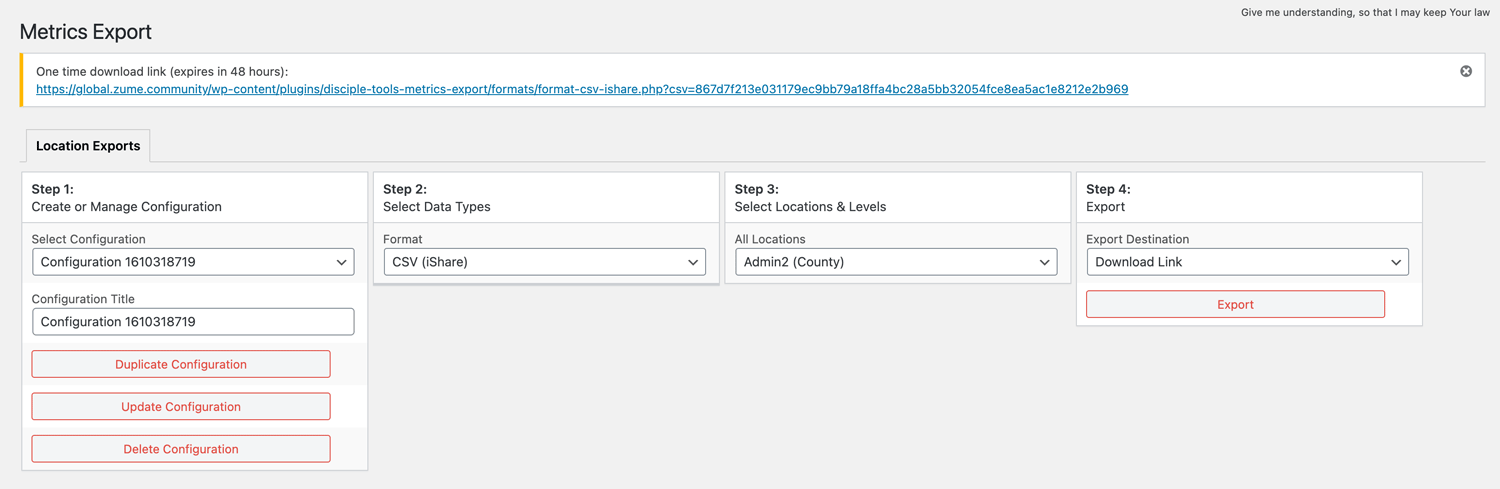
This plugin enables a Disciple.Tools system to export telemetry data in a secure manner to visualization systems. The key to this plugin is that it is expandable to serve other kinds of exports beyond the default export.

one time link

Video Walkthrough

Alt text View Video

Releases

9 releases. Each count is every asset in that release; expand a row for the breakdown.

Tag
Published
Assets
Downloads
1.6.3 latest
Nov 25, 2022 3 years ago
disciple-tools-metrics-export.zip
114
Jun 8, 2022 4 years ago
disciple-tools-metrics-export.zip
46
Oct 29, 2021 4 years ago
disciple-tools-metrics-export.zip
43
1.6
Feb 18, 2021 5 years ago
disciple-tools-metrics-export.zip
28
1.5
Jan 26, 2021 5 years ago
disciple-tools-metrics-export.zip
14
1.4
Jan 7, 2021 5 years ago
disciple-tools-metrics-export.zip
7
1.3
Nov 18, 2020 5 years ago
disciple-tools-metrics-export.zip
17
1.1
Jun 18, 2020 6 years ago
disciple-tools-metrics-export.zip
15
1.0
Jun 16, 2020 6 years ago
disciple-tools-metrics-export.zip
5

Active-site estimate ≈30 comes from the median of recent superseded releases. Method.

D+ grade

Security

Disciple.Tools - Metrics Export 1.6.3 · audited by WP Registry

High-severity findings.

1 high 2 medium
Audited release
1.6.3
Findings
3
Worst severity
high
Content hash
9d1fe8bbe75b8efb36725e0c…

Findings

  • high Public CRM export tokens are SHA256 of userid+time()+site_id+rand(0,999)

    predictable_token

    Every format's create() builds the unauthenticated download secret as hash('sha256', get_current_user_id() . time() . dt_get_site_id() . rand(0, 999)). Formats/*.php then bootstrap wp-load.php with no current_user_can and stream the snapshot if the token hits transient metrics_exports_{token} or postmeta download_/permanent_{token}. The 64 hex chars look random, but input entropy is a small integer uid, second-resolution time(), PHP rand(0,999) (1000 values, not CSPRNG), and dt_site_id. This same plugin treats dt_site_id as a public site identifier: csv-format-ishare.php writes it into every CSV row as creator_organizationCode and identifier salt. dt_get_site_id() itself is hash('SHA256', site_url() . time()) at first use — site_url is public and activation-second is brute-forceable. Once site_id is known, an attacker who can bound export time (email, Referer, admin activity) only needs ~1000 SHA256 guesses per second of window. Help text claims the key is 'unguessable for brute force'. Observable consequence: unauthenticated dump of all contacts' names, emails, phones, and GPS via csv-format-contacts.php / json-format-contacts.php / kml-format-contacts.php / geojson-format-contacts.php (same token constructor copied across format files).

    formats/csv-format-contacts.php:104-110

    Recommendation

    Generate tokens with bin2hex(random_bytes(32)) or wp_generate_password(64, false, false). Do not mix dt_site_id into a secret if that value is also exported. Stop using rand()/time()/uid as token material. Prefer a front-controller under rest_api_init or admin-post with a capability or signed capability token instead of publicly executable format PHP files.

  • medium Expiring export links last ~7 and ~70 days because TTL is string-concatenated

    insecure_config

    set_transient(..., 60 . 60 . 48) and set_transient(..., 60 . 60 . 360) use PHP's '.' operator, so the expiration is the integer 606048 seconds (~7.01 days) and 6060360 seconds (~70.1 days), not 48 hours (172800s) or 15 days (1296000s). The admin UI, notices, and Help tab tell operators the links die in 48 hours / 15 days; those are the values they use when mailing CRM dumps to partners. The same bug is copied into every format file and both extension templates. Combined with unauthenticated format PHP downloaders, a stolen or logged '48-hour' URL keeps serving names/emails/phones/GPS more than three times longer than advertised. iShare additionally calls delete_transient($token) instead of delete_transient('metrics_exports_'.$token), so its 'one-time' link is not burned on download either.

    formats/csv-format-contacts.php:107-123

    Recommendation

    Use multiplication: 60 * 60 * 48 and 60 * 60 * 360 (or HOUR_IN_SECONDS * 48 / DAY_IN_SECONDS * 15). Align notices and Help copy with the real TTL. For iShare, delete_transient('metrics_exports_' . $token) and point the download href at csv-format-ishare.php (the notice currently links format-csv-ishare.php).

  • medium iShare export interpolates unsanitized all_locations into SQL after wp_unslash

    sql_injection

    DT_Metrics_Export_Tab_Location_Export::export() passes filter_post($_POST) into DT_Metrics_Export_CSV_COTW::create(). filter_post() runs dt_recursive_sanitize_array(), which does sanitize_text_field(wp_unslash($value)) — stripping magic quotes. create() then sets $intent_level = $response['all_locations'] (or each selected_locations value) and interpolates WHEN '{$intent_level}' into a large SELECT (phpcs:disable). The switch only copies an integer into $intent_level_int / spatial_intentLevel; $intent_level itself is never replaced with an allow-listed literal, including on default. sanitize_text_field does not escape SQL quotes. A manage_dt user (dt_admin has manage_dt but not manage_options) can POST action=export&format=csv_ishare&all_locations=admin0' OR SLEEP(5) OR '1'='1 and extract or UNION out of $wpdb. The same interpolation is used in the country_by_country loop. Grid ids are correctly passed as prepare %s; only $intent_level/$intent_level_int are interpolated, and the int is safe.

    formats/csv-format-ishare.php:291-352

    Recommendation

    Map $intent_level through an explicit allow-list (admin0–admin5, raw) and only interpolate that constant, or bind it with $wpdb->prepare('%s', $safe_level). Do not wp_unslash user input into concatenated SQL. Keep phpcs enabled on this query.

WP Registry hashes the installable build and reports on that exact bytes-for-bytes copy. Embargoed findings are withheld until they are disclosed, so a clean verdict means nothing public is outstanding. WP Manifest does not audit code itself.