Disciple.Tools - ManyChat WP Registry grade A. No security issues foundWP RegistryNo security issues foundOpen the reportA
Create a basic Integration between ManyChat and Disciple Tools.
Install
Upload it under Plugins → Add New Plugin → Upload Plugin, then activate.
Install straight from GitHub with WP-CLI:
wp plugin install https://github.com/discipletools/disciple-tools-manychat/releases/download/0.5.2/disciple-tools-manychat.zip
Disciple.Tools - ManyChat Integration
This is a "proof of concept" project to create an integration between Disciple.Tools and ManyChat. The purpose is to get a basic contact creation integration in place. Please, feel free to fork the project and take it further.
WARNING: Because the Disciple.Tools - Facebook plugin creates records for all direct messages, it is recommended to use the Facebook plugin over this plugin, or if using this plugin DO NOT USE the Facebook plugin. Using both will create potentially duplicate records.
This plugin will connect ManyChat to Disciple.Tools in three ways:
- An External Request Action in ManyChat can create a contact record in Disciple.Tools from the ManyChat subscriber and return to ManyChat the post_id of the Disciple.Tools contact and store it in a custom field on the ManyChat subscriber record.
- An External Request Action in ManyChat can send a message to Disciple.Tools to log a comment to a contact record. (i.e. "subscriber accomplished action X" or "subscriber was sent X campaign")
- The plugin adds a button to a contact record which links back to a ManyChat's live chat interface.
Obviously, there are a number of other integrations that would be interesting and helpful, but for this version 1 effort these are the two functions supported. Again, feel free to fork the project and improve on it.
Create Contact Setup
-
Create a "ManyChat" Site-to-site Link.
- Give the link any title you want.
- Add site #1 as "manychat"
- Add site #2 as the current site. (Hint: Use the auto fill link)
- Set the type to "ManyChat".
- Make sure you have configuration information on the "Configuration" Tab.
-
In ManyChat create an "Action" in one of your workflows. This action needs to be an "External Request".
- Add External Request Action step to a "Flow"
- Open External Request Action dialogue box.
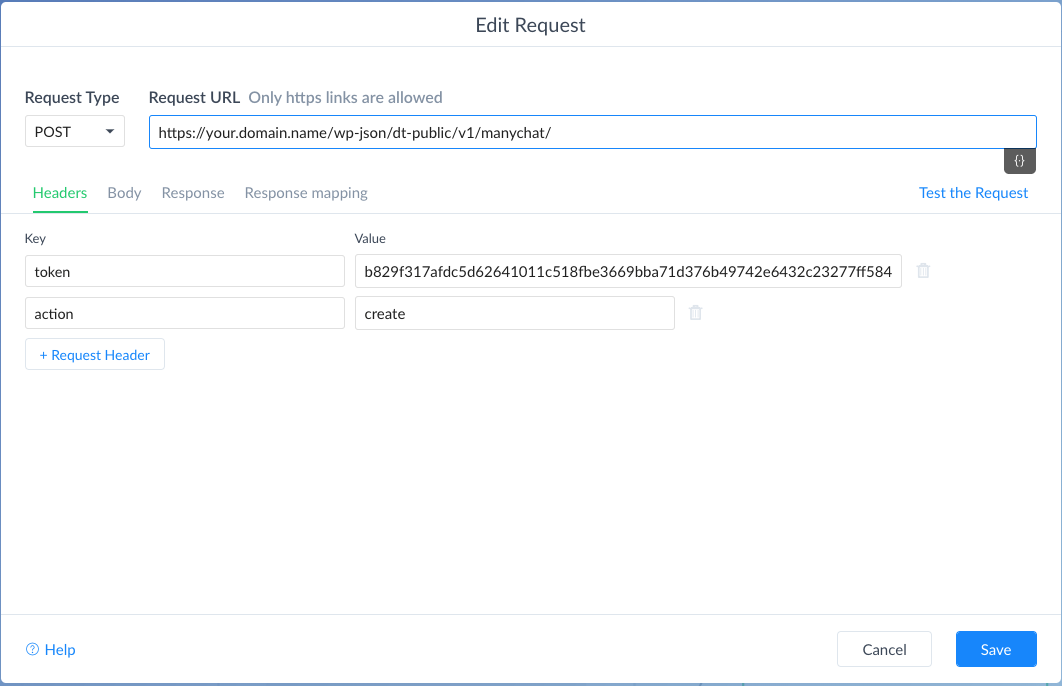
- Transfer the connection information from the "Configuration" Tab under the heading "For Creating A New Record" to the fields in the External Request dialogue box.
- Set Request Type to POST
- Copy URL to Request URL box.
- Add to "Header" section two key/value fields: token: {provided value from configuration tab}, and action: "create"
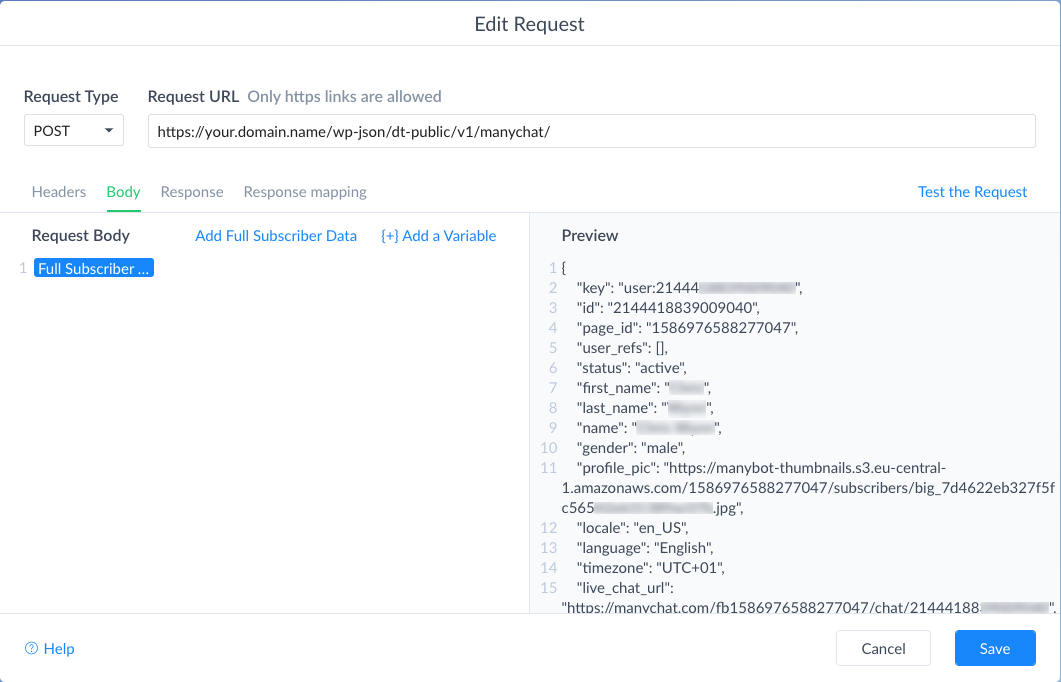
- Add to "Body" section the pre-defined "Add Full Subscriber Data"
- Add to "Response mapping" section, JSONPath: '$.post_id', Select Custom Field: 'dt_post_id'. Note: add the custom field 'dt_post_id' if you haven't already.
- Test connection. You should see a new contact created in Disciple.Tools. You will also get a response of 200/success.
Log Message Setup
- Make sure you have gone through the setup steps above.
-
In ManyChat create an "Action" in one of your workflows. This action needs to be an "External Request".
- Add External Request Action step to a "Flow"
- Open External Request Action dialogue box.
- Transfer the connection information from the "Configuration" Tab under the heading "For Logging Comments" to the fields in the External Request dialogue box.
- Set Request Type to POST
- Copy URL to Request URL box.
- Add to "Header" section two key/value fields: token: {provided value from configuration tab}, and action: "comment"
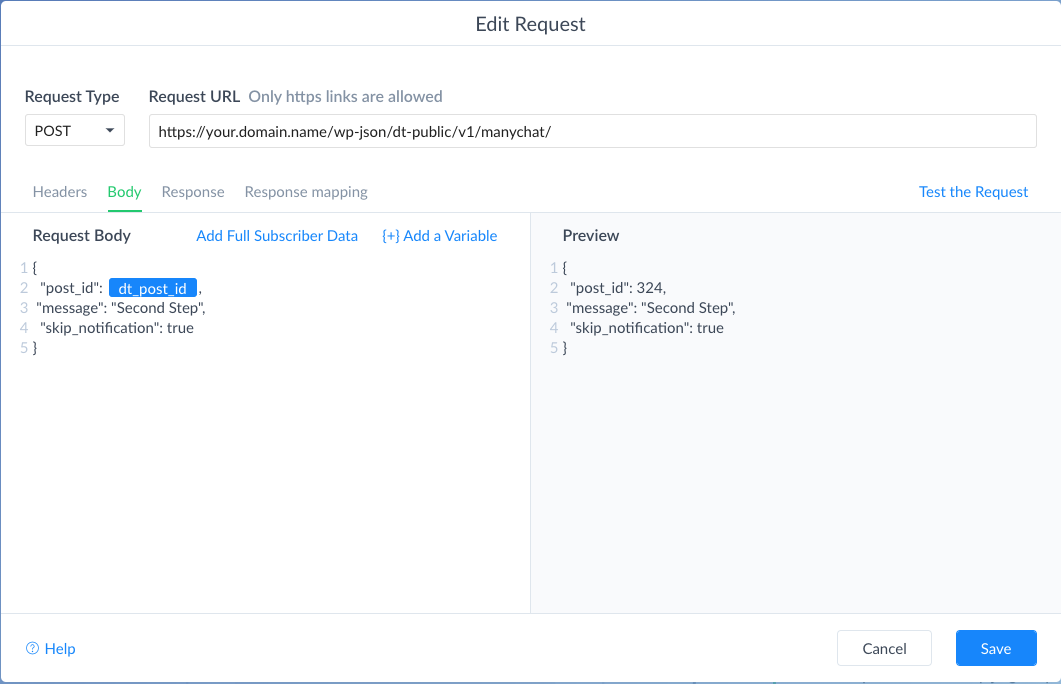
- Add to "Body" section the pre-defined string provided in the configuration body section. This is a JSON string and must be copied exactly.
- "post_id" = (int) This is the Contact record id from Disciple.Tools that was saved during the create record process. You can also add this to a record directly through their contact page in Manychat.
- Note:
dt_post_idis the live variable added from the custom field drop down. This custom field must be created before it will show up in the drop down. - "message" = (string) This can be any string of any length. It will be logged into the comments area of the contact record.
- "skip_notification" = (bool) This is either set to true or false and it controls whether the contact owner in Disciple.Tools gets a notification that the comment was added. True means "do not notify", False means notify.
Button on Contact in Disciple.Tools linking back to Live Chat (if available)
ManyChat Action Example
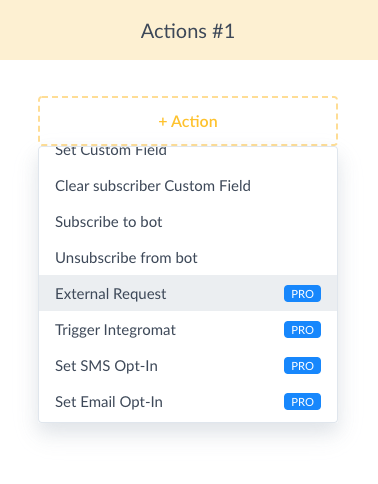
Setup for Create Contact
ManyChat Edit Request Screen -- Create Contact - Header Tab Example
ManyChat Edit Request Screen - Create Contact - Body Tab Example
ManyChat Edit Request Screen - Body Tab Example
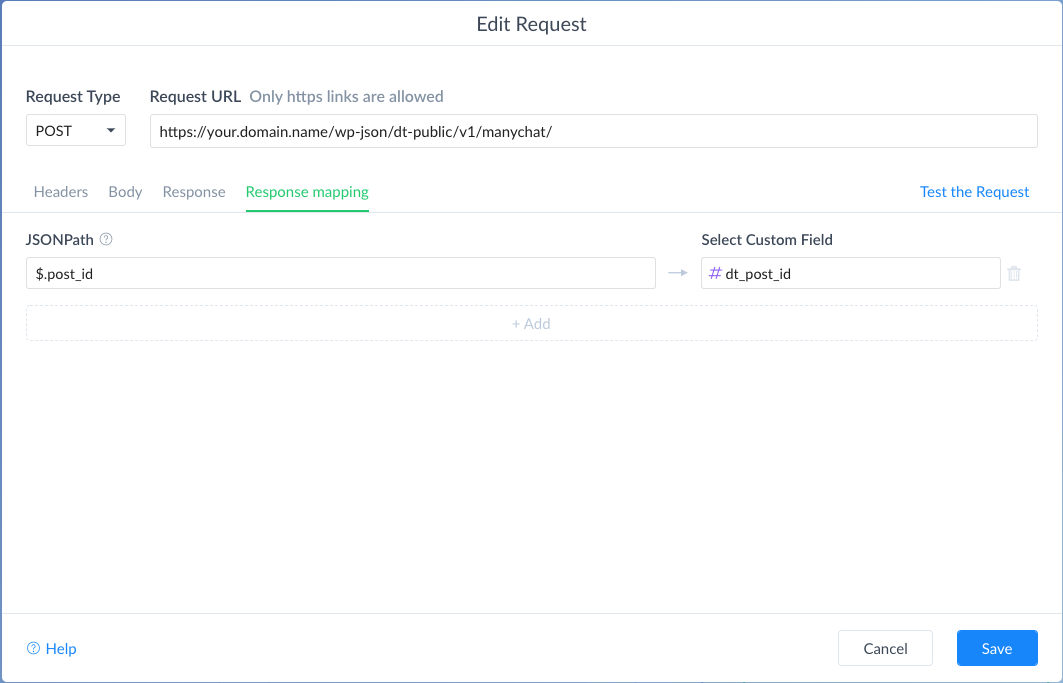
Setup for Comment
ManyChat Edit Request Screen - Body Tab Example
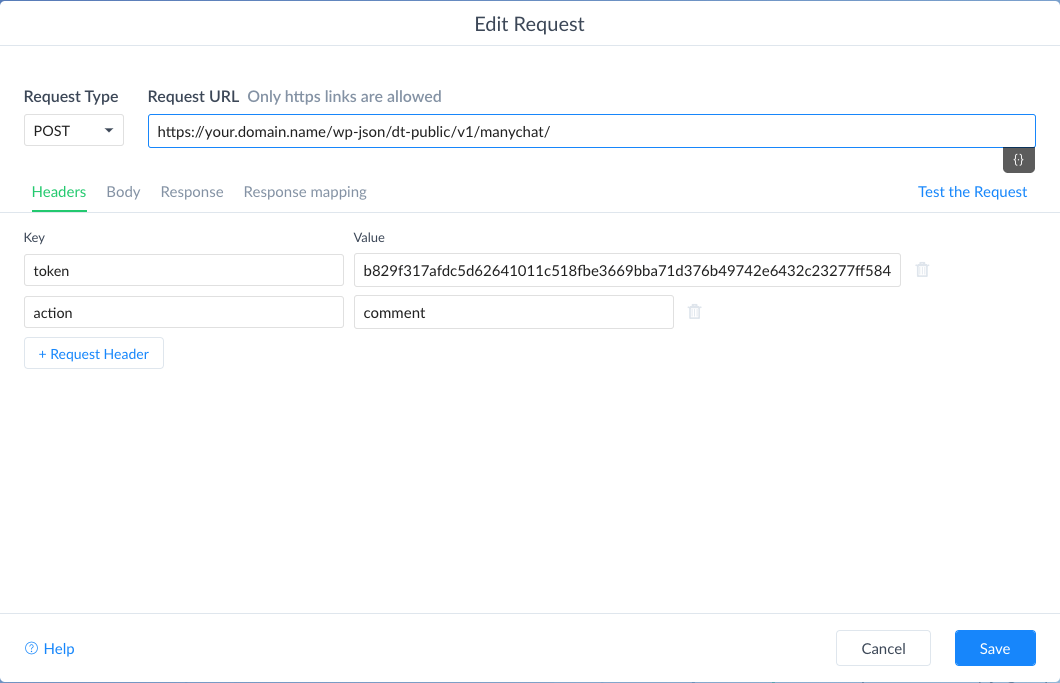
ManyChat Edit Request Screen - Body Tab Example
Releases
6 releases. Each count is every asset in that release; expand a row for the breakdown.
Active-site estimate ≈10 comes from the median of recent superseded releases. Method.