WP Manifestindependent plugin directory
manifest / integrations / disciple-tools-mailchimp

Disciple.Tools - Mailchimp WP Registry grade B. Medium-severity findings · 1 findingWP RegistryMedium-severity findings · 1 findingOpen the reportB

★ 2stars
136release downloads
≈10active sites
1.4.6latest · 3 years ago

Install

Download disciple-tools-mailchimp.zip From the 1.4.6 release on GitHub, Nov 16, 2022

Upload it under Plugins → Add New Plugin → Upload Plugin, then activate.

Install straight from GitHub with WP-CLI:

wp plugin install https://github.com/discipletools/disciple-tools-mailchimp/releases/download/1.4.6/disciple-tools-mailchimp.zip

Updates itself. It ships its own updater (Plugin Update Checker), so new versions appear under Dashboard → Updates.

Plugin Banner

Disciple.Tools - Mailchimp

Integrate your Mailchimp audience lists with Disciple.Tools and keep contact information continuously in sync between the two platforms.

Purpose

This plugin further aids the marketing effort, by keeping mapped fields in sync across platforms, with little to no workflow disruption! New entries are automatically mirrored across both platforms!

Usage

Will Do

  • Control sync direction - Therefore, only accept Mailchimp updates; or just push D.T. updates; or temporarily disable sync runs in both directions.
  • Cherry-pick Mailchimp lists to be kept in sync.
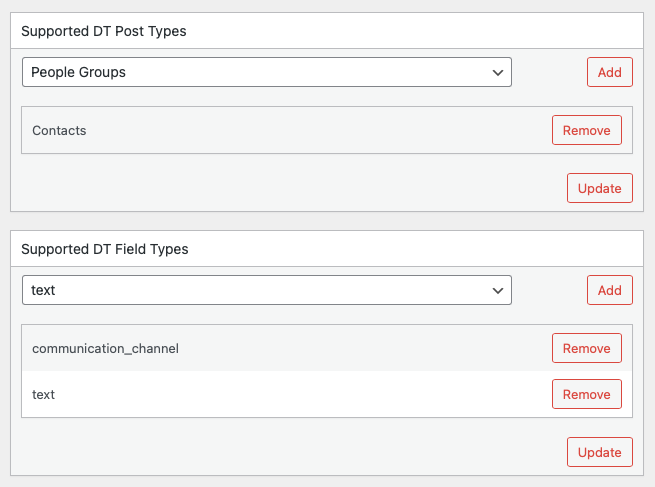
  • Specify supported D.T. post types and field types.
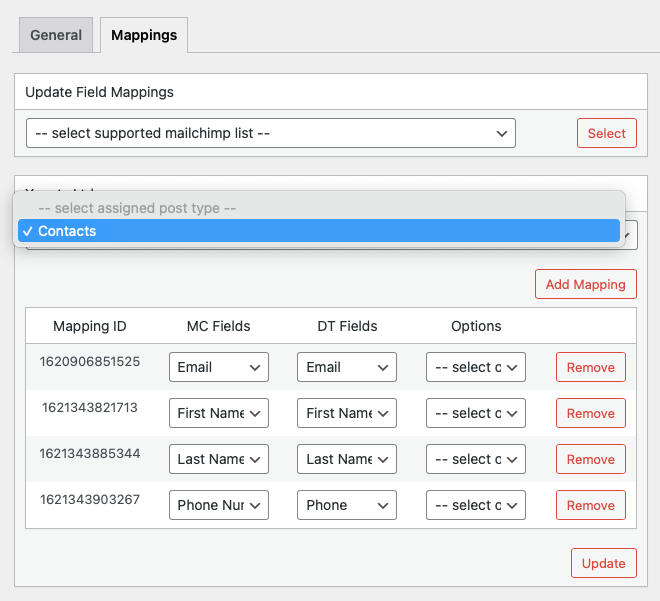
  • Create sync mappings between Mailchimp list & D.T. fields.
  • Control sync direction at the field level.
  • Automatically keep mapped fields in sync across Mailchimp & D.T. platforms.

Will Not Do

  • Does not sync user metadata information such as activity feeds.

Requirements

  • Disciple.Tools Theme installed on a Wordpress Server
  • An activated Mailchimp account, with a valid API key.

Installing

  • Install as a standard Disciple.Tools/Wordpress plugin in the system Admin/Plugins area.
  • Requires the user role of Administrator.

Setup

  • Install the plugin. (You must be an administrator)
  • Activate the plugin.
  • Navigate to the Extensions (D.T) > Mailchimp menu item in the admin area.
  • Enter Mailchimp API key.
  • Disable sync update flags in both directions, during initial setup.
  • Save updates.
  • Ensure to take backups of any pre-existing Mailchimp lists prior to adding any supported lists.
  • Select and add supported Mailchimp lists.
  • Select and add supported D.T. post and field types.
  • Navigate to Mappings tab.
  • For each selected supported Mailchimp list, assign a D.T. post type and create sync field mappings.
  • Save mapping updates.
  • Once all sync field mappings have been created for all lists, enable sync update flags (General Tab), one direction at a time; until all records have been linked and initially sync'd.
  • Finally, enable sync runs in both directions and have the plugin take it from there! :)

Contribution

Contributions welcome. You can report issues and bugs in the Issues section of the repo. You can present ideas in the Discussions section of the repo. And code contributions are welcome using the Pull Request system for git. For a more details on contribution see the contribution guidelines.

Screenshots
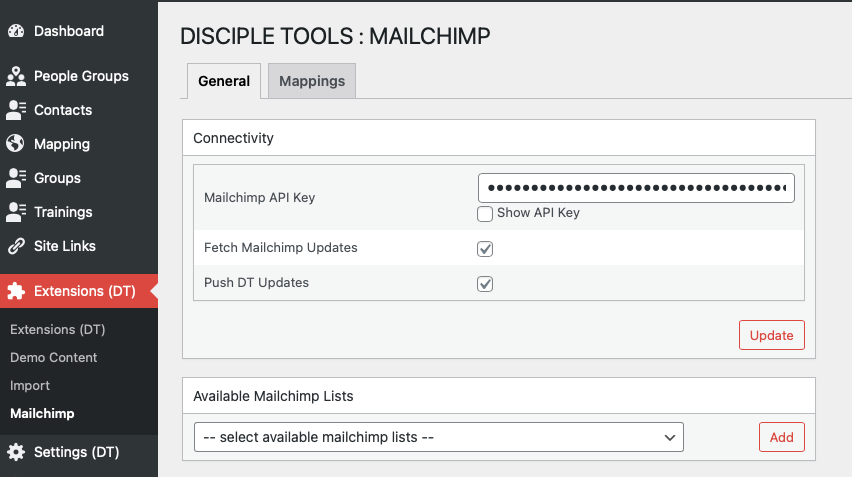
general-connectivity

general-supported

mappings-fields

Releases

8 releases. Each count is every asset in that release; expand a row for the breakdown.

Tag
Published
Assets
Downloads
1.4.6 latest
Nov 16, 2022 3 years ago
disciple-tools-mailchimp.zip
55
Jul 26, 2022 4 years ago
disciple-tools-mailchimp.zip
16
Feb 28, 2022 4 years ago
disciple-tools-mailchimp.zip
11
Oct 12, 2021 5 years ago
disciple-tools-mailchimp.zip
12
1.4
Oct 8, 2021 5 years ago
disciple-tools-mailchimp.zip
5
1.3
Oct 8, 2021 5 years ago
disciple-tools-mailchimp.zip
5
1.2
Jul 20, 2021 5 years ago
disciple-tools-mailchimp.zip
18
1.0
Jun 7, 2021 5 years ago
disciple-tools-mailchimp.zip
14

Active-site estimate ≈10 comes from the median of recent superseded releases. Method.

B grade

Security

Disciple.Tools - Mailchimp 1.4.6 · audited by WP Registry

Medium-severity findings.

1 medium
Audited release
1.4.6
Findings
1
Worst severity
medium
Content hash
5adef353e54554075a15b154…

Findings

  • medium Mailchimp subscribe/unsubscribe capability is UI-only

    missing_capability

    The plugin creates capability admin_mailchimp and a Mailchimp Admin role whose documented purpose is to subscribe/unsubscribe contacts. dt_details_additional_tiles only adds the Mailchimp tile when current_user_can('admin_mailchimp') (and get_the_ID() is set), so multipliers do not see the fields in the contact UI. The same file's dt_custom_fields still registers dt_mailchimp_subscribed_mc_lists, dt_mailchimp_fname, and dt_mailchimp_lname for every contacts viewer, with list ids in field defaults, and does not set a capability/hidden/readonly flag. Disciple.Tools REST (DT_Posts::update_post) accepts any registered field if the user can_update the post; it does not consult tile visibility. dt_mailchimp_auto_subscribe (dt_post_updated) then pushes status subscribed/unsubscribed to Mailchimp with no capability check. A multiplier (or any role with share-based contact update, without admin_mailchimp) can therefore opt a contact into a Mailchimp audience or remove them, sending CRM emails/PII to Mailchimp and enabling campaign mail. This is the bypass the maintainers tried to prevent for GDPR/consent reasons.

    tile/custom-tile.php:32-38,69-107,159-174

    Recommendation

    Enforce admin_mailchimp on the write path, not only the tile. In dt_custom_fields, omit or mark hidden/readonly the Mailchimp fields unless current_user_can('admin_mailchimp'), and/or hook dt_post_update_fields / dt_update_post_check_proceed to strip dt_mailchimp_* keys for users without that capability. In dt_mailchimp_auto_subscribe, return unless current_user_can('admin_mailchimp') (cron/MC→DT sync already uses check_permissions=false and should keep using a dedicated internal path). Filter dt_after_get_post_fields_filter so list membership is not returned to unauthorized viewers.

WP Registry hashes the installable build and reports on that exact bytes-for-bytes copy. Embargoed findings are withheld until they are disclosed, so a clean verdict means nothing public is outstanding. WP Manifest does not audit code itself.