Disciple.Tools - Dashboard WP Registry grade A-. Low-severity findings · 1 findingWP RegistryLow-severity findings · 1 findingOpen the reportA- #10 in Users & Membership
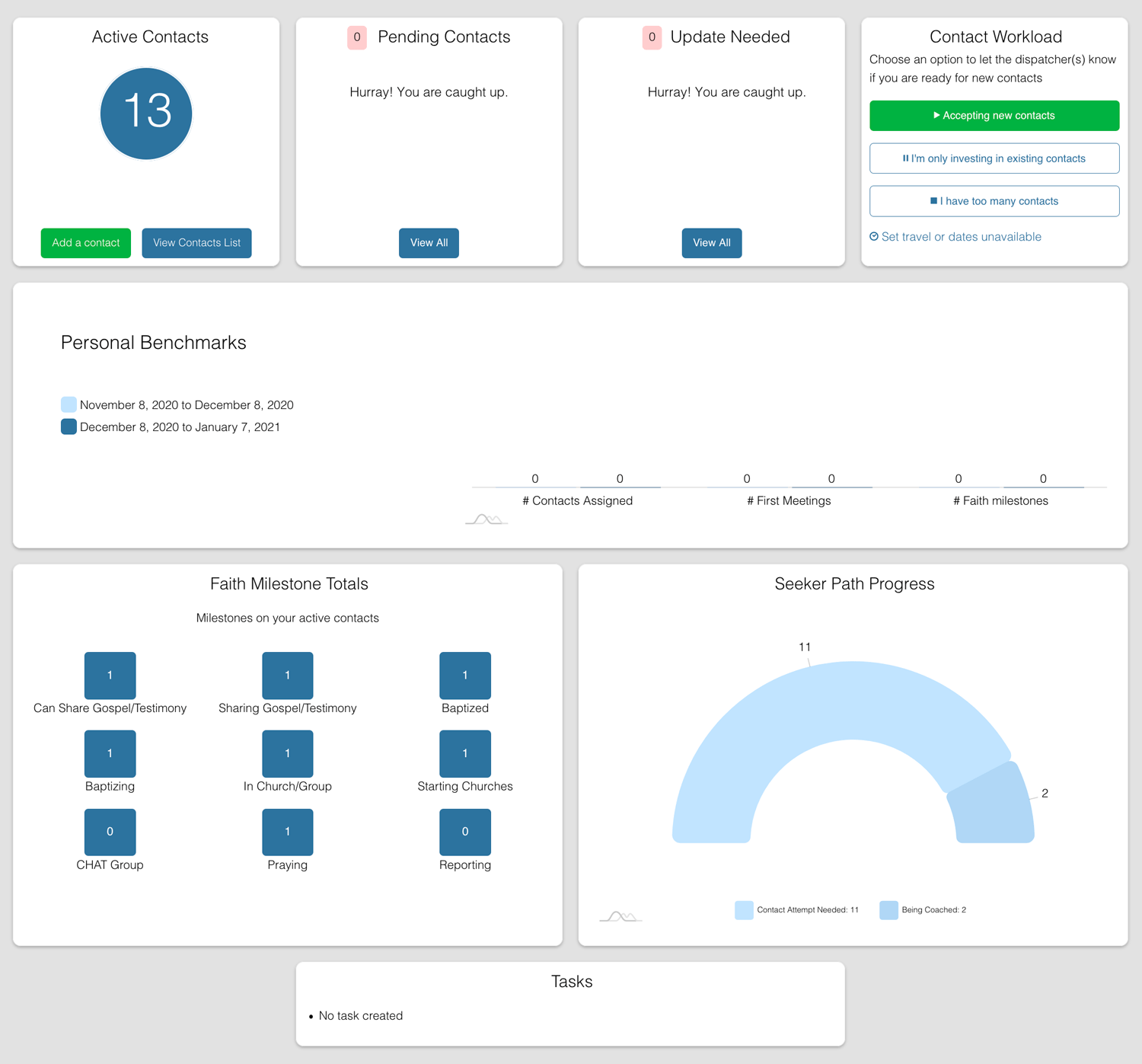
This plugin adds a beautiful start page to assist disciple makers in knowing what are the most important actions to take (New Contacts, Contacts Needing Update, etc).
Install
Upload it under Plugins → Add New Plugin → Upload Plugin, then activate.
Install straight from GitHub with WP-CLI:
wp plugin install https://github.com/discipletools/disciple-tools-dashboard/releases/download/1.5.1/disciple-tools-dashboard.zip
Disciple.Tools - Dashboard
This plugin adds a beautiful start page to assist disciple makers in knowing what are the most important actions to take (New Contacts, Contacts Needing Update, etc).
Purpose
In an access ministry, where you have a large amount of incoming contacts that need follow-up this starting dashboard helps to clarify from the moment that the disciple make signs in to address the most urgent issues.
It quickly helps you answer:
- Do I have any new contacts assigned to me?
- Do I have any contacts that need follow-up?
- What tasks do I have outstanding?
- How is my pace and progress?
Usage
Will Do
- Quick access to number of contacts, newly assigned contacts, and contacts needing updates.
- Quick access to availability for more contact assignments
- Quick access to tasks.
- Quick access to key metrics for faith milestones, personal benchmarks, and seeker progress.
Will Not Do
- Does not do direct editing. It only surfaces the key items for focus.
Requirements
- Disciple.Tools Theme installed on a Wordpress Server
Installing
- Install as a standard Disciple.Tools/Wordpress plugin in the system Admin/Plugins area.
- Requires the user role of Administrator.
Custom tiles
Tiles can be registered by using the dt_dashboard_register_tile function.
dt_dashboard_register_tile(
    'Your_Custom_Tile',                     //handle
    __('Custom Tile Label', 'your-plugin'), //label
    function() {                            //Register any assets the tile needs or do anything else needed on registration.
        wp_enqueue_script( $this->handle, 'path-to-your-tiles-script.js', [], null, true);
    },
    function() {                            //Render the tile
        get_template_part( 'whatever-slug', 'whatever-file', [
            'handle' => $this->handle,
            'label' => $this->label,
            'tile' => $this
        ]);
    }
);
More complex custom tiles can be creating by extending DT_Dashboard_Plugin_Tile.
Here's an example:
/**
* Your custom tile class
 */
class Your_Custom_Tile extends DT_Dashboard_Tile
{

    /**
     * Register any assets the tile needs or do anything else needed on registration.
     * @return mixed
     */
    public function setup() {
        wp_enqueue_script( $this->handle, 'path-t0-your-tiles-script.js', [], null, true);
    }

    /**
     * Render the tile
     */
    public function render() {
        get_template_part( 'whatever-slug', 'whatever-file', [
            'handle' => $this->handle,
            'label' => $this->label,
            'tile' => $this
        ]);
    }
}

/**
* Next, register our class. This can be done in the after_setup_theme hook.
*/
DT_Dashboard_Plugin_Tiles::instance()->register(
    new Your_Custom_Tile(
        'Your_Custom_Tile',                     //handle
        __('Custom Tile Label', 'your-plugin'), //label
         [
            'priority' => 1,
            'span' => 1
         ]
    ));
Hooks
The dt_dashboard_tiles filter can be used to deregister tiles, or to add new tiles without using DT_Dashboard_Plugin_Tiles::instance()->register.
Contribution
Contributions welcome. You can report issues and bugs in the Issues section of the repo. You can present ideas in the Discussions section of the repo. And code contributions are welcome using the Pull Request system for git. For a more details on contribution see the contribution guidelines.
Screenshots
Releases
Newest 25 of 33 recorded releases. Each count is every asset in that release; expand a row for the breakdown.
Active-site estimate ≈110 comes from the median of recent superseded releases. Method.