Install
This is the repository archive. It installs, but the folder name will carry the branch suffix and updates will not flow.
Install straight from GitHub with WP-CLI:
wp plugin install https://github.com/digicyfr/digicyfr-service-menu/archive/refs/heads/main.zipA free, GPL-licensed WordPress plugin for a reusable list of services at a small business. Editors maintain a service once, assign one or more categories, set a native Order number, and embed published services with the Service Menu block or [digicyfr_service_menu] shortcode. English and Polish strings are bundled.
Po polsku: Dla firm usługowych: prowadź jedną listę usług w WordPress i pokazuj ją na stronach blokiem lub shortcode. Wtyczka prezentuje ofertę; nie obsługuje rezerwacji ani płatności.
Website guides and stable release
- Service Menu: English overview and installation
- Lista usług: opis i instalacja po polsku
- Stable v0.1.0 release, ZIP and checksum
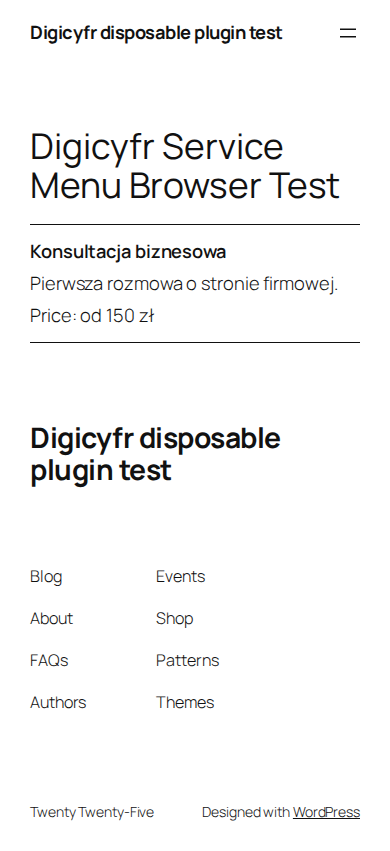
Example screenshot from a disposable test site.
Install and use
- Upload the release ZIP under Plugins → Add New → Upload Plugin and activate it. Requires WordPress 7.1+ and PHP 8.3+.
- Open Services → Add service. Enter a required name, optional plain-text Excerpt description, optional Duration and Price text, categories, and a native Order number from 0 to 9999. Price is your wording, such as
od 100 złorWycena indywidualna; no currency, tax, checkout or booking calculation is made. Save as Draft or Publish. A blank name cannot publish; an invalid order keeps the previous value. - Add the block to a page. Its sidebar accepts an optional category slug, or use
[digicyfr_service_menu]and[digicyfr_service_menu category="consulting"]. An unknown or deleted slug gives an empty list. A service with multiple categories appears once in an unfiltered list. - Services appear in ascending Order, then a database-lowered name compared bytewise, then ID. This makes the same deterministic order apply when selecting and showing the first 100. Edit Order to rearrange without editing pages. Draft and Trash never appear in the embed. Use the Archive row action to confirm changing a published service to Draft; Publish restores it.
- Administrators can use Services → Export CSV for a human-review CSV of published and draft services. The fixed UTF-8 columns are
id,status,menu_order,name,description,category_slugs,duration_text,price_text. Every cell is quoted. Merchant-controlled cells starting with spreadsheet formula characters, including after leading whitespace, receive an apostrophe prefix. This safety prefix can affect machine imports; this is not an import API.
The public embed queries at most 101 matching published services and displays at most 100. When there are more, a visible note says that only the first 100 are shown. The Services admin list also warns when more than 100 are published. Use category-specific embeds or draft older entries if a menu needs to be complete. At the 100-item boundary, the bounded SQL selection and visible order use the same lowered-title byte order, so the displayed first 100 are consistent. Case conversion follows the database character set; editors should verify unusual Unicode title order for their locale.
The service post type and taxonomy have no public single/archive routes, no public REST exposure, and are excluded from search. The embed is their intended public surface. The plugin has no telemetry, remote assets, external service, or outbound calls. WordPress post capabilities govern editing and publishing. Archive and CSV actions also verify nonces and capabilities; CSV requires manage_options.
Data lifecycle: Deactivation and uninstall both retain service posts, terms, and meta to prevent accidental loss. Reactivating the plugin restores their editor UI. Delete services and categories in WordPress before uninstall if you want to remove them. The plugin does not create custom tables.
Updates: Version 0.1.0 uses manual ZIP updates from the Digicyfr plugin page. The unique Update URI prevents unrelated directory updates; there is no automatic update endpoint yet.
Source: github.com/digicyfr/digicyfr-service-menu. For ordinary support use Issues; for vulnerabilities use private security reporting.
Development
The plugin is independent of other Digicyfr plugins. release-files.txt controls the deterministic ZIP. From the repository root:
python3 scripts/release.py
python3 scripts/release.py --verify dist/digicyfr-service-menu-0.1.0.zip
(cd dist && sha256sum -c digicyfr-service-menu-0.1.0.zip.sha256)
bash tests/run-wordpress-integration.sh dist/digicyfr-service-menu-0.1.0.zip
License: GPL-2.0-or-later. See LICENSE.