Install
This is the repository archive. It installs, but the folder name will carry the branch suffix and updates will not flow.
Install straight from GitHub with WP-CLI:
wp plugin install https://github.com/digicyfr/digicyfr-image-alt-use-audit/archive/refs/heads/main.zipA free, GPL-licensed WordPress plugin that locates the alt attribute saved on each <img> use in published posts and pages. It is a local, read-only inventory for editors. It does not edit alt text, fetch public pages, generate descriptions, or judge whether an image is decorative. English and Polish strings are bundled.
Website guides and stable release
- Image Alt Use Audit: English overview and installation
- Przegląd tekstów alt obrazów: opis i instalacja po polsku
- Stable v0.1.0 release, ZIP and checksum
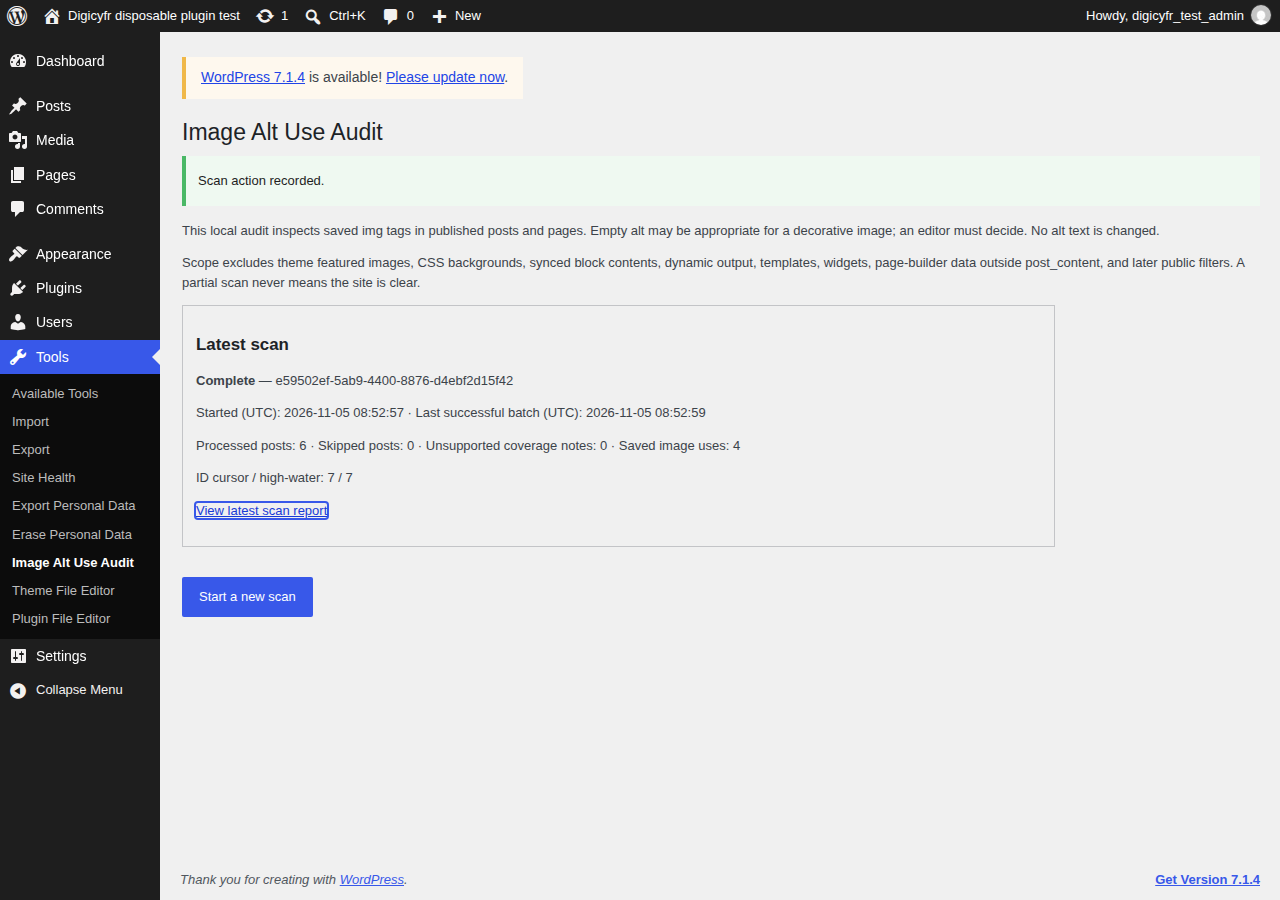
Example screenshot from a disposable test site.
Install and use
- Upload the release ZIP at Plugins → Add New → Upload Plugin and activate it. Requires WordPress 7.1+ and PHP 8.3+ with InnoDB available for three plugin-owned tables.
- Open Tools → Image Alt Use Audit as an administrator. Select Start a new scan. While the page remains open, JavaScript sends one bounded Continue request after a 10-second interval. The Pause link receives keyboard focus after each request; any keyboard or pointer interaction stops automatic submission. Use Pause automatic batches or close the tab to pause; reopen Tools and press Continue one bounded batch to resume. Cancel scan marks the run cancelled.
- Open the latest scan report. Filter by saved alt state or post ID; each row identifies its source block/path/image ordinal and links to the editable source if it still exists. Missing, explicitly empty, whitespace-only, nonempty, and invalid alt values are distinct.
alt=""is a review item; an editor decides whether it is suitable for that image's purpose. A Media Library alt value does not override what was saved on a use. - Export the selected report and filters as a UTF-8 CSV. It is built in bounded chunks to a temporary local stream, then sent only if every read and write succeeds. The fixed columns are
scan_id,scan_started_at_utc,scan_status,coverage_status,post_id,title,permalink,source_block,block_path,image_ordinal,alt_state,alt_preview,src_hint,attachment_id,source_status. User-controlled cells that look like spreadsheet formulas receive a leading apostrophe. This human-review safety prefix can affect machine imports.
Scan contract and limits
Only saved post_content of published post and page records is scanned. The plugin parses blocks and inspects each block's own saved innerHTML once, including nested Image/Gallery blocks, linked images, Cover blocks with a saved <img>, classic/freeform HTML, and ordinary saved HTML fragments. It uses WordPress's HTML Tag Processor for attributes. It never renders blocks or requests image URLs. Cover backgrounds without a saved <img>, dynamic Cover media, synced block references, potential theme-rendered featured images, CSS backgrounds, templates, widgets, page-builder data outside post_content, dynamic output, and later public filters are outside scope. An empty/color-only Cover without media evidence is not treated as unsupported. A saved tag might later be hidden or changed by a public filter.
Each manual Continue request handles at most 10 posts and 2 MiB of saved content. A post over 512 KiB or with more than 300 saved images is explicitly skipped. Block depth has a safety limit of 64. A run stores at most 50,000 image uses; at that cap it stops, marks incomplete, and leaves later IDs unscanned. The scan has a high-water post ID and advances in ID order, querying only currently published posts/pages at each cursor. This is not an immutable publish snapshot: publishing, unpublishing, deleting, or editing during the run can affect coverage. Rows become stale if their source is modified or unpublished after scanning; deleted sources have no edit link. Rescan for a current inventory.
Runs have queued, running, complete, complete_with_skips, failed, or cancelled status. Skips and unsupported coverage are listed with reasons. A partial run never claims the site is clear. The latest fully complete report stays available while a new run is active or incomplete; only a clean complete run replaces that pointer. All controls, report views and CSV exports require manage_options and fresh WordPress nonces; edit links also check edit_post. No public REST route or visitor data collection is added.
Storage and retention: Three site-prefixed InnoDB tables store run state, saved-use rows, and coverage/skip reasons. They may contain post titles by reference, alt previews, and bounded image host/path hints; URLs' query strings, fragments, credentials, signed parameters, data URLs and image bytes are not stored. Deactivation retains tables and reports. When a new run starts or completes, older runs/rows are pruned while retaining the latest complete report and latest run. A cancelled/failed run stays visible until the next run starts. Uninstall drops all three plugin-owned tables and options permanently. Export a needed report before uninstall.
Updates: Version 0.1.0 uses manual ZIP updates from its GitHub release, linked from the Digicyfr plugin page. Its unique Update URI prevents unrelated directory updates; no automatic update endpoint exists yet.
Development
release-files.txt controls the deterministic runtime ZIP. From this repository root:
find . -type f -name "*.php" -not -path "./dist/*" -print0 | xargs -0 -r -n1 php -l
find assets -type f -name "*.js" -print0 | xargs -0 -r -n1 node --check
python3 tools/build_plugin.py digicyfr-image-alt-use-audit
python3 tools/verify_zip.py dist/digicyfr-image-alt-use-audit-0.1.0.zip --slug digicyfr-image-alt-use-audit --against-source
(cd dist && sha256sum --check digicyfr-image-alt-use-audit-0.1.0.zip.sha256)
bash tests/run-wordpress-integration.sh dist/digicyfr-image-alt-use-audit-0.1.0.zip
License: GPL-2.0-or-later. See LICENSE.
The integration command requires Docker Compose and a working Docker daemon. It installs the built ZIP on a disposable WordPress site and removes its volumes afterward.
Source, support and security
Source and ordinary bug reports: https://github.com/digicyfr/digicyfr-image-alt-use-audit and its Issues tab. For sensitive reports, follow SECURITY.md. Contributions are welcome under CONTRIBUTING.md. The public release snapshot is recorded on release/0.1.0; main is for ongoing work. See RELEASE_NOTES.md and docs/QA-0.1.0.md before distribution.