Install
This is the repository archive. It installs, but the folder name will carry the branch suffix and updates will not flow.
Install straight from GitHub with WP-CLI:
wp plugin install https://github.com/diegeduld/mailster-lists-column/archive/refs/heads/main.zipNo built-in updater. New versions won't appear under Dashboard → Updates. Install new releases yourself, or let Git Updater track the repository.
Adds a lists column and filtering options to the Mailster newsletter overview.
Description
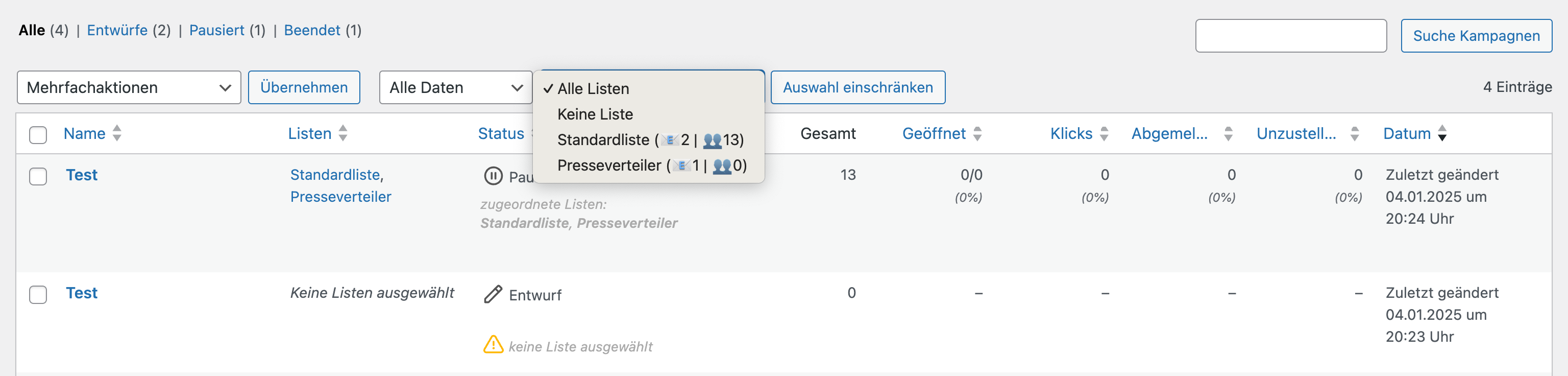
This plugin enhances your Mailster newsletter overview by adding a new column showing the assigned lists along with filtering capabilities.
Features:
- Shows assigned lists in a new column
- Displays subscriber count per list
- Filter newsletters by specific lists
- Shows number of newsletters using each list
- Sortable column
- Easy to use dropdown filter
- Multi-language support
The filter dropdown shows you:
- All available lists
- Number of subscribers per list
- Number of newsletters using each list
- Option to show newsletters without any list assigned
Installation
- Upload the plugin files to
/wp-content/plugins/mailster-lists-column - Activate the plugin
- The lists column will appear in your newsletter overview
- Use the dropdown filter above the newsletter list to filter by specific lists
Frequently Asked Questions
Does this work with Mailster 3.0?
Yes, this plugin is compatible with Mailster 3.0 and above.
Can I filter newsletters by multiple lists?
Currently, you can filter by one list at a time.
Are the subscriber counts live?
Yes, the subscriber counts are always up to date.
Screenshots
- The lists column and filter dropdown in action
- Filtering newsletters by specific list
Changelog
1.0.0
- Initial release
- Added lists column
- Added filter dropdown
- Added subscriber and newsletter counts
- Added multi-language support
Upgrade Notice
1.0.0
Initial release with list column and filtering capabilities