Install
This is the repository archive. It installs, but the folder name will carry the branch suffix and updates will not flow.
Install straight from GitHub with WP-CLI:
wp plugin install https://github.com/devsrealm/quick-summary-plugin/archive/refs/heads/master.zipNo built-in updater. New versions won't appear under Dashboard → Updates. Install new releases yourself, or let Git Updater track the repository.
A ClassicPress plugin that adds a meta box functionality to the post editor for a quick summary of a post.
Installation
- Go to your Dashboard
- Hover over the Plugin section at the left hand side and select Add New
- Click Upload Plugin
- Choose Quick Summary Zip File and Select Install
- When you are done uploading, Activate Plugin and Follow The Next Step Below
Requirements
Requires at least Classicpress V1
Usage
Goto any template part you would like to display the value of the quick summary field, be it a content, below your post title, under featured image, and if you prefer, above the sky ;)
Then, add this:
        $summary_title      = get_post_meta( $post->ID, 'quicksummary_title', true );
        $summary_textarea   = get_post_meta( $post->ID, 'quicksummary_textarea', true );
        if ( is_singular( get_post_type() ) && '' !== $summary_title && '' !== $summary_textarea ) {
          ?>
        <div class="c-summary">
            <p>
          <?php echo esc_html( $summary_title ); ?>
            </p>
            <section aria-label="quick summary" class="article__summary">
              <p>
            <?php echo esc_html( $summary_textarea ); ?>
              </p>
            </section>
          </div>
          <?php
          }
        else {
          echo '';}
If you want to customize the summary box in your post, you can swap the classes for your use cases, e.g you can change the c-summary class to something different and style it the way it fits your use case.
Screenshots
Post Editor:
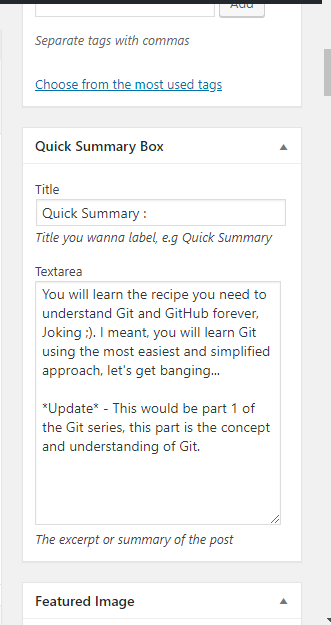
Result:

Changelog
V1.0 - Inital Release