Install
Upload it under Plugins → Add New Plugin → Upload Plugin, then activate.
Install straight from GitHub with WP-CLI:
wp plugin install https://github.com/devrix/dxai-ui/releases/download/v0.4.0-beta.37/dxai-ui-0.4.0-beta.37.zipWordPress plugin that turns a design export — Lovable, Claude Design, a Vite/React, Vue, Next.js or plain HTML/CSS/JS archive, a pasted component, or a Figma file — into editable Gutenberg pages: every section a block, the header and footer in Appearance › Menus and Widgets (or kept with the page), images and fonts in the site, and the look of the design intact.
The plugin is called DX UI (menu: DX); the repository, the text domain and the code still say
dxai-ui.
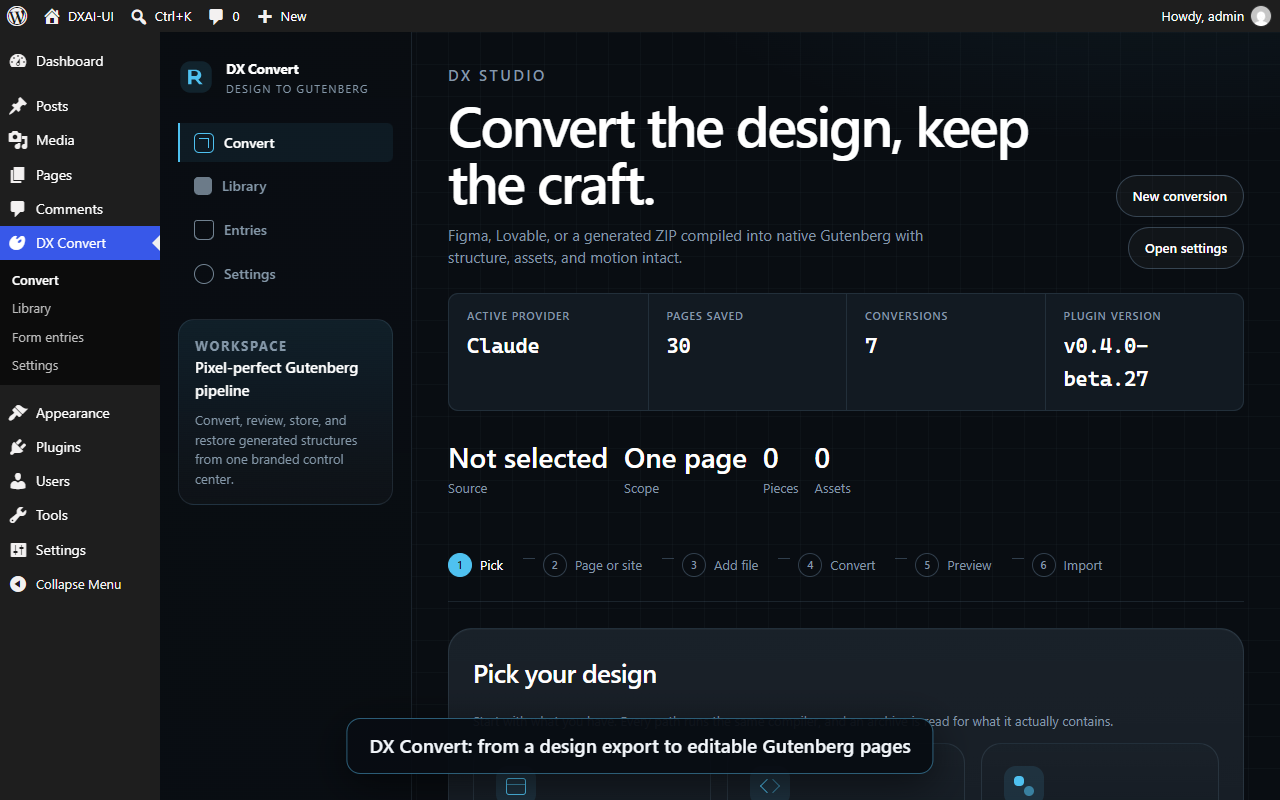
Tour of the admin panel, recorded before the Designs screen — click the picture to play it (about a minute): Convert, the Library (its panels are a design's tabs now, its collections the Site screen), Form entries, Settings.
Requirements
PHP 8.2+ (with dom, libxml, mbstring, zip), WordPress 6.6+, an administrator account with unfiltered_html, a writable wp-content/uploads. A block theme is not required: converted pages use the plugin's own DX Blank page template, which works under classic themes too. The full list is in readme.txt.
Install
- Get
dxai-ui-<version>.zip(a release, or build it yourself — see Build a release). - Plugins › Add New › Upload Plugin, choose the ZIP, Activate.
- Open DX in the admin menu.
To try it first, open it in WordPress Playground (blueprint.json: the newest release, logged in, on DX).
Updates come as any plugin's do: Dashboard › Updates offers each new release of this repository's GitHub releases (the header's Update URI; betas while the site runs a beta — dxai_ui_update_channel chooses). A development checkout — this repository linked into a site — is never offered one: WordPress deletes the folder it replaces, and through the link that is the repository.
Activation stops and names any PHP extension that is missing. Do not update the plugin from wp-admin on a site where it is a junction to this repository (see the working environment).
Using the plugin
The admin menu DX has five screens: Designs (every design on the site, and a page for each with eight tabs: Overview, Pages, Look, Blocks, Words, Speed, Transfer, History), Convert, Site (the site's template, and the collections every import adds to), Form entries and Settings.
1. Settings (only if you need an AI engine)
A design archive is compiled by the plugin itself — colours, images, fonts, motion, pages — with no AI call. The AI engines (Anthropic Claude, OpenAI, xAI Grok, DeepSeek) and the Figma token are for a pasted component, a Figma file, and for Write with AI on a design's Words tab. Add the keys in DX › Settings (keys are encrypted at rest and never sent back to the browser), choose the provider and model, and press Test active engine.
2. Convert a design
DX › Convert is a six-step wizard:
| Step | What you do |
|---|---|
| 1 · Pick | Design archive → Gutenberg (one .zip), Paste a component (JSX/TSX and its CSS), or Figma → Gutenberg (a file URL). |
| 2 · Page or site | One page — the design as one page. Whole site — the page, its header and footer and, if you like, every page its menu links to, built from the design's sections with the live site's own text and pictures. Then choose what happens to the header and footer: install the design's (the header becomes menus in Appearance › Menus, the footer becomes widgets in Appearance › Widgets) or keep the site's current ones (the design's stay with its pages as template parts and Menus and Widgets are not touched). |
| 3 · Add file | Drop the .zip (or paste the code, or the Figma URL). |
| 4 · Convert | The server unpacks and reads the archive, compiles it into blocks and renders a preview. Nothing is saved yet. |
| 5 · Preview | Check the preview and the fidelity score. |
| 6 · Import | Add to WordPress saves the page (and, for a whole site, its pages, menus and template parts) and runs the import checks. |
Importing the same design again updates its pages in place; nothing on the site is deleted.
YouTube videos are never put on a page as a live player: a player loads its scripts and trackers for every visitor, whether anyone watches or not. A YouTube iframe in a design (also the markup an AI engine writes) becomes the team's example: two embeds of the video that are hidden (block visibility, they are what the editor shows, so the address can be changed there) and a facade for the phone and for the desktop (<div class="youtube-facade" data-video-id data-video-title>, in the groups "Mobile iFrame" and "Desktop iFrame"). Only the video's id and title change from one video to the next. The player loads when a visitor presses the facade. The facade is drawn (thumbnail and play button) and swapped for the player by a script, and the phone's and the desktop's are told apart by mobile-show and mobile-hide: the American Restoration theme has the script and the styles. They are not there on a converted page (the theme's scripts and styles are detached from it) or on another theme, so there the plugin prints its own copy (assets/js/youtube-facade.js, assets/css/youtube-facade.css, 768px as the theme's breakpoint), only on a page that has a facade and never on a page of a theme that brings its own. The two work together if both are loaded. A theme can say it has them with add_theme_support( 'dxai-youtube-facade' ) or the dxai_ui_theme_has_youtube_facade filter. Before WordPress 6.9, which cannot hide a block, only the two facades are written. A map, a playlist or a video file is left as the design wrote it.
3. Work with what was made — Designs
DX › Designs lists every design on the site — its pages, its sections, where it is (six chips: imported, native blocks, theme colours, theme fonts, its states and whether the Interactivity API drives them, exported) and when it was last imported — with search and two filters, and opens a page for each design: Overview (what to do next, and the design report), Pages, Look, Blocks, Words, Speed, Transfer (export the package, import one) and History (the import snapshots, with Restore). What is the site's rather than one design's is on DX › Site: the template (the theme, the header in Menus, the footer in Widgets, the logo, the fonts, DX Base) and the collections (every generated page with Export, the synced patterns, the headers and footers, the menus, the conversions). The panels on a design's tabs, one for each thing you may want to do with it:
| Panel | What it does |
|---|---|
| Pages from your live site | Builds the pages your design links to, with each old page's own text and pictures arranged in the design's sections. The menus and the footer then open the new pages. |
| Theme colours | Lets a design take your theme's palette by role (and follow later changes) instead of its own copied colours. |
| Native blocks | Uses core and theme blocks (Group, Buttons, Image…) where they say the same thing as a DX block, so a page gets their controls. Pictures are the theme's DX Picture (dx/picture, the American Restoration theme registers it) where the site has it and the picture is in the media library — a server-rendered <picture> with the right file for the screen, the LCP switch and the sidebar to replace the image — and core's Image where it has not (another theme, a picture from another site, an SVG, a picture with CSS of its own, a link, a caption or a shape the block has no attribute for). The block's own default for a phone is a 4:5 crop made for a hero, which would change the shape of every picture of a design, so converted pictures get the uncropped size on both screens (dxai_ui_picture_sizes chooses others, dxai_ui_use_dx_picture turns it off). Reversible. |
| Pages in the team's style | Makes new pages (a service, a place, About, Contact, the questions, the reviews, the lists) in the order the team's sites use, laid out as the team lays out theirs: the page opens with the design's own hero, and every other section is one of the team's layouts (data/block-library, fifty-two of them, read from the structure of the team's finished sites with none of their words), filled with what the Home states — its phone and places, the steps of its work, what customers said, its questions, its badges, its figures and its points — and, until the words are written (the Words tab, or an AI), with the team's own words where the layout kept them (a line that says nothing of one site, with the company, its phone, the page's subject and its place put in) and provisional words about the page and the company elsewhere. Every layout takes the Home's look: its section titles and padding, and its cards (the box the Home's cards are: corners, shadow, border, background, padding), its eyebrows (the line above a title) and its buttons, read once from the Home and put on the layouts' marked blocks; the drawings are in the site's primary colour. A role is on a page once (a call to action twice: the Home's own band first, then one of the team's), the Home's pictures go to four sections at most, and no card or line is left empty. The library setting chooses otherwise: the Home's sections, the library where it has none (the design's own sections, in the Home's look), the library's first or off. What the Home has no section for is made in the Home's own cards from what the site and the Home say: a list of the site's other pages on each page, the page that lists the services or the places shows all of them, and the ways to reach the company (phone, e-mail, address) are on the contact and About pages. A service page opens with what the Home says about that service. The plan is shown first as a strip of sections for each page (its role, whether it is a Home section, which one, or made in the Home's cards, and what was done to it): what is shown is what is made. A page can be shuffled (another page of the same site) with the sections you like locked, and a slider chooses how much is the Home's alone: only its sections, also the ones the site makes, or an AI choosing the sections (one request a page, off by default, its cost shown first, and a plan that breaks a rule is dropped for the usual one). After making, each page is measured against the rules the database can answer (green or red, with the reason), and the last run can be given back: the pages it made go to the trash (nothing is deleted), the pages that were there are put back as they were, the Home's menu links return, and anything changed since is left alone and named. A page can also be checked for free or sent for notes (they are only notes). |
| Words for the pages | The prompt for the copy of a page, filled in from the page. Copy it into any assistant, or press Write with AI to let the engine chosen in Settings write the words; only the words change and the page can be put back. |
| Page speed | See Fonts and colours follow the theme. Also prints only the part of the theme's stylesheet each page uses. |
| Generated pages / Import package | Export a finished page with its styles, images, header and footer as a .dxai.zip and import it on another site where the plugin is active (for example from a local build to production). |
4. Fonts and colours follow the theme
A converted page can use the site's own fonts and colours instead of the design's:
- Fonts, on a theme that lets the site choose them (the DevriX themes: Theme Global Settings › Fonts). Headings use the headline font, everything else — paragraphs, spans, links, buttons, labels — the body font. The design's own fonts are not used and are not uploaded again: the page uses the theme's font files and asks for no others. Code (
pre,code) stays monospace and icon fonts keep their glyphs. Nothing in the page's content is rewritten, so a change in Theme Global Settings reaches every design at once. A design that already had its fonts copied is put on the theme's with an update (its font rules leave its stylesheet, kept in a record so they can be put back, and the font files no stylesheet names are removed); a design can be set to keep its own fonts with the design's Speed tab › Use the design's own fonts. - A theme that does not manage fonts (a block theme such as Twenty Twenty-Five) leaves designs in their own fonts, copied to the site as before. Another theme can opt in with the
dxai_ui_theme_fontsfilter (the two font stacks, their slugs and the@font-facerules to print). - Theme Global Settings (the ACF options page of the DevriX themes), when the site has it and the owner filled a field: the fonts and the colours as above, the primary logo (the header draws it before the Site Logo, as the theme does, and an import does not give the site the design's logo when it has one), and the radius of buttons and cards (
border_radius_style: the theme's own lengths are printed after the theme's button styles on a page that does not load the theme's stylesheet). Without ACF, on another theme, or with a field left empty, nothing is read and everything works as before.dxai_ui_theme_optionsupplies a value from elsewhere. - Colours, on any theme with a palette (classic or block). A design's Look tab binds its colours to the theme's palette, by role; switch Follow the theme's colours on for the design. Until then it keeps its own.
5. Form entries
Forms in converted pages store their submissions in WordPress. DX › Form entries lists them (date, email, message, page) and exports a CSV.
6. From the command line
wp dxai-ui … (add --user=<admin> where a command writes):
| Command | What it does |
|---|---|
export <page-id> [--file=<path>] |
Export a converted page as a .dxai.zip package. |
import <file> [--chrome=keep\|install] [--dry-run] |
Import a package. |
native-blocks status \| apply \| revert [--design=<home-id>] [--dry-run] |
The native-blocks pass. |
page-order status \| apply \| revert [--design=<home-id>] |
The order of the sections of a page. |
speed status \| apply \| revert \| own \| theme \| clean [--design=<home-id>] [--dry-run] |
Fonts: copy, put back, keep a design's own, use the theme's, remove the files nothing names. speed trim-on \| trim-off prints the theme's stylesheet trimmed to each page, or whole. |
refresh-runtime |
Bring every stored page script up to the current runtime, now. |
repair-styles |
Run the repair of converted posts' stored styles now (it also runs by itself, a batch per admin page load). Every repair is a revision. |
library list \| create <label> --theme=<slug> [--extends=<slug>] \| add <slug> <file> \| build <slug> \| delete <slug> |
The team libraries a site keeps in its uploads: list them (and which is in use), make one for a theme, add an export (a WordPress export or block markup; the library is built again from all of its exports), build it again, remove it. |
Working on the plugin
The working environment
The plugin is developed on Windows with Local (PHP 8.2, nginx, MySQL), and the repository is the plugin: Local loads it through a directory junction, so every saved file is live.
- In Local create a site named
DXAI-UI(domaindxai-ui.local, PHP 8.2, nginx, MySQL), as indocs/LOCAL-WP.md. - Link the repository into the site's plugins folder (a junction, from a Command Prompt):
mklink /J "C:\Users\<you>\Local Sites\DXAI-UI\app\public\wp-content\plugins\dxai-ui" "C:\path\to\DXAI-UI" - Activate it:
wp plugin activate dxai-ui(or in wp-admin). Admin: http://dxai-ui.local/wp-admin/admin.php?page=dxai-ui. - Install the admin build tools:
npm install(Node 20 or newer).
Local's command-line PHP has no php.ini, so scripts that need WordPress go through bin/wp-php.sh, which supplies the extensions and the site's MySQL port (Local changes it when it restarts the site; DXAI_DB_PORT=<port> overrides). wp-cli is not on the PATH either: keep a wp-cli.phar and a dxai-cli.ini in .verify/tools/ (git-ignored) and run php -c .verify/tools/dxai-cli.ini .verify/tools/wp-cli.phar --path=<wp-root> ….
| Where | What |
|---|---|
src/ |
The PHP plugin (PSR-4 DXAI_UI\): Compiler/ (design → blocks), Blocks/, Structures/, Theme/ (theme binding: colours, fonts, fence), Media/, Chrome/ (header and footer), Transfer/, Admin/, API/ (REST). |
assets/src/admin/ |
The React admin app. Built into assets/build/ (git-ignored). |
runtime/ |
The small script that runs a converted page's motion and widgets. |
bin/ |
Verification suites (verify-*.php, verify-import.cjs), oracles and the release script. |
docs/ |
Architecture notes and plans. |
Build the admin app
npm install          # once
npm run build        # production build into assets/build/
npm start            # watch mode while editing assets/src/admin/
The PHP needs no build. assets/build/ is not committed: npm run build creates it, and the release builds it again so a ZIP can never ship a stale bundle.
Templates: a theme and the team's sections for it
The sections a page is made of belong to a template: a theme (or a kind of theme) and the team's sections written in its blocks, classes and colours. The plugin carries one, American Restoration's (data/block-library, for that theme and the DX themes made from it: Pages\Template). A site whose theme has no template gets the generic library: the same sections, made in core blocks (the theme's label block as a paragraph, its box with a link as a group whose title is the link, its picture as core's picture), in the colours this theme's palette has for the same roles (a dark ground, the brand's colour, an accent, a light ground: read from the palette by what the colours are), with the theme's font sizes and button styles where it has them. The panel says which is in use. The sections' own layout classes are the plugin's own rules, so they stand on any theme; what a template's theme adds (its component styles, its patterns in the inserter) is only there on that theme. dxai_ui_templates adds templates; dxai_ui_template names the one to use (a test does).
A site keeps templates of its own too, in its uploads (wp-content/uploads/dxai-ui/templates/<slug>/: the exports as they came, library.json, the layouts' blocks — Pages\Library_Store). In DX › Site › Team libraries, upload a WordPress export of a site the team built (Tools › Export, pages), or a page copied from the editor's code view, for a theme: the plugin reads its pages into layouts the way it read American Restoration's (Pages\Layout_Builder, below), keeps the export, and lays out the pages made on that theme with them — before the built-in template, and together with it when the library is made to extend it (a library for American Restoration that adds the team's newer sections to the plugin's). Upload more exports to train it: each is kept, and the library is built again from all of them, the same arrangements counted together. Open a library to see its layouts and the build's report; remove it and the pages already made keep their sections. Only an administrator; nothing of the exported site reaches a page, not even its name (verify-libraries.php holds it to that). wp dxai-ui library list|create|add|build|delete does the same from the command line.
Build the team's layouts
The pages made in the team's style are laid out with the team's own layouts, kept in the plugin (data/block-library/blocks/layout-*.html, listed in library.json with source: layout; sixty-five of them: forty-four from the eleven live sites, twenty-one from the team's two showcase pages). They are read from the pages of the team's finished sites — the structure, and the words that are every page's: every line of theirs becomes a slot ({{t:h2-s}}, a heading of a short length; {{row:title}} in a repeated card; {{t:call}} on a phone button), and a line that says nothing of one site stays in its slot as its first words ({{t:p-m|We work with all insurance companies.}}, with [[company]], [[phone]], [[subject]], [[region|the area]] where the site's own facts were; a line with a figure, a street, a tool, a platform, a name, or that goes on about the page's own service is not kept), every picture of a row a row's picture, every drawing a marker to the plugin's own (data/block-library/icons, bin/build-icons.cjs extracts them from the lucide package), a picture laid under a section stays behind (it is the site's decoration), a brand's colour goes (a dark band of it becomes the theme's dark, so its light words stay readable) and a theme colour stays, and a site's classes, scripts and ids go; a card's second link to its page goes (a row has one page), and a section of a list — reviews, steps, questions, badges, places, related pages — whose rows were a widget or a picture is no layout at all. Nothing of the sites reaches a page, not even their names (verify-block-library.php holds it to that). The builder is a developer's tool; the plugin ships only its result.
wp eval-file bin/build-layouts.php --user=1 <pages dir> [<export.xml> …] [dry] [only=<role>] [max=<n>]
node bin/build-icons.cjs
<pages dir> holds one JSON a page (id, title, site, url, content), as a database dump of the sites gives; an <export.xml> is a WordPress export (WXR) of the team's own showcase — the test page with every block of theirs — read as a site of its own, every arrangement of which counts once (the sections the library already holds by hand, from the same pages, are not taken twice). The builder picks, for every role but the hero and the form, up to eight structures: up to half from the showcase, the rest the ways the live sites use most, from as many sites as there are; it writes data/block-library again, keeping the sections built by hand. After it, run verify-block-library.php.
Run the checks
The whole pack runs with one command, each suite judged by one rule — exit 0 is PASS, 1 is FAIL, 77 is SKIP (something it needs is not here; a line SKIP: <why> says what), anything else is an ERROR, and a pass that ran no checks is an ERROR too:
node bin/run-suites.cjs --wp "wp --path=/path/to/a/test/site" --group ci --strict--wp is however wp-cli reaches the site you test on, run from this folder (CI uses npx @wordpress/env run cli --env-cwd=wp-content/plugins/dxai-ui wp). bin/suites.json puts every suite in a group: ci runs on a clean WordPress (this plugin, DX Base, Twenty Twenty-Five, nothing imported), local needs what a working site holds (the American Restoration theme, imported designs), manual and browser are run by hand. --strict fails a SKIP too, and a bin/verify-* file the manifest does not list. The pack packs the fixture archives first (bin/pack-fixtures.php: .verify/ is not in git).
The static checks need composer install once, then composer check: every PHP file and script parses (bin/lint.cjs), the PHPCS gate holds (phpcs.xml.dist: security, prepared SQL, translations, PHP 8.2 and later — not formatting), and PHPStan finds nothing that is not in phpstan-baseline.neon. node bin/hooks-doc.cjs writes docs/HOOKS.md, the filters and actions the plugin fires; document a hook with a comment above its call.
CI (.github/workflows/ci.yml) runs the static checks, hooks-doc --check, the admin build and the ci group under --strict on wp-env for every push to main and every pull request.
Each suite is a PHP script that loads WordPress, runs its checks offline against fixtures, prints ok / FAIL, and exits non-zero on a failure:
bash bin/wp-php.sh bin/verify-speed.php            # or: wp eval-file bin/verify-speed.php --user=1
bash bin/wp-php.sh bin/verify-theme-fonts.php
bash bin/wp-php.sh bin/verify-native-blocks.php
bash bin/wp-php.sh bin/verify-team-pages.php
bash bin/wp-php.sh bin/verify-block-library.php
bash bin/wp-php.sh bin/verify-libraries.php| Suite | Covers |
|---|---|
verify-theme-fonts.php |
The theme's fonts: roles, the rule printed with a page, blocks bound to it, fonts leaving a sheet and coming back, the migration, the clean-up. |
verify-dc-media.php |
A Claude Design component that watches two media queries (a mobile one and a wide one) is read with each state following its own query, and each variant is worked out at the width it stands for: the element that reads the wide state depends on no other state (it vanished when a dropdown opened), a state that is true on both sides of the breakpoint needs no media mark, a component with one query is read as before. Nothing is written. |
verify-header-menus.php |
A header whose menu is a dropdown or a mega menu is read as menus and the menus draw it again: the converter writes a header row that holds a panel as blocks (and leaves a page's lists and a footer's alone), the reader finds the dropdowns, the columns of a panel, a link's title and its description apart, a picture block's link as the logo, a trigger with no panel as an item of the bar (and not a promo's bullet points inside a panel), the renderer writes a changed title, a changed or emptied description and a new link or dropdown each into its own place. Nothing is written to the database. |
verify-menu-pages.php |
The pages a design's header menu names, made at the menu's own addresses (a design's Pages tab, "From the site's menu"): an address read (a page of the site with or without www and a folder, another site, a place on a page, a file, a phone, the Home), the kind of each item told from its address, the dropdown it is in and its words (Five Star's menu: six services, two offices, six towns, About and Testimonials; Careers, the anchors and what has no kind are left out, each with why), the page above a service or a place offered as their list, the menus the design's header was built into read as they are now (a person's edit of them is a page); pages made at their addresses whatever the order asked for, under the page at the address above (a page whose parent is not there waits, and says so), one About where the menu and the general pages both ask, an address that is another page (or another design's) kept as it is, a page this design made found again by its address; the items of the header's menus that led to a section of the Home lead to the pages made (a trigger, a phone, a menu a person made are left), and giving the run back puts them back; the panel's route. |
verify-template-fonts.php |
The fonts of the site's template: a design's Google fonts hosted on the site and set as the site's (the Latin faces only, in a folder the clean-up leaves alone, the headline font and the body font told apart, the stacks the design wrote), what they feed (the theme's choice for every design that follows it, every page the theme draws, the block editor, the preload), that a person's choice in the theme's settings wins, and that what cannot be installed changes nothing. Google's answers are made in the suite. |
verify-dx-template.php |
The DX template (templates/dxai-template.php, Template_Chrome) draws a design's header, page and footer as a template does, in the order and the markup DX Blank made (byte for byte once the scope ids are the same), and the pages of earlier imports on DX Blank are drawn as before: one scope element, each part once, the page's stored content is its body only, a page read outside the template (a REST preview, a feed) is its body alone; what a page loses (the skip link, the header spacer: an empty block, one click to delete) is put back from the import's copy and its rules are written with the page's; a header built from Menus; a page of no design is given the skip link and the spacer of the design the site's header came from, before the header, with their rules (written on the front end and not in wp-admin), and a theme's header.php (DX Base) gets the same from Template_Chrome::site_header(); and the quality measure (Team_Quality, bin/team-quality.cjs) counts the header the template draws among what opens a page, so a page whose title is a word of the header's menu (a page made from the menu) is not paired with the header. |
verify-design-document.php |
The Design IR (Design\Document, docs/PLAN-ARCHITECTURE.md section 4): one document per design, built from the compile result before anything is saved and from what the import saved, with its pages and their sections (read as the team pages read a Home), its header and footer and the navigation in them, its tokens, fonts, screens and breakpoints, its assets, its behaviours and the compiler's report; the same design has the same fingerprint before and after a save and on any site; a document with a problem is not kept and the problem is; the store, GET /design/{id} (manage_options; 404 for a page that is no design's or a design with no document), wp dxai-ui design and the rebuild of a design imported before documents were kept from its conversion snapshot (wp dxai-ui design rebuild <id>|all, POST /design/{id}); what reads the document: a section's items (what its cards, steps and questions are called), the panel's services and places from them when the Home's cards name none, the pages of a header kept as a template part from the document's navigation (verify-menu-pages.php), the save's answer carrying the document's summary (the import summary's tile), GET /design for the Designs list and a design's Overview, and a page id carried over from another site looked up again by address; the design's own site (source.origin: a crawl's origin, else where the header's or the page's links lead) so a header read from a live site names this site's pages and not another site's; each section knowing the structure the compiler made it from (source_name) and what the design's classes say of its layout (layout: columns by breakpoint, flex direction, centred text, widest content; null where the classes say nothing); against .verify/dc-minimal.zip and a Lovable archive of the corpus, with a saved round of the fixture under a name of its own, removed when it ends. What the compiled page does when touched is read back from its markup (Design\Behaviour_Reader): one row per state — its kind, its starting value, its values, what drives it, what it projects — and the rest by kind (sections that reveal, counting numbers, the Radix components by their ARIA, portals, rails, the facade, icons), each saying whether the Interactivity API could express it with directives, with a store callback, or not without the runtime, and why; a state's name and kind are in the fingerprint, the summary counts the levels, and problems() refuses a level it does not know. |
verify-style-variation.php |
A design's tokens as a theme.json style variation (Design\Style_Variation) and the theme capability contract (Theme\Capabilities): the variation is a version-3 theme.json titled after the design, its palette under the brand design's slugs (the two never drift apart), its fonts, the styles that make it the site's; applied, the theme layer of theme.json has its presets beside the theme's own and the global stylesheet defines them, a plain page is drawn in its look, the design's own page is as it was byte for byte but for the two blocks a brand change rewrites by design (its tokens now refer to the presets) and carries none of the variation's styles; the filter carries the theme's palette forward (a merge replaces it whole) and leaves the styles off a design's page; written only into the plugin's own theme, read as JSON, GET/POST /design/{id}/variation; a design that is gone takes its variation with it; the palette the plugin fits a design to leaves the brand design's own presets out on a classic theme too, where they reach theme.json now that the brand's filter runs after the theme's. Against .verify/dc-minimal.zip imported under a name of its own and removed when the suite ends; the site's look and brand design are put back. |
verify-background-color.php |
A design's background colours are set in the block's Colour panel, not by classes (Native\Background_Color, the other half of Text_Color): a group, the columns and a column with a bg-dxai-… class get the colour as the block's custom colour, or as the site's preset when the design's colour is one; the class is gone, the others stay, the tag says it, the markup parses back; a block whose text colour the other converter set gets the background beside it, both kept on the tag; left as the class: a variant, a gradient or a picture beside it, two colours, a setting already there, a block whose own CSS names a background, a style someone wrote, an attribute this does not move, a paragraph; the brand design's presets reach theme.json after a theme's own filter on the same hook (American Restoration rewrites its palette at 100), so the converter binds to them on such a theme too; the pass converts a design's posts and reverting puts them back byte for byte. |
verify-theme-contract.php |
The theme capability contract everywhere (Theme\Capabilities, Theme\Adapters): the active theme is read through the adapter of its kind (DX Base, a DX theme, a block theme, a classic theme), and only the adapters spell a theme's name or a theme's block; the contract names the theme's picture, link box and label blocks, how they are written, which attributes hold an attachment, the picture block's shape and what the theme brings on its own pages; each adapter is assumed in turn and answers for itself; the converters, the section readers, the chrome and a transfer ask the contract, not a name; and a reader of the plugin's own source (comments left out) finds no theme name and no theme block outside the adapters — proved on a planted string. Nothing on the site is written. |
verify-interactivity.php |
A design's states as Interactivity API directives where the site asks for it (Blocks\Interactivity, the interactivity setting, on unless turned off): every mark the compiler wrote for the page runtime gets the directive that says the same thing as the page renders — a trigger its click and hover handlers and its aria, a projection and a panel their class binding (whole, since the design's classes hold / and :) and the panel's style bindings where it animates, a disabled control its binding, words by state none (the store writes them); the scope element is the region with the store's init and the document and window listeners; off, nothing of it; the setting saves as a boolean whatever the form sends; the page runtime stands down for the states of such a region and no more; the store is a script module on @wordpress/interactivity; on a page of the fixture the region, the directives, the import map and the module are there with the setting on, none of it off, and the two pages are otherwise the same bytes. The behaviour itself — the same outcome of every click, hover and scroll on and off — is measured in a browser on the test install. |
verify-base-theme.php |
DX Base, the theme the plugin carries for a site that has no DX theme (themes/dx-base, Base_Theme): its files and version, valid PHP, no ACF, the three locations a DX theme names; copied byte for byte into the themes folder (an older copy brought up to date, what the person put in its folder kept, a folder that cannot be written refused, a folder named dx-base that holds another theme left alone, a copy that stops halfway said and finished by the next one), recorded, never switched to by itself and nothing in the code deletes; listed from the plugin's own folder where the themes folder cannot be written; counted as a DX theme; and, with the theme active (the site is switched for a few requests and back, in a shutdown function as well), a page of no design, a post, an archive, the search and the 404 page, each over HTTP as a visitor, in the design's header (the spacer under a fixed header, the skip link hidden by its rule) and footer, the design's own page drawn by the plugin with the same elements and words as on the theme the site had, and the theme's plain header and footer from the same menu and widgets when the plugin has none; and the route of the Site screen's Template (/template): what the screen is told (the theme, DX Base, whose header and footer are the site's, the fonts, the logo, the links), who may install and who may switch (refused with a reason, DISALLOW_FILE_MODS lists the theme from the plugin instead of copying it), an older copy offered the update, and that installing never switches the site. |
verify-speed.php |
The stylesheet trim, the theme-sheet trim, the fonts copied into a design's sheet. |
verify-native-blocks.php |
The native-block converters, and that apply and revert, run with no user (WP-CLI without --user, cron: KSES is on), keep the forms, controls and iframes of a design's pages. |
verify-rest-routes.php |
Every REST route, called as the admin screens and the public form call it: who may call what (a visitor, a subscriber, an editor, an administrator with and without unfiltered_html, against a table of tiers; a route not in the table is held to the strictest), a visitor refused by each through the server, bad input on every route that writes (a 4xx with a code, never a fatal, no post written), the wizard's chain (process-source, generate-block, preview) on a pasted component with a YouTube iframe, GET settings never carrying an API key, and that every route path the admin app calls exists with the method it uses. Nothing leaves the machine and nothing is saved. |
verify-theme-options.php |
What the owner chose in Theme Global Settings is used where a design can use it — the primary logo of the header, the radius of the theme's buttons — and nothing changes without it (no ACF, another theme, an empty field): the field formats of an image, the order of the logos, an import that leaves a site's logo alone, the radius printed after the button styles, and a real ACF option saved and read back. |
verify-picture-block.php |
A picture of a design is the theme's DX Picture where the site has the block and core's Image where it has not: what the converter writes (the attachment, the alt, the size the design gave, the design's classes marked for the rules, the uncropped sizes), what it declines (a picture not in the library, an SVG, CSS of its own, a caption, a link, a parent that spaces its children), the site without the block, and that the team's page tools (image slots, another picture in a block, the Home's pool of pictures, the rules for the figure) know the block. |
verify-video-facade.php |
A YouTube video is the team's example byte for byte with its id and title, nothing of YouTube is printed until the facade is pressed, an iframe of a design and the markup an engine writes become it, a map, a playlist and a video file are left alone, and the plugin's own script and styles are printed only where the theme does not bring them (a converted page, another theme). |
verify-video-facade-view.cjs |
The plugin's facade script and styles in a real browser, w |
This README is longer than the copy stored here. Read the rest on GitHub →
Releases
5 releases. Each count is every asset in that release; expand a row for the breakdown.