Install
This is the repository archive. It installs, but the folder name will carry the branch suffix and updates will not flow.
Install straight from GitHub with WP-CLI:
wp plugin install https://github.com/dev3tech/dev3-ai-store-insights-for-woocommerce/archive/refs/heads/main.zipAsk your WooCommerce store questions in plain English and get charts, AI explanations, pinned dashboards, email digests and anomaly alerts.
Features
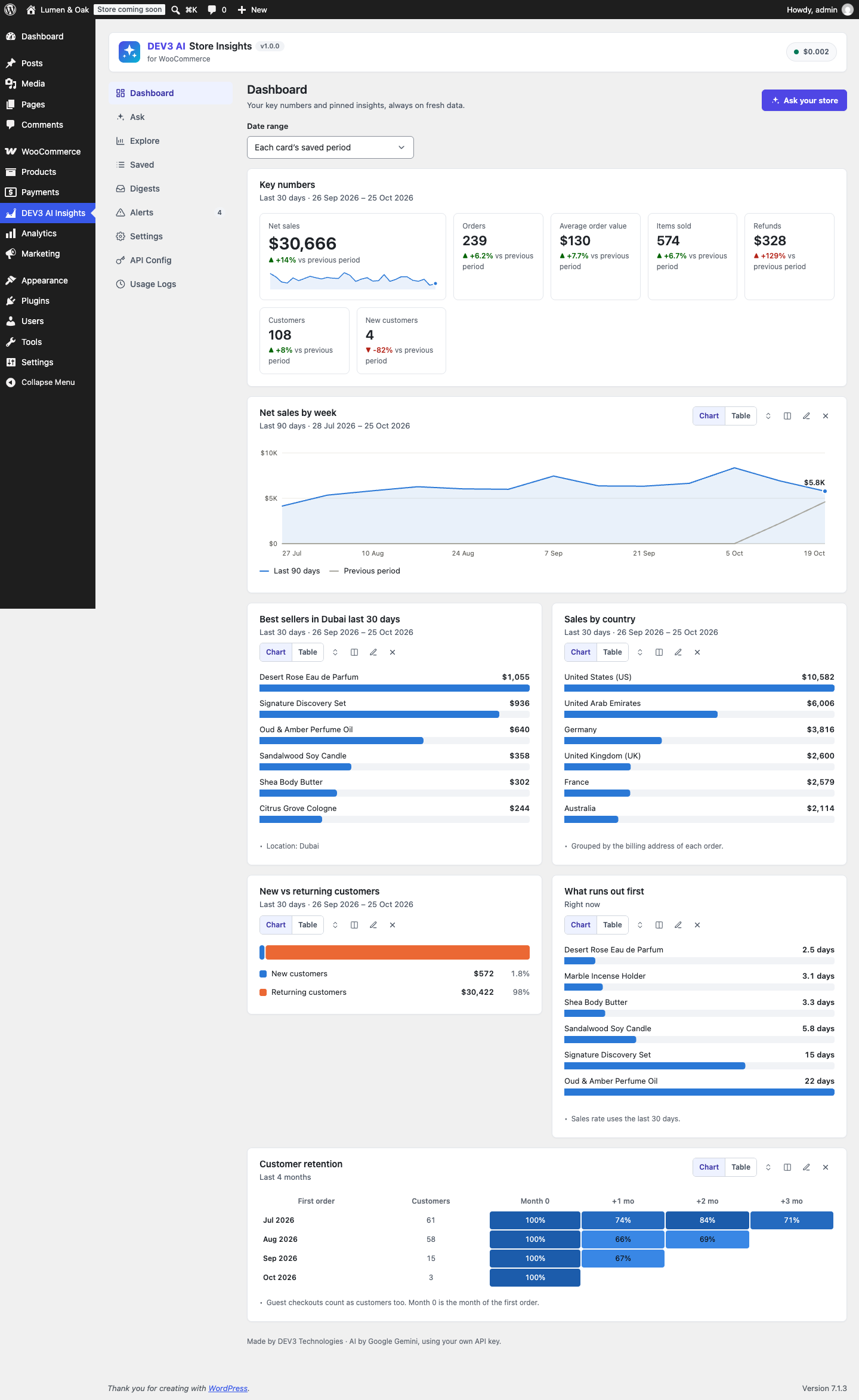
Type "best sellers in Dubai last month" and get a clean chart, the table behind it and a short explanation.
DEV3 AI (Google AI, your own API key) reads the question and picks one report from a fixed library of safe, parameterised reports. It only fills in typed options such as the period, the measure or a location. The model never writes database queries, and every option is checked again before the report runs.
Everything also works without AI. Built-in rules understand the common questions, and Explore lets you build any report by hand.
Reports
- Store summary: net sales, orders, average order value, items sold, refunds, customers and new customers, each with a change against the previous period or the same period last year
- Sales trend by day, week, month, quarter or year
- Top products and top categories, ranked by revenue, quantity or orders
- Sales by country, region/state or city
- New vs returning customers, registered vs guest customers
- Top customers
- Refunds over time and the most refunded products
- Monthly customer cohorts, showing retention or revenue
- Stock: low stock, out of stock, days of stock left and overstock
- Top coupons
- Filters: location, product category, product, customer type and account type
- Periods: presets or a custom date range, in your site's timezone and week start
Store owners also get
- Saved questions and a dashboard of pinned insights, with one date range for every card
- Scheduled e-mail digests (daily, weekly or monthly), with a preview, a test send and an optional DEV3 AI summary paragraph
- Anomaly alerts: daily checks against a 28-day baseline. Each alert shows the products and countries that moved most, can be explained by DEV3 AI and can be sent by e-mail. A "best sellers about to run out" stock alert is included. DEV3 AI can suggest alert rules, and nothing is saved until you accept them.
- CSV export of any report
- A WordPress dashboard widget
- Light and dark themes. Charts are accessible: keyboard navigation, tooltips, a table view and colour-blind-safe palettes.
- HPOS and Cart/Checkout blocks compatible. Reports read the WooCommerce Analytics tables. A data health check imports any order the Analytics tables missed.
Requirements
- WordPress 6.0 or newer (tested up to 6.8)
- PHP 7.4 or newer
- WooCommerce 8.0 or newer (required)
- Optional: your own Google AI API key (from Google AI Studio) to switch on the DEV3 AI features. The rest of the plugin works without one.
Installation
From the release zip
- Download
dev3-ai-store-insights-for-woocommerce.zipfrom the latest release. - In WordPress, go to Plugins → Add New → Upload Plugin, choose the zip and click Install Now.
- Click Activate.
Build from source
git clone https://github.com/dev3tech/dev3-ai-store-insights-for-woocommerce.git
cd dev3-ai-store-insights-for-woocommerce
composer install --no-dev
npm ci
npm run build
Then copy the dev3-ai-store-insights-for-woocommerce folder into wp-content/plugins/ and activate it.
Getting started
- Upload the zip in Plugins > Add New > Upload Plugin and activate it. WooCommerce 8.0+ must be active.
- Open DEV3 AI Insights in the admin menu.
- Optional: add your Google AI API key in API Config to enable DEV3 AI.
FAQ
Does the AI see my customers' data?
DEV3 AI receives your question plus aggregated report rows. E-mail addresses are never sent. Customer names are replaced with "Customer 1, 2…" unless you allow names in Settings.
Can the AI break or change my data?
No. The AI can only choose a report and its options. Reports are read-only and run as prepared statements.
Do I need an API key?
No. Without a key, questions are answered by the built-in rules, and explanations are short summaries the plugin writes itself.
My numbers look low
WooCommerce fills its Analytics tables in the background. Settings > Data health shows any missing orders and can import them.
Privacy
When DEV3 AI is enabled, questions and aggregated report data are sent to Google AI under your own API key. The plugin adds a suggested text to your privacy policy, plus a personal-data exporter and eraser for each user's question history.
Documentation
The full HTML guide (installation, settings, hooks and FAQ) is in docs/index.html. Open it in a browser after cloning or downloading the repository.
Changelog
1.0.0
- Initial release.
Licence
Released under the GNU General Public License v2.0 or later (GPL-2.0-or-later). See LICENSE.