Install
This is the repository archive. It installs, but the folder name will carry the branch suffix and updates will not flow.
Install straight from GitHub with WP-CLI:
wp plugin install https://github.com/dev3tech/dev3-ai-product-filter-for-woocommerce/archive/refs/heads/main.zipFast AJAX product filters with SEO URLs and an index table, plus smart live search with DEV3 AI natural-language and semantic search.
Features
Filters
- Filter by category, tag, brand, any attribute, price, rating, stock, sale, custom fields and ACF fields.
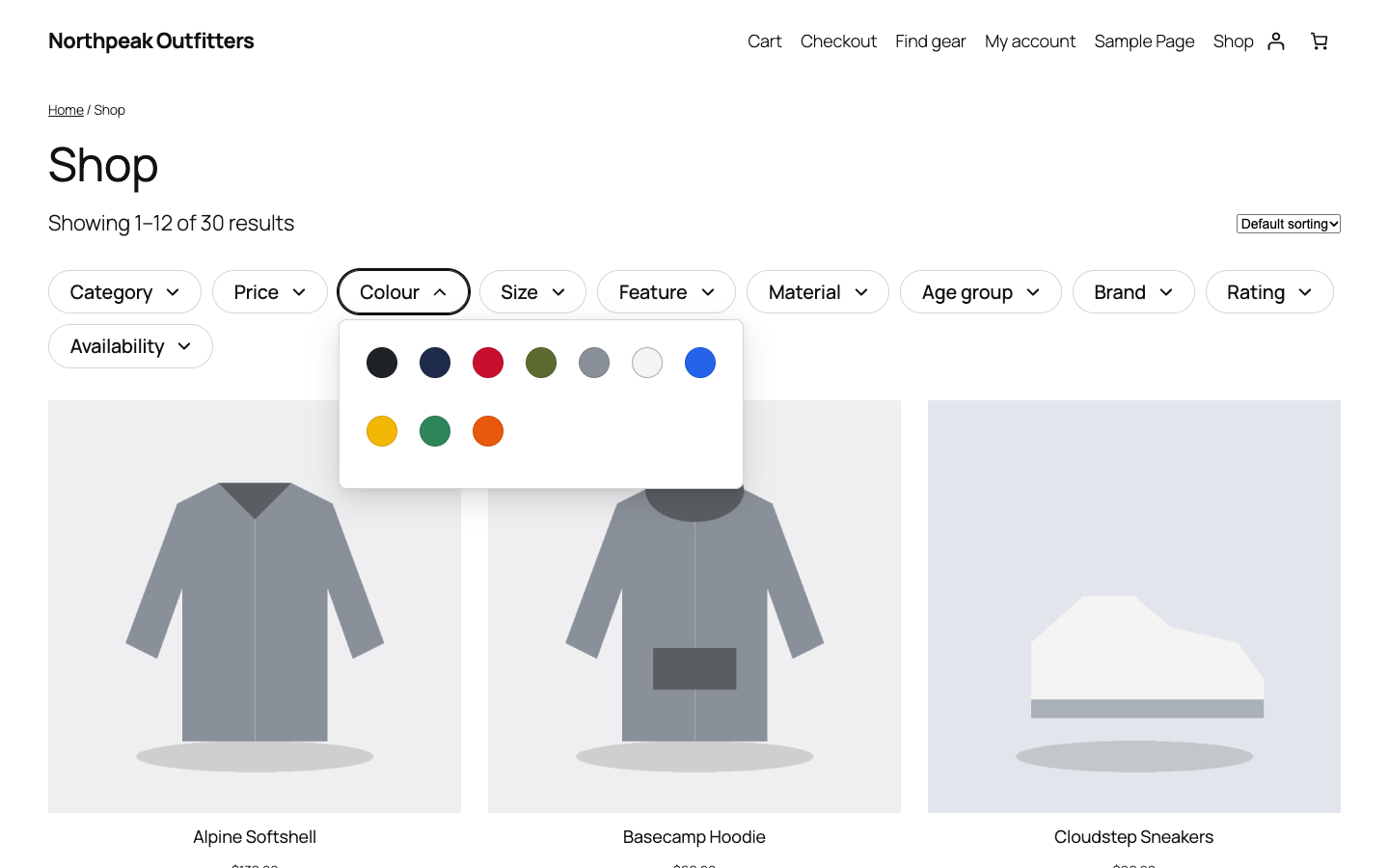
- 10 display types: checkboxes, radio buttons, dropdown, multi-select, range slider, min/max inputs, colour swatches, images, labels (buttons) and star rating.
- Instant (AJAX) or "Apply" mode, active-filter chips, product counts, "show more", option search, hierarchical categories.
- SEO-friendly filter URLs (
/shop/filter/color/black/), one canonical URL per state, noindex for filter combinations and indexable SEO landing pages with their own title, meta description, H1 and intro (listed in the XML sitemap). - Index table + cached postings lists: full filter responses in about 90 ms on 50,000 products. Updates when products change and rebuilds nightly (Action Scheduler).
- Mobile-first: a "Filters" drawer on phones, a horizontal bar or a sidebar on desktop. Works in block themes (Twenty Twenty-Five) and classic themes.
- Gutenberg blocks, classic widgets, shortcodes, Elementor widgets and WPBakery elements.
- HPOS and cart/checkout blocks compatible.
Smart search
- Live search dropdown with thumbnails, prices, categories and full keyboard support.
- Relevance ranking (title, SKU, attributes, descriptions), typo tolerance, synonyms and typo lists.
- Replaces the WooCommerce search results page with the same smart search.
- Search log with zero-result reports.
DEV3 AI (Google AI, your own key)
- Natural-language search: "black waterproof jacket under 100 for kids" becomes Category, Colour, Feature, Age and Price filters (cached per query, validated against your catalog). A built-in parser does the same without AI.
- Semantic search with Google AI embeddings stored in your database (cosine search in PHP); an adapter filter connects an external vector store for very large catalogs.
- "Build my filters": the best filter set for a category from real catalog data.
- AI synonym and typo lists from your catalog and search log.
- Zero-result report with AI fixes (synonym, typo, missing attribute).
- AI-written SEO copy for filter landing pages.
Every AI result is a draft you accept, edit or reject. The plugin is fully usable with AI off or without a key.
Requirements
- WordPress 6.0 or newer (tested up to 6.8)
- PHP 7.4 or newer
- WooCommerce 8.0 or newer (required)
- Optional: your own Google AI API key (from Google AI Studio) to switch on the DEV3 AI features. The rest of the plugin works without one.
Installation
From the release zip
- Download
dev3-ai-product-filter-for-woocommerce.zipfrom the latest release. - In WordPress, go to Plugins → Add New → Upload Plugin, choose the zip and click Install Now.
- Click Activate.
Build from source
git clone https://github.com/dev3tech/dev3-ai-product-filter-for-woocommerce.git
cd dev3-ai-product-filter-for-woocommerce
composer install --no-dev
npm ci
npm run build
Then copy the dev3-ai-product-filter-for-woocommerce folder into wp-content/plugins/ and activate it.
Getting started
- Upload the plugin zip in Plugins → Add New → Upload, then activate it (WooCommerce must be active).
- Open "DEV3 AI Product Filter & Smart Search for WooCommerce" in the admin menu. A starter filter set is created and the index is built.
- Filters appear above the products on shop and category pages. Edit them in Filters.
- Add the "Smart Product Search" block, widget or
[dev3pf_search]shortcode to your header or a page. - Optional: add a Google AI API key in API Config to turn on the DEV3 AI features.
FAQ
Do I need an AI key?
No. Filters, live search, typo tolerance, synonyms and the natural-language parser all work without it.
Is my API key safe?
It is stored encrypted on your server and never sent to the browser. Storefront AI calls go through a rate-limited, same-origin endpoint with caching and a non-AI fallback.
How fast is it on big catalogs?
On a 50,000-product test index a full response (results, all counts, price range, rating counts) takes about 90 ms. See docs for the benchmark script.
Does it work with my theme?
Yes for block themes and classic themes. If your theme shows product counts outside the product area, add their CSS selectors in Settings → "Extra regions to refresh".
Privacy
When DEV3 AI features are on, the plugin sends search queries and product data (titles, categories, attributes, short descriptions) to Google AI. No customer personal data is sent. A privacy-policy snippet is added to Settings → Privacy.
Documentation
The full HTML guide (installation, settings, hooks and FAQ) is in docs/index.html. Open it in a browser after cloning or downloading the repository.
Changelog
1.0.0
- Initial release.
Licence
Released under the GNU General Public License v2.0 or later (GPL-2.0-or-later). See LICENSE.