Install
Upload it under Plugins → Add New Plugin → Upload Plugin, then activate.
Install straight from GitHub with WP-CLI:
wp plugin install https://github.com/dev3tech/dev3-ai-acf-field-filler/releases/download/v1.0.1/dev3-ai-acf-field-filler.zipFill Advanced Custom Fields with DEV3 AI, generate field groups from a description and bulk-fill posts with review and undo.
Features
DEV3 AI Field Filler for ACF is an add-on for Advanced Custom Fields (free or Pro) and Secure Custom Fields. It reads your post and fills its custom fields: per field or per field group, in the block editor and the classic editor, and in bulk for hundreds of posts. Every value is a draft you review first, every change can be undone.
Fill with DEV3 AI in the post editor
- A "DEV3 AI" chip next to every fillable field label and a "Fill with DEV3 AI" button on every field group box.
- Uses the unsaved title, content, excerpt, terms and the other field values.
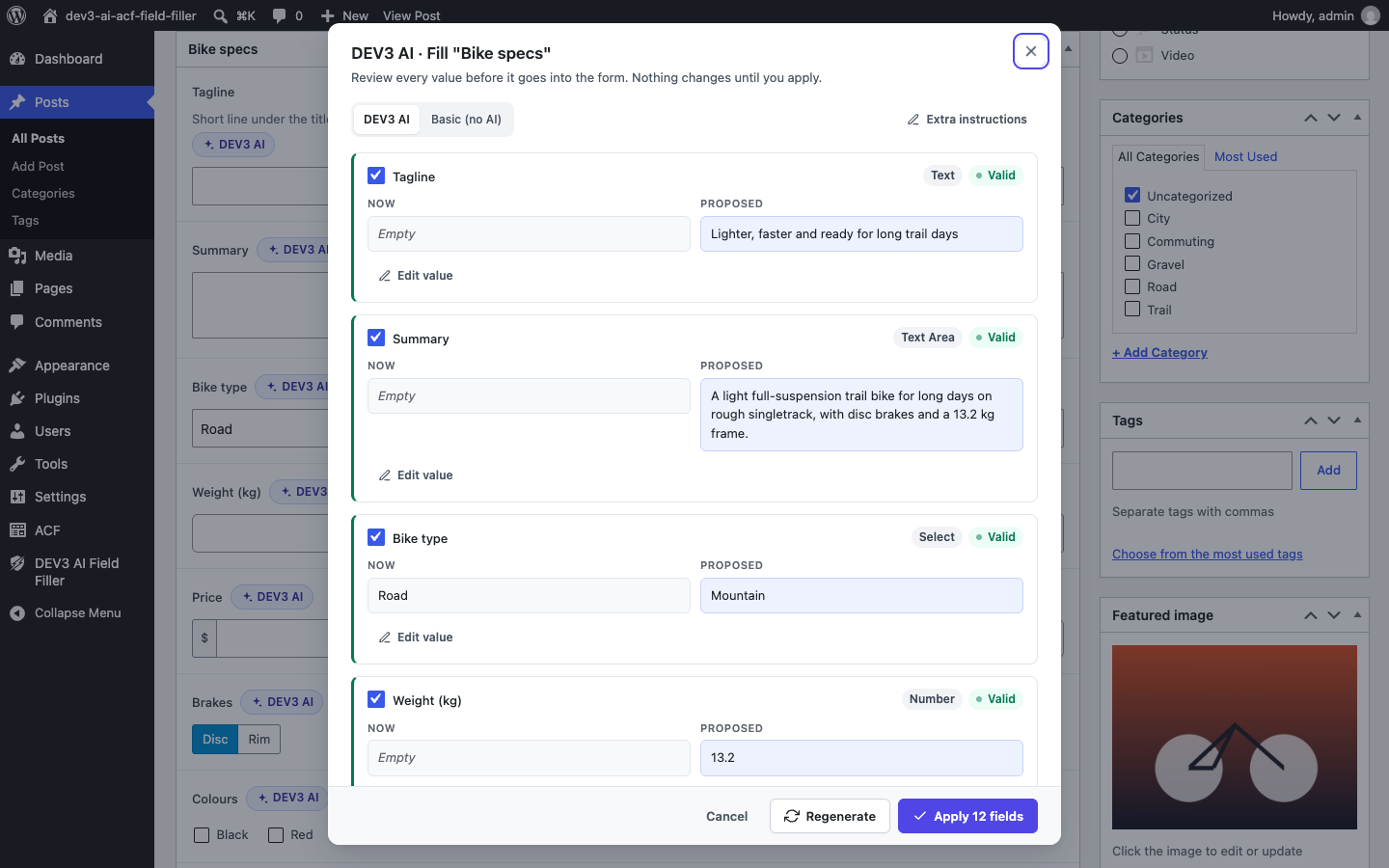
- A review dialog shows "Now" and "Proposed" for each field, a word diff for text, validation status and notes. Edit any value, untick what you do not want, regenerate with extra instructions, then apply.
- Accepted values go straight into the ACF form, so they are saved with the post as usual. Repeater, flexible content and gallery values are saved directly and the field is locked until you reload.
- Undo from the toast, or later from History.
Respects field types and validation
- Structured output per field type: choices only from the field, numbers clamped to min / max and rounded to the step, dates in ACF's format, true / false, colours, links, emails and URLs checked.
- ACF's own validation runs on every value, including your custom
acf/validate_valuefilters. Invalid values are flagged and cannot be applied until fixed. - Relationship, post object, page link, taxonomy and user fields only link to real posts, terms and users from a candidate list built from the field's own filters.
- Image, file and gallery fields pick from your media library, or DEV3 AI proposes a new image that is generated only when you click Generate and saved only when you accept it.
- Per-field "Instructions for DEV3 AI" and "Skip in DEV3 AI" settings in a DEV3 AI tab of ACF's field settings (they travel with local JSON).
Field-group generator
- Describe the data you need in plain words. DEV3 AI drafts a field group with labels, snake_case names, types, instructions, choices, ranges, relationships and sub fields.
- Review and edit the draft in a field tree editor, check the JSON and PHP export, then create it in the database (ACF › Field Groups) or as a local JSON file.
- Eight ready-made templates (product specs, event, team member, property listing, recipe, testimonial, location, book) work without AI.
Bulk fill with review, history and undo
- Pick a post type, the fields, filters (status, search, selected posts from the posts list bulk action) and "only empty fields".
- Runs in the background with progress, cancel and retry. Values wait in the review queue: accept, edit or reject one by one or in bulk, or accept a whole run.
- History keeps before and after values of every applied change: undo one change, a batch or a whole run. Undo warns if the field was edited since.
Works without AI
Basic fill extracts values with simple rules (labelled lines such as "Weight: 12 kg", links, emails, dates, mentioned choices and related posts, the featured image, field defaults), and the templates, queue, history and undo all work without an API key.
Privacy and cost
AI runs on Google AI with your own API key, stored encrypted and never sent to the browser. A usage log, monthly budget cap, cache, AI on/off switch and PII masking are in API Config. Only the content needed for a fill is sent.
Requirements
- WordPress 6.0 or newer (tested up to 6.8)
- PHP 7.4 or newer
- Optional: your own Google AI API key (from Google AI Studio) to switch on the DEV3 AI features. The rest of the plugin works without one.
Installation
From the release zip
- Download
dev3-ai-acf-field-filler.zipfrom the latest release. - In WordPress, go to Plugins → Add New → Upload Plugin, choose the zip and click Install Now.
- Click Activate.
Build from source
git clone https://github.com/dev3tech/dev3-ai-acf-field-filler.git
cd dev3-ai-acf-field-filler
composer install --no-dev
npm ci
npm run build
Then copy the dev3-ai-acf-field-filler folder into wp-content/plugins/ and activate it.
Getting started
- Install and activate Advanced Custom Fields (free or Pro) or Secure Custom Fields.
- Upload the plugin zip under Plugins › Add New › Upload Plugin and activate it.
- Open DEV3 AI Field Filler › API Config and add a Google AI API key (optional: Basic fill works without one).
- Choose the post types in Settings, then open a post and click "Fill with DEV3 AI".
FAQ
Does it work with ACF free?
Yes. Repeater, flexible content and gallery need ACF Pro or Secure Custom Fields, which include those field types.
Does DEV3 AI change my posts on its own?
No. Editor fills only change the form until you save; bulk fills wait in the review queue until you accept them. Every applied change can be undone.
Can it invent related posts or images?
No. It can only pick posts, terms, users and media from candidate lists of real items, and the server checks them again. New images are only generated when you ask for them.
Which fields are never filled?
Passwords, Google Map (needs geocoding), clone, message, tab, accordion, separator and icon picker, plus any field with "Skip in DEV3 AI".
Where are local JSON files written?
To your theme's acf-json folder when ACF's save path is writable, otherwise to wp-content/uploads/dev3af-acf-json, which the plugin adds to ACF's load paths.
Documentation
The full HTML guide (installation, settings, hooks and FAQ) is in docs/index.html. Open it in a browser after cloning or downloading the repository.
Changelog
1.0.1
- Readme tags updated (DEV3 AI branding).
1.0.0
- Initial release: editor fill (block + classic), type-aware validation, field-group generator (database or local JSON), bulk fill with review queue, history and undo, Basic mode, SCF support.
Licence
Released under the GNU General Public License v2.0 or later (GPL-2.0-or-later). See LICENSE.
More from DEV3
Releases
2 releases. Each count is every asset in that release; expand a row for the breakdown.