CR Relocate DB
Easily replace URLs and custom text in your WordPress database with a modern UI, AJAX progress, and detailed logs. Built with PHP OOP principles, Webpack, and WordPress coding standards.
by CraftRoq · github.com/designs-labz/dl-relocate-db · website
Install
No release zip yet. The repository archive installs, but the folder name will carry the branch suffix and updates will not flow:
wp plugin install https://github.com/designs-labz/dl-relocate-db/archive/refs/heads/main.zip

CR Relocate DB
Safely search and replace URLs and text across your whole WordPress database.
Preview every change first. Nothing is written until you say so.





🤔 What does it do?
Moving a WordPress site almost always means changing text inside the database. For example, every link that points to your staging site has to point to your live site instead:
https://staging.example.com → https://example.comThat address can appear thousands of times: in posts, menus, widgets, page builder layouts and plugin settings. CR Relocate DB finds every one of them and changes them safely, including the ones hidden inside data that a normal find-and-replace would break.
Good for:
- 🚚 Moving a site from staging to live, or live to staging
- 🌐 Changing a domain name
- 🔒 Switching from
http://tohttps:// - 📁 Updating server paths, such as
/home/old/public_html - ✏️ Renaming a product, company or phrase everywhere it appears
✨ Features
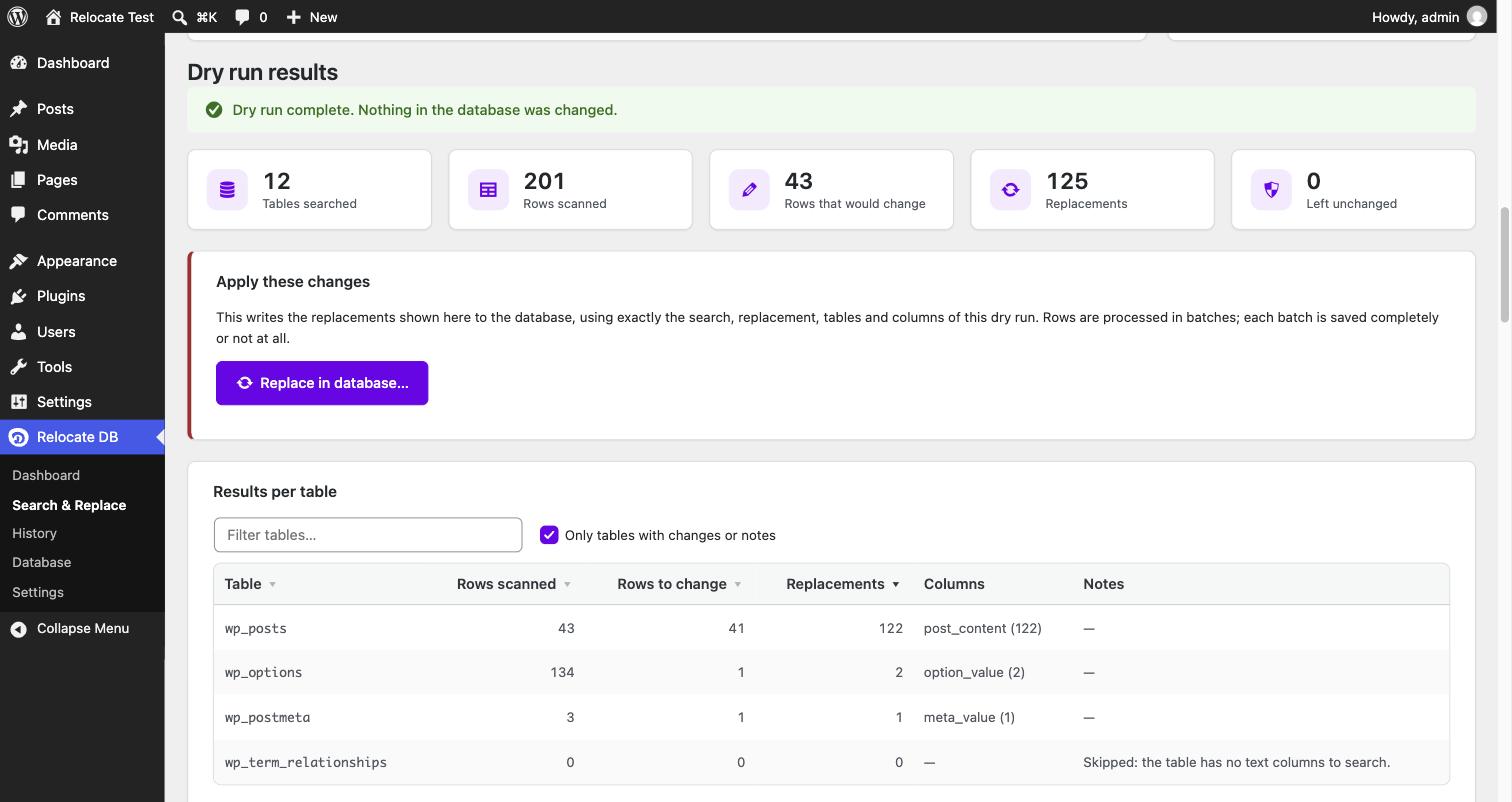
- 👀 Dry run first, always. See exactly what would change, table by table, with before and after examples. Nothing is written until you confirm.
- 🧩 Safe with serialized data and JSON. Plugin settings and page builders store data in formats that break if their length changes. CR Relocate DB rewrites them correctly every time.
- ➕ Up to 5 search and replace pairs at once. Change your domain and your server path in a single run.
- 🎯 Choose tables and columns. Search all WordPress tables, only some, or leave individual columns out.
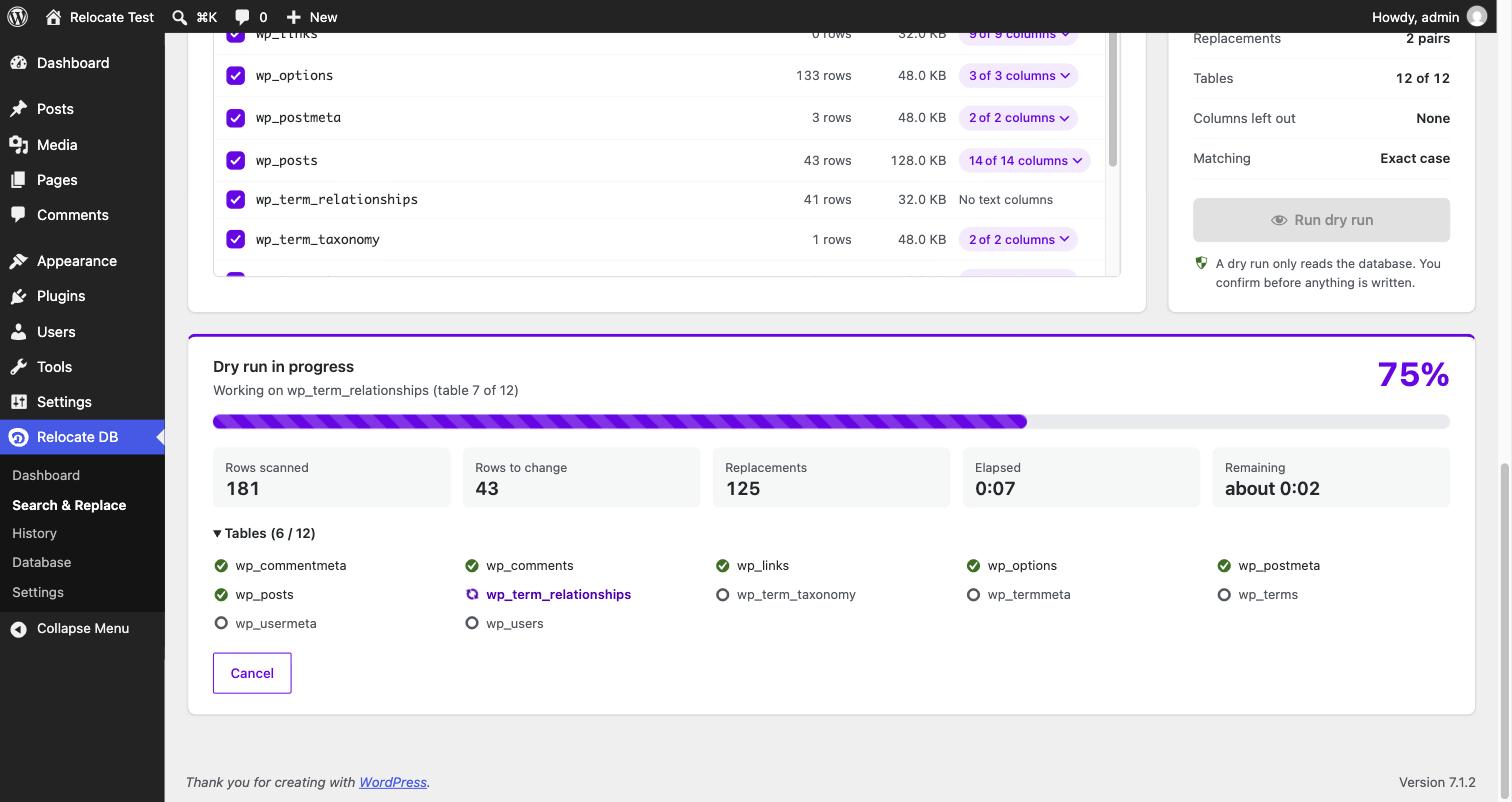
- 📊 Live progress. A progress bar with the current table, rows scanned, changes found and time remaining.
- 💾 Keeps a copy of the original values. Before anything changes, the old values are saved to a file you can download.
- 🐘 Built for big databases. Works in small batches, so it never times out or runs out of memory. If it is interrupted, you can continue from where it stopped.
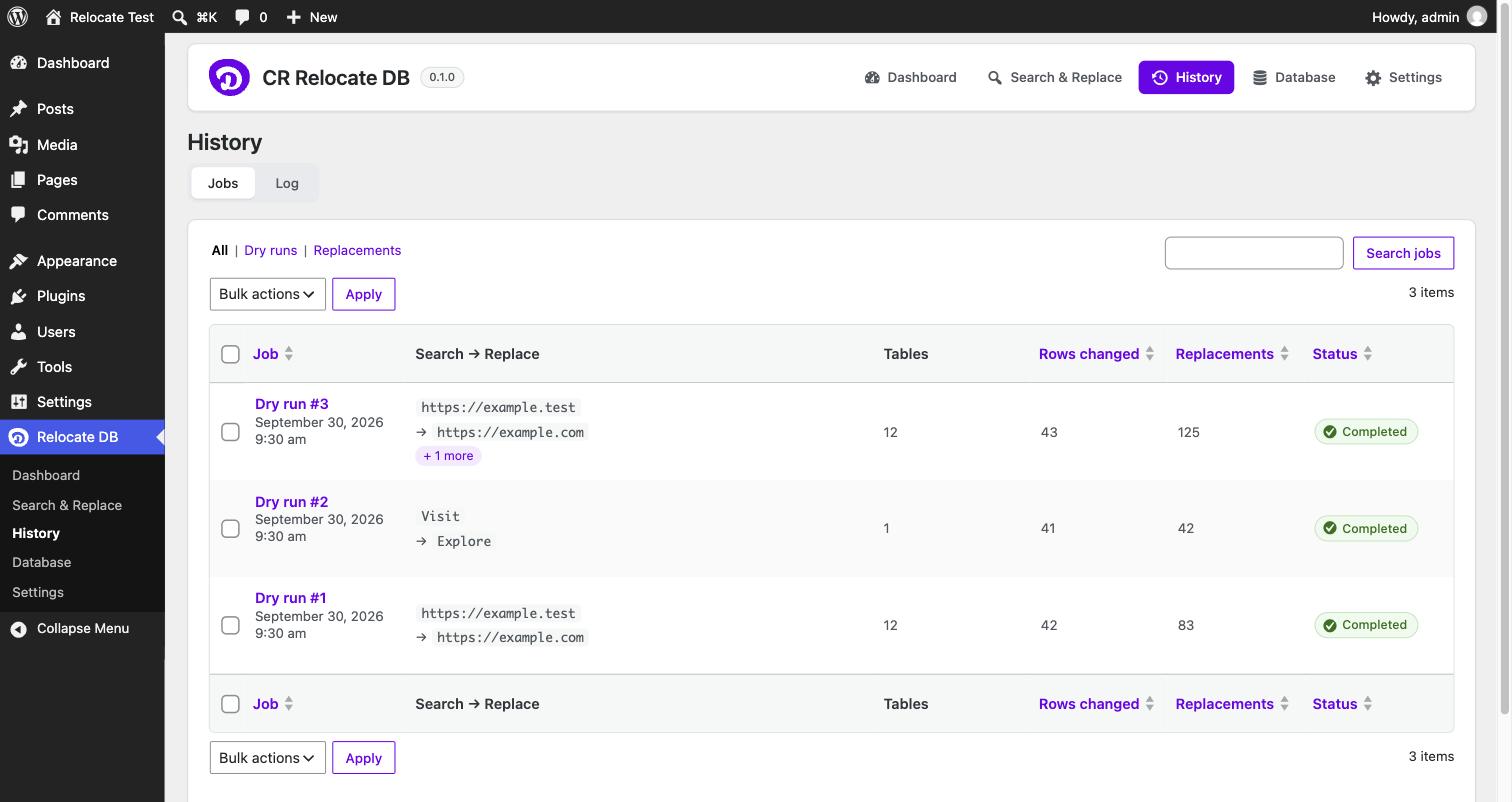
- 🗂️ Full history. Every dry run and replacement is recorded, searchable and sortable, with a log.
- ⌨️ WP-CLI support for developers and hosting teams.
- 📱 Works on any screen, from a phone to a wide monitor.
- ♿ Accessible. Keyboard friendly, screen reader friendly, and it never relies on colour alone.
🖼️ Screenshots
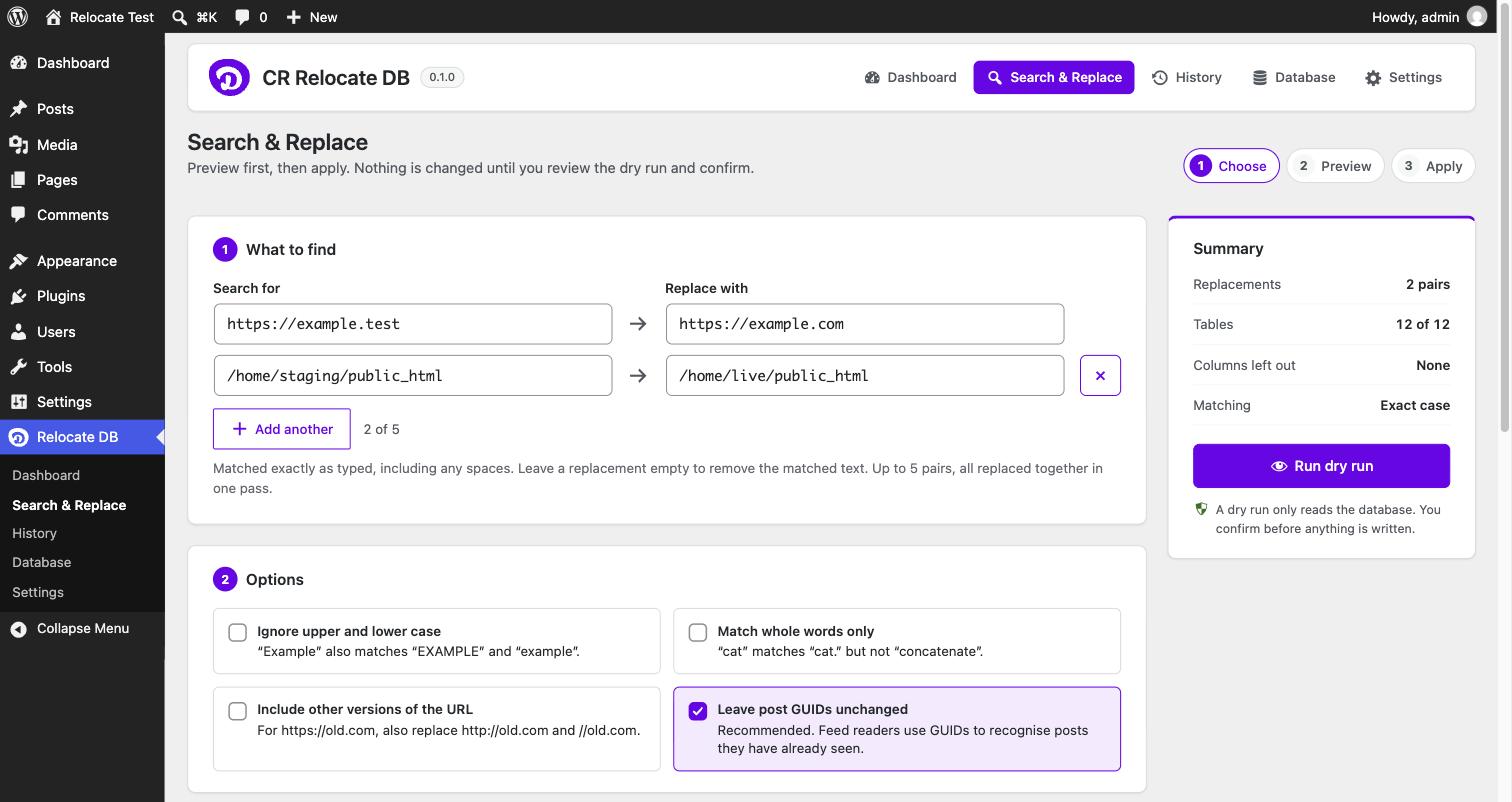
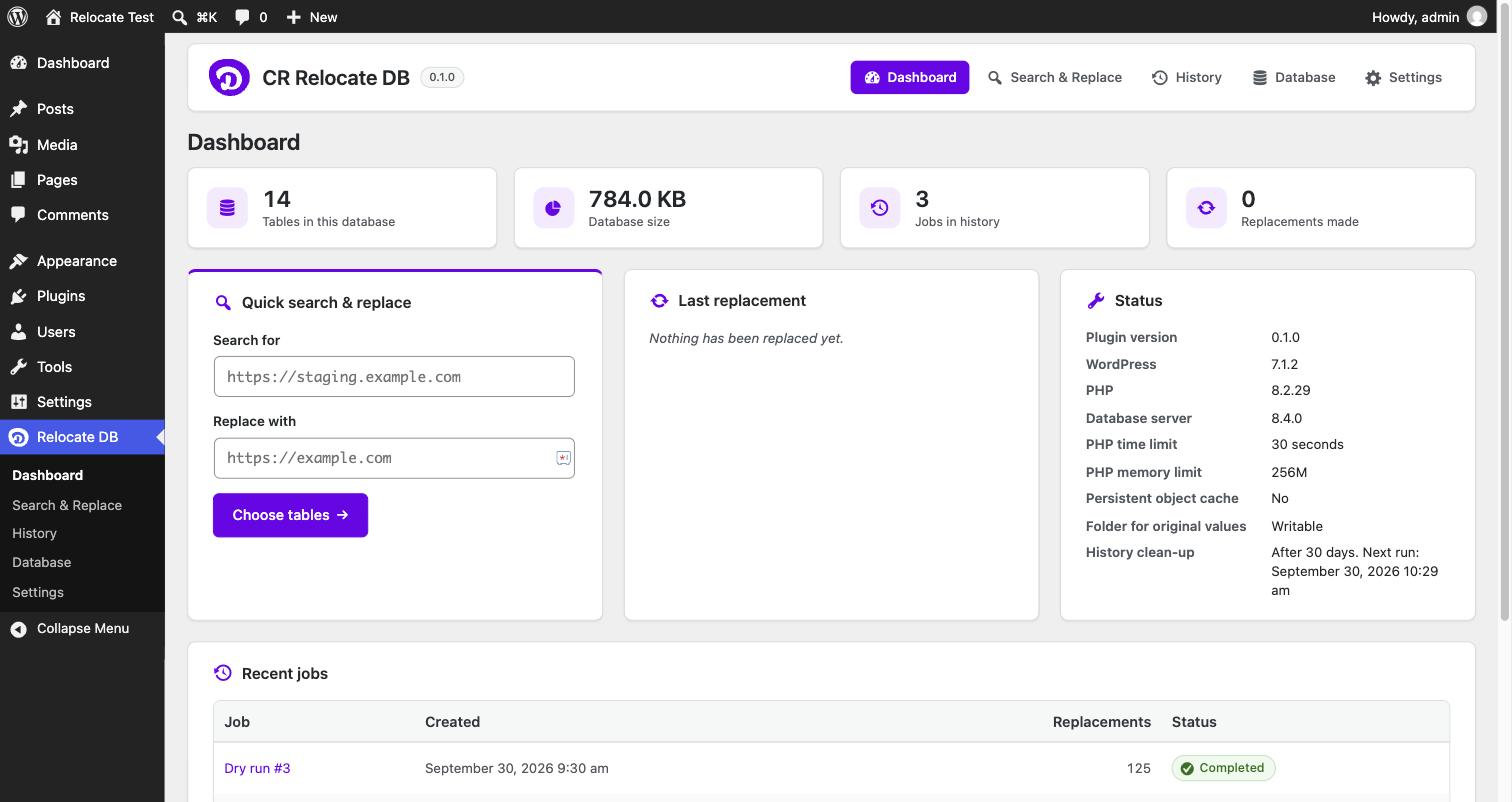
| Dashboard | Choose what to replace |
|---|---|
 |
|
| Watch the progress | Review the dry run |
 |
 |
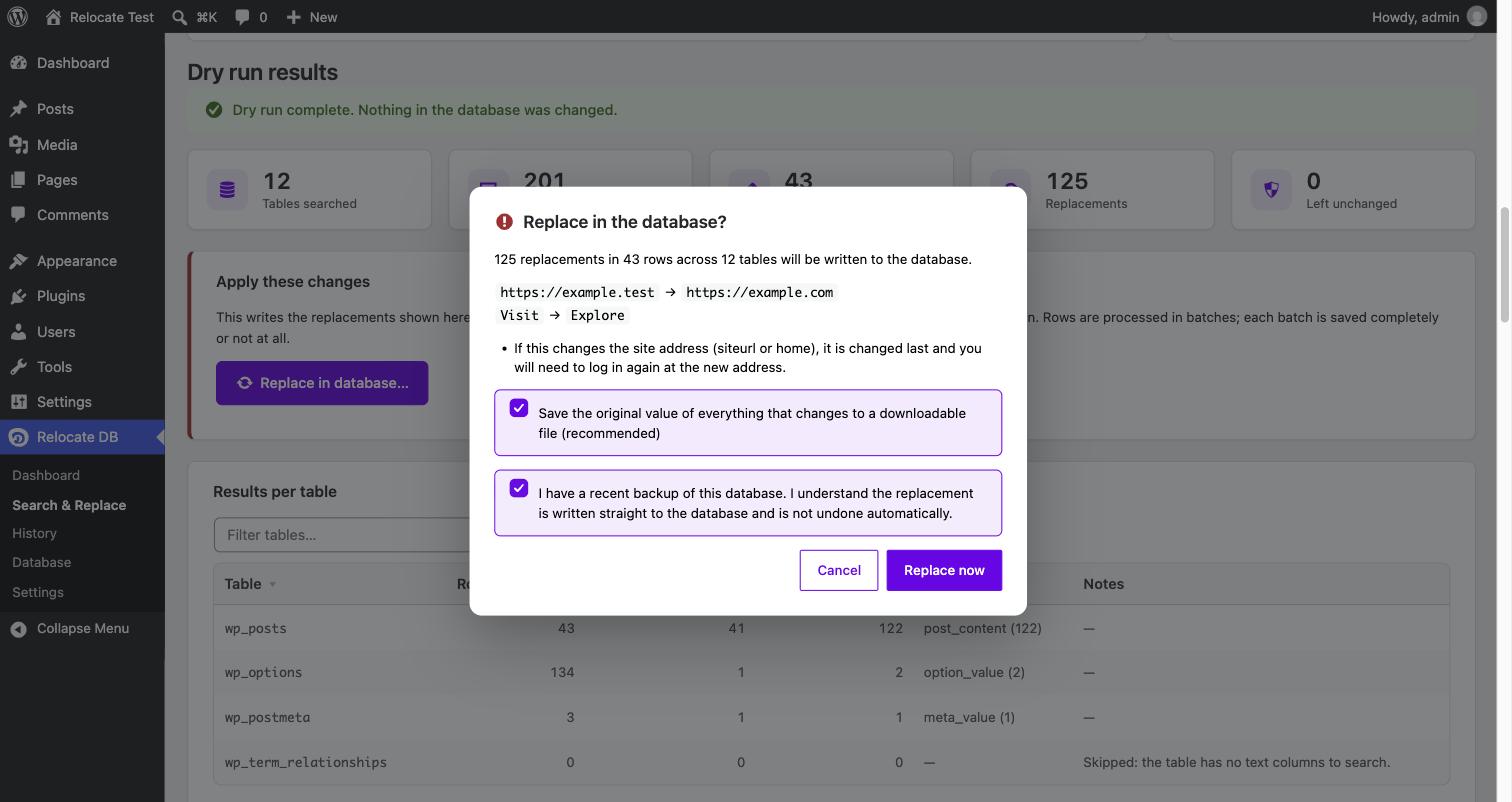
| Confirm before anything changes | Look back at every job |
 |
 |
🚀 Getting started
What you need
| Requirement | Version |
|---|---|
| WordPress | 6.5 or newer, single site (Multisite is planned for Pro) |
| PHP | 8.1 or newer |
| Database | MySQL 5.7+ or MariaDB 10.4+ |
Install it
- Download the plugin: on this page, click Code → Download ZIP.
- In WordPress, go to Plugins → Add New Plugin → Upload Plugin, choose the ZIP and click Install Now.
- Click Activate.
- You will find Relocate DB in the admin menu on the left.
💡 Tip: GitHub names the folder inside the ZIP
cr-relocate-db-main. The plugin works either way, but for tidy future updates you can unzip it, rename the folder tocr-relocate-db, and zip it again before uploading.
🧭 How to use it
It always works in three steps: Choose → Preview → Apply.
1️⃣ Choose what to replace
Open Relocate DB → Search & Replace.
- Search for: the text or address you want to change, for example
https://staging.example.com. - Replace with: what it should become, for example
https://example.com. - Need to change more than one thing? Click ➕ Add another (up to 5 pairs).
- Pick your options and tables. The defaults are right for most sites.
2️⃣ Preview with a dry run
Click Run dry run. The plugin reads your database and shows:
- how many rows would change, and in which tables and columns;
- examples of the text before and after;
- anything it would leave alone to keep your data safe, and why.
Nothing in your database changes during a dry run.
3️⃣ Apply the changes
Happy with the preview? Click Replace in database…, tick the box to confirm you have a backup, and click Replace now. When it finishes, you can download the original values.
✅ Examples
| I want to… | Search for | Replace with | Options |
|---|---|---|---|
| Move staging to live | https://staging.example.com |
https://example.com |
Tick Include other versions of the URL |
| Switch to HTTPS | http://example.com |
https://example.com |
|
| Change the server path | /home/staging/public_html |
/home/live/public_html |
|
| Rename a brand | Acme Ltd |
Acme Group |
Match whole words only |
💡 Tip: use the full address, including
https://. Searching for justexample.comwould also matchmyexample.com.
🛡️ How it keeps your site safe
- 👀 Preview before every change. A replacement can only be started from a finished dry run, and does exactly what the preview showed.
- 🧩 No broken data. Serialized settings and JSON are rewritten correctly. If a value could not be changed safely, it is left as it was and listed in the results.
- 🧱 All or nothing per batch. Rows are changed in small batches, and each batch is either saved completely or not at all.
- 💾 Original values saved. Before anything is written, the old values go into a downloadable file.
- 🏠 Stays logged in. Your site address is changed last, so you are not logged out part way through.
- 🔐 Administrators only. Only users who can manage the site and post unfiltered HTML can use it.
⚠️ Always take a full backup of your database first. The file of original values helps, but it is not a replacement for a proper backup.
❓ Questions
Can I undo a replacement?There is no undo button. But each replacement can save the original value of everything it changed to a .sql.gz file. Importing that file puts the old values back, for example with phpMyAdmin, or:
gunzip -c relocate-job-12-original-values.sql.gz | mysql your_databaseIt overwrites any edits made to those values since, so use it soon after the replacement.
What if I close the page while it is running?Nothing breaks. The batch in progress either finishes or is rolled back. Open the job from the Dashboard or History and click Continue. It carries on from the last completed batch.
Why were some values "left unchanged"?Sometimes changing a value would damage it: for example, plugin data that was already broken, or a custom format only that plugin understands. CR Relocate DB leaves those alone and tells you which table they are in, so you can check them yourself.
Does it work on large sites?Yes. It works through each table in small batches, a few seconds at a time, so it does not hit time or memory limits. If your pages are very large (for example page builder content), lower Rows per batch in Settings.
Does it support Multisite?The free plugin works on single sites. Multisite support is planned for CR Relocate DB Pro. On a Multisite network the free plugin shows a notice and does not run.
Does it send my data anywhere?No. Everything happens inside your own database. Nothing is sent to CraftRoq or anyone else.
⌨️ WP-CLI
Prefer the command line? The same features are available through WP-CLI:
# Preview only: nothing is changed
wp crq search-replace https://staging.example.com https://example.com --dry-run

# Preview, then apply after you confirm
wp crq search-replace https://staging.example.com https://example.com

# Two pairs at once, only in two tables, without the confirmation question
wp crq search-replace https://staging.example.com https://example.com /home/staging /home/live \
  --tables=wp_posts,wp_postmeta --yes

# Continue a job that was interrupted
wp crq resume 42
Run wp help crq search-replace to see every option.
🗺️ What's next
⭐ CR Relocate DB Pro is planned, with:
- 🌐 Multisite support: choose which sites of a network to update
- 💾 Automatic backups and one-click rollback
- 🗂️ Saved profiles and scheduled jobs
- 🔄 Moving databases between sites
- ➕ More than 5 search and replace pairs per job
Ideas or problems? Open an issue.
🧑💻 For developers
How the code is organised| Part | Where |
|---|---|
| Replacing within one value: plain text, serialized PHP, JSON | src/Replace/ (no WordPress dependency) |
| Table discovery and allowlisting | src/Database/Schema.php |
| Jobs: batching, transactions, resume, original values file, clean-up | src/Jobs/ |
| REST API used by the admin screens | src/Rest/ (crq-relocate/v1) |
| Admin screens | src/Admin/, templates/admin/, assets/ |
| WP-CLI | src/Cli/Command.php |
The admin screens and WP-CLI create jobs through JobStarter and run them with JobRunner::step(), so both behave the same way.
| Hook | Type | What it does |
|---|---|---|
crq_relocate_step_seconds |
filter | How long one step may work before saving and returning. Default 4. |
crq_relocate_max_pairs |
filter | How many search and replace pairs one job may have. Default 5. |
crq_relocate_supports_multisite |
filter | Whether the plugin may run on a Multisite network. Default false; meant for the Pro add-on. |
crq_relocate_manage |
capability | Required for everything. Maps to manage_options plus unfiltered_html; change it with a map_meta_cap filter. |
Classes load through the PSR-4 autoloader in cr-relocate-db.php, so the plugin runs straight from a Git checkout. Composer is only needed for development tools.
composer install
composer lint              # PHPCS (WordPress-Extra)
composer analyse           # PHPStan level 6
composer test              # Unit tests, no WordPress or database needed
Integration tests run against a real WordPress and MySQL. They drop and recreate tables in the database you point them at, so use an empty one:
WP_TESTS_DB_HOST=127.0.0.1:3306 WP_TESTS_DB_NAME=relocate_tests composer test:integrationWP_TESTS_DB_USER and WP_TESTS_DB_PASSWORD default to root and an empty password.
Regenerate the translation template after changing strings:
wp i18n make-pot . languages/cr-relocate-db.pot --exclude=vendor,testsCI runs the linters, the unit tests on PHP 8.1–8.4, and the integration tests on WordPress 6.5 and the latest release against MySQL 8.0, MySQL 8.4 and MariaDB 10.11.
📄 License
GPL-3.0-or-later. Free to use, change and share.
Made with 💜 by CraftRoq