Install
This is the repository archive. It installs, but the folder name will carry the branch suffix and updates will not flow.
Install straight from GitHub with WP-CLI:
wp plugin install https://github.com/deioces120/ai-connect/archive/refs/heads/master.zipAI Connect Pro
Complete AI Integration for WordPress
What is AI Connect Pro?
AI Connect Pro is a powerful WordPress plugin that brings complete AI integration to your website. It provides a full REST API, advanced SEO analysis, AI-powered content generation, security tools, and WooCommerce support — all in one plugin.
Screenshots
Dashboard
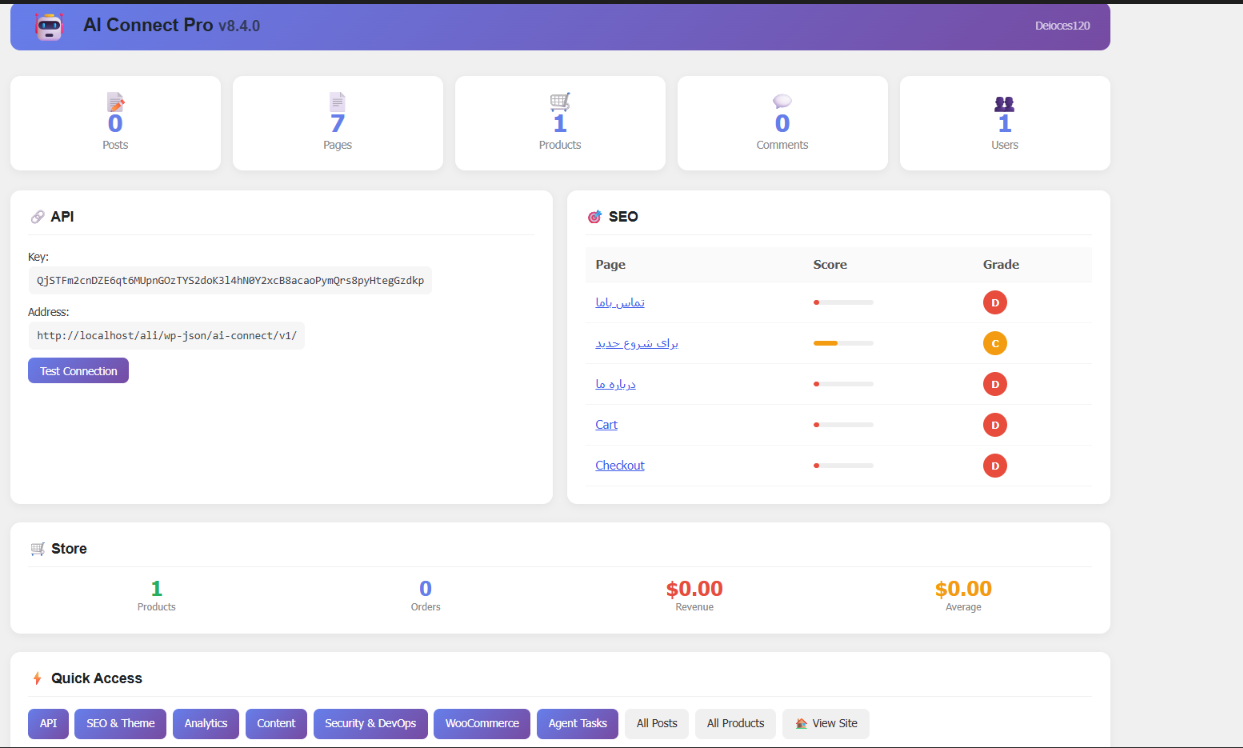
- Site statistics (Posts, Pages, Products, Comments, Users)
- API key and connection test
- SEO overview with page scores
- WooCommerce store stats
- Quick access buttons
SEO Analysis
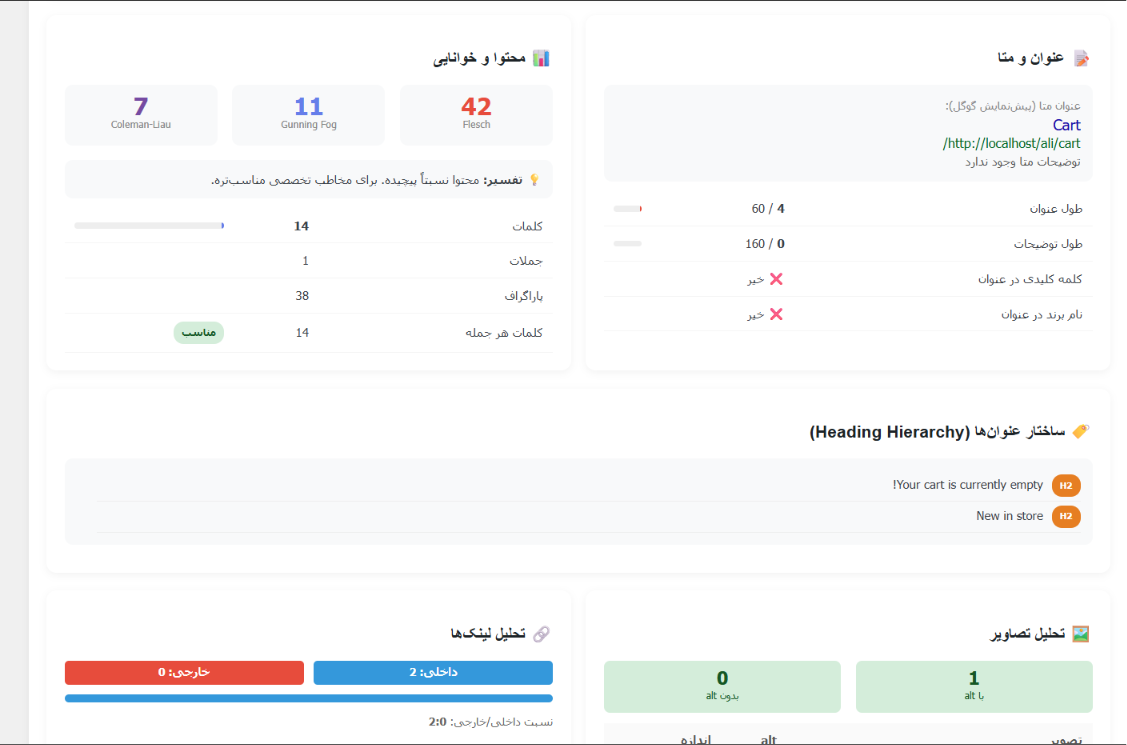
- Meta title and description analysis
- Content readability scores (Flesch, Gunning Fog, Coleman-Liau)
- Heading hierarchy check
- Internal/External link analysis
- Image alt text verification
AI Agent Analysis
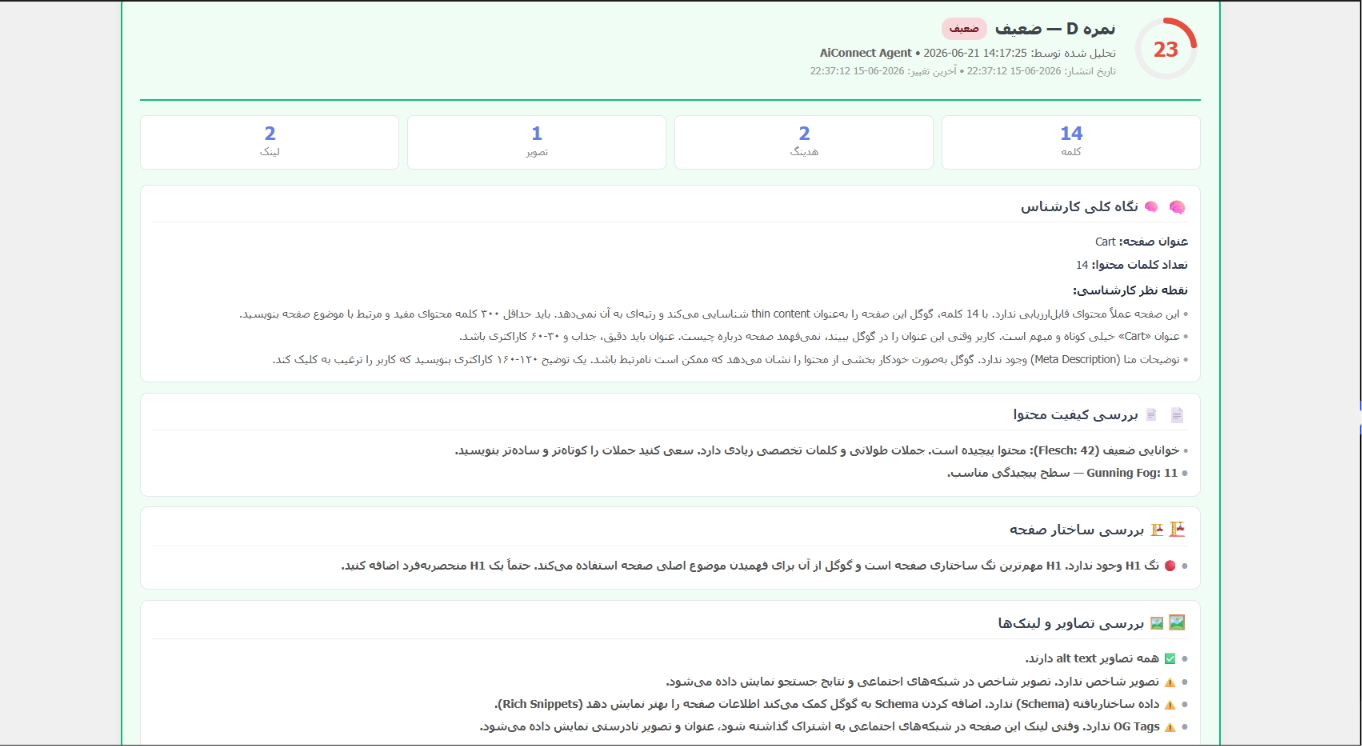
- AI-powered page scoring (A/B/C/D grade)
- Expert content review
- Page structure analysis
- Images and links review
- Actionable recommendations
Security & DevOps
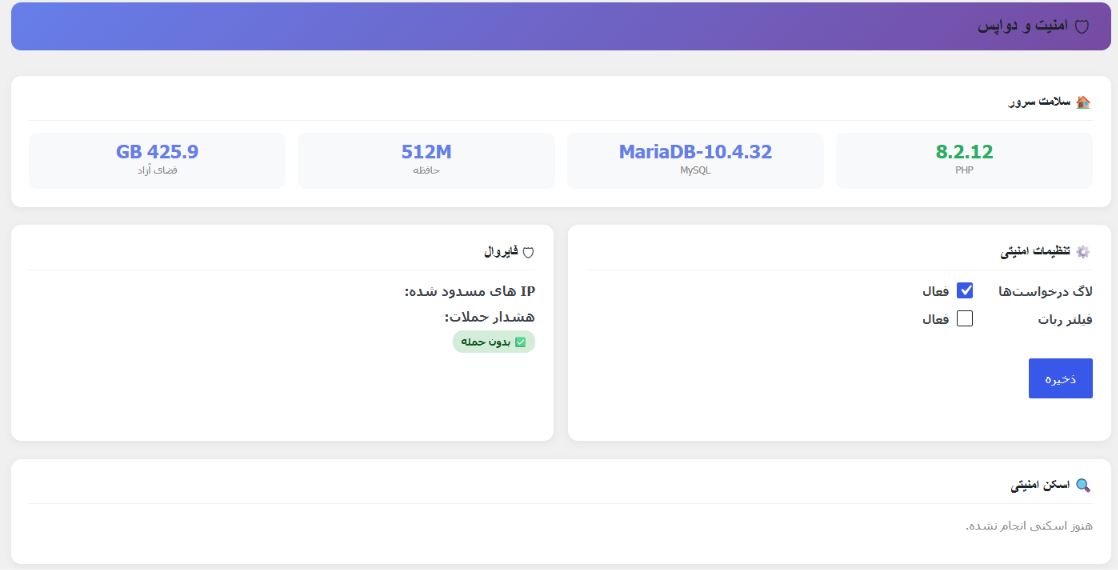
- Server health monitoring
- Firewall with IP blocking
- Security settings (logging, bot filtering)
- Security scanning
SEO & Theme Settings
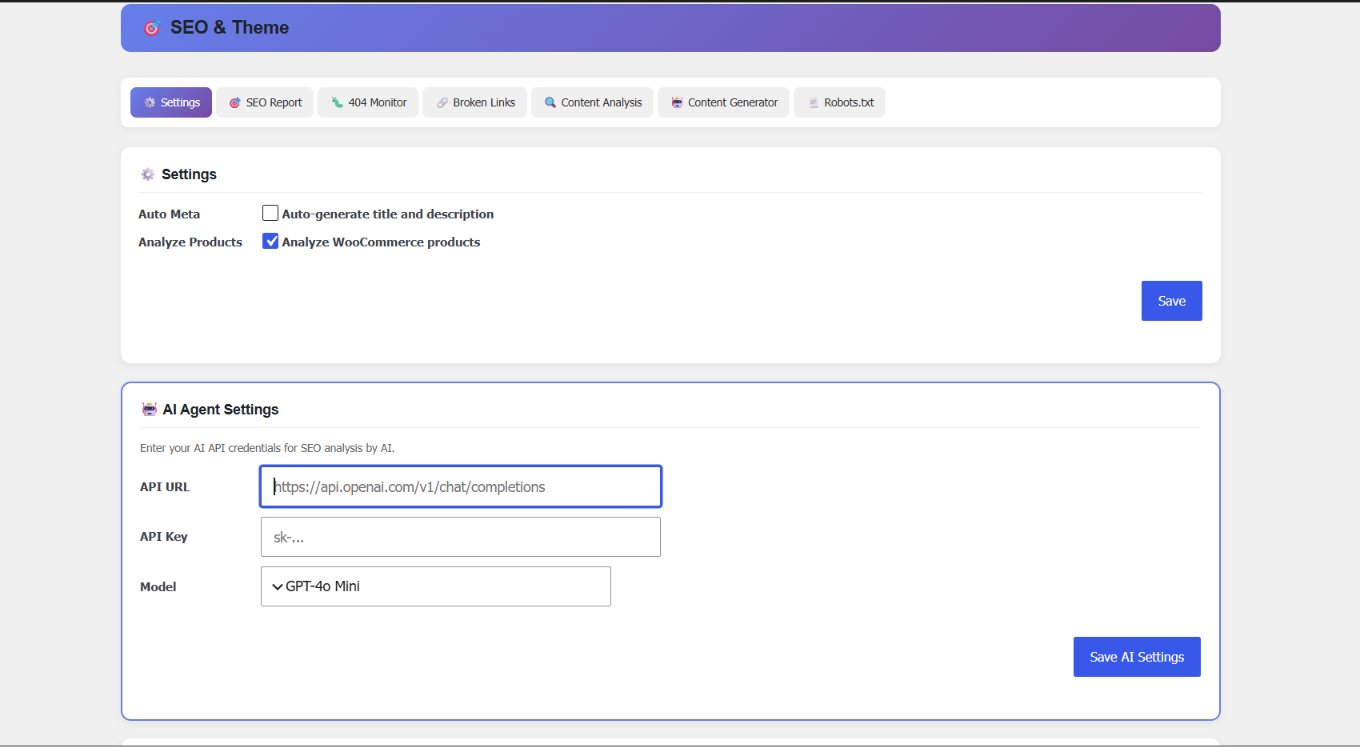
- Auto meta generation
- WooCommerce product analysis
- AI Agent configuration (GPT-4o, GPT-4, GPT-3.5)
- Multiple SEO tools tabs
Features
| Feature | Description |
|---|---|
| 🔗 REST API | Full CRUD for posts, pages, media, users, comments, plugins, themes, menus, options, files, database |
| 🎯 SEO Analysis | Deep page analysis with scoring (A/B/C/D), meta tags, headings, readability, images, links |
| 🤖 AI Integration | Connect to GPT-4o, GPT-4, GPT-3.5 for analysis and content generation |
| 📝 Content Generation | Articles, product descriptions, landing pages, FAQ |
| 🔒 Security | Rate limiting, IP filtering, security scanning, firewall, 404 monitoring |
| 🛒 WooCommerce | Product management, orders, revenue tracking |
| 🌐 Multilingual | Full support for Persian (Farsi) and English |
| 📊 Analytics | Site health, content matrix, broken link detection |
Quick Start
Installation
Method 1: Upload ZIP
- Download
ai-connect.zip - Go to Plugins > Add New > Upload Plugin
- Upload and activate
Method 2: Manual
- Copy
ai-connectfolder towp-content/plugins/ - Activate from Plugins page
First Steps
After activation:
- ✅ AI Connect Theme is auto-activated
- ✅ API key is auto-generated
- ✅ Shop page is created (if WooCommerce is installed)
- ✅ Default language is Persian
API Documentation
Base URL
https://your-site.com/wp-json/ai-connect/v1/Authentication
# Header
X-API-Key: YOUR_API_KEY

# Or query parameter
?api_key=YOUR_API_KEY
Quick Examples
Test Connection:
curl -s "https://your-site.com/wp-json/ai-connect/v1/ping"Get Posts:
curl -s -H "X-API-Key: YOUR_KEY" \
  "https://your-site.com/wp-json/ai-connect/v1/posts"
Create Post:
curl -s -X POST \
  -H "X-API-Key: YOUR_KEY" \
  -H "Content-Type: application/json" \
  -d '{"title":"My Post","content":"<p>Hello</p>","status":"publish"}' \
  "https://your-site.com/wp-json/ai-connect/v1/posts"
Analyze SEO:
curl -s -H "X-API-Key: YOUR_KEY" \
  "https://your-site.com/wp-json/ai-connect/v1/seo/analyze/1"
Generate Content:
curl -s -X POST \
  -H "X-API-Key: YOUR_KEY" \
  -H "Content-Type: application/json" \
  -d '{"topic":"WordPress SEO","content_type":"article","word_limit":800}' \
  "https://your-site.com/wp-json/ai-connect/v1/seo/generate-content"
API Endpoints
| Method | Endpoint | Description |
|---|---|---|
| GET | /ping |
Test connection |
| GET/POST | /posts |
Manage posts |
| GET/POST | /pages |
Manage pages |
| GET/POST | /media |
Media library |
| GET/POST | /comments |
Comments |
| GET | /users |
Users |
| GET/POST | /products |
WooCommerce products |
| GET | /orders |
WooCommerce orders |
| GET | /plugins |
Plugins |
| GET | /themes |
Themes |
| GET/POST | /menus |
Menus |
| GET/POST | /options |
WordPress options |
| GET/POST | /files |
File system |
| POST | /db/query |
SQL queries |
| GET | /seo/analyze/{id} |
SEO analysis |
| GET | /seo/scores |
All page scores |
| GET | /seo/site-health |
Site health |
| POST | /seo/generate-content |
AI content generation |
| GET | /analytics/summary |
Analytics summary |
| POST | /devops/scan |
Security scan |
AI Setup
Configure AI Agent
- Go to AI Connect > SEO & Theme > Settings
- Enter your AI API credentials:
- API URL:
https://api.openai.com/v1/chat/completions - API Key: Your OpenAI API key
- Model: GPT-4o, GPT-4o Mini, GPT-4 Turbo, or GPT-3.5 Turbo
- API URL:
- Save settings
Auto SEO Analysis
- Go to AI Connect > SEO & Theme > SEO Report
- Click on a page
- Click "Auto Analyze" button
- AI will analyze the content and provide recommendations
Language Support
Persian (Farsi) 🇮🇷
- Full RTL (Right-to-Left) support
- All admin panel texts in Persian
- Default font: Tahoma
English 🇺🇸
- Full LTR (Left-to-Right) support
- All admin panel texts in English
Change Language
- Go to AI Connect > Language
- Select your preferred language
- Save
Security Notes
- Keep your API key secret - Never expose it in public code
- Use HTTPS - All API communication should be over HTTPS
- Set IP restrictions - Limit access to specific IPs in production
- Enable rate limiting - Prevent abuse
- Disable SQL access - Turn off
/db/queryendpoint in production
Requirements
- WordPress 5.0+
- PHP 7.4+
- MySQL 5.6+
- PHP memory: 128MB minimum (256MB recommended)
Optional
- WooCommerce (for store features)
- cURL (for broken link checking)
- OpenAI account (for AI analysis and content generation)
- Pexels API key (for free image search)
Contributing
- Fork the repository
- Create feature branch:
git checkout -b feature/my-feature - Commit changes
- Push and create Pull Request
License
GPL v2 - View License
Author
Deioces120
If this plugin is helpful, please give it a ⭐ on GitHub!
[فارسی / Persian]
AI Connect Pro چیست؟
افزونه AI Connect Pro یک ابزار قدرتمند برای وردپرس است که اتصال کامل هوش مصنوعی را به سایت شما میآورد. این افزونه یک REST API جامع، تحلیل سئوی پیشرفته، تولید محتوا با AI، ابزارهای امنیتی و پشتیبانی از ووکامرس را در یک پکیج واحد ارائه میدهد.
اسکرینشاتها
داشبورد
- آمار کلی سایت (نوشته، صفحه، محصول، دیدگاه، کاربر)
- کلید API و تست اتصال
- نمای کلی سئو با امتیاز صفحات
- آمار فروشگاه ووکامرس
- دسترسی سریع
تحلیل سئو
- بررسی عنوان و توضیحات متا
- امتیازات خوانایی محتوا (Flesch، Gunning Fog، Coleman-Liau)
- بررسی ساختار هدینگ
- تحلیل لینکهای داخلی و خارجی
- بررسی alt text تصاویر
تحلیل AI Agent
- امتیازدهی صفحه توسط هوش مصنوعی (A/B/C/D)
- بررسی تخصصی محتوا
- تحلیل ساختار صفحه
- بررسی تصاویر و لینکها
- پیشنهادات عملیاتی
امنیت و دواپس
- مانیتورینگ سلامت سرور
- فایروال با مسدودسازی IP
- تنظیمات امنیتی (لاگگیری، فیلتر ربات)
- اسکن امنیتی
تنظیمات SEO و قالب
- ساخت خودکار متا
- تحلیل محصولات ووکامرس
- پیکربندی AI Agent (GPT-4o، GPT-4، GPT-3.5)
- تبهای ابزارهای سئو
امکانات
| ویژگی | توضیح |
|---|---|
| 🔗 REST API | مدیریت کامل نوشته، صفحه، رسانه، کاربر، افزونه، قالب، منو و... |
| 🎯 تحلیل سئو | تحلیل عمیق صفحات با نمرهدهی A/B/C/D |
| 🤖 هوش مصنوعی | اتصال به GPT-4o برای تحلیل و تولید محتوا |
| 📝 تولید محتوا | مقاله، توضیحات محصول، لندینگ پیج، FAQ |
| 🔒 امنیت | Rate Limiting، فیلتر IP، اسکن امنیتی |
| 🛒 ووکامرس | مدیریت محصولات و مشاهده آمار فروش |
| 🌐 چند زبانه | پشتیبانی کامل از فارسی و انگلیسی |
نصب سریع
روش ۱: آپلود فایل ZIP
- فایل
ai-connect.zipرا دانلود کنید - به افزونهها > افزودن > بارگذاری افزونه بروید
- فایل را آپلود و فعال کنید
روش ۲: نصب دستی
- پوشه
ai-connectرا در مسیرwp-content/plugins/کپی کنید - افزونه را از بخش افزونهها فعال کنید
تنظیمات اولیه
پس از فعالسازی:
- ✅ قالب AI Connect به صورت خودکار فعال میشود
- ✅ کلید API به صورت خودکار تولید میشود
- ✅ صفحه فروشگاه ساخته میشود (در صورت نصب ووکامرس)
- ✅ زبان پیشفرض فارسی است
مستندات API
آدرس پایه
https://your-site.com/wp-json/ai-connect/v1/احراز هویت
# هدر
X-API-Key: YOUR_API_KEY

# یا پارامتر URL
?api_key=YOUR_API_KEY
نمونه درخواستها
تست اتصال:
curl -s "https://your-site.com/wp-json/ai-connect/v1/ping"دریافت نوشتهها:
curl -s -H "X-API-Key: YOUR_KEY" \
  "https://your-site.com/wp-json/ai-connect/v1/posts"
ایجاد نوشته:
curl -s -X POST \
  -H "X-API-Key: YOUR_KEY" \
  -H "Content-Type: application/json" \
  -d '{"title":"عنوان","content":"<p>محتوا</p>","status":"publish"}' \
  "https://your-site.com/wp-json/ai-connect/v1/posts"
تحلیل سئو:
curl -s -H "X-API-Key: YOUR_KEY" \
  "https://your-site.com/wp-json/ai-connect/v1/seo/analyze/1"
پشتیبانی زبان
فارسی 🇮🇷
- پشتیبانی کامل RTL (راست به چپ)
- تمام متون پنل مدیریت فارسی
- فونت پیشفرض: Tahoma
انگلیسی 🇺🇸
- پشتیبانی کامل LTR (چپ به راست)
- تمام متون پنل مدیریت انگلیسی
تغییر زبان
- به AI Connect > زبان بروید
- زبان مورد نظر را انتخاب کنید
- ذخیره کنید
نکات امنیتی
- کلید API را مخفی نگه دارید
- از HTTPS استفاده کنید
- محدودیت IP تنظیم کنید
- Rate Limit را فعال نگه دارید
نیازمندیها
- وردپرس 5.0 یا بالاتر
- PHP 7.4 یا بالاتر
- MySQL 5.6 یا بالاتر
- حافظه PHP حداقل 128MB
لایسنس
GPL v2
نویسنده
Deioces120
Releases
1 release.
These releases are tags only. The author does not attach a packaged zip, so there are no download counts to report.