Install
This is the repository archive. It installs, but the folder name will carry the branch suffix and updates will not flow.
Install straight from GitHub with WP-CLI:
wp plugin install https://github.com/deckerweb/builder-pdf-presenter/archive/refs/heads/main.zip
About
Publish PDFs with less effort: lightweight cover cards for browsing and a comfortable reader that opens when needed. Suitable for club newsletters, meeting minutes, community publications and document libraries on any supported content post type.
Your data in your WordPress. Period. Free, without advertising, reader tracking or a Pro edition.
Version 1.0.0 · WordPress 6.9+ · PHP 8.3+
Getting started · User guide · FAQ by topic · Examples
Contents
- At a Glance
- Getting started
- Feature Highlights
- FAQ
- Changelog
- About the project
- Help, security and support
At a Glance
- One PDF or an ordered collection per post, page or independent block.
- Three card designs: cover, compact and document list; responsive grids.
- Local PDF.js reader in a modal or new tab; direct-file opening is also available.
- Configurable reading/download buttons, labels, covers and reader controls.
- Website defaults with content type, contribution and document overrides.
- Document and filter blocks, eight starter patterns, shortcodes and three native Bricks elements.
- Optional central reader watermark; explicit PDF Poster migration with recovery.
- Local Site Health checks and permission-aware Command Palette shortcuts.
Getting started
- Install and activate the plugin ZIP under Plugins → Add Plugin → Upload Plugin.
- Open Settings → Builder PDF Presenter. Select content types that should receive the PDF management panel and set the website defaults.
- In a post, select PDFs from the Media Library or upload them. Reorder entries and edit display titles where useful.
- Insert the Builder PDF Presenter block and use the assigned documents. Alternatively create an independent collection in the block, use
[builder_pdf_presenter]or choose a native Bricks element. - Preview the page and test reading/download actions. Save changes before leaving the settings page.
Embedding PDFs: Settings → Builder PDF Presenter → Embed PDFs shows the available ways to insert documents. Use [builder_pdf_presenter] in a Shortcode block or the Classic Editor; the shortcode reference lists every parameter with examples. Block Editor blocks/patterns and native Bricks elements are alternative insertion methods.
Switching from another PDF plugin: Under Tools → PDF migration, review supported PDF Poster/PDF Embedder content and migrate selected posts. Read the migration guide for supported formats, result reports and recovery.
Use Builder PDF Presenter with the WordPress Block Editor (Gutenberg): insert documents with its blocks and patterns. The Classic Editor is supported through shortcodes. When Bricks Builder is installed and active, dedicated native elements are also available.
The native Bricks integration was tested with Bricks 2.4.5.
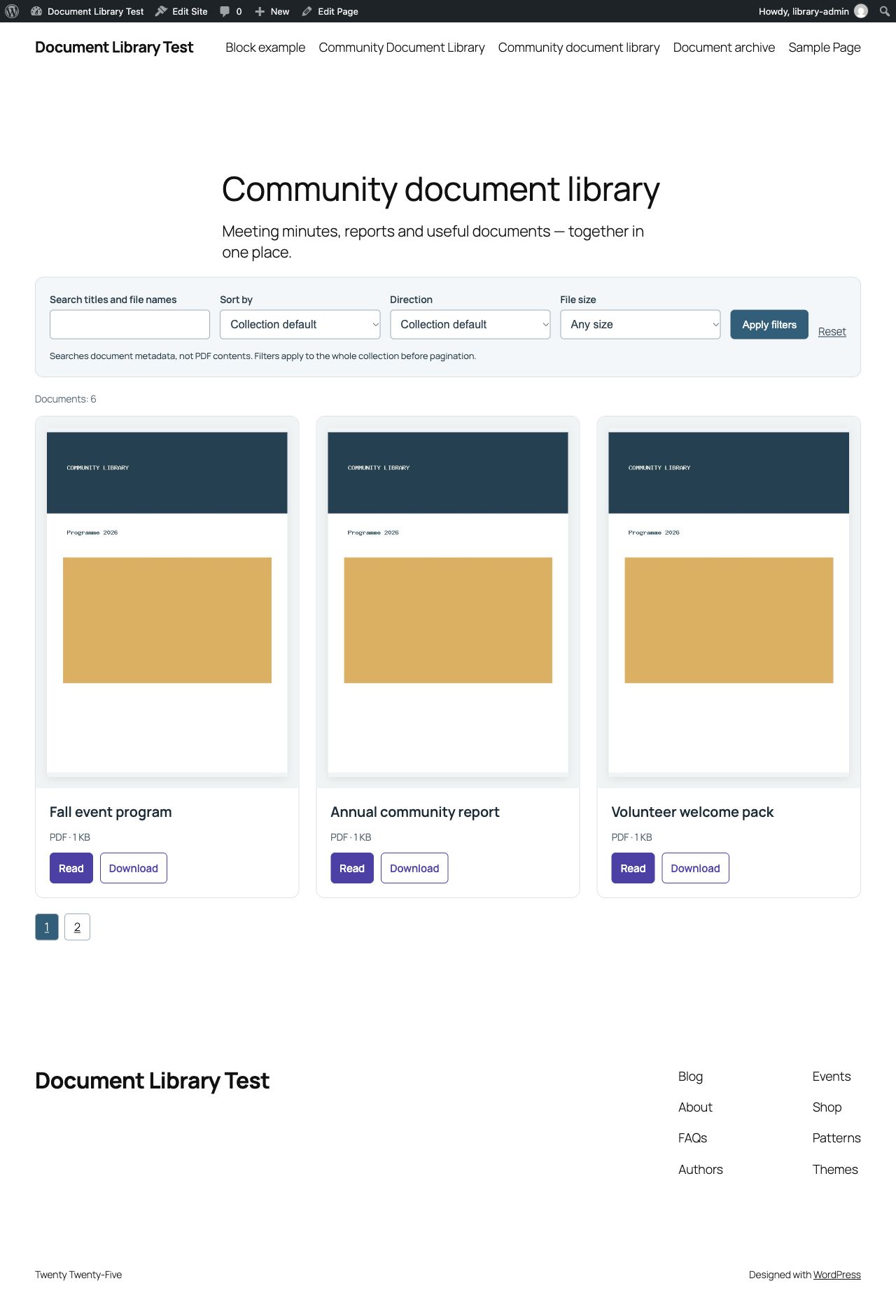
A PDF collection with cover cards, reading and download buttons, metadata filters and pagination.
Feature Highlights
A fast overview, a reader when needed
The grid displays ordinary cover images. It does not initialize a separate PDF.js reader for every visible card. Opening a document loads the reader on demand. Large source PDFs can still take time to load; the overview does not compress the original files.
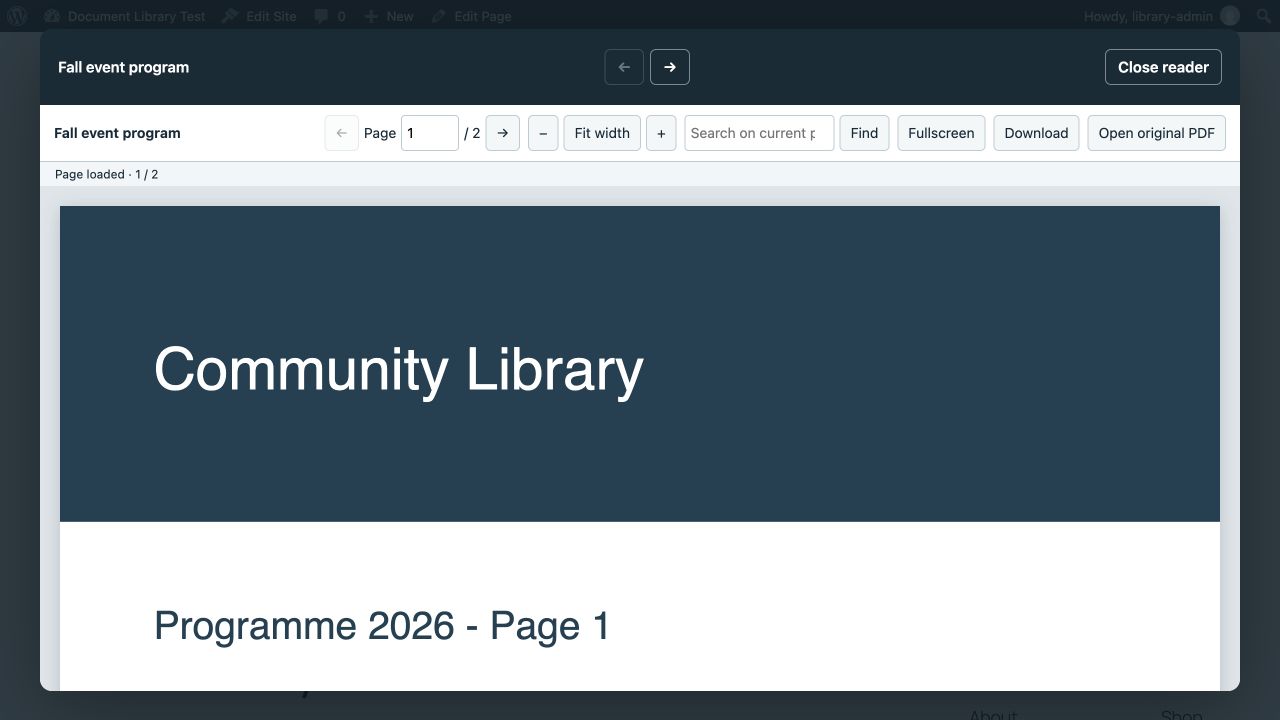
The local PDF.js reader opens in a modal when a document is selected.
Simple document care
Select or upload multiple PDFs, reorder them, change display titles, replace files or assign covers. Administrators set collection limits. Reducing a limit never removes existing entries.
Consistent defaults with useful exceptions
Keep the usual settings in one place. Content types, individual contributions and documents can override inheritable settings. The fixed save bar identifies unsaved changes and keeps edits available after a save failure.
Block Editor and native Bricks workflows
Use Block Editor color, typography, spacing and other supported style controls for the current block. The compact “PDF Presenter · Block” toolbar belongs to the editor only. In Bricks, PDF document works inside post loops; PDF collection displays one post’s documents. Native styles, dynamic tags and conditions remain available.
Central reader branding
Administrators enable a shared text/logo watermark and decide whether editors may disable it per document. The overlay changes the reader display only; original files and downloads are unaffected.
A deliberate scope
No flipbook effects, Pro edition, advertising, reader analytics or cloud synchronization. Hiding Download is not copy protection. Document files and cover images keep the server’s existing access rules.
Sort and find documents
Search named libraries by titles and file names, sort results and filter file sizes. Search covers the whole accessible collection before pagination, never PDF contents. Ready-to-use patterns connect a grid and filters, including a sidebar layout.
FAQ
Which editors are supported?
Use Builder PDF Presenter with the WordPress Block Editor (Gutenberg): insert documents with its blocks and patterns. The Classic Editor is supported through shortcodes. When Bricks Builder is installed and active, dedicated native elements are also available.
Can one post contain several PDFs?
Yes. Add an ordered collection to the post or directly to a block and display it as cards or a list.
Can I create an archive across posts?
Yes. Use the block’s contribution query or a native post Query Loop. The plugin query shows the first or all PDFs per source post and filters the complete accessible collection before pagination.
Why is a preview image missing?
Automatic PDF previews depend on the server. Generate a missing preview where supported or select a custom cover.
Is this a protected file or membership system?
No. Button visibility is not file protection. Existing server permissions still apply.
Does the watermark change downloads?
No. It appears only in the embedded reader.
Is there a Pro edition or reader tracking?
No. There is no Pro edition, upselling or reader tracking by the plugin.
Read all questions and answers →
Changelog
1.0.0 · 2026-11-06
- New: PDF cards with previews, a reader and downloads for individual documents and collections.
- New: Global defaults and individual settings for any post type.
- New: Block Editor, shortcodes and native Bricks integration, including metadata filters and sorting.
- New: Migration from PDF Poster and PDF Embedder with outcome reports and recovery.
About the project
For years, club and community clients needed a simple way to publish PDFs. Missing functions, upselling and awkward administration kept getting in the way. A client project in autumn 2026 finally prompted me to build a focused solution of my own.
— David Decker · Read the story
Help, security and support
User guide · FAQ by topic · Plugin website
Report suspected vulnerabilities privately; follow SECURITY.md. Do not post customer files, credentials or exploit details in public support requests.
To support the project: Ko-fi · Buy Me a Coffee · PayPal.
© 2026 David Decker – DECKERWEB. Plugin license: GPL v2 or later. PDF.js: Apache-2.0, see vendor/pdfjs/LICENSE. Embedded deckerweb components retain their included notices. Original PDF Presenter interface glyphs by David Decker – DECKERWEB. Any retained Tabler asset notices are in vendor/tabler/LICENSE.
Marketing artwork: original vector artwork by David Decker – DECKERWEB. Bricolage Grotesque and Manrope lettering under SIL OFL 1.1; license notices in .github/assets/licenses.