CRM Lead Connector
Reliable WordPress and Elementor lead delivery to GoHighLevel or any CRM webhook.
Install
This is the repository archive. It installs, but the folder name will carry the branch suffix and updates will not flow.
Install straight from GitHub with WP-CLI:
wp plugin install https://github.com/davimiza1/wordpress-crm-lead-connector/archive/refs/heads/main.zipCRM Lead Connector for WordPress
A lightweight WordPress plugin that sends Elementor Pro or custom form submissions to GoHighLevel, a custom CRM, Zapier, Make, n8n, or any HTTPS webhook.
Built by Muhammad Dawood, Senior WordPress Developer at Tvoxel Technologies.
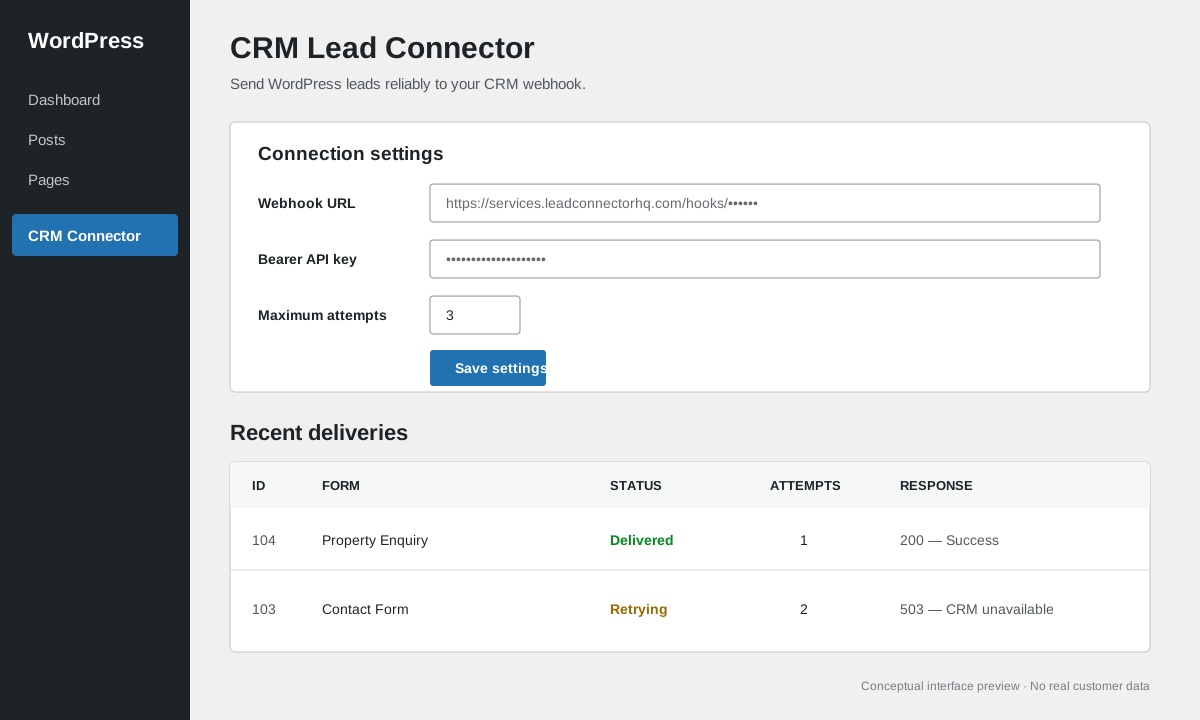
Conceptual interface preview using fictional data.
Why this project exists
Lead integrations often fail silently when a CRM is temporarily unavailable. CRM Lead Connector creates a delivery record before sending each lead, retries failed requests with exponential backoff, and gives administrators a simple delivery-status view inside WordPress.
This repository contains original demonstration code. It does not contain client code, API credentials, or private customer data.
Features
- Automatic Elementor Pro Form integration
- Public action hook for custom WordPress forms
- JSON delivery to any valid HTTPS webhook
- Optional bearer-token authentication
- Optional HMAC-SHA256 request signing
- SSRF-aware requests through the WordPress HTTP API
- Delivery logs without exposing payloads in the admin table
- Configurable retry limit with exponential backoff
- WordPress Cron retry worker
- Sanitized settings and capability-protected administration
- Clean uninstall routine
Typical workflow
Form submitted
    ↓
Normalize and sanitize fields
    ↓
Save a pending delivery record
    ↓
Send signed JSON webhook
    ├── 2xx response → Delivered
    └── Error/non-2xx → Retry with backoff → Failed after limit
Installation
- Download or clone this repository.
- Copy the folder to
wp-content/plugins/crm-lead-connector. - Activate CRM Lead Connector in WordPress.
- Open CRM Connector in the WordPress admin menu.
- Add your HTTPS webhook URL and, if needed, an API key or signing secret.
- Submit a test form and confirm its status in Recent deliveries.
Elementor Pro
No extra configuration is needed. The plugin listens to Elementor Pro's elementor_pro/forms/new_record event and sends each field using its Elementor field ID.
Use clear field IDs such as:
first_name
last_name
email
phone
message
These IDs make field mapping in GoHighLevel or another CRM predictable.
Custom form integration
Any WordPress theme or plugin can submit a lead using the public action:
do_action(
    'md_clc_submit_lead',
    array(
        'first_name' => 'Ayesha',
        'email'      => 'ayesha@example.com',
        'phone'      => '+92 300 0000000',
    ),
    'Property Enquiry',
    array(
        'property_id' => 125,
        'campaign'    => 'summer-listings',
    )
);
The example values are fictional.
Example payload
{
  "event": "lead.created",
  "form_name": "Property Enquiry",
  "fields": {
    "first_name": "Ayesha",
    "email": "ayesha@example.com",
    "phone": "+92 300 0000000"
  },
  "context": {
    "property_id": "125",
    "campaign": "summer-listings"
  },
  "source_url": "https://example.com/",
  "submitted_at": "2026-07-23T08:00:00+00:00"
}
Webhook verification
When a signing secret is configured, requests include:
X-CLC-Signature: sha256=<hex digest>Verify the signature on the receiver using an HMAC-SHA256 hash of the raw request body. Use a timing-safe comparison function such as hash_equals() in PHP.
Extension hooks
Modify the outgoing payload:
add_filter(
    'md_clc_payload',
    function ( array $payload, array $raw_fields, string $form_name ): array {
        $payload['context']['site_language'] = get_locale();
        return $payload;
    },
    10,
    3
);
Observe delivery outcomes:
add_action( 'md_clc_lead_delivered', function ( int $log_id, int $status_code ): void {
    // Notify another internal service.
}, 10, 2 );

add_action( 'md_clc_lead_failed', function ( int $log_id, string $message, ?string $next_attempt ): void {
    // Send an operational alert.
}, 10, 3 );
Security choices
- Admin screens require the
manage_optionscapability. - WordPress Settings API provides nonce validation for saved options.
- Webhook URLs are validated and sent with
wp_safe_remote_post(). - Production endpoints must use HTTPS; HTTP is limited to local development.
- User-supplied lead values and option values are sanitized.
- Secrets never appear in logs or the public repository.
- Payloads are stored in the database for retry processing but are not printed in the delivery table.
For highly sensitive environments, encrypt payloads at rest or replace database payload storage using the provided hooks and your infrastructure's secret-management policy.
Requirements
- WordPress 6.2 or newer
- PHP 7.4 or newer
- Elementor Pro only when using the automatic Elementor integration
Project status
This is a portfolio-ready reference implementation. Test it in a staging environment before production use and adapt the CRM payload mapping to the destination API.
License
GPL-2.0-or-later. See LICENSE.