Install
Upload it under Plugins → Add New Plugin → Upload Plugin, then activate.
Install straight from GitHub with WP-CLI:
wp plugin install https://github.com/dan0sz/edd-delete-account/releases/download/v1.0.3/edd-delete-account.zipDelete Account for Easy Digital Downloads
Lets customers delete their own Easy Digital Downloads account (GDPR's right to erasure), with a Delete Account block you place on e.g. your Account page, below the profile editor.
The block lists what deleting the account does, and asks to confirm with a checkbox. Its heading, introduction, list,
checkbox label and button text are edited in the block editor, and it supports borders, colors and spacing.
{site_name} is replaced with your site's name. The block is only shown to logged-in customers;
administrators see a preview.
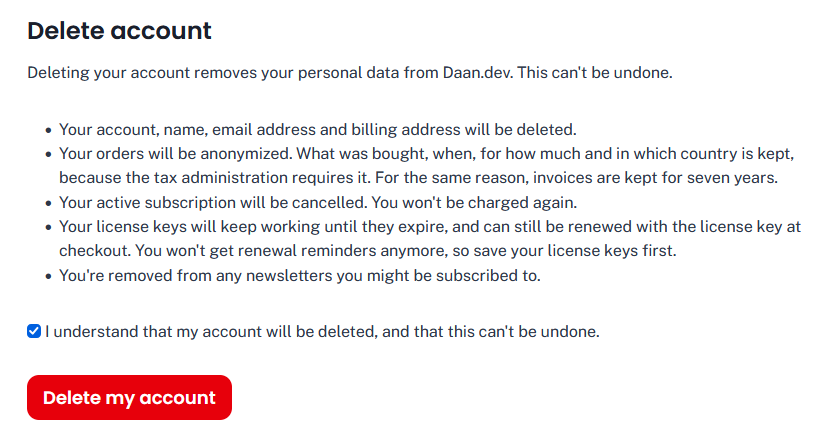
What happens when a customer deletes their account
- Their active subscriptions (EDD Recurring) are cancelled at the payment gateway, so they're not charged again. If that fails, the account isn't deleted, and you're notified.
- Their license keys (EDD Software Licensing) are detached from the account: they keep working until they expire, and can still be renewed with the license key at checkout.
- WordPress' personal data erasers run (the same as Tools > Erase Personal Data): EDD anonymizes the customer and their download logs, reviews, comments and AffiliateWP customer records, and anonymizes or deletes their orders depending on each order's status (see below). If Brevo for EDD is set up, the contact is deleted from Brevo.
- The WordPress user is deleted and logged out, and sees a confirmation.
- You get an email with what was done, and which erasers failed, if any. If the email can't be sent, the report goes to PHP's error log.
Staff, affiliates (AffiliateWP) and customers with orders EDD may not change (e.g. still processing) can't delete their account here: they're asked to contact you.
Orders
What happens to a customer's orders depends on their status, as set in Downloads > Settings > Policies > Privacy > Order Statuses. By default:
| Status | Default | |
|---|---|---|
| Complete, Refunded, Revoked, Pending | Anonymize | Name, address lines and email address are removed; what was bought, when, for how much, and the city, postcode and country are kept, for taxes. |
| Failed, Abandoned | Delete | Never paid. |
| Processing | Do Nothing | The customer can't delete their account here. |
| Renewal (EDD Recurring) | Same as Complete | Unless you set it yourself: if it's Do Nothing, customers with a renewal can't delete their account here. |
You can change this per status (Anonymize, Delete or Do Nothing) in Downloads > Settings > Policies > Privacy > Order Statuses.
Installation
- Download the zip from the latest release, upload it in Plugins > Add New and activate it.
- Add the Delete Account block to your Account page, e.g. below the profile editor, and enter the URL of your contact page in its settings.
- Check Downloads > Settings > Policies > Privacy > Order Statuses: EDD only anonymizes a customer if all of their orders may be anonymized or deleted, so set e.g. Renewal to Anonymize.
Hooks
| Hook | Type | |
|---|---|---|
edd_delete_account_customer_roles |
filter | Roles of users who can delete their own account. Default: subscriber, edd_subscriber, customer. |
edd_delete_account_blocked_reason |
filter | Why a customer can't delete their account (empty if they can). |
edd_delete_account_notification_recipient |
filter | Who's emailed. Default: the site's admin email address. |
edd_delete_account_notification_lines |
filter | The lines of that email. Gets what the form submitted. |
edd_delete_account_before_form |
action | Before the form, e.g. to add a message. |
edd_delete_account_form_fields |
action | Inside the form, before the confirmation checkbox, e.g. to add fields. |
edd_delete_account_after_form |
action | After the form. |
edd_delete_account_before |
action | Before the account is deleted (subscriptions are already cancelled). Gets what the form submitted. |
edd_delete_account_deleted |
action | After the account was deleted. Gets what the form submitted. |
What the form submitted is passed unslashed, but not sanitized: sanitize it yourself.
Example: ask why they're leaving
// Add a field to the form.
add_action( 'edd_delete_account_form_fields', function () {
    ?>
    <p>
        <label for="leaving-reason">Why are you leaving? (optional)</label>
        <textarea id="leaving-reason" name="leaving_reason" rows="3"></textarea>
    </p>
    <?php
} );

// Add the answer to the email you get when someone deletes their account.
add_filter( 'edd_delete_account_notification_lines', function ( $lines, $user, $data ) {
    $reason = sanitize_textarea_field( $data['leaving_reason'] ?? '' );

    if ( $reason ) {
        $lines[] = '';
        $lines[] = 'Why they left: ' . $reason;
    }

    return $lines;
}, 10, 3 );
To save it somewhere else instead, e.g. in a database table, use the edd_delete_account_before action: function ( $user, $customer, $data ). Don't store it with the user or customer: those are deleted or anonymized right after.
Development
No build step: the block's editor script is plain JavaScript. After adding a class, run composer dump-autoload.
Releases
4 releases. Each count is every asset in that release; expand a row for the breakdown.