Install
This is the repository archive. It installs, but the folder name will carry the branch suffix and updates will not flow.
Install straight from GitHub with WP-CLI:
wp plugin install https://github.com/daley-mottley/customer-support-bot/archive/refs/heads/main.zip
☀️ Customer Support Bot ☀️
Request Feature · View Demo · Report Bug
Contributing Guidelines & Code of Conduct
Project Overview 📑
Customer Support Bot is a WordPress plugin that enables businesses to automate customer support using AI technology, now powered by the Google Gemini API. The bot offers features like knowledge base searches (basic conversational ability), appointment scheduling checks, and appointment booking capabilities to enhance user experience and reduce the workload on customer support agents.
Table of Contents📋
- Features
- Technologies Used
- Installation
- Configuration
- Help Wanted
- Report A Bug
- Contributions
- Contributors
- Let's Stay Connected
Features 📝
- 📌 Conversational AI: Engage users with responses powered by Google Gemini.
- 📌 Appointment Availability Checks: Check appointment slots via webhook integration.
- 📌 Appointment Scheduling: Allow users to book appointments through the bot via webhook integration.
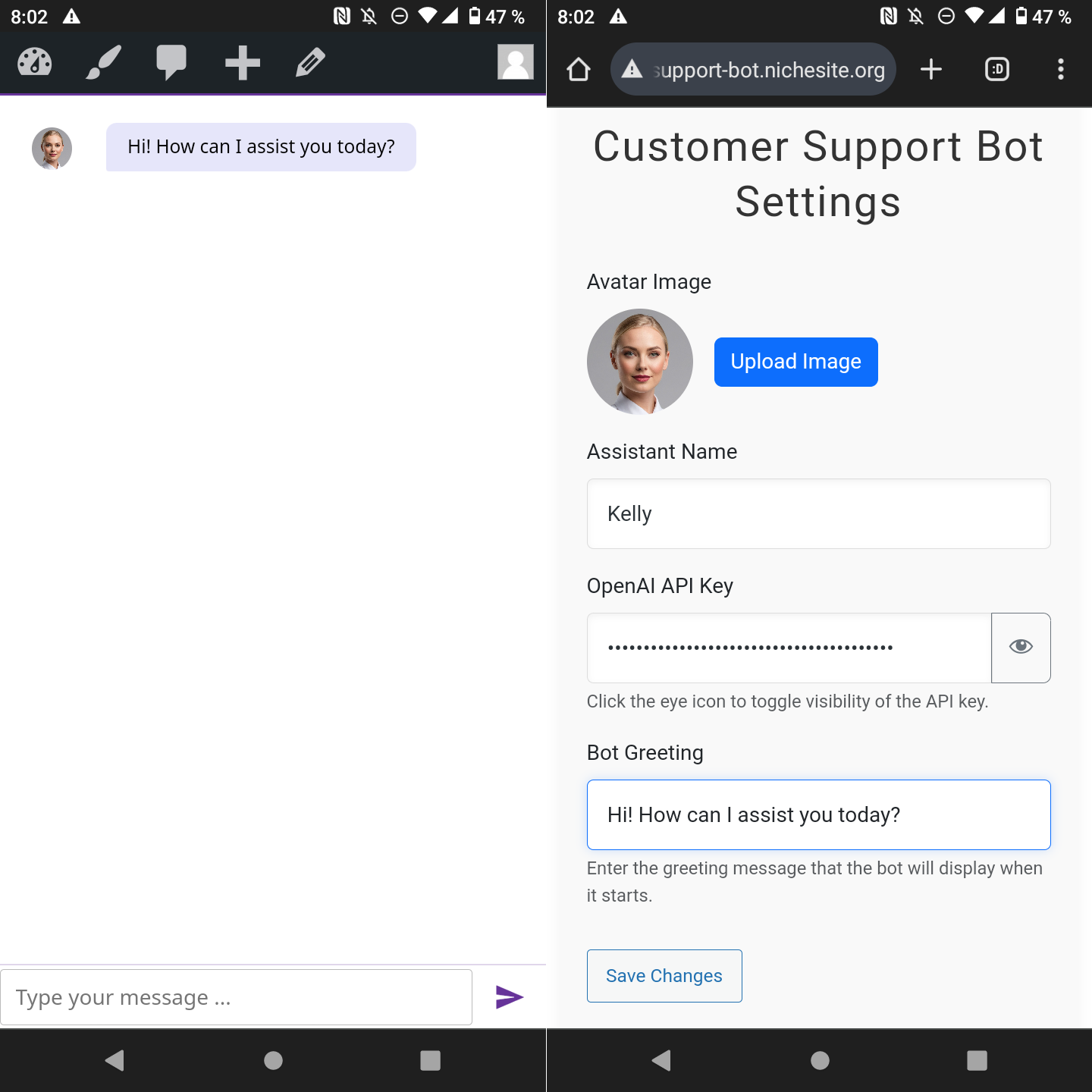
- 📌 Customization Settings: Customize bot appearance (colors), avatar, name, and greeting in the WordPress admin panel.
Technologies Used 📚
- WordPress – CMS platform where the plugin is installed and activated.
- PHP – Server-side language for API interactions and WordPress plugin development.
- JavaScript – Frontend logic for chatbot interaction.
- Axios – HTTP client used on the frontend for AJAX requests.
- Bootstrap – CSS framework for styling the admin settings page.
- Google Gemini API – Integrates AI capabilities for advanced NLP features and function calling.
Installation ⚙️
You can install the Customer Support Bot plugin in two ways:
1. Download from GitHub
- Go to the GitHub repository and download the repository as a ZIP file (e.g., from the "Code" button -> "Download ZIP").
- Navigate to your WordPress admin dashboard.
- Go to Plugins > Add New > Upload Plugin.
- Choose the downloaded ZIP file and click Install Now.
- After installation, click Activate Plugin.
2. Clone the Repository
Alternatively, you can clone the repository using Git if you have command-line access to your server:
- Navigate to your WordPress plugin directory (usually located at
wp-content/plugins/). - Clone the repository:
git clone https://github.com/daley-mottley/customer-support-bot.git - Log in to your WordPress admin dashboard.
- Go to Plugins > Installed Plugins.
- Find Customer Support Bot in the list and click Activate.
Configuration ⚙️
After activating the plugin, navigate to Settings -> Chat Widget in your WordPress admin dashboard. You must configure the following for the bot to work:
- Gemini API Key: Enter your API key obtained from Google AI Studio. This is required.
- Assistant Name: Customize the name displayed in the chat header (e.g., "Support Bot", "Booking Assistant").
- Avatar Image: Upload a custom avatar image for the bot.
- Bot Greeting: Set the initial message the bot displays when opened by a user.
- Theme & Text Colors: Customize the primary background color and text color of the chat widget.
- Webhook URLs: If you want to use appointment checking or booking, enter the full webhook URLs provided by your automation service (like Make.com or Zapier) for the "Check Availability" and "Book Appointment" functions.
Save your settings after making changes.
Help Wanted 🪧
We are looking for contributors to help add more features! Some ideas include:
- [ ] Conversation History: Implement frontend and backend logic to remember the context of the current chat session.
- [ ] Knowledge Base Integration: Allow the bot to search WordPress posts/pages or a custom knowledge base to answer questions.
- [ ] Basic Troubleshooting: Provide users with automated solutions for common problems based on predefined flows.
- [ ] Ticket Categorization: Automatically sort incoming support tickets (if integrated with a helpdesk).
- [ ] Status Updates: Notify users of ticket status and resolution progress (if integrated).
- [ ] Password Resets: Allow users to initiate password resets through the bot (requires integration).
- [ ] Billing Inquiries: Help users resolve common billing-related questions.
- [ ] Product Information: Provide detailed information on products/services.
- [ ] Return/Refund Processing: Guide users through the process of returns or refunds (requires integration).
- [ ] Escalation Management: Option to escalate unresolved issues to human support agents (e.g., via email or helpdesk ticket).
- [ ] Satisfaction Surveys: Gather feedback from users about their support experience.
- [ ] Multi-language Support: Offer support in multiple languages.
Report A Bug 🪰
If you encounter any issues or have questions, feel free to open an issue or reach out to the maintainers. Please provide as much detail as possible, including steps to reproduce the bug.
Contributions 🧑🔧👷♀️🏗️🏢
Contributions are welcome! It only takes five (5) steps!
To contribute:
- Fork the repository.
- Create a new branch for your feature or bug fix:
git checkout -b my-feature-branch. - Make your changes and commit them with clear messages:
git commit -m 'Add some feature'. - Push your changes to your forked repository:
git push origin my-feature-branch. - Open a pull request against the
mainbranch of the original repository.
Please read our Contributing Guidelines to get started! 🚀
Say 'Hi' To Our Contributors!





🫶 Thank you for your support! 🙌
🌎 Let's Stay Connected!🫸🫷
If you like this project and would like to see more features or show your support.
Feel free to reach out to the developers and give this project a ⭐!