Wordfence blockings log WP Registry grade A-. Low-severity findings · 1 findingWP RegistryLow-severity findings · 1 findingOpen the reportA-
Wordpress Wordfence blockings log
★ 3stars
v1.0.1latest · 2 years ago
Install
This is the repository archive. It installs, but the folder name will carry the branch suffix and updates will not flow.
Install straight from GitHub with WP-CLI:
wp plugin install https://github.com/cyrille37/wordfence-blockings-log/archive/refs/heads/main.zipNo built-in updater. New versions won't appear under Dashboard → Updates. Install new releases yourself, or let Git Updater track the repository.
Wordpress Wordfence blockings log
A Wordpress plugin which logs Wordfence IP blockings to make them available to other software such as Crowdsec.
Configuration
Options page is available in Tools admin menu.
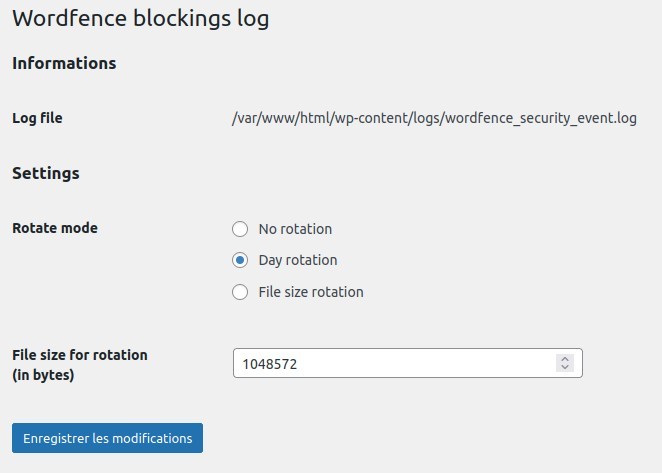
The only setting is about the log file rotation. You have 3 choices:
- no rotation: nothing append, you can manage rotation with a tool like logrotage
- day rotation: the log file will be renamed as "...-2024-08-03.log" when the file's modification date is older than the incoming event
- size rotation: the log file will be renamed as "...20240803_154103" when it become bigger than the file size setting
Crowdsec side
You'll find in crowdsec/hub folder :
- the parser
crowdsec/hub/wordpress-wordfence-blockings-log.yaml - scenario
crowdsec/hub/wordpress-wordfence-blockings-wsn.yamlto propagate Wordfence Security Network IP to Crowdsec, only those who have visited the website - scenario
crowdsec/hub/wordpress-wordfence-blockings-san.yamlto propagate to Crowdsec IP who have exceeded a maximum requests per minutes
Thanks & Credits
- https://developer.wordpress.org for Wordpress developer documentation
- https://github.com/jeremyHixon/RationalOptionPages for Settings & Options page
Releases
2 releases.
These releases are tags only. The author does not attach a packaged zip, so there are no download counts to report.