Install
This is the repository archive. It installs, but the folder name will carry the branch suffix and updates will not flow.
Install straight from GitHub with WP-CLI:
wp plugin install https://github.com/cvinfotech/slider-studio/archive/refs/heads/main.zipA lightweight, customizable slider builder plugin for WordPress. Create image and content sliders with a drag-and-drop admin builder and display them using a native Gutenberg block or shortcode.
Features
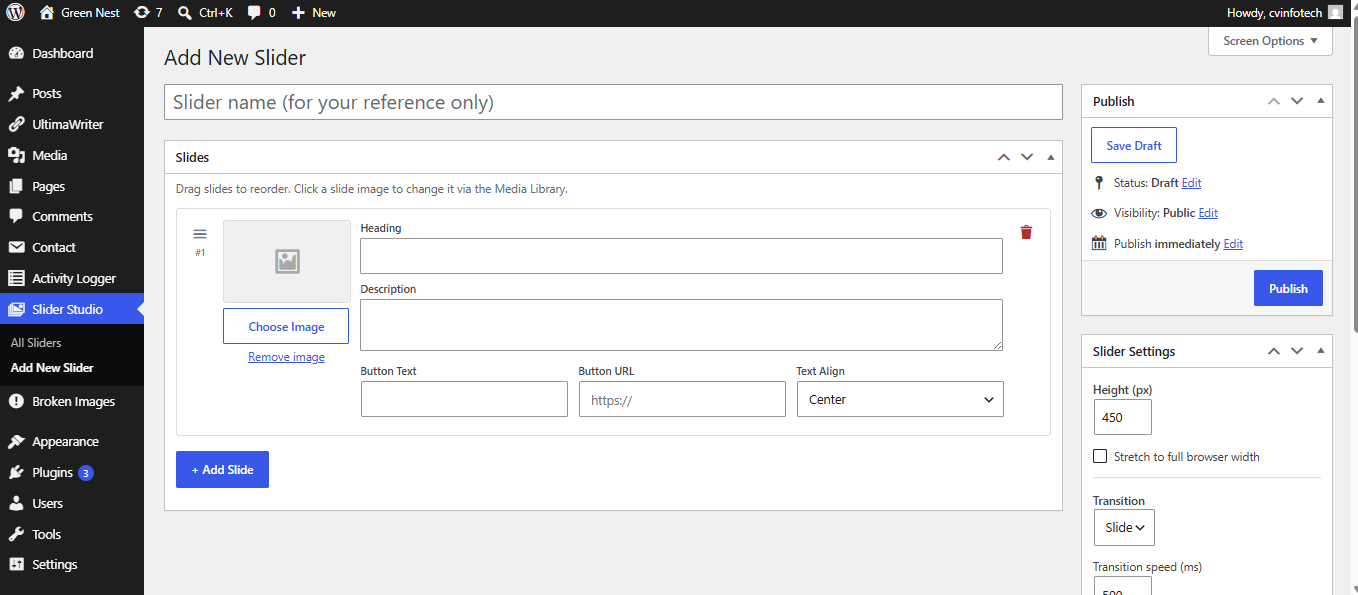
- Drag-and-drop slide builder
- WordPress Media Library integration
- Image, heading, description, and CTA button support
- Left, center, and right slide content alignment
- Slide and fade transitions
- Configurable transition speed
- Autoplay with configurable delay
- Pause on hover
- Infinite loop
- Navigation arrows and dot indicators
- Touch/swipe support
- Keyboard arrow-key navigation
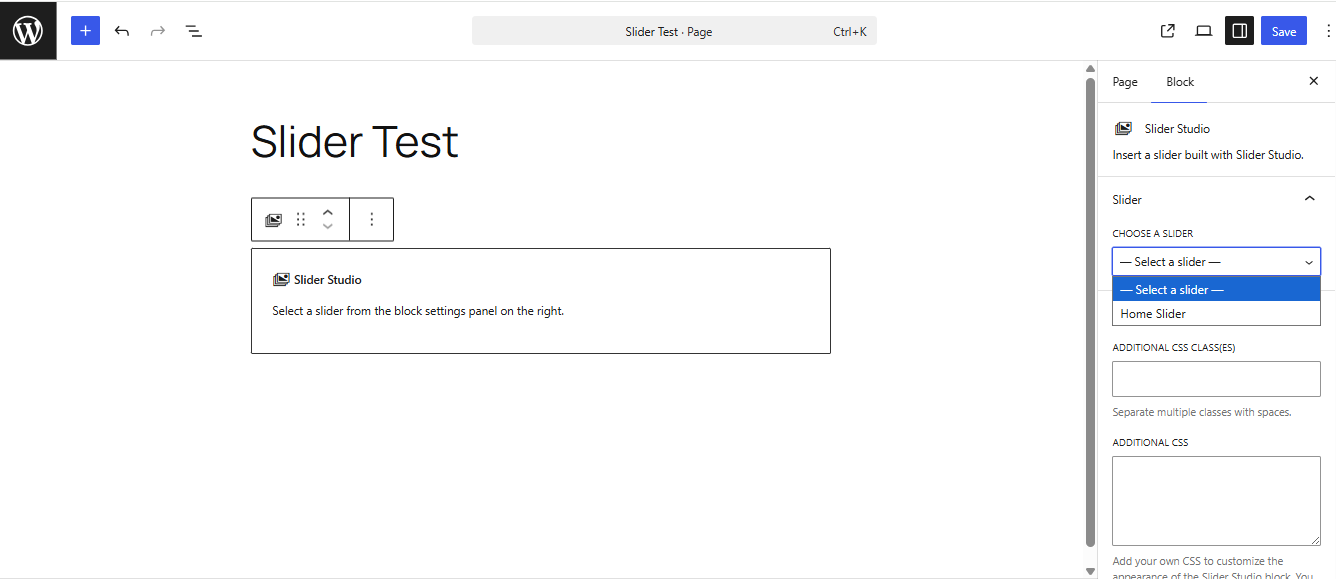
- Native Gutenberg block with editor preview
[slider_studio id="123"]shortcode- Multiple slider instances on the same page
- Dependency-free frontend JavaScript; no jQuery required
- Frontend assets are loaded when a slider is rendered
- Translation-ready
- WordPress nonce, capability, sanitization, and escaping practices
Requirements
- WordPress 6.0 or higher
- PHP 7.4 or higher
Installation
WordPress admin
- Download the plugin ZIP from the repository's Releases or package the
slider-studiodirectory as a ZIP. - In WordPress, go to Plugins → Add New Plugin → Upload Plugin.
- Upload the ZIP and click Install Now.
- Activate Slider Studio.
- Open Slider Studio → Add New Slider and create your first slider.
Manual installation
Copy the plugin directory to:
wp-content/plugins/slider-studio/Then activate it from Plugins → Installed Plugins.
Creating a slider
- Open Slider Studio → Add New Slider.
- Enter a slider title.
- Add slides and choose images from the Media Library.
- Add optional headings, descriptions, and CTA buttons.
- Reorder slides with drag and drop.
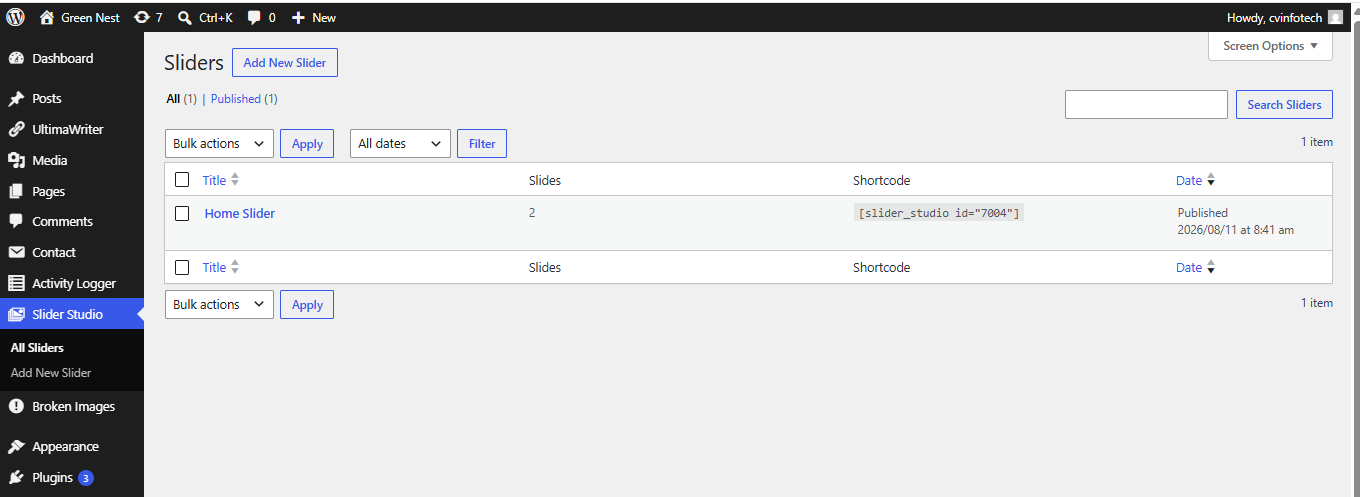
- Configure height, width, transition, autoplay, navigation, and other options.
- Publish the slider.
Gutenberg block
Open a page or post in the WordPress Block Editor and add the Slider Studio block. Select the published slider from the block settings.
The block uses a server-side render callback, so the frontend markup is generated by the plugin.
Shortcode
Use a slider anywhere WordPress accepts shortcodes:
[slider_studio id="123"]Replace 123 with the slider post ID.
PHP template
<?php echo do_shortcode( '[slider_studio id="123"]' ); ?>Plugin structure
slider-studio/
├── admin/
│   ├── css/
│   │   └── admin.css
│   └── js/
│       ├── admin-builder.js
│       └── block.js
├── includes/
│   ├── class-admin.php
│   ├── class-block.php
│   ├── class-frontend.php
│   ├── class-post-type.php
│   ├── class-shortcode.php
│   ├── class-slider-studio.php
│   └── helpers.php
├── public/
│   ├── css/
│   │   └── frontend.css
│   ├── js/
│   │   └── frontend.js
│   └── partials/
│       └── slider-frontend.php
├── slider-studio.php
├── uninstall.php
├── readme.txt
├── README.md
├── LICENSE
└── .gitignore
Main components
slider-studio.php— plugin bootstrap, constants, requirements, and hooks.includes/class-slider-studio.php— main plugin controller.includes/class-post-type.php— registers thess_slidercustom post type.includes/class-admin.php— admin slider builder and settings UI.includes/class-frontend.php— frontend styles and scripts.includes/class-shortcode.php— shortcode registration and rendering.includes/class-block.php— Gutenberg block registration and server-side rendering.includes/helpers.php— shared defaults, sanitization, lookup, and rendering helpers.public/js/frontend.js— custom carousel behavior including autoplay, navigation, keyboard controls, and swipe gestures.
Data storage
Slider Studio uses the WordPress custom post type:
ss_sliderSlider slides and settings are stored as post metadata. The plugin does not require a separate database table.
Deactivation does not remove slider data. Uninstalling preserves data by default. Data deletion is only performed when the plugin's uninstall setting explicitly enables it.
Security
The plugin follows common WordPress security practices, including:
- Capability checks for administrative actions
- Nonce verification
- Input sanitization
- URL sanitization
- Output escaping
- Safe handling of stored slider data
- Direct-access protection for PHP files
Performance
Slider Studio uses a small custom frontend engine without jQuery or a third-party carousel library. Frontend assets are registered by the plugin and enqueued when a slider is rendered, helping avoid unnecessary slider assets on pages that do not use one.
Development
No Node.js or build step is required for the current plugin implementation. The Gutenberg block and frontend JavaScript are maintained as plain JavaScript files.
For local development:
- Clone the repository into your WordPress plugins directory.
- Activate Slider Studio.
- Create test sliders using different combinations of settings.
- Test both the Gutenberg block and shortcode.
- Test desktop, keyboard, and touch interactions.
Changelog
1.0.0
- Initial release
- Drag-and-drop slider builder
- Media Library integration
- Content slides and CTA buttons
- Transition and fade effects
- Autoplay and pause-on-hover
- Loop, arrows, and dots
- Touch/swipe support
- Keyboard navigation
- Gutenberg block
- Shortcode support
- Responsive frontend
- Dependency-free frontend JavaScript
- Translation-ready structure
License
Slider Studio is licensed under the GNU General Public License v2.0 or later. See LICENSE.
Author
CVInfotech
- Website: https://www.cvinfotech.com
- Plugin: https://www.cvinfotech.com/slider-studio
Contributing
Issues and pull requests are welcome. Please test changes against the supported WordPress and PHP versions before submitting a pull request.
📸 Screenshots
Slider Builder
Slider Settings
Gutenberg Block
Frontend Slider